Every project eventually comes down to money. I have spent years working alongside project managers, finance leads, and business owners who all started in the same place: a spreadsheet that slowly stopped making sense. Budget actuals drifted from estimates with no warning. Resources were over-allocated without anyone catching it until payday. Invoices went out late because nobody could easily reconcile hours to billing.
That is the exact problem that financial project management software solves. The right tool gives you a single source of truth where your project plan and your project budget live together. No more toggling between disconnected tools. No more asking your team to update two systems. Everything, tasks, timelines, time logs, budgets, and invoices, lives in one place.
I evaluated dozens of tools, and the 10 on this list stood out for their ability to actually connect financial oversight to project execution. Whether you are managing a small team or running multi-project operations, you will find something here that fits.
What Is Financial Project Management Software?
Financial project management software is a tool that combines project planning and execution with financial tracking capabilities such as budgeting, cost management, time tracking, invoicing, and financial reporting. Unlike standard project management tools that focus only on tasks and timelines, project financial management software gives teams visibility into where project money is going at every stage, from planning to delivery to billing.
It helps project managers, finance directors, and business owners stay on budget, avoid cost overruns, and make data-driven financial decisions throughout the project lifecycle.
Why Do Teams Need Project Finance Software?
The numbers tell a clear story. A study by Mosaic in 2025 shows that cost overruns average 27% per project across industries, and only 34% of projects are delivered on time and within budget.
The root cause is almost always the same: project execution happens in one tool and financial tracking happens somewhere else entirely. That gap between “what the project is doing” and “what the project is spending” is where budget overruns are born.
Project finance management software closes that gap by:
- Connecting task progress directly to budget consumption
- Alerting teams to cost overruns before they become write-offs
- Making resource costs visible in real time
- Automating time-to-invoice workflows so billing is always accurate
How Does Financial Project Management Software Work?
A good project finance software platform follows this basic workflow:
- Project Setup: Define the project scope, assign a budget baseline, and set up task dependencies
- Resource Assignment: Allocate team members to tasks and attach their hourly or fixed rates
- Time And Cost Tracking: Team members log hours as they work; the system updates budget burn automatically
- Budget Monitoring: Dashboards show planned vs. actual costs, budget remaining, and forecast to completion
- Milestone And Billing Triggers: When a milestone is hit, invoicing can be triggered automatically
- Reporting: Finance and project managers get real-time reports on project profitability, resource utilization, and overall financial health
Top 10 Financial Project Management Software for 2026
After testing and reviewing tools against real-world financial project management needs, including budget tracking depth, ease of use, time-to-invoice workflows, reporting quality, and pricing transparency, here are the 10 best options.
| Tool | Best For | Pricing | User Rating (G2) |
| ProProfs Project | Simplest Project Management Tool for SMBs With Client Invoicing, Time & Billing | Free plan available. Paid plan starts at $39.97. | 4.4/5 |
| Scoro | Professional services profitability | Starts at $26/user/month | 4.5/5 |
| Wrike | Enterprise budget tracking | Starts at $10/user/month | 4.2/5 |
| Zoho Projects | Financial oversight + time tracking | Starts at $5/user/month | 4.3/5 |
| Teamwork | Client billing and project margins | Starts at $10.99/user/month | 4.4/5 |
| Productive | Agency financial management | Starts at $9/user/month | 4.6/5 |
| BigTime | Professional services billing | Custom pricing | 4.5/5 |
| Monday.com | Customizable financial workflows | Starts at $9/user/month | 4.7/5 |
| ClickUp | Budget tracking with flexible views | Starts at $7/user/month | 4.6/5 |
| Microsoft Project | Enterprise project financial control | Starts at $10/user/month | 4.0/5 |
1. ProProfs Project – Simplest Project Management Tool for SMBs With Client Invoicing, Time & Billing
ProProfs Project is a complete project management platform that brings task tracking, time logging, budget management, and client invoicing together in a single, easy-to-use workspace. It is built for small to mid-sized teams that need financial visibility without the complexity or cost of enterprise platforms.
The platform covers the full financial project management cycle, from budgeting and resource allocation to time tracking and branded client invoices. What makes it stand out right now is its built-in AI layer. The AI project management capability lets you describe your project in plain text and it sets up the full structure, including tasks, stages, and team assignments, ready to go live in seconds.
An AI project assistant stays active at every project stage, helping teams check task progress, flag blockers, and stay aligned without status meetings. Most relevant for financial oversight, the AI continuously monitors budget utilization alongside timeline health and flags risks before they escalate. Open a report and the AI surfaces what is on track, what is at risk, and where the team needs to focus, all from your live data.
Pros:
- AI builds full project structures from a description, cutting setup time significantly
- AI assistant actively monitors budget utilization and flags risks before they escalate
- Built-in billing and invoicing removes the need for third-party integrations
- Kanban boards and Gantt views make it easy to visualize timelines alongside financial milestones
- Unlimited users on the Business plan make it cost-effective for growing teams
Cons:
- Dark mode interface is not currently available
- No dedicated account manager on the free plan
User Rating: 4.4/5
Pricing:
Free plan available. Paid plans start at $39.97.
2. Scoro – Best for Professional Services Profitability
When I tested Scoro for managing professional services projects, I was genuinely impressed by how tightly it connected quoting, project delivery, and billing into a single flow. It went well beyond task management and gave me a view of project profitability that most tools simply cannot match.
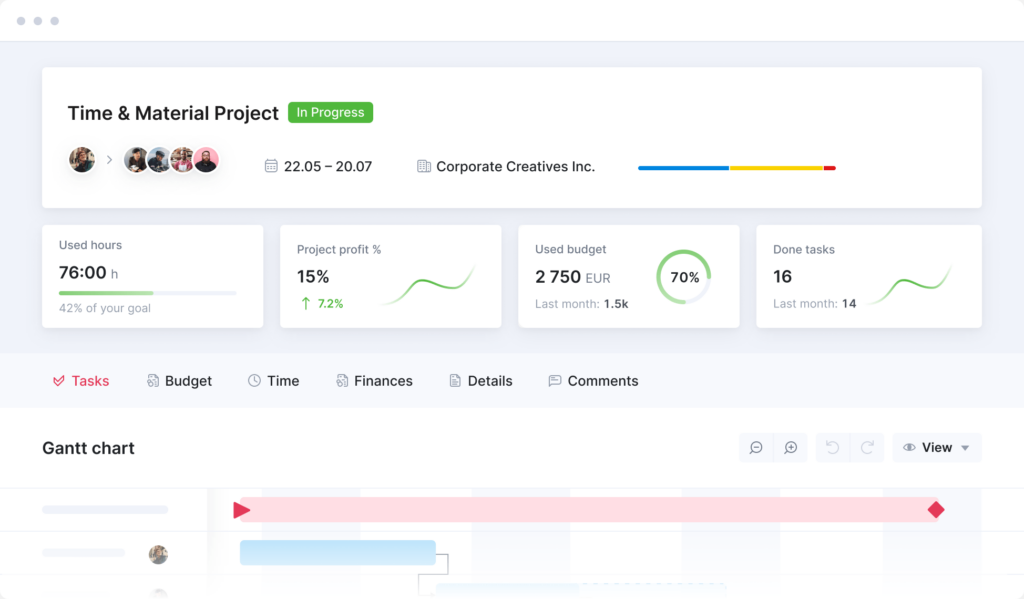
Image source: Scoro
Scoro is built specifically for agencies, consultancies, and professional services teams that need to track not just whether a project is on time, but whether it is actually making money.
I found the work scheduling and time tracking features particularly strong, and the ability to see budget burn at the project and task level in real time was exactly what finance-conscious project managers need.
Pros:
- Work scheduling and resource planner show real-time capacity and cost impact
- Project-level profitability dashboards connect delivery data to financial outcomes
- Automated invoicing supports multiple billing models including fixed-fee, retainer, and T&M
- CRM-to-project workflow means financial baselines are set from the quote stage
Cons:
- The platform has a significant learning curve during initial setup and configuration
- Some users report that advanced reporting requires time investment to configure correctly
User Rating: 4.5/5
Pricing:
Starts at $26/user/month.
3. Wrike – Best for Tracking Budgets Across Teams
I used Wrike primarily for managing multi-departmental projects with financial tracking requirements, and it handled scale well. The ability to build custom dashboards that surfaced budget usage alongside project status was a genuine productivity gain for finance-aware project managers on my team.
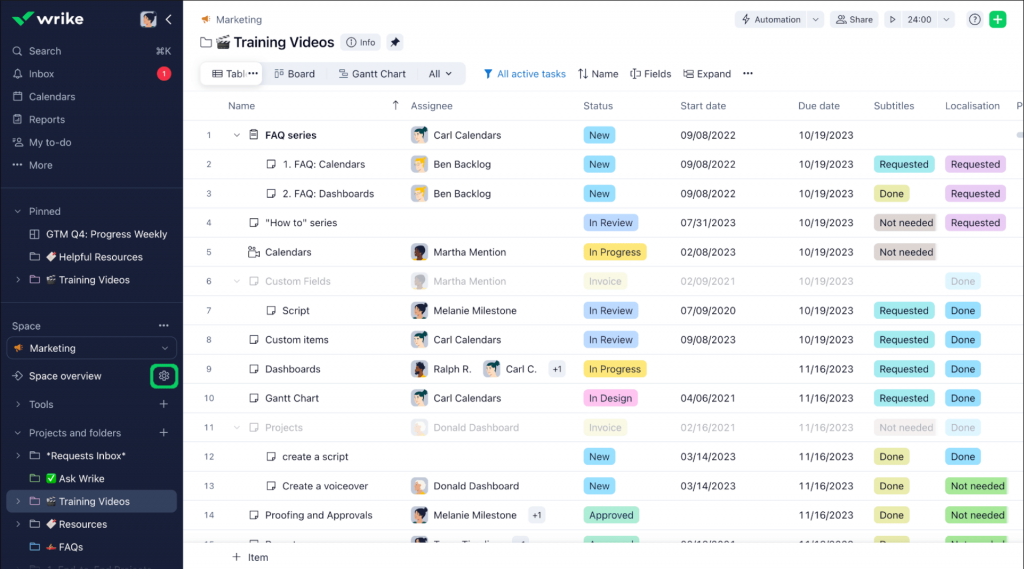
Wrike’s budget tracking connects directly to time logs, resource allocations, and project milestones, making it easier for project managers and finance leads to stay aligned.
I appreciated how the custom widget builder let me create financial views that matched exactly what stakeholders wanted to see in weekly reviews.
Pros:
- Custom dashboards can combine task status, resource allocation, and budget tracking in one view
- Budget planning and resource booking available on Business and higher tiers
- Extensive integrations with accounting and ERP tools for financial data continuity
- Strong permission controls protect sensitive budget data within shared projects
Cons:
- Most financial features are locked behind Business, Enterprise, or Pinnacle tiers
- Some users report notification management can become noisy at scale
User Rating: 4.2/5
Pricing:
Starts at $10/user/month.
4. Zoho Projects – Best for Financial Oversight With Time Tracking
When I evaluated Zoho Projects for a team running multiple concurrent projects, the value-to-cost ratio stood out immediately. At $5 per user per month, it delivers time tracking, expense management, budget baselines, and integration with Zoho Books that most tools charge significantly more for.
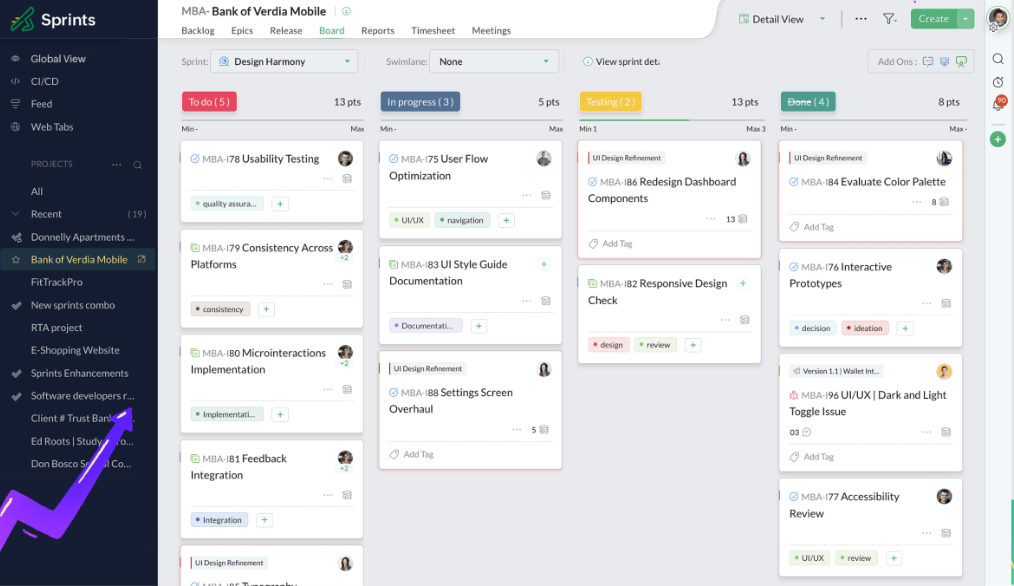
I found the time tracking features particularly strong. Logging hours against specific tasks and then connecting those to budget estimates made it straightforward to see whether a project was on track financially without digging through separate spreadsheets.
The Zoho ecosystem integration was a genuine advantage for teams already using Zoho CRM or Zoho Books.
Pros:
- Budget baselines and expense tracking are available on paid plans
- Native integration with Zoho Books makes accounting reconciliation seamless
- Time tracking connects to project tasks for accurate billing and cost analysis
- Gantt charts include financial milestones alongside scheduling dependencies
Cons:
- The interface can feel dated compared to newer project management tools
- Users coming from more visual tools may find the learning curve steep initially
User Rating: 4.3/5
Pricing:
Starts at $5/user/month.
5. Teamwork – Best for Client Billing and Project Margins
I tested Teamwork extensively for client-facing project management, and its financial tracking features consistently impressed me for agencies and consultancies. The platform makes it easy to connect time logged by team members directly to billing rates and client invoices.
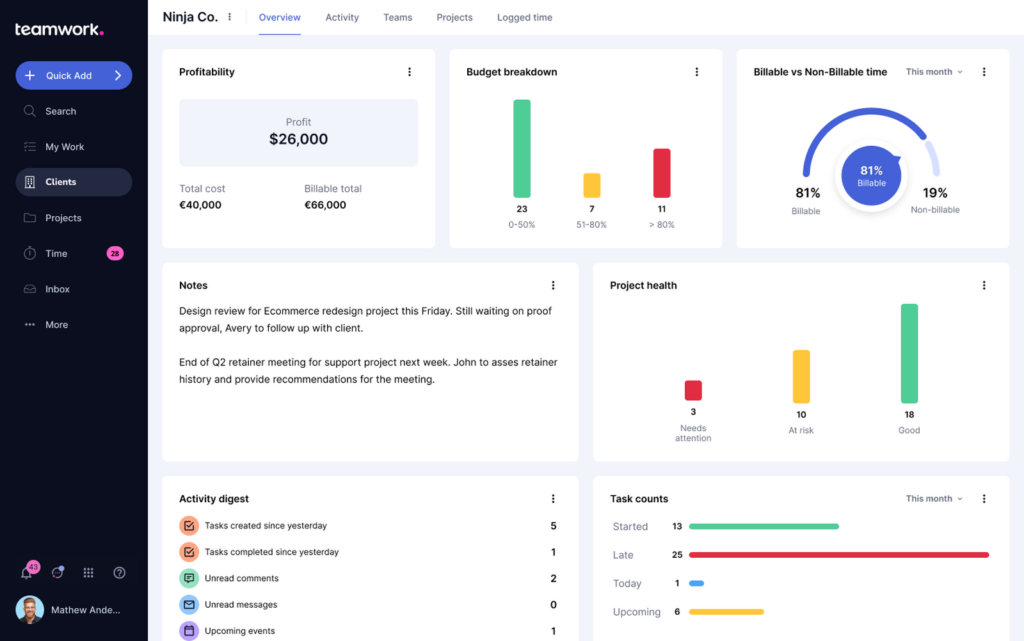
Image source: Teamwork
What set Teamwork apart in my testing was how clearly it surfaced project margins. I could see budget vs. actual at the project level, flag tasks that were consuming more hours than estimated, and trigger invoices directly from approved time entries.
For teams that run client projects where billing accuracy is non-negotiable, this is a strong option.
Pros:
- Built-in time tracking connects directly to client billing and invoice generation
- Budget vs. actual tracking available at the project, phase, and task level
- Client portal gives clients visibility without exposing internal financial data
- Profitability reporting helps identify which project types and clients are most valuable
Cons:
- Mobile app experience is not as strong as the desktop version
- Certain advanced financial reports require higher-tier plans
User Rating: 4.4/5
Pricing:
Starts at $10.99/user/month.
6. Productive – Best for Agency Financial Management
Productive was one of the most complete financial project management platforms I reviewed specifically for agencies. It combined resource planning, project budgeting, time tracking, and profitability analysis in a way that felt genuinely purpose-built for teams that bill clients for work.
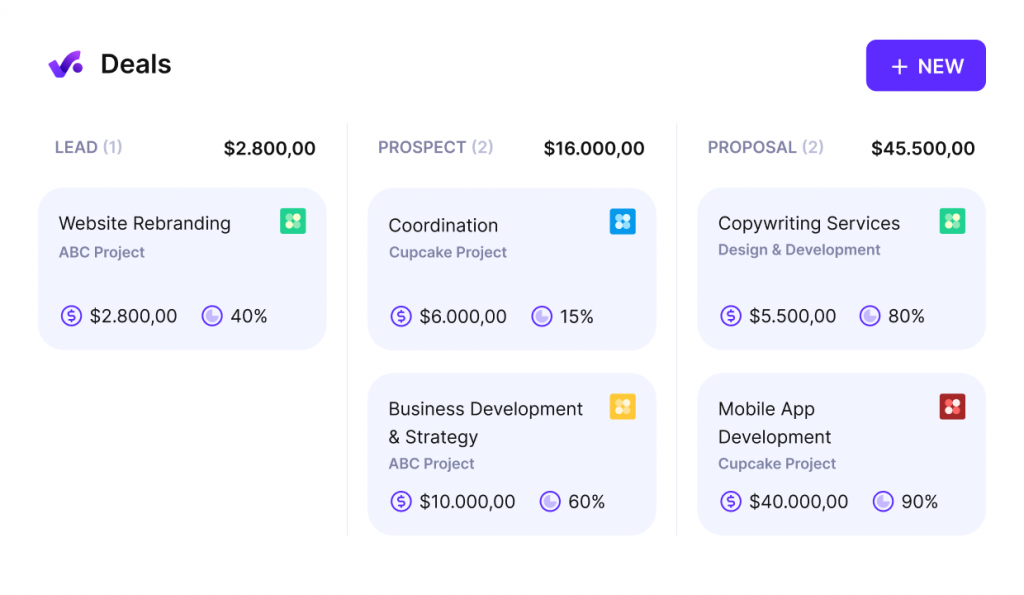
The budget monitoring in Productive was particularly impressive. I was able to see real-time budget burn against estimates, get alerts before overrun thresholds were crossed, and forecast project completion costs based on current spending velocity.
For agencies that manage multiple concurrent client engagements, this kind of early warning system is worth its weight.
Pros:
- Real-time budget burn tracking with configurable overrun alerts
- Profitability dashboard shows margins at the project, client, and service line level
- Resource planning integrates with budgets to surface when overallocation creates cost risk
- Supports fixed-fee, retainer, and time-and-materials billing models
Cons:
- Initial setup requires time to configure cost structures and team rate cards
- Some customization of views and reports requires navigating a learning curve
User Rating: 4.6/5
Pricing:
Starts at $9/user/month.
7. BigTime – Best for Professional Services Billing and Revenue Forecasting
BigTime was clearly designed by people who deeply understand how professional services firms think about money. When I went through its feature set, every major financial pain point for consulting, engineering, and IT services teams had a dedicated workflow, from project budgeting to invoice approval to revenue forecasting.
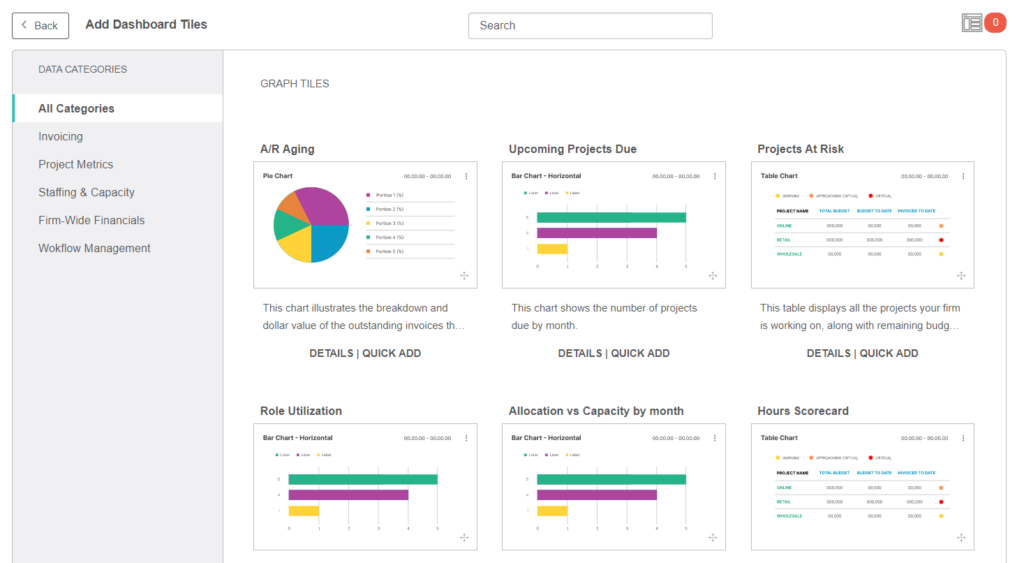
Image source: Bigtime
I found BigTime’s invoicing and billing capabilities notably strong. The ability to support multiple billing models, including fixed fee, T&M, milestone-based, and retainer, in a single platform with automated calculation tied to logged time is exactly what finance teams at services firms need.
The integration with accounting and ERP systems added further credibility for finance teams.
Pros:
- Advanced project budget tracking with support for multi-phase and multi-year projects
- Multiple billing models supported with automated calculations
- Strong reporting on utilization, profitability, and project financial health
- Native integrations with accounting and ERP systems for financial data continuity
Cons:
- Better suited for mid-sized and enterprise professional services firms than small teams
- Some users find the interface less intuitive compared to more modern project tools
User Rating: 4.5/5
Pricing:
Custom pricing (contact for a quote).
8. Monday.com – Best for Customizable Financial Workflows
I used monday.com on a team that had very specific financial tracking requirements, and what stood out immediately was how configurable the platform is. We built budget tracking columns, cost formulas, and invoice status boards that matched our exact workflow rather than adapting to a rigid template.
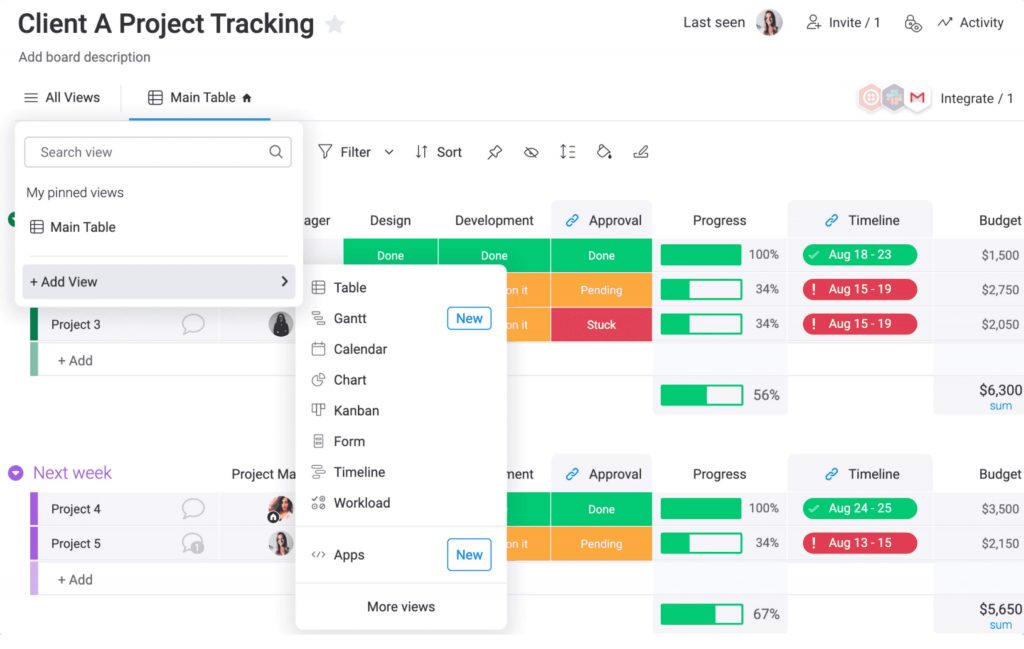
Monday.com does not come with deep out-of-the-box financial features the way BigTime or Productive do, but its flexibility makes it powerful for teams willing to invest in setup.
The budget tracking widgets and formula-based custom fields let me build a financial dashboard that surfaced everything stakeholders needed in one view.
Pros:
- Highly customizable columns, formulas, and dashboards for financial tracking
- Wide integration library includes accounting tools and financial data sources
- Multiple project views give financial and project context in one place
- Automation builder can trigger alerts when budget thresholds are crossed
Cons:
- Financial features require setup and configuration, not plug-and-play out of the box
- Advanced automation and budget features are available only on higher-tier plans
User Rating: 4.7/5
Pricing:
Starts at $9/user/month.
9. ClickUp – Best for Budget Tracking With Flexible Project Views
ClickUp was the most flexible tool I reviewed in terms of how teams can structure their financial tracking. I found it particularly useful for teams that are transitioning away from spreadsheets and want a tool that can match the way they already think about project finances.
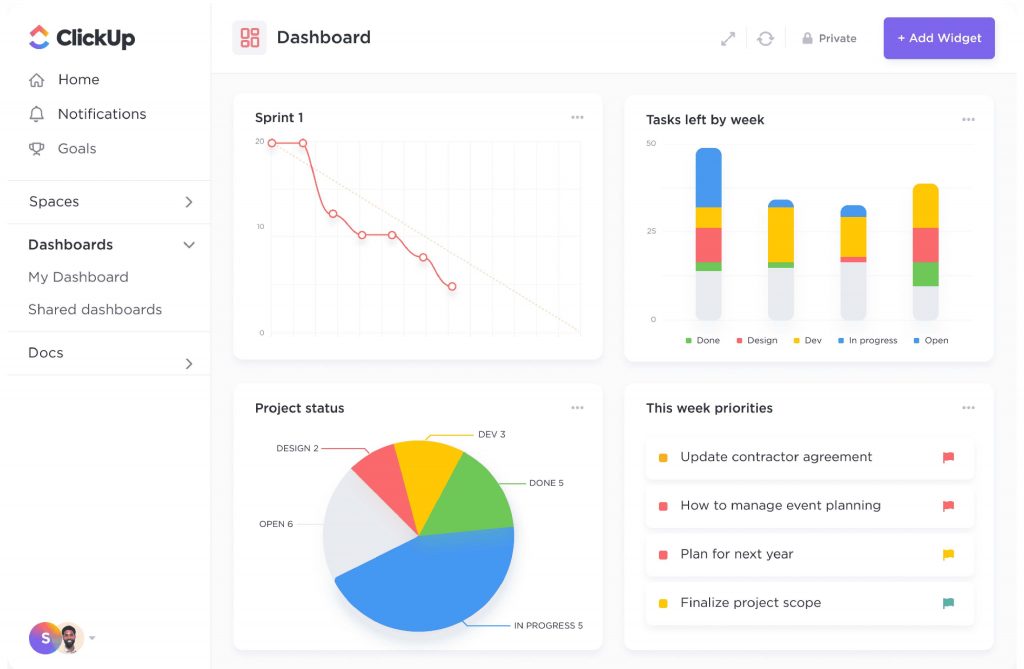
The budget tracking in ClickUp works through custom fields, dashboards, and reporting views that let teams build exactly the financial visibility layer they need.
Time estimates connect to cost formulas, and workload views help surface when resource assignments are creating financial risk before hours are actually logged.
Pros:
- Custom fields and formulas support flexible budget tracking without rigid templates
- Native time tracking with cost rates connects hours directly to budget actuals
- Multiple views let project and finance teams see the same data differently
- Large integration library connects to accounting tools for financial continuity
Cons:
- The platform is feature-dense, which creates a steeper initial learning curve
- Some users report performance slowdowns in large workspaces with many projects
User Rating: 4.6/5
Pricing:
Starts at $7/user/month.
10. Microsoft Project – Best for Comprehensive Enterprise Project Financial Control
Microsoft Project remains the enterprise standard for organizations running large, complex project portfolios with significant financial oversight requirements. I reviewed it primarily in the context of enterprise teams that need integration with the Microsoft 365 ecosystem for financial reporting and governance.
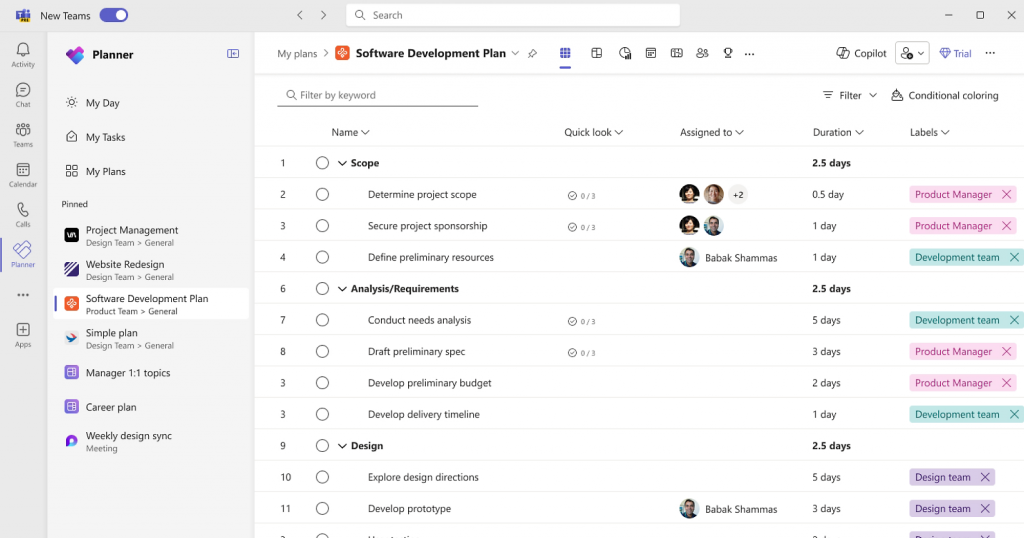
The platform excels at cost tracking, earned value management, resource allocation optimization, and budget forecasting with variance analysis. For organizations already running Teams and Excel, the integration depth is a meaningful advantage.
However, the learning investment is real, and smaller teams would likely find better ROI elsewhere.
Pros:
- Comprehensive financial management including earned value management and variance analysis
- Deep integration with Microsoft 365 and Teams for reporting and collaboration
- Resource capacity planning connects staffing costs to project budget forecasts
- Suitable for complex, multi-phase projects with long-duration financial tracking needs
Cons:
- Licensing costs can be high, especially when adding viewer licenses for stakeholders
- Less intuitive for teams transitioning from modern, visual project management tools
User Rating: 4.0/5
Pricing:
Starts at $10/user/month.
How Did I Evaluate These Financial Project Management Tools?
Picking the right project finance software is not just about the feature list. I evaluated every tool on this list using the same six-point framework to make sure the recommendations here reflect real-world usefulness, not just marketing claims.
- User Reviews And Ratings: I looked at direct experiences from verified users on platforms like Capterra, G2, and GetApp, paying particular attention to how finance managers, project leads, and business owners rated each tool. Recurring themes in negative reviews were weighted just as heavily as praise.
- Essential Features And Functionality: I dug into the core financial capabilities of each tool: budget planning, cost tracking, time tracking, invoicing, resource cost management, and financial reporting. Tools with shallow implementations of these features scored lower regardless of how long their general feature list was.
- Ease Of Use: Financial project management software only works if teams actually use it. I assessed how quickly non-technical users could get up and running, how intuitive the financial dashboards were, and whether the interface supported daily financial oversight without friction.
- Customer Support: I looked at how each vendor supports users through setup, configuration, and ongoing use. Responsiveness, availability of help documentation, and the quality of onboarding resources all factored into this assessment.
- Value For Money: I compared what each tool delivers against what it costs, taking into account pricing models, per-seat fees, and what features are locked behind higher tiers. A $39.97 flat-rate plan with unlimited users scores differently than a $30 per-user plan with financial features gated behind an enterprise tier.
- Personal Experience And Expert Perspective: Where I have used a tool hands-on, I draw on that direct experience. For tools I reviewed without extended use, I cross-referenced findings against expert assessments and case studies from teams with comparable project finance needs.
My Top 3 Picks for the Best Project Accounting Software
After going through every tool on this list in detail, these three consistently rose to the top across use cases, team sizes, and financial management needs. Here is where I would start depending on your situation.
1. ProProfs Project
ProProfs Project is my top pick for most teams. It covers the complete financial project management workflow, from budget planning and time tracking to billing and invoicing, at a flat rate with unlimited users. The AI layer is a genuine differentiator: it builds project structures in seconds, monitors budget utilization continuously, and flags risks before they become overruns. For small to mid-sized teams that need financial visibility without enterprise complexity, it delivers more per dollar than anything else on this list.
2. Productive
Productive is the strongest choice for agencies and consulting firms running multiple client engagements simultaneously. Its real-time budget burn monitoring, configurable overrun alerts, and profitability dashboards at the project, client, and service line level make it purpose-built for teams where every project needs to make money, not just get delivered on time. The resource planning module also surfaces when overallocation is creating financial risk before it hits the bottom line.
3. Wrike
Wrike is where I would point enterprise teams with complex, multi-departmental financial tracking needs. The combination of custom financial dashboards, AI-powered risk prediction, and deep integrations with accounting and ERP systems gives large organizations the visibility and control they need across a project portfolio. It is not the simplest tool to get started with, but for teams managing serious financial complexity at scale, the depth is worth it.
What Are the Key Features to Look for in Project Finance Management Software?
When evaluating project financial management software, these are the features that separate genuinely useful tools from ones that just have “budget tracking” in their marketing copy.
Budget Planning And Baseline Tracking
The ability to set a budget at the start of a project and compare actuals against it continuously is the foundation of financial project management. Look for tools that let you define budget baselines at the project and task level, not just at the top line, so you can catch overspend before it compounds.
You can learn more about what strong cost management in project management looks like to frame what you should expect from this feature.
Real-Time Cost Visibility
A dashboard that updates as team members log time and expenses gives you the early warning system you need.
The difference between a tool that shows you last month’s costs and one that shows you today’s burn rate is the difference between catching a problem and discovering a write-off. Project tracking tied directly to financial data is what makes this possible.
Time Tracking Connected To Cost Rates
Every hour logged should automatically translate into a cost figure based on who logged it and at what rate. This is how project finance software turns time data into budget intelligence.
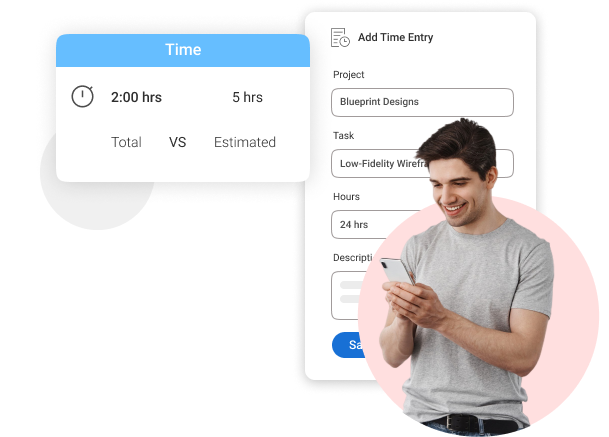
Teams without this connection are still reconciling hours manually at the end of every billing cycle.
Invoicing And Billing Workflows
For client-facing teams, the ability to generate invoices from approved time entries or milestones directly inside the tool saves significant time and reduces billing errors. Look for tools that support your billing model, whether that is fixed fee, time-and-materials, milestone-based, or retainer.
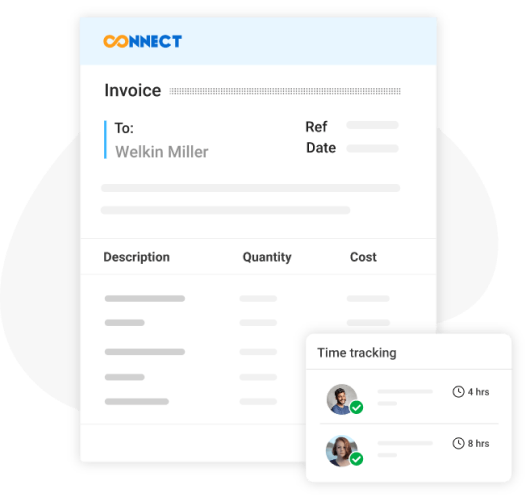
A dedicated project billing and invoice feature built into the platform eliminates the need for a separate invoicing tool entirely.
Resource Management With Financial Context
When you allocate a resource to a project, the tool should show you what that decision costs, not just whether the person is available.
Resource planning for multiple projects is especially important here, since overallocation across a project portfolio is one of the most common drivers of unplanned budget overruns.
Reporting And Financial Dashboards
Finance managers, project managers, and executives often need the same data presented differently. A finance director wants margin by project. A project manager wants the budget remaining by task.
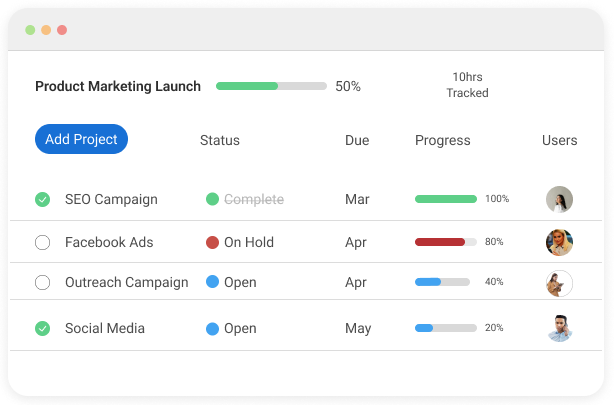
An executive wants portfolio-level financial health. Good reports and analytics that can be customized for each audience save significant time in weekly and monthly reporting cycles.
AI-Powered Financial Monitoring
The best platforms now use AI to actively monitor budget utilization, flag timeline risks, and surface insights from project reports without you having to ask. This is no longer a premium feature exclusive to enterprise tools.
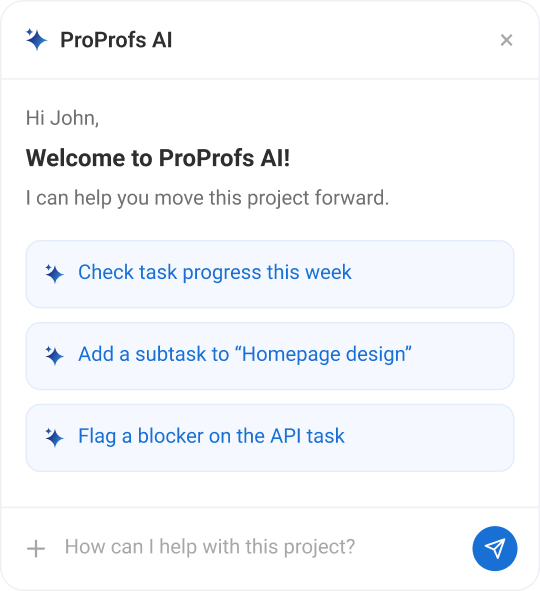
Platforms like ProProfs Project include AI that continuously reviews your live data and alerts you when a project is trending toward overrun, which is exactly the kind of proactive visibility that prevents budget surprises.
Ready to Deliver Projects Faster with AI?
Integration With Accounting Tools
A connection to your accounting system means financial data flows where it needs to go without manual exports or reconciliation. This is particularly important for finance teams that need project cost data to feed into broader financial reporting.
Financial Project Management Software vs. Standard Project Management Software: What Is the Difference?
Standard project management software focuses on tasks, timelines, and team coordination. Financial project management software does all of that and connects every project activity to a financial value.
| Feature | Standard PM Software | Financial PM Software |
| Task management | Yes | Yes |
| Timeline and Gantt views | Yes | Yes |
| Budget planning | Limited or none | Core feature |
| Real-time cost tracking | No | Yes |
| Time tracking with cost rates | Sometimes | Yes |
| Invoicing and billing | Rarely | Often included |
| Financial reporting | Basic | Dedicated dashboards |
| Resource cost management | No | Yes |
| Integration with accounting tools | Sometimes | Prioritized |
The short answer: if your projects have budgets, clients, or billable hours, standard project management software will leave gaps that cost you money.
How to Choose the Right Financial Project Management Software?
The right tool depends on how your team works and what your biggest financial pain point is. Here is a quick decision framework:
- For Small Businesses And Freelancers: Look for tools with flat-rate pricing, unlimited users, simple invoicing, and a free trial. ProProfs Project and Zoho Projects are strong starting points.
- For Agencies And Consulting Firms: Prioritize tools with profitability dashboards, client billing workflows, and support for multiple billing models. Productive, Scoro, and Teamwork are built for this.
- For Professional Services Firms: You need advanced revenue forecasting, earned value management, and accounting system integration. BigTime and Scoro cover this territory well.
- For Enterprise Teams: Complex resource planning, multi-currency support, ERP integration, and compliance requirements point toward Microsoft Project or Wrike Enterprise.
Questions to ask before selecting any tool:
- How quickly will the team actually adopt and use it?
- Does it connect to our accounting system?
- Can it handle the billing model we use with clients?
- What does the pricing look like as we add users?
- Is there a free plan or trial to test before committing?
Take Control of Your Project Finances and Stop Watching Budgets Slip Away
Managing project finances without the right software is a losing battle. Spreadsheets cannot alert you when a budget is drifting. Disconnected tools create the exact information gaps that turn manageable overruns into write-offs.
The tools on this list solve that by bringing project execution and financial oversight into one place. Whether you need simple invoicing and time tracking for a small team or a full profitability management suite for a services firm, there is an option here that fits.
ProProfs Project is the strongest starting point for most teams. It covers the financial project management essentials at a flat, affordable price, with AI that actively monitors your budgets and flags risks before they escalate. Give it a try and see how much cleaner project finances look when everything lives in one place.
Frequently Asked Questions
How is project finance software different from accounting software?
Accounting software records and reconciles financial transactions after they happen. Project finance software tracks costs as they happen within the context of specific projects, tasks, and resources. The two serve different purposes and are often used together, with project finance software feeding data into the accounting system.
What features should I look for in financial project management software?
The most important features are real-time budget tracking, time tracking with cost rates, resource cost management, invoicing and billing workflows, financial dashboards, and integration with accounting tools. The depth of each depends on your team size and business model.
Can small businesses use financial project management software?
Yes. Tools like ProProfs Project, Zoho Projects, and ClickUp offer affordable plans designed for small teams. ProProfs Project in particular offers a flat-rate Business plan with unlimited users, making it cost-effective as a team grows.
How does time tracking connect to project financial management?
When team members log hours against project tasks, the software multiplies those hours by the assigned cost rate to calculate the real-time cost of work done. This updates budget actuals automatically and helps project managers catch overruns before they become significant.
What is the typical cost of project financial management software?
Pricing ranges widely. Entry-level tools start around $5 to $10 per user per month. Mid-market platforms range from $10 to $30 per user per month. Enterprise and professional services platforms like BigTime use custom pricing. ProProfs Project offers a flat-rate plan starting at $39.97 per month for unlimited users, which is notably cost-effective for growing teams.
Which financial project management software is best for agencies?
Agencies typically need a tool that supports client billing, multiple billing models (fixed fee, retainer, T&M), profitability tracking, and time-to-invoice workflows. Productive, Scoro, Teamwork, and ProProfs Project all serve agency use cases well, with varying levels of complexity and pricing.
Can financial project management software reduce budget overruns?
Yes.A study by Rocketlane in 2026 shows that integrating project management with financial tracking can reduce budget overruns by up to 28% by providing real-time visibility into project expenses. The key is catching cost drift early, which requires a tool that updates financial data in real time rather than after month-end.
FREE. All Features. FOREVER!
Try our Forever FREE account with all premium features!