I have seen what happens when a hospital IT team tries to coordinate an EHR rollout across six departments using a shared Google Sheet and a WhatsApp group. The short version: three months of delays, a near-miss on a compliance deadline, and a project manager who had not slept properly in two weeks. That is not a technology problem. That is what happens when healthcare organizations try to run project-sized operations on tools built for personal to-do lists.
The demand for proper healthcare project management software has never been more urgent. A study by Mordor Intelligence in 2025 shows that the healthcare segment is now the fastest-growing vertical in the project management software market, expanding at a 15.85% CAGR through 2031. EHR rollouts, compliance program overhauls, facility expansions, and digital transformation initiatives are all driving that growth. Healthcare teams are running more projects than ever, with fewer resources and less margin for error.
I have personally evaluated dozens of project management platforms with medical teams in mind, looking specifically at how well they handle the realities of clinical operations: overlapping recurring tasks, cross-department coordination, budget-conscious leadership, and the need for tools that non-technical staff will actually use. This guide covers the 7 best tools I found, what they do well, where they fall short, and who each one is right for.
What Is Healthcare Project Management Software?
Healthcare project management software is a digital platform designed to help hospitals, clinics, and healthcare organizations plan projects, assign tasks, track progress, manage resources, and coordinate across departments, all from a single system. It replaces manual tracking methods like spreadsheets and sticky notes with structured workflows, visual timelines, and automated reporting.
Unlike generic project management tools, solutions built for healthcare environments support complex multi-department coordination, compliance-sensitive documentation, recurring task management, and real-time visibility for leadership teams.
Why Do Medical Teams Need Project Management Software?
Healthcare operations are more complex than they look from the outside. On any given week, a hospital IT department might be running an EHR upgrade, a compliance audit prep cycle, a new staff onboarding program, and three vendor coordination projects simultaneously. Managing that through email chains and spreadsheets is not just inefficient. It is a setup for missed deadlines, accountability gaps, and patient care disruption.
A study by KLAS Research in 2025 shows that only 38% of healthcare organizations said their recent EHR implementation hit the mark. A major reason cited was poor project coordination and change management. That is not a technology failure. It is a project management failure.
A study by Mordor Intelligence in 2025 shows that the healthcare segment is posting the fastest growth in the project management software market at a 15.85% CAGR through 2031. The demand is being driven by EHR rollouts, compliance workflows, digital transformation initiatives, and the shift toward value-based care.
The right management software for healthcare does not just help you track tasks. It gives your team a single source of truth for every project, every deadline, and every person responsible.
How Does Healthcare Project Management Software Work?
A good healthcare project management platform works in five core steps:
- Project Creation: Define the project scope, add team members, set start and end dates, and build task lists with assigned owners.
- Task Breakdown: Break large projects into milestones and subtasks. Assign priority levels, set task dependencies, and attach relevant files or notes.
- Timeline Visualization: Use Gantt charts or calendar views to map out the full project timeline, spot conflicts, and track dependencies across simultaneous projects.
- Progress Tracking: Monitor task completion percentages, time logged, and milestone status in real time through dashboards.
- Reporting And Review: Generate reports on team performance, project health, budget usage, and upcoming deadlines for leadership review.
Support change management in project management with a RACI chart project management. Guide: RACI Chart Project Management.
What Are the Top 7 Healthcare Project Management Software Tools?
Here is a quick look at the best options available right now:
| Tool | Best For | Pricing | User Rating (G2) |
| ProProfs Project | Simplest Project Management Tool for SMBs With Client Invoicing, Time & Billing | Free plan available. Paid plan starts at $39.97. | 4.4/5 |
| Monday.com | Visual board-based project tracking | Starts at $9/user/month | 4.7/5 |
| Asana | Cross-department task coordination | Starts at $10.99/user/month | 4.4/5 |
| ClickUp | All-in-one operations management | Starts at $7/user/month | 4.6/5 |
| Wrike | Scalable enterprise healthcare PM | Starts at $9.80/user/month | 4.2/5 |
| Smartsheet | Spreadsheet-style healthcare workflows | Starts at $9/user/month | 4.4/5 |
| Microsoft Project | Advanced scheduling for large hospitals | Starts at $10/user/month | 4.0/5 |
1. ProProfs Project – Simplest Project Management Tool for SMBs With Client Invoicing, Time & Billing
ProProfs Project is a comprehensive project management platform that supports task management, Gantt chart scheduling, real-time dashboards, time tracking, and unlimited users under a flat monthly plan. It is designed for teams that need structure and visibility across multiple concurrent projects without complex setup or high licensing costs.
The AI project management features have genuinely changed how I work. I describe a project, and the AI builds the full structure with tasks, stages, and assignments in seconds. The AI assistant sits with the team at every project stage, flagging blockers, surfacing deadline risks, and answering direct questions like “which projects are running over?” from live data. When I open a report, AI scans it instantly and tells me exactly what is on track, what is at risk, and where the team needs to focus. That kind of insight used to take hours to compile manually.
For healthcare teams specifically, the recurring task automation is a standout. Compliance check cycles, weekly reporting, and audit prep workflows can all be templated once and run automatically, so nobody is rebuilding the same task structure every month. And with workflow management built in, clinical operations teams can standardize how projects move from initiation to close without relying on tribal knowledge.
Pros:
- Unlimited users and projects under a single flat-rate plan
- Gantt charts and Kanban boards for flexible project visualization
- Recurring task automation for compliance cycles and audit prep
- AI project designer builds full project structures in seconds
- Built-in time tracking lets administrators monitor staff workload and generate billing or grant compliance reports
Cons:
- Dark mode interface is not currently available
- No dedicated account manager on the free plan
User Rating: 4.4/5
Pricing:
Free plan available. Paid plans start at $39.97.
Try ProProfs Project Software for Free
Deliver delightful projects within deadlines & budget
2. Monday.com – Best for Visual Board-Based Project Tracking
I tested Monday.com when our team was evaluating tools for cross-department campaign coordination, and it impressed me with how visually intuitive the board layouts were. For healthcare teams that are primarily visual thinkers, the color-coded status boards made project tracking feel almost effortless.
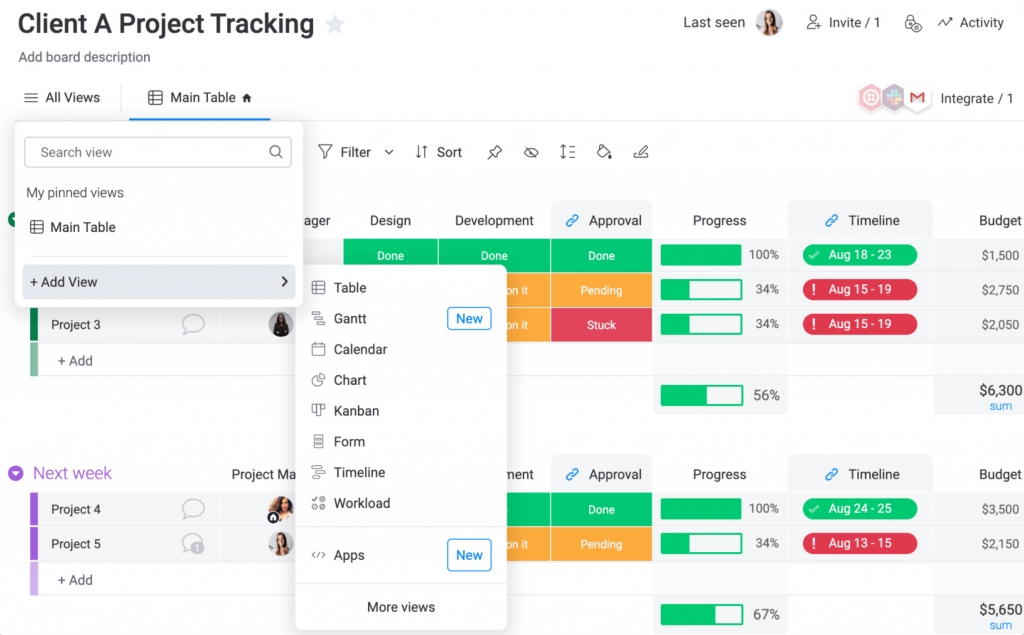
Building out workflows for recurring operational tasks was reasonably quick, and the automation builder handled repetitive status update notifications well. The dashboard customization options gave leadership clear visibility without needing to dig into task-level detail.
That said, the per-seat pricing added up quickly when we started factoring in external collaborators and guest reviewers. The HIPAA compliance tier is only available on the Enterprise plan, which puts it out of reach for smaller healthcare organizations.
Pros:
- Highly visual and customizable project boards
- Strong automation for repetitive workflows
- Multiple project view options including Gantt, timeline, and workload
- HIPAA compliance available on Enterprise plan
Cons:
- HIPAA compliance is locked behind the Enterprise plan
- Steeper learning curve for non-technical users
User Rating: 4.7/5
Pricing:
Starts at $9/user/month.
3. Asana – Best for Cross-Department Task Coordination
Asana was one of the first tools I evaluated when looking for something that could handle multi-department project coordination without overwhelming clinical staff with too many features. The task assignment structure is clean and logical, and the timeline view worked well for mapping out phased project rollouts.

What I found most useful was Asana’s ability to create project templates for repeatable processes like staff onboarding and equipment procurement workflows. Setting those up once and reusing them saved the team a significant amount of setup time on recurring projects.
The downside for healthcare use cases is that Asana’s reporting can feel thin unless you are on a higher-tier plan. And like Monday.com, HIPAA compliance requires an Enterprise license.
Pros:
- Clean, intuitive task management interface
- Project templates for repeatable healthcare workflows
- Timeline and workload views for resource planning
- Strong integration with communication tools like Slack and Teams
Cons:
- Advanced reporting features require higher-tier subscription
- Can feel feature-light for complex portfolio management
User Rating: 4.4/5
Pricing:
Starts at $10.99/user/month.
4. ClickUp – Best All-in-One Operations Management Platform
ClickUp was a tool I used heavily during a period when the team needed one platform to handle task management, document storage, and real-time collaboration simultaneously. The sheer number of views and features available is impressive, and for a healthcare operations team managing diverse project types, that flexibility is genuinely useful.
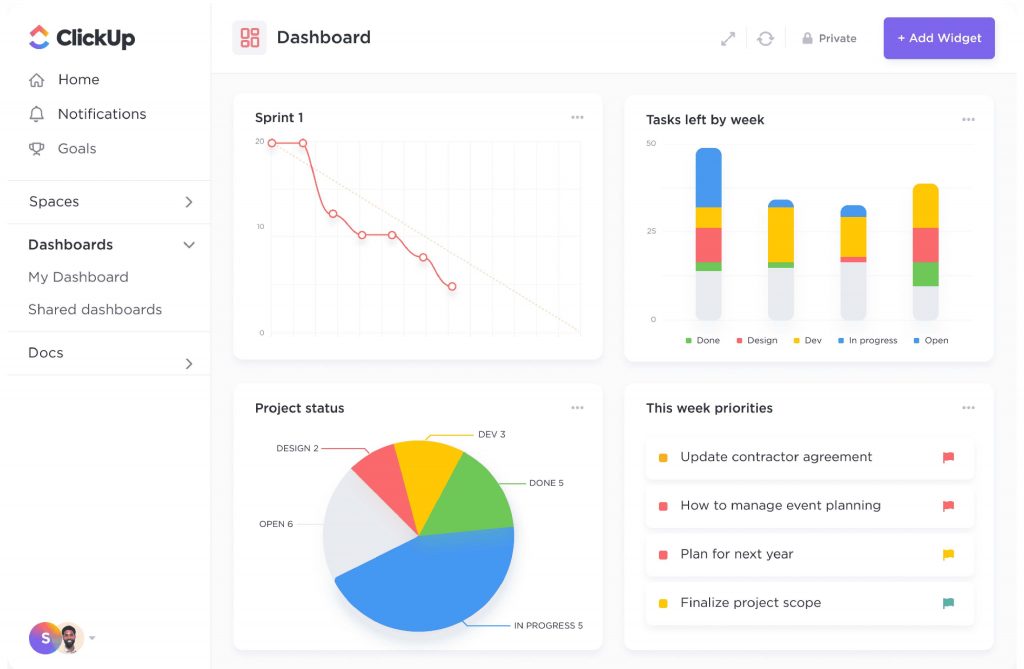
The custom fields and custom workflow statuses let me map out healthcare-specific processes in a way that felt natural rather than forced. The docs feature meant that project-related documentation and SOPs could sit alongside the tasks they related to.
The one area where ClickUp fell short for healthcare use was onboarding speed. New team members found it overwhelming initially, and getting everyone using it consistently took more investment than expected.
Pros:
- Highly customizable views and workflows for diverse healthcare use cases
- Built-in document management alongside task tracking
- HIPAA compliance available on Enterprise plan
- Automation builder for repetitive clinical admin workflows
Cons:
- Steep learning curve for non-technical clinical staff
- Performance can slow down with very large project structures
User Rating: 4.6/5
Pricing:
Starts at $7/user/month.
5. Wrike – Best Scalable Project Management Platform for Larger Healthcare Organizations
Wrike was on my radar for enterprise-scale project coordination, and after testing it, I understood why larger healthcare organizations gravitate toward it. The cross-project dashboards gave a genuinely useful bird’s-eye view of resource allocation across multiple simultaneous initiatives, which is valuable in a hospital setting where teams are stretched thin.
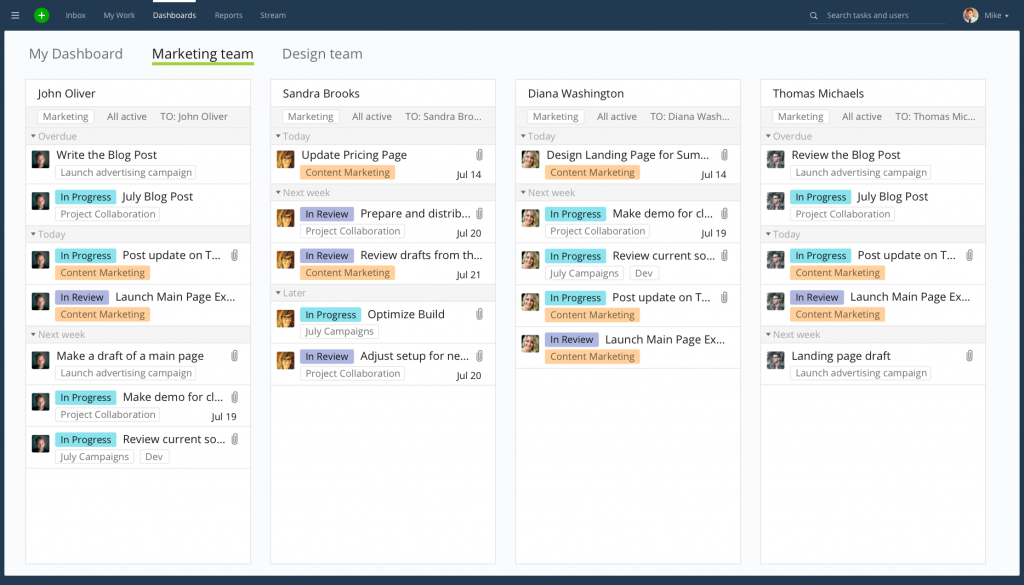
The request intake forms were particularly useful for managing inbound project requests from multiple departments, reducing the back-and-forth that typically bogs down project initiation. Wrike’s reporting suite also produced detailed, shareable project health summaries for leadership without much configuration work.
The downside is the price point. Wrike’s costs escalate significantly as you move up tiers, and the initial setup requires meaningful investment in configuration before the platform delivers value.
Pros:
- Cross-project dashboards for portfolio-level visibility
- Request intake forms to streamline project initiation
- Strong role-based access and permission controls
- Scales well for enterprise healthcare organizations
Cons:
- Complex setup and configuration required
- Interface can feel dense for less technical users
User Rating: 4.2/5
Pricing:
Starts at $9.80/user/month.
6. Smartsheet – Best for Teams Transitioning From Spreadsheets to Project Management Software
Smartsheet came up repeatedly when I was researching tools for teams that were deeply entrenched in Excel-based workflows. The spreadsheet-style interface genuinely eases the transition for teams that feel comfortable in rows and columns but need more structure and collaboration features than Excel can provide.
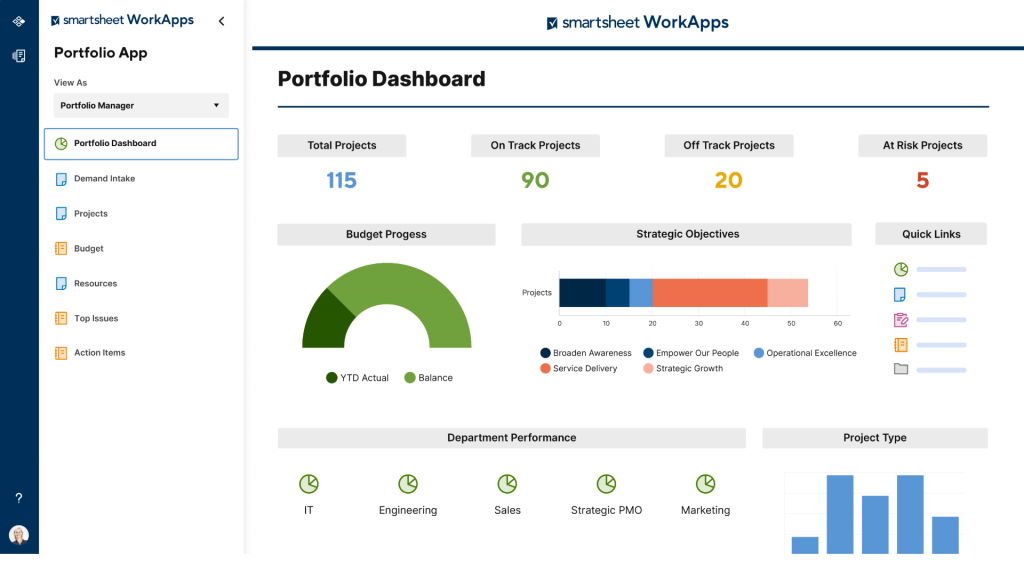
For healthcare operations teams managing resource planning, budget tracking, and compliance schedules, Smartsheet’s grid view offered a familiar but significantly more powerful alternative to manual spreadsheets. Automated alerts and approval workflows added a layer of accountability that a plain spreadsheet simply cannot replicate.
The limitation is that Smartsheet’s interface, while familiar, can feel constrained when managing complex multi-phase projects where a visual Gantt or Kanban view would be more informative.
Pros:
- Spreadsheet-like interface ideal for Excel-heavy healthcare teams
- Strong automation for alerts, approvals, and reminders
- Good resource management and workload tracking features
- Integration with Microsoft 365 and Google Workspace
Cons:
- Interface can feel limiting for non-spreadsheet project management needs
- Limited built-in communication features
User Rating: 4.4/5
Pricing:
Starts at $9/user/month.
7. Microsoft Project – Best for Advanced Scheduling
Microsoft Project was the legacy tool in the healthcare organizations I worked with before cloud-based alternatives became the norm. For large hospital systems managing major infrastructure builds, facility expansions, or long-horizon EHR migration projects, it remained the standard for a reason: the scheduling engine is genuinely best-in-class for complex, dependency-heavy project plans.
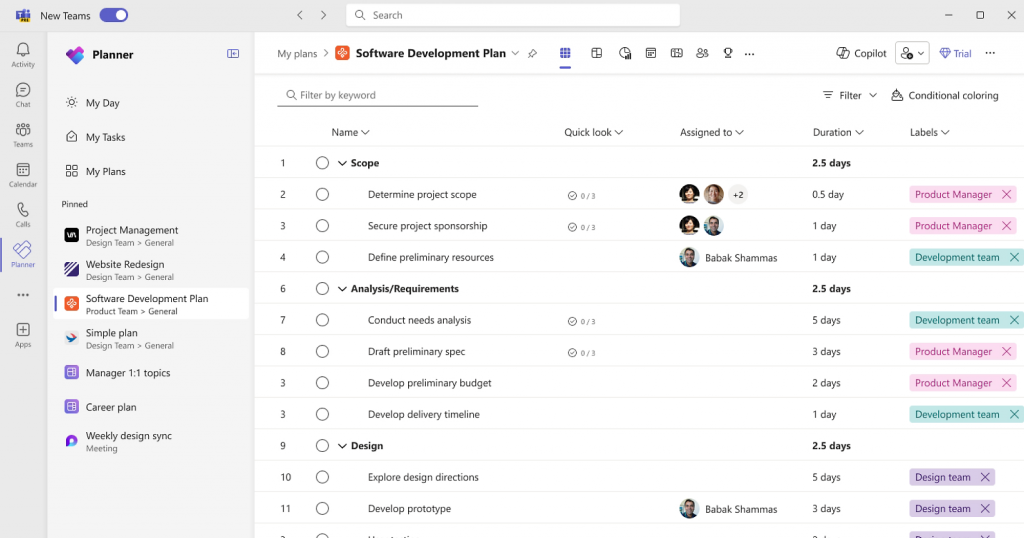
The critical path analysis and resource leveling features are more granular than anything else on this list. If your project has dozens of interdependencies and tight scheduling constraints, Microsoft Project handles that complexity well.
The core challenge is that it is not designed for day-to-day team collaboration. It is a planning tool for project managers, not a team-wide coordination platform. Getting clinical staff to engage with it meaningfully requires significant training and buy-in.
Pros:
- Industry-leading Gantt chart and scheduling capabilities
- Advanced resource management and workload leveling
- Critical path analysis for complex project dependencies
- Deep integration with the Microsoft 365 ecosystem
Cons:
- Not intuitive for non-project-manager users
- Higher per-user cost, especially for view-only licenses
User Rating: 4.0/5
Pricing:
Starts at $10/user/month.
How Did I Evaluate These Tools?
I evaluated each tool on this list using the same six-factor framework I apply to any project management software review, with healthcare-specific use cases in mind.
- User Reviews and Ratings: I reviewed verified ratings and feedback from Capterra, G2, and Trustpilot to understand how real users, including those in healthcare and operations-heavy environments, experience each tool day to day. Patterns in the feedback, both positive and negative, shaped my assessment of each platform’s real-world reliability.
- Essential Features and Functionality: I looked beyond the feature checklist and tested how well each tool actually performs on the things that matter most in healthcare project environments: Gantt chart scheduling, recurring task automation, role-based access, and cross-project visibility. A feature that exists in name only does not count.
- Ease of Use: This was a priority criterion specifically because healthcare teams include non-technical users, nursing managers, department heads, and operations directors who are not project managers by trade. I paid close attention to how quickly a new user could get productive without formal training.
- Customer Support: I evaluated the quality and responsiveness of support channels, including documentation, live chat, and onboarding assistance. For healthcare teams deploying a new tool across departments, the speed and depth of support matters.
- Value for Money: I compared what each pricing tier actually delivers against what healthcare teams realistically need. Per-seat models that penalize large cross-functional teams scored lower here. Flat-rate plans with unlimited users scored higher.
- Personal Experience and Expert Input: My own hands-on testing informed every tool entry on this list. Where applicable, I also drew on conversations with healthcare operations professionals and project managers who have deployed these tools in clinical environments.
Integrate changes using project integration management alongside change management in project management. Guide: Project Integration Management.
What Are My Top 3 Picks for Healthcare Project Management?
After evaluating all seven tools, these three consistently stood out as the strongest fits for healthcare teams at different stages and sizes.
1. ProProfs Project
ProProfs Project is my top overall pick for small and mid-size medical teams. It delivers a complete project management toolkit, including Gantt charts, recurring task automation, time tracking, role-based access, and AI-powered reporting, without the per-seat pricing that makes most alternatives expensive as soon as a project involves external stakeholders. The AI project designer alone is a meaningful productivity lever: describe your project and the system builds the full structure in seconds. For healthcare teams that need to ship projects faster without adding headcount, that matters.
2. Monday.com
Monday.com is the strongest pick for visual-first healthcare teams that need a highly customizable platform and already have the budget for an Enterprise plan. The board-based interface reduces the friction of getting clinical staff and administrators to engage with project tracking, and the automation builder handles repetitive workflows well. It is best suited for organizations where visual clarity is the primary concern and HIPAA compliance is a non-negotiable requirement.
3. Wrike
Wrike is the right call for larger healthcare organizations managing complex portfolios across multiple departments or facilities. The cross-project dashboards and intake forms address the coordination overhead that hospital-scale operations create. It requires more setup and a larger budget, but for organizations where project complexity genuinely demands enterprise-grade structure, Wrike delivers it.
What Are the Key Features to Look for in Healthcare Task Management Software?
Choosing the right healthcare task management software comes down to more than a feature checklist. Here is what each core capability actually does for healthcare teams in practice:
Gantt Chart Scheduling
A Gantt chart gives you a visual timeline of every task, milestone, and dependency across a project. In healthcare, where EHR rollouts and facility upgrades involve dozens of interconnected workstreams, this view is the difference between spotting a conflict before it causes a delay and discovering it after the fact.
Look for Gantt tools that support drag-and-drop rescheduling and dependency linking, not just static timeline views.
Recurring Task Automation
Healthcare operations run on cycles. Monthly compliance reviews, quarterly audit prep, annual policy renewals, and weekly status reporting all happen on a fixed schedule. A platform with recurring task management lets you build those workflows once and have them regenerate automatically.
Without this, a project manager is manually recreating the same task structure every cycle, which is both time-consuming and error-prone.
Kanban Board Views
Not everyone on a healthcare team thinks in Gantt charts. Clinical staff and department heads often find Kanban boards more intuitive for tracking task status at a glance.
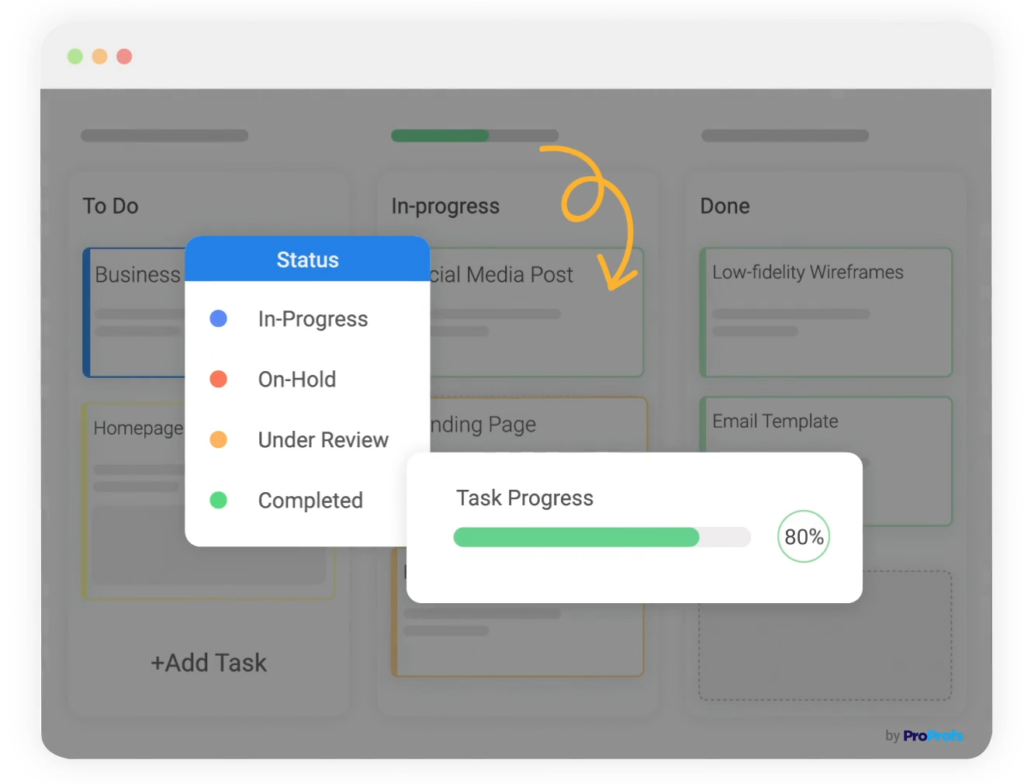
A platform that offers both views lets different users engage with the same project data in the format that works best for them, which improves adoption across departments.
Time Tracking
Time tracking tied directly to tasks and projects gives healthcare operations teams accurate data on where staff hours are going. This is useful for resource planning, identifying bottlenecks, and generating reports for leadership that show actual effort against estimates.
It is also valuable for organizations that need to account for time spent on billable or grant-funded projects.
Role-Based Access Controls
Healthcare projects routinely involve external vendors, IT consultants, compliance auditors, and third-party lab partners.
Role-based permissions let you give each type of user exactly the level of access they need, without exposing internal project data or giving edit permissions to people who only need to view progress.
Real-Time Dashboards and Reports
CMOs, CIOs, and hospital administrators need project visibility without getting into task-level detail. A platform with customizable dashboards and one-click reports and analytics means leadership can check project health at any time without asking the project manager to compile a status update.
This saves hours of manual reporting work every week.
AI-Powered Project Management
Modern healthcare project management tools are starting to incorporate AI in ways that go beyond cosmetic features. Look for platforms where AI can auto-generate project structures from a brief description, flag timeline risks before they become delays, and surface answers from live project data on demand.
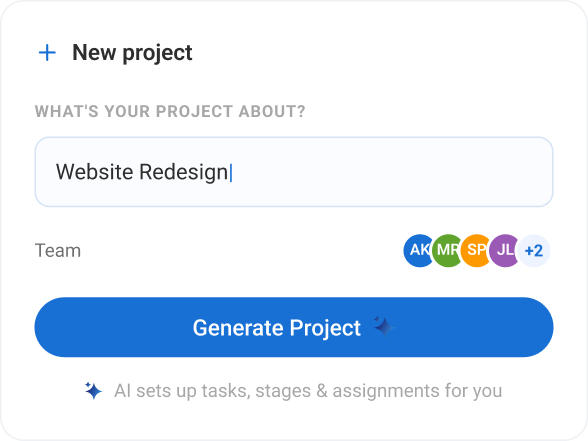
This is especially useful in healthcare environments where project managers are stretched across multiple simultaneous initiatives and need faster ways to stay on top of everything.
Mobile Access
Healthcare teams are not always at a desk. Nursing managers, facility coordinators, and department heads need to update task status, check deadlines, and flag issues from wherever they are.
A platform with a functional mobile app keeps the whole team connected to project data in real time.
Notifications and Reminders
Missed deadlines in healthcare can have downstream consequences for compliance and patient care. A platform with smart notifications and reminders keeps the team informed when tasks are due, overdue, or blocked, without requiring a project manager to manually chase every update.
What Problems Does Healthcare Project Management Software Solve?
Healthcare organizations face a distinct set of project management challenges that general business tools are not built to handle:
- Spreadsheet Dependency: Most clinical and operations teams start with Excel. It breaks down fast when more than three people are working on the same project.
- No Cross-Department Visibility: IT, nursing, admin, and finance each run their own tracking systems. Nobody has a complete picture.
- Recurring Compliance Cycles: Audit prep, policy reviews, and regulatory filings happen on a fixed schedule and require reliable, repeatable task management.
- Resource Overload: Healthcare teams manage more projects than available staff. Without workload visibility, burnout and missed deadlines are inevitable.
- Leadership Reporting: CMOs and CIOs need project status without getting into task-level detail. Manual reporting wastes hours every week.
The right project management software for hospitals and medical teams addresses all five of these pain points from a single platform.
Manage Healthcare Projects Better: Your Next Step
Running healthcare projects on spreadsheets and group chats is not a sustainable strategy. As organizations take on more complex initiatives, from EHR implementations to compliance program overhauls to multi-department process improvements, the need for dedicated healthcare project management software becomes clear.
The tools on this list all offer meaningful ways to bring structure and visibility to healthcare project work. The right choice depends on your team size, technical comfort level, and how many external collaborators you regularly work with.
If you want a platform that is simple to adopt, scales to unlimited users without cost surprises, and handles both one-off projects and recurring operational cycles well, start with ProProfs Project. The AI project management features alone cut project setup time significantly, and the flat-rate pricing means you can involve your whole team from day one.
Frequently Asked Questions
Why is project management important in hospitals?
Hospitals run dozens of simultaneous initiatives, from IT system upgrades to compliance audits to facility construction. Without a structured system to track tasks, deadlines, and accountability, projects slip, costs overrun, and care delivery gets disrupted. A study by KLAS Research in 2025 shows that only 38% of healthcare organizations rated their recent EHR implementations as successful, with poor project coordination cited as a leading cause.
What features should I look for in project management software for hospitals?
Look for Gantt chart scheduling, recurring task automation, role-based access controls, real-time dashboards, cross-project visibility, time tracking, and flat-rate or unlimited-user pricing. Teams transitioning from spreadsheets should prioritize ease of adoption.
Is ProProfs Project suitable for small healthcare teams?
Yes. ProProfs Project is designed for teams of any size. Its flat-rate pricing with unlimited users makes it especially practical for small and mid-size healthcare teams that need to involve a large number of stakeholders without paying per seat. A free version is also available for teams of up to 3 users.
What is the difference between healthcare project management software and general project management software?
General project management software handles tasks, timelines, and team coordination for any industry. Healthcare project management software adds configurations relevant to medical environments, such as recurring compliance cycle support, role-based access for clinical and external teams, and dashboards built for multi-department visibility. Some platforms also offer HIPAA-compliant configurations for teams handling protected health information.
Does healthcare project management software need to be HIPAA compliant?
It depends on how the software is used. If the platform is being used to manage project tasks, timelines, and team coordination without storing or transmitting protected health information, HIPAA compliance may not be required. If the platform will store patient data or PHI as part of project documentation, HIPAA compliance becomes essential. Always verify with your compliance team before selecting a platform.
How much does healthcare project management software cost?
Pricing varies widely. Per-user tools like Asana, Monday.com, and ClickUp start around $7 to $11 per user per month, which can add up quickly for large healthcare teams. ProProfs Project offers a flat-rate plan starting at $49.97 per month for unlimited users, which is significantly more cost-effective for organizations that need broad access across departments and external collaborators.
Can project management software help with EHR implementation?
Yes. EHR implementations are among the most complex projects healthcare organizations undertake. Project management software helps by centralizing task assignments, tracking milestones and dependencies, managing cross-department coordination, logging time and progress, and generating status reports for leadership. A structured platform reduces the risk of the coordination failures that a study by KLAS Research in 2025 identified as the leading cause of EHR implementation issues.
FREE. All Features. FOREVER!
Try our Forever FREE account with all premium features!