A RACI chart is a simple grid that spells out who does the work, who signs off on it, who gets consulted, and who just needs to stay in the loop on every task in a project. It replaces guesswork with one clear answer to “wait, whose job is this?”
If you have ever sat in a meeting where three people thought they owned a task and nobody actually did it, you already know why this matters. Let’s break down what RACI means, how to build one, and how to actually use it without turning it into a chart nobody looks at again.
What Does RACI Chart Mean?
RACI stands for Responsible, Accountable, Consulted, and Informed. Each letter is a role you assign to a person for a specific task, not a job title. The same person can hold different RACI roles on different tasks within the same project.
A study by McKinsey in 2019 shows managers spend 37% of their time on decisions, and more than half of that time gets used ineffectively, often because nobody was clear on who should have made the call in the first place. A RACI chart exists to close that exact gap before a project even starts. If you are still fuzzy on how this fits into the bigger picture, it helps to brush up on basic project management terms and concepts before you dive in.
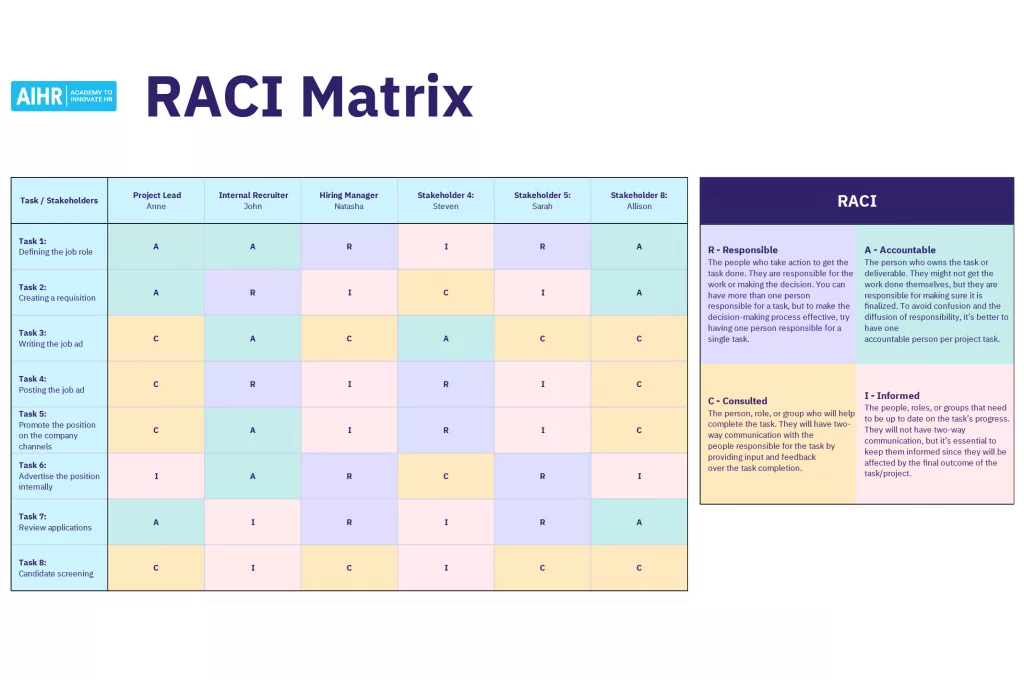
RACI Chart Definitions
Here is what each letter actually means and how to spot the right person for each role.
- Responsible (R): The person who does the work. Every task needs at least one, and it is fine to have more than one.
- Accountable (A): The single person who owns the outcome and signs off on it. Only one person per task, no exceptions.
- Consulted (C): Subject matter experts you loop in for input before the work is finalized. This is a two way conversation.
- Informed (I): People who need a status update but do not need to weigh in. This is a one way update, not a discussion.
Quick way to remember the split: R and A actually touch the work. C and I give and receive information. Overlap is normal, especially between R and A on smaller tasks.
Why Use a RACI Chart?
Teams reach for a RACI chart when a project has more than a handful of people touching it and the risk of two people assuming the other one has it covered is real.
Here is what it actually fixes:
- Stops duplicate work. Nobody redoes a task someone else already finished because ownership was never clear.
- Speeds up approvals. One accountable person means one sign off, not five people weighing in at the last minute.
- Cuts down on status meetings. Informed parties get updates without needing a recurring call.
- Makes onboarding faster. New hires or new vendors can see exactly where they fit on day one.
- Prevents burnout. A quick scan shows if one person is marked Responsible for too many tasks at once.
A study by PMI in 2025 shows projects with a clear, well communicated vision and clearly assigned roles see meaningfully stronger outcomes than projects that rely on informal, verbal role assignment. This lines up with what most project manager roles and responsibilities guides point out too: confusion about ownership is usually a leadership gap, not a team effort gap.
How to Build a RACI Chart
You do not need special software to start. A spreadsheet, a whiteboard, or a project management tool all work. The real work is in getting the details right, so here is the process broken down step by step.
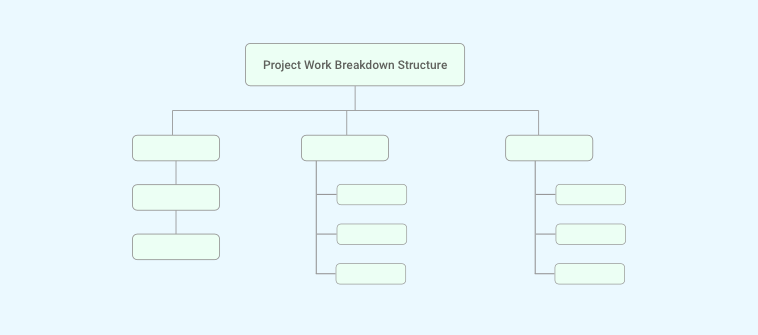
- List every task or deliverable. Put these down the left side of your chart. Keep them at the level of an actual deliverable, not a five minute action item. If your task list feels too vague or too huge to break down cleanly, running through a work breakdown structure first will make this step much easier.
- List every person or role across the top. Use job titles if the team is large or the project spans departments, or use names if it is small enough that everyone already knows each other. Try to keep the list to people who genuinely touch the work. Adding someone “just in case” is how charts get cluttered and confusing.
- Assign one letter per person, per task. Go row by row and mark R, A, C, or I in each cell. A useful gut check here is asking two questions for every name on the list: “does this person actually do the work?” and “does this person need to approve it, be asked for input, or just be told?” The answer sorts them into the right letter almost every time.
- Check that every task has exactly one A. If a task has two Accountable people, pick one. Two owners usually means zero owners in practice, because everyone quietly assumes the other person will make the final call.
- Check nobody is overloaded on R. If one person is Responsible for half the chart, redistribute before the project starts, not after week three. This is also where it helps to look at actual workload data instead of guessing, so pulling up your team’s current task load is worth doing before you finalize assignments.
- Share it and walk through it together. A RACI chart that lives in a folder nobody opens does not help anyone. Review it out loud with the team, ideally as part of your kickoff meeting, and make sure every single person can point to their own row and say “yes, that’s me.”
- Revisit it at every major milestone. Roles shift as a project moves. A quick five minute check-in at each phase keeps the chart honest instead of letting it quietly go stale.
RACI Chart Example
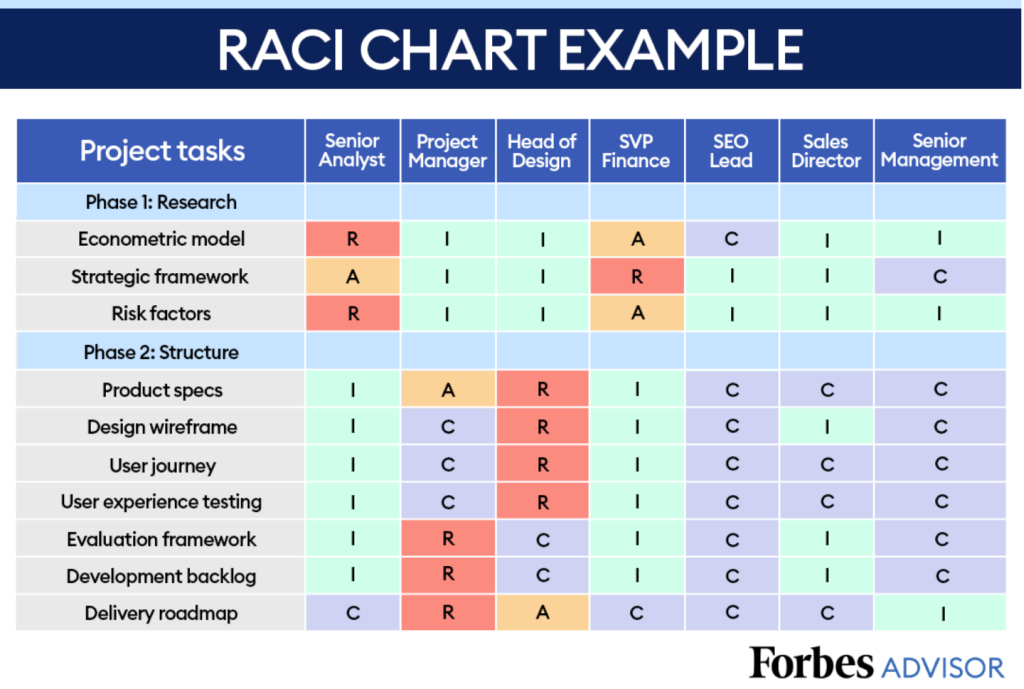
Here is a small, real world example for a company launching a new landing page.
| Task | Marketing Manager | Copywriter | Designer | Developer | VP of Marketing |
| Write page copy | C | R | I | I | I |
| Design page layout | C | I | R | I | I |
| Build and code page | I | I | C | R | I |
| Approve final page | A | I | I | I | I |
| Launch announcement | R | I | I | I | I |
Notice the copywriter is Responsible for the copy but only Consulted on the design, and the VP only shows up as Informed because this launch does not need executive sign off. That is a normal, healthy sample RACI chart. Not every row needs every role filled.
RACI Chart Rules to Follow
A few rules keep a RACI chart useful instead of just decorative. Here is why each one actually matters, not just what it says.
- Every task needs at least one responsible person. A blank row is not neutral, it is a task nobody is actually planning to do. If you cannot name a responsible person for a task, that is a sign the task is not ready to go on the chart yet.
- Every task needs exactly one Accountable person. This is the rule teams break most often, usually by naming a whole team or department as “accountable.” A study by Wellingtone in 2026 shows only 45% of PMOs have clearly defined roles and responsibilities in the first place, and a fuzzy Accountable field is very often where that breaks down. One name, one person, every time.
- Keep the Consulted list short. One subject matter expert per affected team is usually enough. Every extra name you add to Consulted is another person’s calendar you need before the work can move forward.
- Do not skip Informed just because it feels like extra admin. Silence is where confusion grows. If a stakeholder finds out about a change after the fact instead of during it, that is usually a missed Informed role, not a communication failure. A basic project management communication plan pairs well with a RACI chart for exactly this reason.
- Match the role to actual authority, not to job title. A senior title does not automatically make someone Accountable. The right question is always “who actually has the authority to sign off on this,” not “who is the most senior person in the room.”
- Review the chart at least once per project phase. A RACI chart built at kickoff and never touched again slowly stops matching reality as people join, leave, or change roles mid project.
RACI vs DACI vs RAPID
RACI is not the only framework out there, and it is worth knowing the difference so you pick the right one for the right situation.
| Framework | Best For | Key Roles |
| RACI | Ongoing task and project ownership | Responsible, Accountable, Consulted, Informed |
| DACI | One-off, single decisions | Driver, Approver, Contributor, Informed |
| RAPID | High-stakes, strategic calls | Recommend, Agree, Perform, Input, Decide |
RACI is built for the day to day. It answers “who is doing this task and who owns the outcome,” which is exactly what a running project needs across dozens or hundreds of tasks.
DACI is built for a single decision, not an ongoing task list. A Driver pushes the decision forward, an Approver makes the final call, Contributors weigh in, and Informed parties are told the outcome. It works well for things like “which vendor do we pick” rather than “who manages this project.”
RAPID goes a step further and is usually reserved for big, strategic, often one time calls, like a market entry decision or a major reorg. It separates out who Recommends, who Agrees, who actually Performs the resulting work, who gives Input, and who ultimately Decides.
If you are managing the ongoing work of a project, not a single big decision, RACI is almost always the right starting point. Teams that are actively making decisions inside a project rather than assigning task ownership are usually the ones who should be looking at DACI or RAPID instead.
Build Clarity Into Your Team With Raci Chart
A RACI chart is a small thing to set up and a big thing to skip. Once every task has one clear Responsible person and one clear Accountable owner, most of the back and forth that slows projects down just quietly disappears.
You do not need to overthink this. Start with your next project’s task list, run it through the steps above, and keep the chart somewhere your team actually looks at, not buried in a folder from kickoff day. Revisit it every phase and it will keep paying for itself long after the first project it was built for.
If you would rather not maintain a separate document at all, tools like ProProfs Project let you attach Responsible and Accountable owners directly to each task, so the roles update automatically as the work moves instead of living in a spreadsheet that falls out of date.
Frequently Asked Questions
What does RACI stand for?
RACI stands for Responsible, Accountable, Consulted, and Informed. These four roles are assigned to individuals for each task in a project to clarify who does the work, who approves it, who gives input, and who just needs updates.
What is a RACI chart used for?
A RACI chart is used to assign clear ownership across every task in a project. It prevents duplicate work, speeds up approvals, and gives new team members an instant view of where they fit.
Can one person hold more than one RACI role on the same task?
Yes. It is common for the Responsible and Accountable roles to fall on the same person for smaller tasks, especially on lean teams. The one rule that never changes is that only one person can be Accountable per task.
How many people should be consulted on a single task?
Keep the Consulted list as short as possible, usually one subject matter expert per affected team. Too many consulted parties slows down decisions instead of improving them.
Is a RACI chart the same as an org chart?
No. An org chart shows reporting lines and hierarchy. A RACI chart shows task level ownership, which often crosses departments and reporting lines entirely.
What is the difference between RACI and RASCI?
RASCI adds a fifth role, Supportive, for people who help the Responsible party without owning the task themselves. Most teams start with RACI and only move to RASCI if tasks regularly need extra hands.
Do RACI charts work for agile teams?
Yes, though many scrum teams find their framework already builds in accountability through roles like product owner and scrum master. RACI is more commonly used for cross functional work that agile ceremonies do not fully cover.
Do I need special software to build a RACI chart?
No. A spreadsheet or a whiteboard works fine for small teams. Larger teams often move their RACI roles into a project management tool so assignments stay attached to the live task instead of a document that goes stale.
FREE. All Features. FOREVER!
Try our Forever FREE account with all premium features!