I’ve sat across from small business owners who were running five-person teams out of color-coded Excel sheets, three WhatsApp groups, and a sticky note on the monitor that said: “DON’T FORGET FRIDAY.” And honestly, many of them avoided project management software for years because they assumed it would be too expensive, complicated, or built only for large teams. Sounds familiar?
Here’s the truth: the problem isn’t your team. It’s the tools. Running a business without the right project management software for a small business is like trying to navigate a city without a map. You’ll eventually get somewhere, but you’ll waste hours, miss turns, and lose clients along the way. According to a study by PMI in 2025, 12% of project investment is lost every year due to poor performance and miscommunication. For a small business, that’s not just a statistic. That’s your margin.
I’ve spent years testing, comparing, and recommending project management tools for small businesses, startups, freelancers, and operations teams who are done with chaos and ready to actually grow. In this guide, I’ve handpicked the 16 best options, rigorously assessed for ease of use, affordability, and the features that actually matter when you’re running lean.
Why Do Small Businesses Need Project Management Software?
Small business project management software solves a problem that every growing team hits at roughly the same point: things start falling through the cracks.
Here’s what that typically looks like:
- A client follow-up slips because it was buried in someone’s inbox
- Two team members worked on the same deliverable in different directions
- A deadline was missed because no one knew who was responsible for the last step
- You’re spending an hour every Monday just figuring out where things stand
These aren’t signs of a bad team. They’re signs of outgrown systems. According to a survey by Wrike in 2025, 45% of project managers spend more than one full day per week just manually reporting status updates. That time is being stolen from actual work.
Project management tools for small businesses eliminate that friction by centralizing tasks, communication, deadlines, and accountability in one place, visible to everyone and accessible from anywhere. If you’re curious about why project management matters beyond just keeping tasks organized, it goes deeper than most people expect.
Top 16 Best Project Management Software for Small Business
Here is the list of the 16 best project management software for small businesses, hand-tested and assessed for features, pricing, ease of use, and real-world small business fit.
| Tool | Best For | Pricing | User Rating (G2) |
| ProProfs Project | Simplest Project Management Tool for SMBs With Client Invoicing, Time & Billing | Free plan available. Paid plan starts at $39.97/month. | 4.4/5 |
| Asana | Best for simple task management | Free plan available; paid starts at $10.99/user/month | 4.4/5 |
| ClickUp | Best for flexible work management | Free plan available; paid starts at $7/member/month | 4.7/5 |
| Wrike | Best for real-time project monitoring | Free plan available; paid starts at $9.80/user/month | 4.2/5 |
| monday.com | Best for portfolio management | Free plan available (up to 2 seats); paid starts at $8/seat/month | 4.7/5 |
| Trello | Best for Kanban board visualization | Free plan available; paid starts at $5/user/month | 4.4/5 |
| Airtable | Best for sprint management | Free plan available; paid starts at $10/seat/month | 4.7/5 |
| Zoho Projects | Best for handling large, complex projects | Free plan available (up to 3 users); paid starts at $4.22/user/month | 4.3/5 |
| Paymo | Best for time tracking in projects | Free plan available (1 user); paid starts at $4.95/user/month | 4.6/5 |
| Celoxis | Best for keeping project risks under control | Starts at $22.50/user/year | 4.5/5 |
| ProofHub | Best for creative and design teams | Starts at $45/month | 4.5/5 |
| Nifty | Best for agile project development | Free plan available (1 user); paid starts at $39/month | 4.7/5 |
| Todoist | Best for organizing everyday project workflows | Free plan available; paid starts at $4/month | 4.4/5 |
| Teamwork | Best for cross-functional teams | Free plan available (up to 5 users); paid starts at $5.99/user/month | 4.4/5 |
| Smartsheet | Best for intelligent workflow automation | Free plan available (1 user); paid starts at $7/user/month | 4.4/5 |
| Basecamp | Best for remote team collaboration | Starts at $4.21/user/month | 4.1/5 |
1. ProProfs Project – Simplest Project Management Tool for SMBs With Client Invoicing, Time & Billing
ProProfs Project is our top-rated small business project management software, an all-in-one, centralized platform that helps small teams align projects, tasks, timelines, and people without a steep learning curve.
I currently use ProProfs Project to manage multiple client deliverables across a lean team, and the difference from our old setup, a mix of spreadsheets and email threads, is immediate. From day one, ready-to-use templates let you get a project live in minutes. You pick a template, customize task names, assign team members, set due dates, and you’re off.
What sets it apart for small businesses specifically is how it balances power with simplicity. You get Gantt charts, Kanban boards, Calendar view, time tracking, project baselines, and analytics, all without the bloated complexity of enterprise tools. The dashboard gives a clean, single-view overview of everything in motion, and automated notifications mean nobody on the team is ever in the dark about a status change or missed milestone.
The most recent addition that’s actually changed my day-to-day is the AI layer. Instead of building out a new client project task by task, I describe what the project involves, and it lays out the structure, stages, and assignments on its own. There’s an AI assistant sitting on top of that too, so when I want to know which deliverables are at risk of slipping, I just ask instead of clicking through every board to check.
Pros:
- Ready-to-use, customizable templates help teams get started within minutes
- AI-powered project setup and an AI assistant that flags at-risk tasks without manual digging
- Multiple project views (Gantt, Kanban, Calendar) for flexible progress tracking
- Built-in time tracking generates accurate timesheets and client invoices
- Task prioritization and baseline comparison keep projects on schedule
Cons:
- No downloadable or on-premise version available
- Dark mode not available in the current interface
Pricing:
Free plan available. Paid plan starts at $39.97/month.
2. Asana – Best for Simple Task Management
Asana was the first tool I moved my team to when we graduated from email-based project tracking, and it delivered on its core promise: making task management genuinely easy.

Setting up projects was fast. I could create clear workflows, break work into subtasks, assign them to different team members, and customize the whole thing within a single afternoon.
The 50+ templates for common use cases, marketing campaigns, product launches, onboarding, meant I wasn’t starting from scratch. For a small business that needs clean, simple task and project management without a long setup period, Asana does this better than most.
Pros:
- Over 50 pre-built project templates for quick setup
- Integrates with 100+ third-party applications including Slack, Google Workspace, and Zoom
- Supports multiple views: List, Board, and Calendar for flexible project tracking
- Strong automation rules to reduce manual task updates
Cons:
- Lacks a robust native time tracking feature
- Interface is not optimized for highly complex, multi-phase projects
Pricing:
Free plan available. Paid plan starts at $10.99/user/month.
3. ClickUp – Best for Flexible Work Management
A colleague of mine who runs a small digital consultancy swore by ClickUp for the better part of two years, and when she showed me how she had the whole thing configured, I understood why. She’d set it up as a full operating system for her team, tasks, docs, goals, time tracking, and reporting all in one workspace.
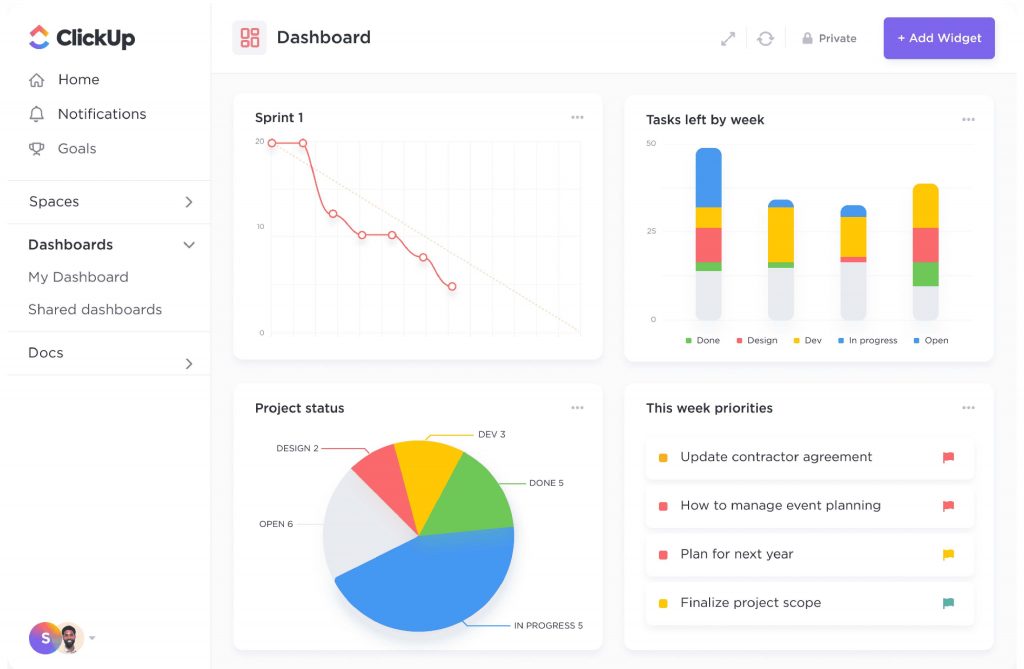
ClickUp’s defining characteristic is its flexibility. You can run it as a simple to-do list or build complex, multi-layered workflows with cross-functional dependencies. Gantt charts, Kanban boards, Timelines, and Mind maps are all available within the same platform.
For task management software for small business that needs to adapt as the business scales, ClickUp covers the widest range of workflow styles.
Pros:
- Handles complex, cross-functional projects with advanced dependency tracking
- Centralizes tasks, documents, goals, and chat in one intelligent interface
- Full-featured mobile app for iOS and Android for on-the-go project management
- Strong integrations with Google Workspace, Microsoft Office, Trello, and Slack
Cons:
- The feature-packed dashboard can feel overwhelming, especially for new users
- Collaboration tools and real-time commenting could be more intuitive
Pricing:
Free plan available. Paid plan starts at $7/member/month.
4. Wrike – Best for Real-Time Project Monitoring
Wrike was the tool my operations manager at a previous role insisted on, and once I’d spent a week with it, I stopped pushing back. The real-time visibility it provides, especially across multiple simultaneous projects, is genuinely impressive for a small business that manages client work with tight timelines.
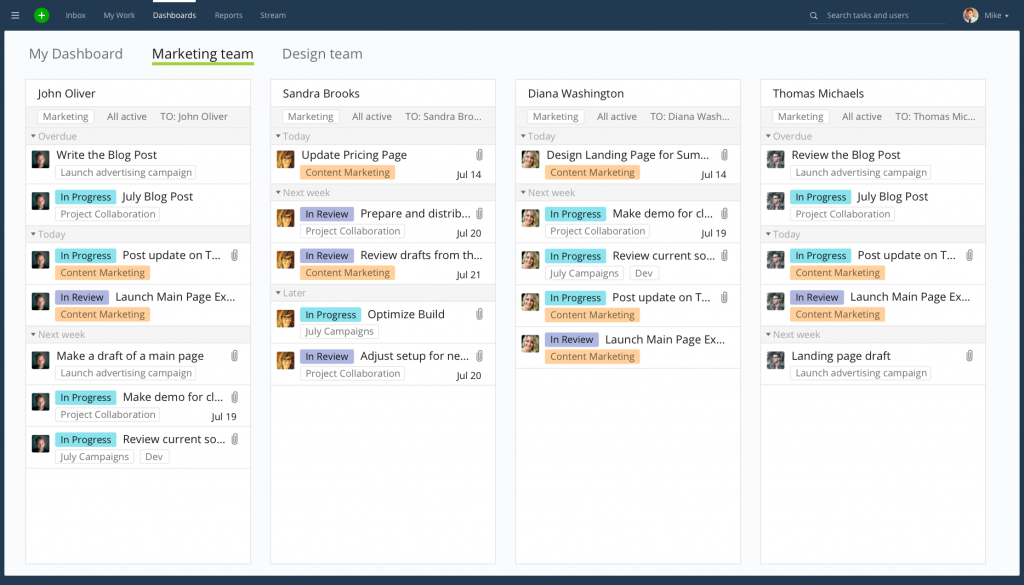
The customizable dashboards surface real-time data so you can track task progress, flag approaching deadlines, and view project performance at a glance without digging through nested folders. The activity stream feature shows a live feed of every comment, status change, and update across the account.
For project management for small companies that need to keep a close eye on delivery pace without scheduling constant check-in meetings, Wrike delivers.
Pros:
- Customizable dashboards display real-time project metrics and progress data
- Activity stream provides a live feed of all task updates, comments, and changes
- Accessible across web, desktop, and mobile with consistent functionality
- Time tracking and timesheet generation support accurate project cost estimation
Cons:
- Feature set can be overwhelming for first-time project management software users
- Collaboration and communication features are less developed than competitors
Pricing:
Free plan available. Paid plan starts at $9.80/user/month.
5. monday.com – Best for Portfolio Management
Monday.com was recommended to me by a startup founder who needed to manage 12 simultaneous client projects across a team of eight. She’d tried three other tools before landing here, and what kept her was the portfolio-level visibility.
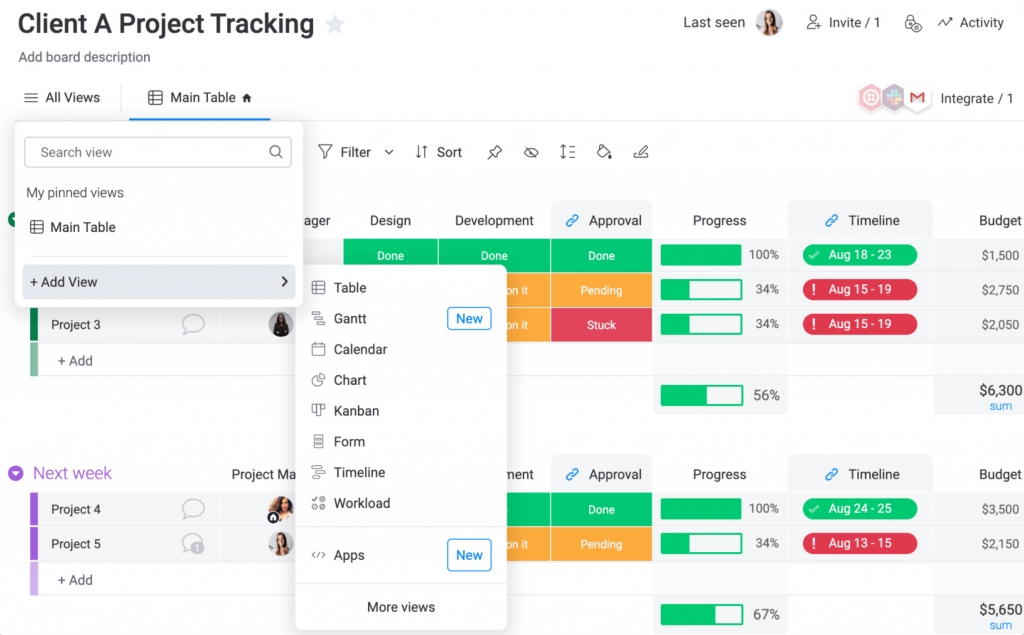
The platform lets you manage multiple projects, initiatives, and assets across the organization from a single board. Adding columns for project owners, start and end dates, milestones, budget, and status makes the portfolio view genuinely useful for operations managers and small business owners who need a helicopter view alongside ground-level detail.
Reporting tools pull key metrics directly to the dashboard, and automation handles recurring updates without manual input.
Pros:
- Visual portfolio boards for tracking multiple projects and initiatives simultaneously
- Ready-made, customizable templates for fast project setup
- Strong automation and integration features for increased operational efficiency
- Multiple data visualization options: Charts, Calendar, and Gantt views
Cons:
- Initial setup can be challenging for teams without prior PM software experience
- Collaboration features are functional but less seamless than dedicated communication tools
Pricing:
Free plan available (up to 2 seats). Paid plan starts at $8/seat/month.
6. Trello – Best for Kanban Board Visualization
Trello was the first project management tool I ever used, back when I was managing content production for a small media team, and it remains one of the cleanest Kanban-style interfaces available for simple project tracking.
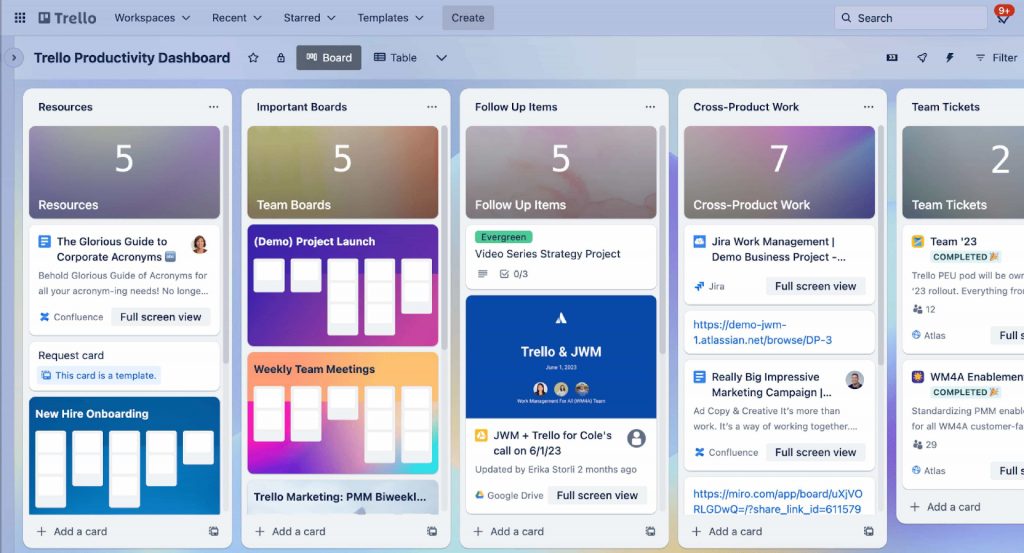
Cards represent tasks. Columns represent stages: “To Do,” “In Progress,” “Done.” Drag and drop a card across the board and the whole team sees the update in real time. It’s an intuitive, visual approach to task management that almost anyone can pick up in an hour.
Trello’s Butler automation tool handles repetitive triggers, and integrations with Google Drive, Slack, and other common tools round out the feature set for small teams. If you want to explore how Kanban compares to other approaches, the Kanban vs. Scrum breakdown is worth a read before you decide.
Pros:
- Intuitive Kanban-style interface with drag-and-drop task management
- Trello cards display due dates, assignees, and task conversations in one view
- Butler automation tool handles repetitive triggers and workflow rules
- Most affordable paid plan on this list for solo operators and micro-teams
Cons:
- No offline access, the tool requires an active internet connection
- Lacks native Gantt charts or time tracking without power-up add-ons
Pricing:
Free plan available. Paid plan starts at $5/user/month.
7. Airtable – Best for Sprint Management
Airtable was introduced to me by a product manager friend who was running agile sprints for a SaaS startup. What surprised me was how much it blurred the line between a database and a project management tool, and for sprint management, that combination turned out to be a genuine advantage.
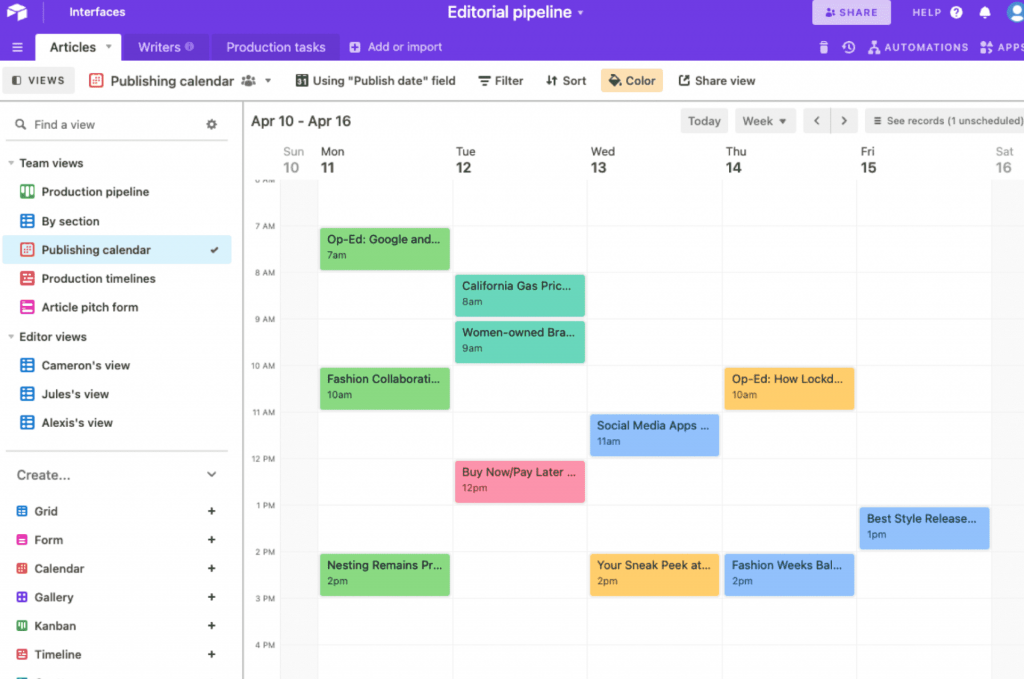
You can create tables for tasks, user stories, team members, and sprint cycles, then link records across tables so that dependencies and relationships are visible at the data level. Calendar views, Kanban boards, and Gallery views all pull from the same underlying data.
For small product and engineering teams that need flexible sprint tracking without committing to a full agile platform, Airtable hits the mark.
Pros:
- Highly flexible data structure supports any project methodology, agile, scrum, or Kanban
- Calendar view supports remote and distributed teams with clear timeline visibility
- Custom interfaces allow teams to build tailored sprint management dashboards
- Cross-table record linking connects tasks, sprints, team members, and user stories
Cons:
- Steep learning curve compared to simpler project management tools
- Lacks advanced native reporting and analytical capabilities
Pricing:
Free plan available. Paid plan starts at $10/seat/month.
8. Zoho Projects – Best for Handling Large, Complex Projects
When a client I was consulting for needed to manage a construction rollout across four cities with 30+ stakeholders per phase, I recommended Zoho Projects. It was the right call.
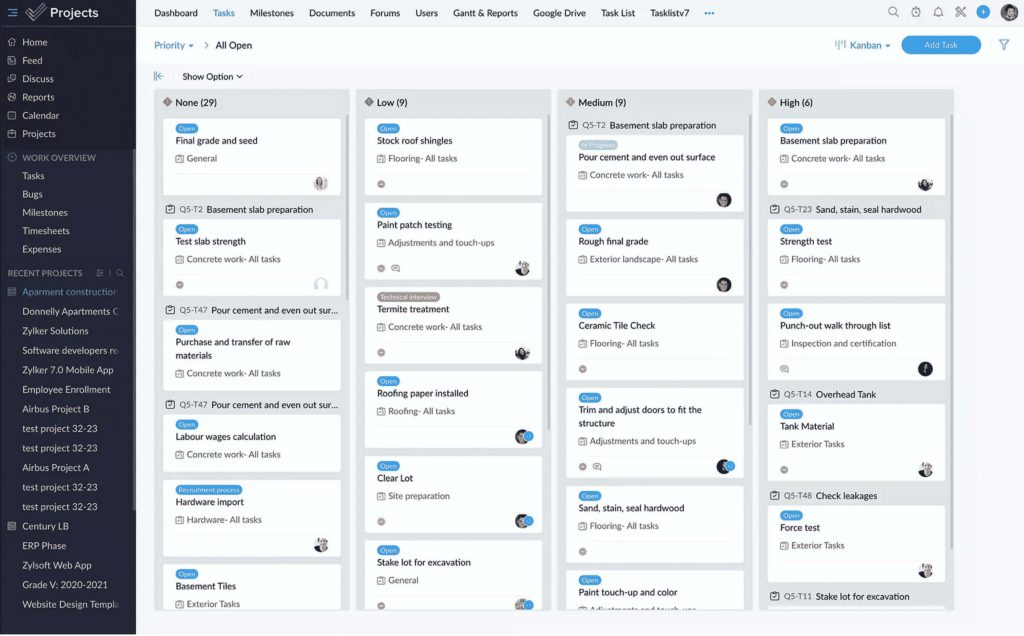
The tool’s ability to break complex, multi-phase projects into manageable tasks, with dependencies, priorities, and resource assignments at each level, made an otherwise unwieldy project trackable.
Zoho Projects also benefits from strong integration with the broader Zoho ecosystem (CRM, Books, Desk), which matters for small businesses already using Zoho tools. The blueprint automation feature handles recurring workflow logic, and inter-project dependency management keeps parallel workstreams from colliding.
Pros:
- Access to 20+ professional project templates for fast project initialization
- Blueprint automation saves significant time on recurring task sequences
- Inter-project dependency management ensures smooth coordination across workstreams
- Comprehensive project reports with actionable KPI insights for informed decision-making
Cons:
- Configuring the software to match highly specific workflows can be difficult
- Customer support response times and quality have received mixed user feedback
Pricing:
Free plan available (up to 3 users). Paid plan starts at $4.22/user/month.
9. Paymo – Best for Time Tracking in Projects
I tested Paymo specifically during a period when our team was struggling to accurately estimate how long client deliverables were actually taking, and therefore losing money on fixed-price contracts. Paymo solved that problem directly.

The time tracking feature allows you to log time manually or with a live timer, categorize entries, and assign them to specific projects or clients. When it came time to invoice, the tool pulled the tracked time directly into customizable invoice templates, which cut billing time in half.
For freelancers and small service businesses where billable hours are the business model, Paymo earns its place on this list. It also pairs well with a broader approach to project time management if you’re trying to build tighter estimates across your team.
Pros:
- Transparent time tracking with manual entry or live timer, categorized by project and client
- Invoicing functionality generates client-ready invoices directly from tracked time and expenses
- Multiple task progress views: List, Table, Calendar, and Board for flexible tracking
- Automation for recurring tasks saves setup time on repeat project types
Cons:
- Reporting capabilities are less robust than competing tools at similar price points
- Project customization options could be expanded for more complex workflow needs
Pricing:
Free plan available (1 user). Paid plan starts at $4.95/user/month.
10. Celoxis – Best for Keeping Project Risks Under Control
Celoxis came on my radar when I was advising a construction and engineering consultancy that needed formal risk tracking integrated into their project workflows, something most tools treat as an afterthought.
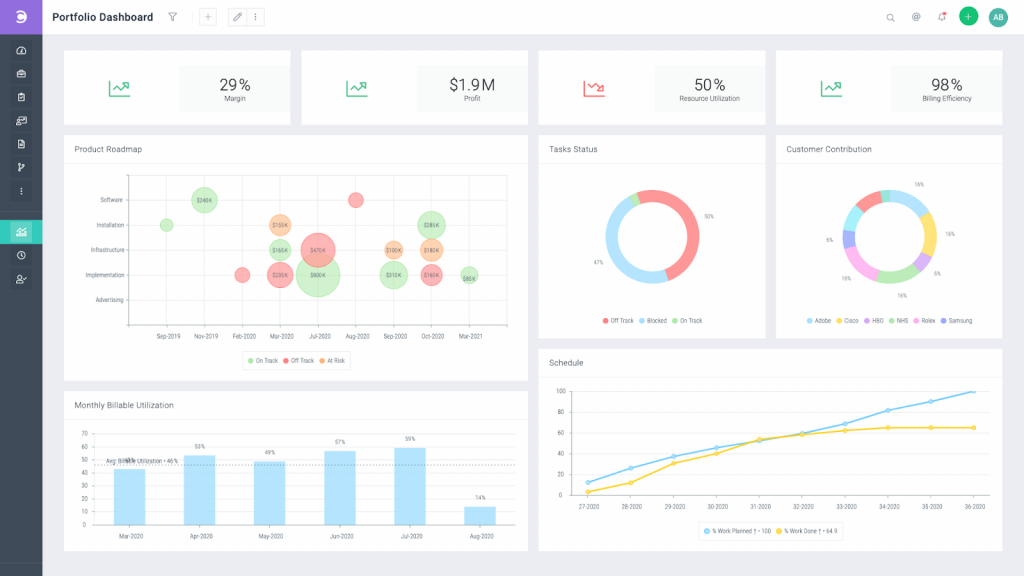
The risk management capabilities in Celoxis allow teams to identify, document, assess, and prioritize project risks by severity and likelihood. Each risk can be assigned a mitigation strategy, an owner, and a status, so nothing falls into a “someone’s looking into it” grey area.
For project management for small companies operating in industries where risk documentation is a client or compliance requirement, Celoxis fills a gap that general-purpose tools don’t. A good project risk assessment process paired with the right tool makes risk management feel practical rather than bureaucratic.
Pros:
- Structured risk identification and documentation with severity and likelihood assessment
- Risk reduction effort tracking and adjustable mitigation plans
- Reporting provides clear insight into the overall risk landscape of each project
- Supports simultaneous planning and execution of multiple projects
Cons:
- Customer support experience could be improved based on user feedback
- New users may require additional time to adapt to the tool’s feature set
Pricing:
Starts at $22.50/user/year.
11. ProofHub – Best for Creative and Design Teams
A friend who runs a boutique branding agency introduced me to ProofHub when she was drowning in feedback cycles, clients emailing annotated PDFs with comments like “make it pop more” scattered across three different file versions.
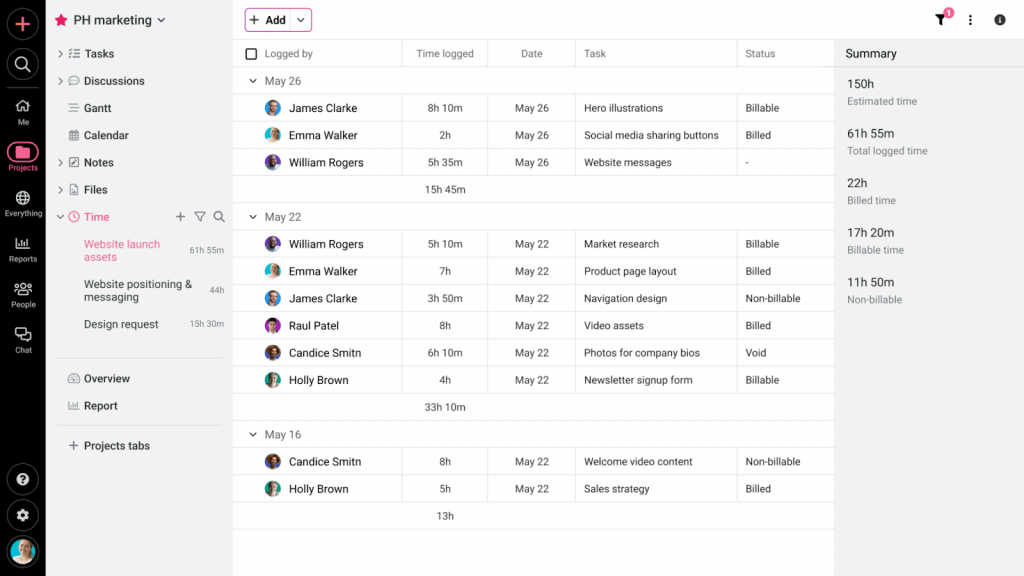
ProofHub’s online proofing tool changed that for her team. Clients and stakeholders could annotate creative assets, images, videos, and documents directly within the platform, eliminating the file-version chaos. The built-in discussion boards and task management features kept the entire creative workflow in one place.
For the best project management for small business in creative verticals, ProofHub’s proofing capability is a genuine differentiator. Teams managing ongoing creative output may also find value in understanding creative workflow management as a discipline, not just a tool choice.
Pros:
- Online proofing tool enables direct annotation of creative assets by all stakeholders
- Built-in discussion boards and group chat keep creative conversations connected to tasks
- Mobile app supports on-the-go creative project management
- Performance reports allow managers to visualize productivity and project health
Cons:
- Volume of notifications can become distracting for team members
- Pricing may be on the higher end for early-stage small businesses
Pricing:
Starts at $45/month.
12. Nifty – Best for Agile Project Development
I came across Nifty while researching agile project management tools for small product teams who needed milestone-driven sprint management without the complexity of full Jira configurations.
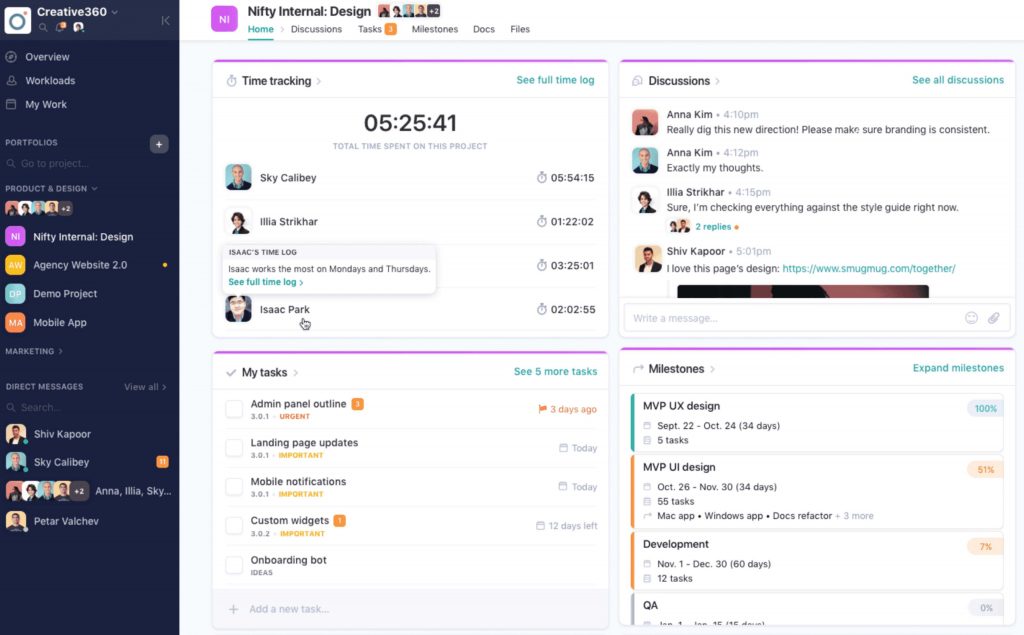
What makes Nifty stand out is its milestone-centered approach to sprint planning. Milestones drive goal-oriented organization of tasks, while automated workflows reduce the manual overhead of agile ceremonies. Story point balancing helps predict release effort, and the cross-project overview keeps engineering leads from losing sight of the broader roadmap while managing individual sprint backlogs.
If you’re evaluating agile approaches more broadly, the comparison between hybrid vs. agile project management is worth understanding before committing to a methodology.
Pros:
- Milestone-driven sprint management automates agile development workflows
- Customizable Kanban, List, and Swimlane views for tailored team experience
- Story points support effort balancing and release planning across sprints
- Cross-project overviews maintain strategic visibility alongside sprint-level detail
Cons:
- Third-party integrations are more limited than competitors like ClickUp or Asana
- Template library is relatively small compared to other project management tools
Pricing:
Free plan available (1 user). Paid plan starts at $39/month.
13. Todoist – Best for Organizing Everyday Project Workflows
Todoist is a deceptively simple tool. I used it for about eight months when I was freelancing solo and needed something that wouldn’t get in the way between me and the actual work.
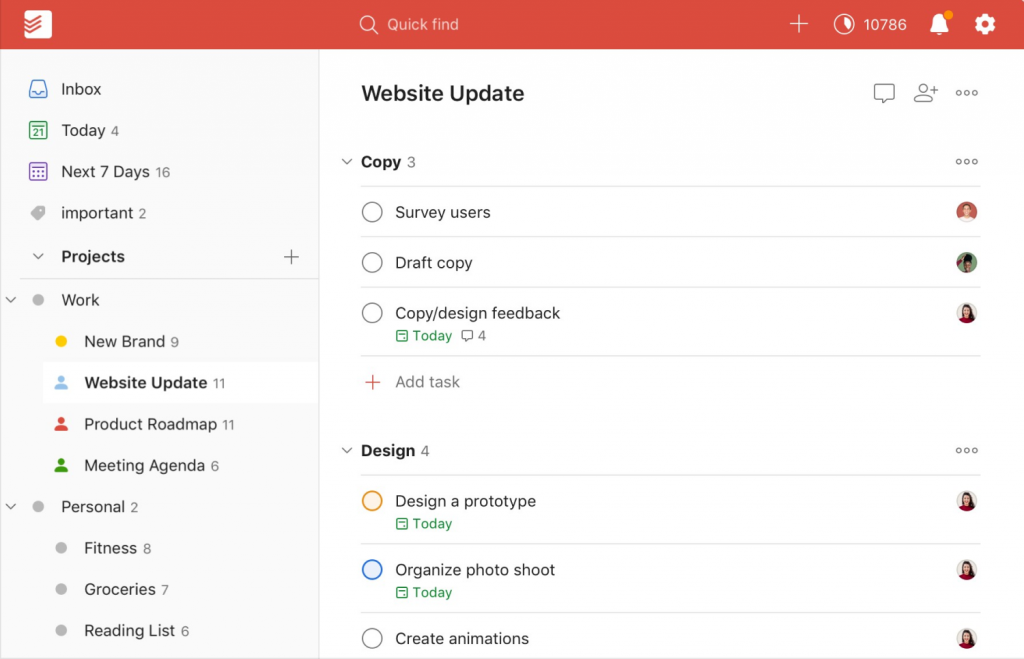
You create projects, add sections within each project, and populate them with tasks. Priority levels and due dates keep the most important work visible. Labels help filter and categorize tasks across projects.
For solopreneurs, freelancers, and one-person small businesses who need an organized task management system without team collaboration complexity, Todoist is the lightest-weight option on this list that still does the job well. Building the habit of prioritizing tasks effectively matters as much as the tool itself when you’re working solo.
Pros:
- Labels enable cross-project task categorization and filtering for better organization
- Priority flags and due dates ensure time-sensitive tasks stay front of mind
- Project and task templates maintain consistency for recurring workflow types
- Clean, distraction-free interface reduces cognitive load during focused work
Cons:
- Not a scalable solution for growing teams that need collaboration features
- Time tracking capabilities are limited compared to purpose-built alternatives
Pricing:
Free plan available. Paid plan starts at $4/month.
14. Teamwork – Best for Cross-Functional Teams
When I was coordinating a product launch across a marketing team, a development team, and an external design agency, all working in parallel, Teamwork was the tool that kept communication from collapsing.
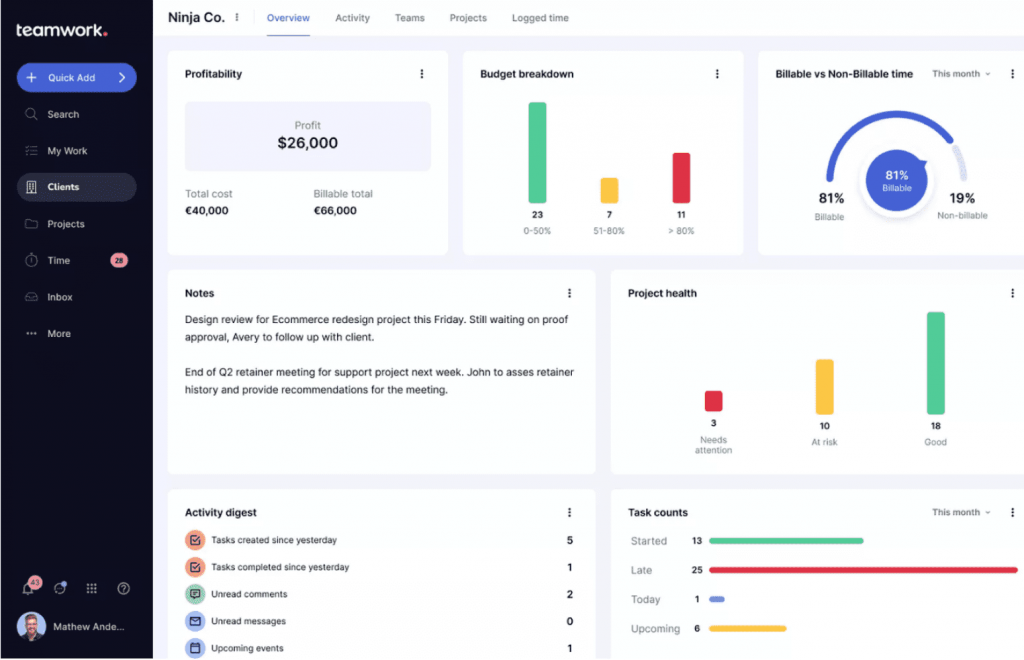
Its task management system handles tags, resource assignment, due dates, and dependencies cleanly. The workflow setup is clear enough that team members across departments can understand their responsibilities without needing a separate briefing.
Built-in messaging, task comments, and file sharing keep cross-functional communication contained within the project rather than scattered across email threads and Slack channels. For teams that want to go deeper on effective team collaboration strategies, the tool is only part of the answer.
Pros:
- Task dependencies and defined workflows eliminate ownership ambiguity across teams
- Built-in time tracking maintains visibility into team efficiency and resource use
- Task list templates and recurring task automation reduce setup overhead
- Workload management tools help optimize resource allocation across the team
Cons:
- Third-party integration library is more limited than some competing tools
- Reporting lacks the granular detail available in platforms like Wrike or Celoxis
Pricing:
Free plan available (up to 5 users). Paid plan starts at $5.99/user/month.
15. Smartsheet – Best for Intelligent Workflow Automation
Smartsheet was brought to my attention by an operations manager who loved spreadsheets but needed them to actually do something, trigger actions, send approvals, route data, rather than just store it.
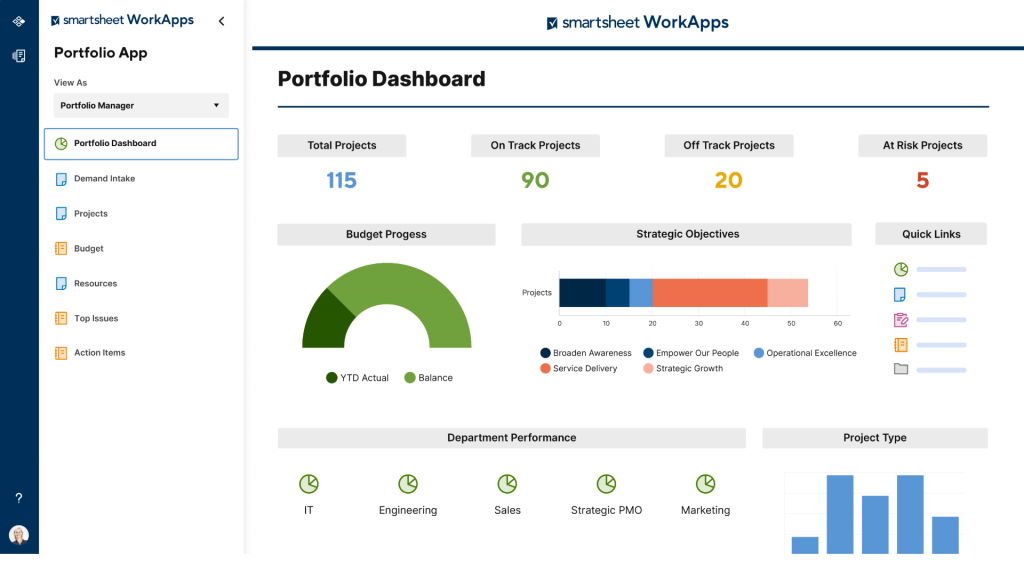
What Smartsheet calls “intelligent workflows” is essentially a visual automation builder layered over a spreadsheet interface. You define if-then scenarios: when a status field changes to “Approved,” an email goes to the client automatically. Approval workflows route documents to designated reviewers without manual follow-up.
For best project management for small business teams with process-heavy operations, procurement, compliance, content approvals, Smartsheet’s automation layer is genuinely powerful. Teams interested in a broader look at workflow automation will find it goes well beyond just PM tools.
Pros:
- Intelligent workflow automation handles repetitive tasks, approvals, and data routing
- Conditional logic (if-then scenarios) enables sophisticated process automation without coding
- Built-in request forms capture client or stakeholder data directly into project sheets
- Flexible and scalable, adapts well to growing small business operations
Cons:
- High learning curve, particularly for users unfamiliar with spreadsheet-style interfaces
- Interface complexity can feel overwhelming for teams that prefer visual, card-based tools
Pricing:
Free plan available (1 user). Paid plan starts at $7/user/month.
16. Basecamp – Best for Remote Team Collaboration
Basecamp was the tool I landed on during a stretch of fully remote work when my team was spread across four time zones. The problem wasn’t just task tracking. It was the social glue of a team that couldn’t see each other.
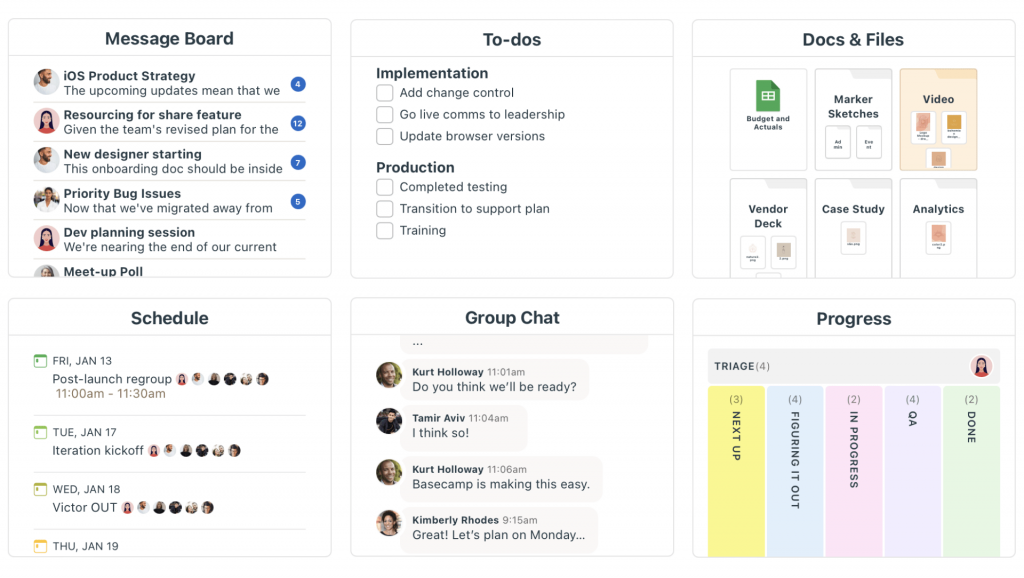
Basecamp’s structure is refreshingly simple. Projects contain to-do lists, message boards, file storage, and a chat room called “Campfire,” all in one place, all accessible to everyone on the project. Message boards reduce the noise of individual DMs by routing team-wide updates to a single, searchable feed.
For project management for small companies with remote or distributed teams who are struggling with fragmented communication as much as fragmented tasks, Basecamp brings coherence to both. Teams navigating the challenges of remote working often find that structure and clarity matter more than feature count.
Pros:
- Message boards centralize team-wide announcements and project updates
- Campfire real-time chat rooms foster informal team communication and culture
- Simple, holistic project structure gives complete visibility from start to finish
- Integration with popular third-party apps extends platform functionality
Cons:
- No native tag or label system for tasks, limiting filtering and categorization
- Customization settings are more limited compared to tools like ClickUp or monday.com
Pricing:
Starts at $4.21/user/month.
How Did I Evaluate the Best Project Management Software?
Before recommending any project management software for small business, I put each tool through a structured evaluation process. I’ve been in situations where a tool looked great in a demo and fell apart in real daily use, so I’ve learned not to take marketing claims at face value. Here’s exactly how I assessed every tool on this list.
- User Reviews and Ratings: I cross-referenced ratings and user feedback from reputable third-party platforms like G2, Capterra, and Trustpilot to get an honest ground-level view. Real user experiences reveal friction points that no product page will mention, such as how a tool actually performs when a deadline is on the line, or a new team member joins mid-project.
- Essential Features and Functionality: I evaluated each tool’s core project management capabilities: task creation and assignment, deadline tracking, project views (Gantt, Kanban, Calendar), time tracking, automation, and reporting. The question I asked for each feature was simple: does this actually help a small business team get work done faster, or does it just add complexity?
- Ease of Use: A small business doesn’t have the luxury of a dedicated IT team to onboard everyone or troubleshoot configuration issues. I paid close attention to how quickly a new user could get a project running from scratch, how intuitive the interface is across different roles, and whether the tool has a learning curve that could slow adoption.
- Customer Support: I assessed the quality, speed, and accessibility of each tool’s support, including live chat, email, knowledge bases, and onboarding resources. For small teams, being stuck on a setup issue for two days is not a minor inconvenience. It delays real work.
- Value for Money: I compared what each tool delivers against what it costs, including free plan limitations, per-seat pricing at small team sizes, and what features are locked behind higher tiers. The goal was to identify which tools genuinely earn their price for a lean team and which ones charge enterprise rates for features a small business will rarely use.
- Personal Experience and Expert Input: Where possible, I tested tools firsthand on real projects. I also drew on conversations with operations managers, freelancers, startup founders, and small business owners who use these tools daily. Their real-world input shaped my assessments far more than feature checklists.
Find the best project management software for small businesses within the top 16 project management software for small businesses. Ranked guide: Top 16 Project Management Software for Small Businesses.
My Top 3 Picks for the Best Project Management Software for Small Businesses
The best project management software depends on your team’s specific needs, budget, and workflow. Here are three recommendations based on distinct use cases:
1. ProProfs Project
ProProfs Project is the most well-rounded small business project management software on this list. It combines ease of use, multiple project views, time tracking, real-time collaboration, and analytics in a single platform, at a price point designed for small businesses, not enterprise teams. If you’re moving off spreadsheets or looking to replace an expensive, overcomplicated tool, this is the right starting point.
2. Nifty
If your team is running sprints, tracking milestones, and needs a platform that speaks the language of agile development, Nifty is purpose-built for that workflow. Milestone-driven sprint management and cross-project visibility make it the strongest agile option on this list for small product and engineering teams.
3. Teamwork
For small businesses that need multiple departments, sales, operations, design, development, working on shared projects with clear ownership and defined workflows, Teamwork handles cross-functional collaboration better than almost anything at its price point.
What Problems Does Project Management Software Solve for Small Businesses?
Most articles answer this question with a bullet list and move on. But based on real conversations with hundreds of small business owners, these problems are not abstract. They show up in specific, recurring ways that quietly cost money every week.
1. Scattered Work With No Single Source Of Truth
When tasks live in email, Slack, spreadsheets, and sticky notes simultaneously, nothing is really “owned.” Team members duplicate effort, miss context, and waste time hunting for the latest version of a file or the last decision made on a project.
A study by Wellingtone in 2025 found that 66% of organizations report frequent project delays caused specifically by unclear requirements and fragmented communication. Project management software creates one place where everything lives, and everyone knows where to look.
2. No Visibility Into Follow-Ups Until It’s Too Late
This is the most expensive problem for service businesses. A client emails with a question. Someone means to respond. Three days pass. The client moves on to a competitor. Project management tools let you track tasks and set follow-up reminders so nothing sits in a grey zone between “someone’s handling it” and “nobody handled it.”
3. Missed Deadlines With No Early Warning System
By the time a deadline is missed, the damage is done. The real fix is upstream: knowing five days in advance that a task is behind schedule, so you can reassign resources or reset client expectations before it becomes a crisis. A report by Breeze in 2026 found that only 35% of projects worldwide finish on time and within budget.
For small businesses without a buffer, a single missed deadline can mean losing a client. Tools with Gantt charts and automated deadline alerts solve this structurally, not reactively. You can read more about how to avoid project delays and what causes them in the first place.
4. Unclear Ownership After Kickoff
Kickoff meetings are full of energy. Three weeks later, nobody remembers who was supposed to handle the client approval, the final review, or the invoice.
Task assignment with named owners and due dates eliminates this ambiguity at the point of creation, not after the fact. Task delegation in project management is one of the most underrated levers for small team efficiency.
5. Manual Status Reporting That Eats The Workweek
If your team lead is spending Friday afternoon assembling a status update from six different people’s inboxes, that’s time that could go toward billable work.
Automated dashboards and real-time project views generate that status report automatically. Project management metrics and KPIs become visible without anyone having to compile them manually.
6. Poor Resource Allocation That Burns People Out
When you can’t see workloads across the team, you default to assigning new tasks to whoever is most visible or most vocal. The result is that some team members are chronically overloaded while others have capacity they’re not using.
Visual workload tools inside project management software surface this imbalance before it becomes a retention problem. Project resource management is something most small business tools now handle in a lightweight, accessible way.
7. No Audit Trail When Things Go Wrong
When a project goes sideways, the first question is always “what happened?” Without a centralized log of decisions, comments, file versions, and status changes, the answer is usually “nobody knows.”
A proper audit trail inside your project management tool means you can trace exactly what changed, when, and who approved it, which protects you in client disputes and helps you learn from failures systematically. Understanding common reasons for project failure can help you put the right guardrails in place from the start.
8. Scaling From One Person To A Team Without Breaking Everything
Solo founders and freelancers often start with a spreadsheet and willpower. It works until it doesn’t. When the first hire arrives, the system breaks down because it was never built for collaboration.
The right small business project management software scales from one user to twenty without requiring a full system rebuild.
What Are the Key Features to Look for in Small Business Project Management Software?
The best project management software for small business is not the one with the most features. It’s the one with the right features for the way your team actually works. Here’s what to prioritize.
For a more detailed breakdown, the guide on must-have project management software features goes into each one with examples.
1. Task Management
Every tool on this list handles tasks, but look for the ability to create subtasks, set priorities, assign owners, define due dates, and add dependencies. Without these basics working cleanly, the rest of the feature set doesn’t matter.
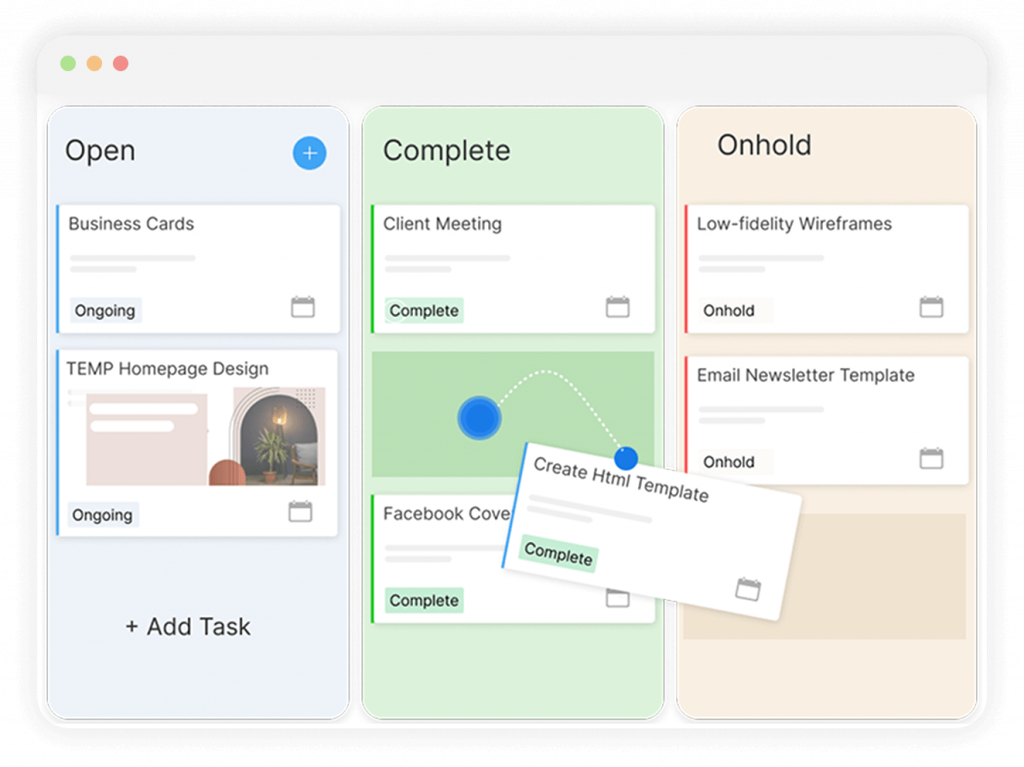
2. Gantt Charts and Kanban Boards
Visual project views are essential for small teams. Gantt charts show timelines and dependencies. Kanban boards show task status at a glance. The best tools offer both, and the ability to switch between views means different team members can work in the format that makes sense to them.
3. Time Tracking
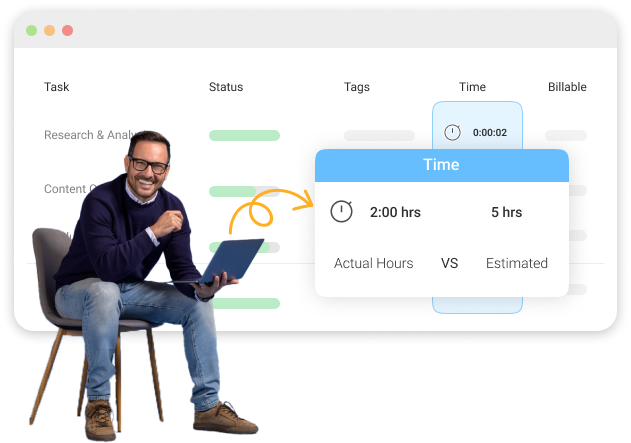
For any service business billing by the hour, consulting, design, development, legal, real estate, and time tracking that connects to invoicing is not a nice-to-have. It’s the difference between knowing your margins and guessing. A good project time tracking setup pays for the tool within weeks.
4. Collaboration and Communication
The goal of project management software is to move communication out of email and into context. Task comments, file sharing, and real-time notifications should be native, not add-ons. Tools that improve team communication reduce the meeting load and the email thread chaos significantly.
5. Automation
A study by ProofHub in 2025 found that workflow management software helps employees save an average of 498 hours per year. Recurring task creation, automated reminders, status-triggered notifications, and approval routing are the most impactful automation features for small teams.
6. Reporting and Analytics
You can’t improve what you can’t measure. Look for dashboards that show project progress, resource utilization, time spent, and deadline adherence without requiring a custom report every time. Tracking the right project management KPIs from the start makes performance reviews and client check-ins much easier.
7. Integrations
Your PM tool does not operate in a vacuum. Check for native integrations with the tools your team already uses, Slack, Google Workspace, Microsoft 365, and Zapier, before committing.
How to Choose the Best Project Management Software for Small Firms
Choosing the right project management software for your small company comes down to four honest questions. If you want a full framework, the guide on choosing project management software walks through each consideration in more depth.
1. What’s the actual size of the problem? Are you a solo freelancer who forgets follow-ups, or a 20-person team managing simultaneous client projects? A solo operator does not need Wrike. A 20-person team will quickly outgrow Todoist.
2. What’s your budget? The market ranges from free to $45+/month flat. Flat-rate pricing tends to be cheaper for larger teams; per-seat pricing is better for very small teams.
3. What’s your biggest workflow pain?
- Disorganized tasks
- Missed follow-ups and deadlines
- Billing by the hour
- Creative proofing and feedback
- Remote team communication
- Complex risk management
4. Will your team actually use it? The fanciest tool in the world delivers zero ROI if adoption is low. Prioritize ease of use and a short learning curve over feature count, especially for teams with no prior PM software experience.
How to Integrate Project Management Software Into a Small Business: A Step-by-Step Guide
Switching to a new project management tool sounds simple on paper. In practice, it’s where most small business implementations quietly fail. Not because the tool is wrong, but because the transition wasn’t planned. The software gets set up, a couple of people use it, the rest don’t, and two months later, you’re back to email threads with the subscription running in the background.
Here’s how to do it right, step by step, based on what actually works for teams making this transition.
Step 1: Map Your Current Workflow Before Touching Any Tool
Before you open a free trial, document how work moves through your business today, even if it’s messy. What happens when a new project comes in? Who does what, in what order, and how do people know when it’s their turn? You don’t need a formal flowchart.
A rough written description of your current process is enough. The reason this matters: you can’t configure a tool around a workflow you haven’t articulated. If you skip this step, you’ll end up with a project management tool that mirrors your chaos rather than organizing it. Understanding project management process phases helps you see where the structure should sit.
Step 2: Separate Must-Haves From Nice-To-Haves
Make two lists. The first is what you need on day one to replace what you’re currently doing: task assignment, deadline tracking, and some way for the team to communicate on tasks. The second list is everything else: time tracking, custom reports, and advanced automation.
Start with the first list only. Teams that try to configure every feature at once before going live almost never fully launch.
Step 3: Start Your Trial With A Real Project, Not A Test Project
Every tool on this list offers a free trial. Use it to run an actual active project, not a sandbox dummy project. A real project surfaces real friction: the fields that don’t map to how you think, the notification settings that need adjustment, the view that confuses your least technical team member.
You want to discover these things during the trial, not after you’ve committed.
Step 4: Configure The Workspace Before Inviting The Team
Set up your task categories, project templates, automation rules, and user permissions before you bring the full team in. A blank or half-configured tool is the fastest way to lose adoption before it starts.
When your team opens the tool for the first time, it should already look like your work, not like a generic demo. Building solid project planning tools and workflows upfront makes onboarding significantly smoother.
Step 5: Migrate Your Most Active Projects First
Don’t try to import everything at once. Identify the two or three projects that are currently the most active or the most chaotic, and migrate those first. Most tools support CSV import for tasks, contacts, and project data. Get those projects live and running cleanly in the new tool before touching anything else.
This gives the team an early win and builds confidence in the transition.
Step 6: Train The Team On A Live Project, Not A Walkthrough
The most effective onboarding is not a screen-share tour of the features. It’s sitting together (virtually or in person) and walking through a real active project that’s already in the tool. Show the team how to update a task status, add a comment, upload a file, and check their assigned work.
Ten minutes of hands-on practice beats an hour of feature demonstration every time. Teams that struggle with managing multiple projects will particularly benefit from this kind of structured kickoff.
Step 7: Establish One Rule From Day One
If a task doesn’t exist in the tool, it doesn’t exist. This sounds strict, but it’s the only way to break the habit of parallel systems. The moment someone creates a task in a side spreadsheet “just for now,” the tool loses authority. Set the expectation clearly and enforce it gently for the first month.
Step 8: Review And Close The Gaps At 30 Days
Schedule a 30-minute team check-in at the one-month mark. Ask three questions: What’s working? What’s not being used? What’s still happening outside the tool? The answers will tell you exactly what to adjust, whether that’s a workflow configuration issue, a permission setting, or a training gap. Improving project evaluation at regular intervals is what separates teams that actually adopt new tools from those that cycle through them every year.
A study by PMI in 2025 found that organizations using proven project management practices waste 28 times less money than those operating without structured processes. The tool is only as good as the process it supports.
Project Management Software vs. Spreadsheets: What’s the Real Difference?
Many small businesses delay switching because spreadsheets feel free, familiar, and flexible. Here’s the honest comparison:
| Factor | Spreadsheets | Project Management Software |
| Real-time collaboration | Manual version control, risk of overwrites | Live, multi-user editing with full history |
| Deadline tracking | Manual, requires someone to check | Automated reminders and alerts |
| Task assignment | Cell-level notes at best | Formal ownership with notifications |
| Reporting | Manual data aggregation | Auto-generated dashboards |
| Communication | External, email or chat | In-context, comments on tasks and files |
| Scalability | Breaks down above ~50 rows per project | Scales with team and project volume |
| Automation | None natively | Recurring tasks, triggers, approvals |
The conclusion from real data: 34% of small business teams are still running projects entirely from spreadsheets. When they switch, the most common feedback is “I wish we’d done this earlier.” The productivity gains from using technology intentionally are significant, and the switch is rarely as disruptive as people fear.
Watch Your Small Business Thrive With the Right Project Management Software
Running a small business is hard enough without your workflow working against you. The right project management software doesn’t just organize your tasks. It gives you back the clarity to focus on the work that actually moves your business forward, instead of spending half your week chasing updates, hunting for files, and figuring out who dropped the ball.
The good news is that you don’t need a complex, expensive platform to get there. Most of the tools on this list are affordable, fast to set up, and built for teams that are too busy to spend weeks on onboarding. The key is picking one that fits how your team already works and committing to it consistently. Even a simple system, used well, beats a sophisticated one that nobody opens.
If you’re not sure where to start, ProProfs Project is worth a look. It’s built specifically for small teams, easy to get running on day one, and covers the core features most small businesses actually need without charging enterprise prices for them. A 15-day free trial means you can test it on a real project before making any decisions.
Frequently Asked Questions
Is there free project management software for small businesses?
Yes. ProProfs Project, Asana, ClickUp, Trello, monday.com, Teamwork, Todoist, Airtable, Zoho Projects, and Paymo all offer free plans. Most free tiers have user limits (typically 3 to 15 users) and restrict advanced features like automation, reporting, or Gantt charts. ProProfs Project offers a 15-day free trial on all features.
How much does project management software cost for a small business?
Task management software for small businesses ranges from free (limited features) to $45/month flat rate, with most per-user plans falling between $4 and $15/user/month. For a team of 5, expect to spend $20 to $75/month for a solid mid-tier plan. Flat-rate tools like ProofHub and ProProfs Project can be more economical for slightly larger teams.
What features does a small business actually need in project management software?
The must-have features for best project management for small businesses are: task management with assignments and deadlines, at least one visual project view (Gantt or Kanban), team collaboration (comments and file sharing), automated reminders, and basic reporting. Time tracking matters for any service-based business. Everything else is optional until you actually need it.
How long does it take to implement project management software in a small business?
Most teams are operational within 1 to 3 days. Cloud-based tools like those on this list require no installation. Template-based setup means you can launch your first project within an hour. Full team adoption, including data migration and workflow customization, typically takes 1 to 2 weeks with active effort.
Can project management software replace email for team communication?
It significantly reduces reliance on email for internal project communication. Task comments, file sharing, status notifications, and team messaging within the platform keep most project-related conversation in context, visible alongside the work it relates to. Most teams find that switching reduces internal email volume by 30 to 50%.
What is the easiest project management software for small teams with no prior experience?
Trello is the easiest entry point for teams with no prior project management software experience. Its Kanban card system is intuitive within minutes. ProProfs Project and Asana are close second choices for teams that need more structure without a steep learning curve. All three offer onboarding templates that guide new users through setup.
FREE. All Features. FOREVER!
Try our Forever FREE account with all premium features!