

The popular project management software, Hive, offers a lot, from task automation to custom workflows and templates. But even then, project managers and team leaders are looking for Hive alternatives just like you.
The reason? Frustrating UI bugs, security concerns, limitations to customizability, and pricing that doesn’t scale well for growing teams.
There are quite a few solid options out there. ProProfs Project is one that small and growing teams tend to gravitate toward, mostly because it keeps things simple without cutting corners on the features that actually matter.
In this blog, you will read about the top 7 project management tools with pros, cons, and a direct comparison to Hive – so you can make a confident switch.
What Problems Do Hive Alternatives Solve?
Teams typically search for Hive alternatives when they face one or more of these issues:
- Frequent UI bugs that interrupt daily work and slow down project delivery.
- Security and data privacy concerns that make IT teams and compliance officers uncomfortable.
- Limited customization that forces teams to work around the tool instead of inside it.
- Per-seat pricing that becomes expensive as the team grows or when adding external clients.
- Lack of guest or client access without paying for additional licenses.
- Poor mobile experience for remote and field-based teams.
- Weak reporting for senior leadership and stakeholders.
The tools listed below directly address one or more of these gaps.
List of the 7 Best Hive Alternatives
This list of the 7 best Hive alternatives has been created considering suggestions from market leaders across different industries, feedback from software review sites, peer recommendations, etc.
As someone who has worked with several project management software over the years, I also incorporated my expertise to make this detailed comparison for you.
| Tool | Best For | Starting Price |
| ProProfs Project | Planning, Collaborating & Delivering Projects on Time | Free plan available. Paid plans start at $39.97. |
| Jira | Developer teams | $8.15/user/month |
| Asana | Strategic Project Planning | Free for up to 10 users. Paid from $10.99/user/month |
| Smartsheet | Real-Time Project Collaboration | Starts at $7/user/month |
| Wrike | Automating Administrative Workflows | Starts at $9.80/user/month |
| ClickUp | Detailed reporting | Starts at $7/member/month |
| monday.com | Resource management | Starts at $8/seat/month |
1. ProProfs Project – Best for Simplified Project Management
ProProfs Project is a cloud-based project management tool designed for startups and SMBs. It covers task management, Gantt charts, time tracking, budget management, and stakeholder reporting under one flat monthly rate.
(Image Source: ProProfs Project)
ProProfs Project stands out as a promising alternative to Hive, especially for startups and SMBs looking for a simple tool with competitive pricing. Throughout my usage of the software, I found that it strongly focuses on simplified project management. Here, tasks flow effortlessly from creation to completion, with clear timelines, dependencies, and instant visibility into who’s doing what.
The software also packs serious AI muscle. The AI Project Designer builds your full project structure the moment you describe your project in plain text. The AI Project Assistant keeps your team aligned at every stage by flagging blockers and tracking progress without status meetings. And AI Reports & Insights gives you a continuous read on timeline health, budget utilization, and risk, with shareable summaries ready in one click. With Gantt charts and insightful reports, advanced capabilities like time tracking, budget management, and resource management round out the full package.
Pros:
- Shared calendars, file-sharing, and @mentions for real-time team collaboration
- Generates invoices automatically when a project is completed
- Gantt charts and Kanban boards to simplify project planning and tracking
- Lets you share reports and project updates with external stakeholders through secure URLs
- Manages resources and allocates them to different projects as per availability
Cons:
- Dark mode interface is not currently available
- No dedicated account manager on the free plan
How Does ProProfs Project Compare to Hive?Hive uses per-user pricing that increases every time you add a team member or external reviewer. ProProfs Project charges a flat rate, meaning your 15th user costs nothing extra. Where Hive has reported UI bugs that disrupt daily workflows, ProProfs Project is built around a clean, minimal interface that new users pick up in under a day. Hive’s mobile app is limited to remote teams; ProProfs Project supports full project visibility from any device. External sharing via secure URLs also lets you give clients access without adding a paid seat. Add in the AI Project Designer, AI Project Assistant, and AI Reports and Insights, and ProProfs Project delivers a smarter, more affordable package than Hive at every level.
Pricing: Free plan available. Paid plans start at $39.97.
Here’s what Emma Cook from Cleveland State University (CSU) has to say about ProProfs Project:
2. Jira Software – Best for Project Issue Tracking for Developers
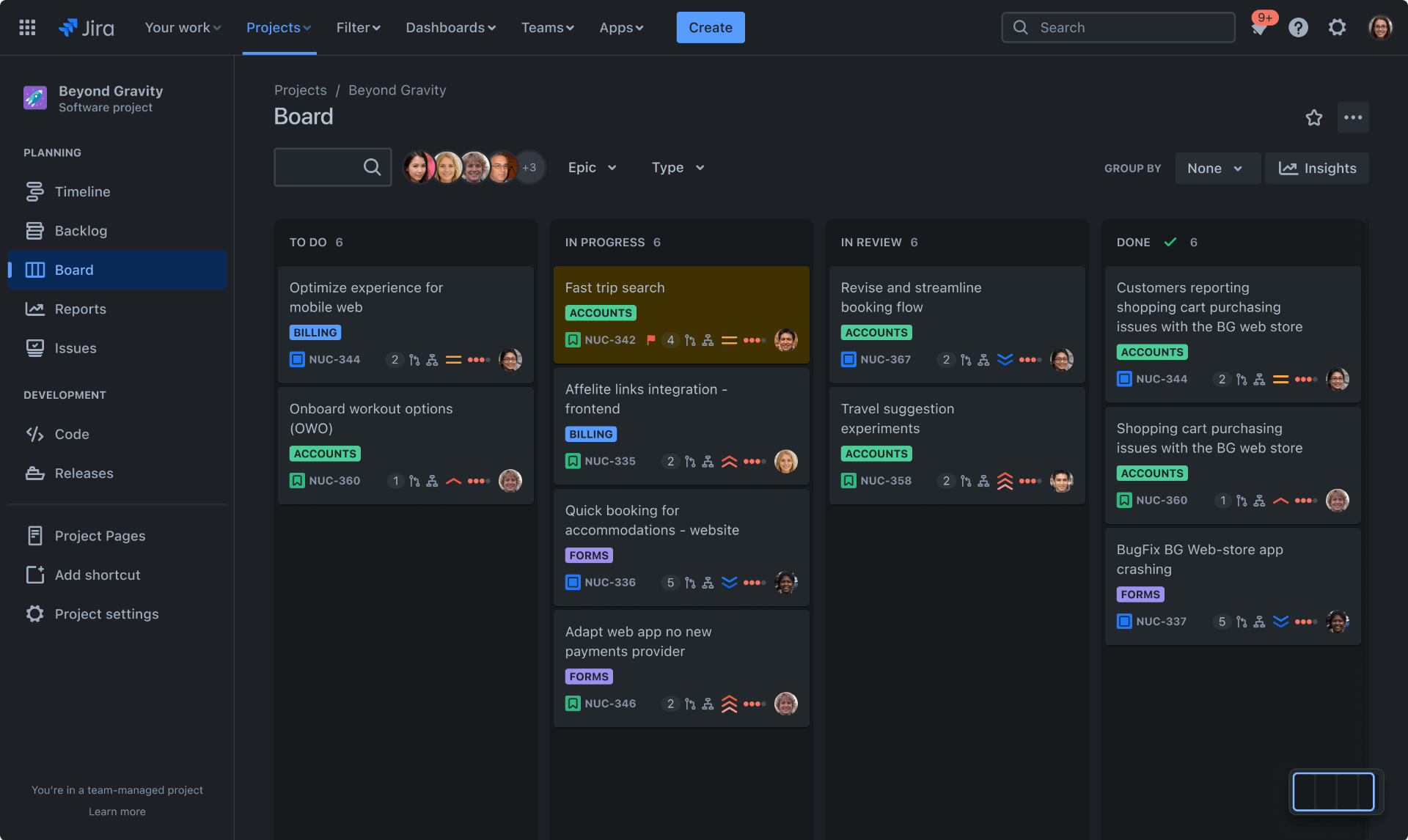
I have used Jira Software for a while, and I think it is better than Hive for developer teams specifically. It is a project management tool that supports any agile methodology, whether Scrum, Kanban, or anything else.
(Image Source: Atlassian)
The software helped our developers track issues effortlessly. It comes with agile tools that help the scrum team efficiently perform events. Using Jira, I could estimate stories, adjust sprint scope, check velocity, and re-prioritize issues in real time.
You can change Jira’s scrum boards to work like your team. Adding things like swimlanes to separate tasks, people, projects, and more is easy.
Pros:
- A timeline feature to plan and pivot quickly, enabling teams and stakeholders to stay in sync
- Agile boards for managing work, including Scrum and Kanban boards
- Customizable workflows that can map to any style of work, providing autonomy for teams
- Enhanced security features such as SAML SSO, enforced two-step verification, etc.
- Rich APIs for easy integration with other development tools and systems
Cons:
- Jira has a steep learning curve, which can take time to get used to
- While there is a mobile app, its functionality is limited compared to the web version
How Does Jira Compare to Hive?
Jira is purpose-built for software development teams running agile sprints – Hive is a generalist tool that tries to serve both dev and non-dev teams. If your team writes code and tracks bugs, Jira’s issue tracking, velocity charts, and sprint management are more powerful than anything Hive offers. However, Jira has a steep learning curve and per-user pricing ($8.15/user/month) that adds up fast. For non-technical teams or mixed teams, Jira may be overkill. For pure development teams, it is a stronger Hive replacement than most.
Pricing: A free plan is available for only up to 10 users. Paid options start from $8.15/user/month.
3. Asana – Best for Strategic Project Planning
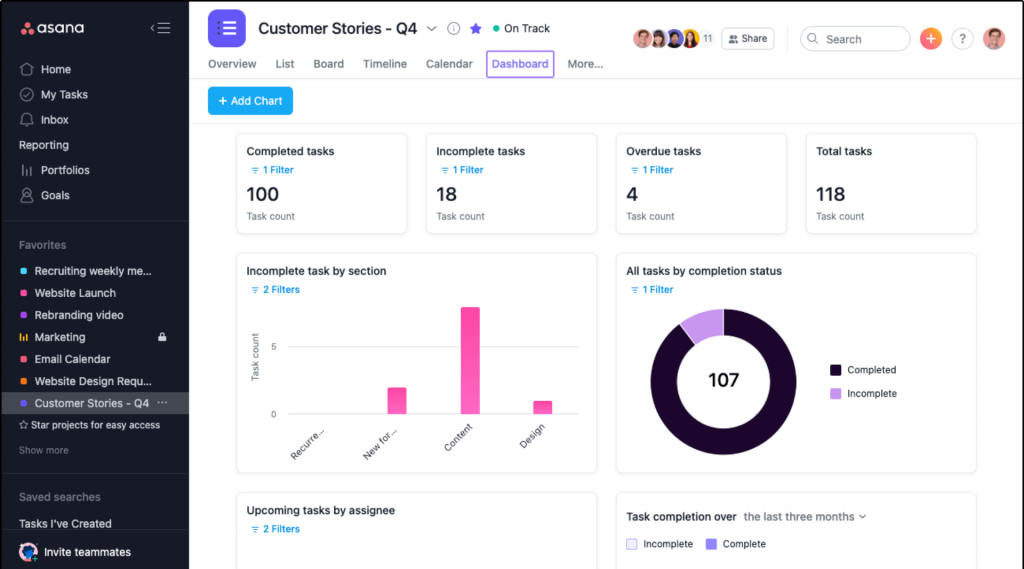
Asana may not be one of the most affordable Hive alternatives, but it is a better choice when it comes to strategic project planning.
(Image Source: Asana)
From creating yearly plans to managing budgets, it aids in prioritizing crucial objectives to boost your company’s financial performance. With the “Goals” feature, your team can readily view and align with your most significant tasks. Additionally, you can link resources and priorities to activities that generate revenue, ensuring quicker delivery of results.
The software also lets you set objectives and track results, from annual planning to individual KPIs. Then, you can easily track project progress toward goals with real-time data from integrations like Salesforce.
Pros:
- Kanban boards, timelines, and calendars to make dependencies and progress crystal clear
- Centralizes conversations within tasks to foster real-time collaboration
- Reporting dashboards and goal-tracking capabilities to make data-driven decisions
- Admin console that allows administrators to manage user settings and permissions effectively
- Effective resource management through workload tracking and time tracking features
Cons:
- For managing intricate projects with numerous dependencies, users might initially struggle to map out all the moving parts
- Asana can sometimes lead to information overload, especially for teams with many stakeholders
How Does Asana Compare to Hive?
Hive focuses on day-to-day task management and workflow execution. Asana plays a different game – it connects daily tasks to business goals, making it the stronger choice for marketing, operations, and leadership teams that need to show the ROI of their work. Asana’s “Goals” feature has no equivalent in Hive. On the flip side, Asana costs more ($10.99/user/month on paid plans) and can feel overwhelming for small teams that just need a simple task list. If your team needs to connect projects to revenue and report upward to leadership, Asana is the better Hive alternative.
Pricing: A free plan is available with limitations to features like task templates, Gantt charts, etc. Paid options start at $10.99/user/month.
4. Smartsheet – Best for Real-Time Project Collaboration
Smartsheet is a tool pretty similar to Hive when it comes to project collaboration.
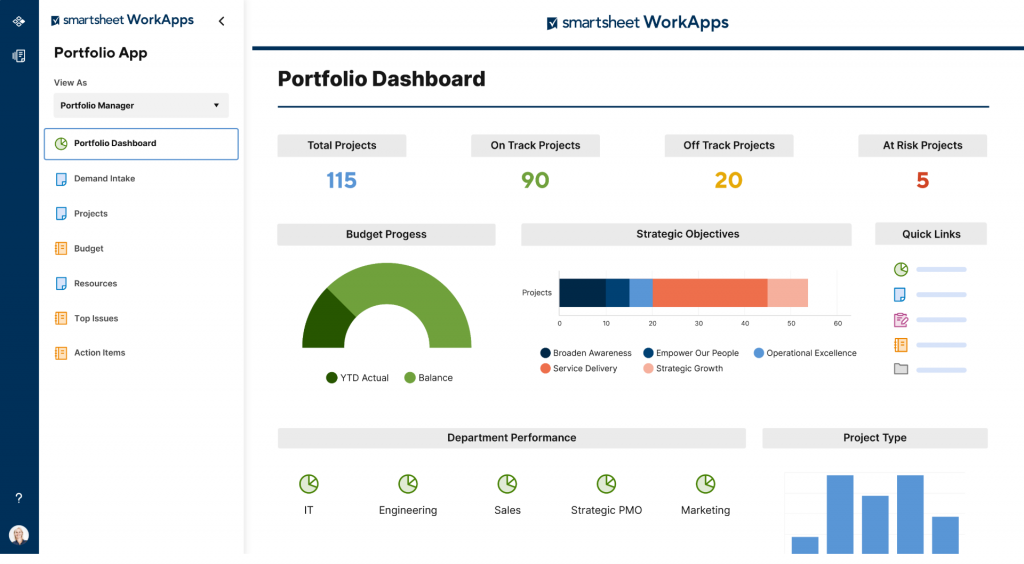
With Smartsheet, I can share my work with internal or external stakeholders and collaborate on project plans with everyone. I can assign items, add comments, and set automatic reminders for regular updates.
(Image Source: Smartsheet)
Besides, the software enables me to manage projects the way that works for my team. I can use grids to organize tasks, Gantt to create timelines, calendars to visualize due dates, and cards for online Kanban boards.
You even get a file storage option to bring context to project details with files from your computer or Google Drive, OneDrive, Dropbox, Box, Evernote, etc.
Pros:
- Real-time updates and notifications keep everyone informed and up to date on project progress
- Customizable templates and workflows to streamline project planning and execution
- Advanced reporting and analytics functionalities to track project performance
- Secure environment with granular permission settings to ensure data privacy and control access
- Task management capabilities with options for assigning, prioritizing, and tracking tasks
Cons:
- You only get 500 MB of storage space in the free plan
- Users not familiar with the spreadsheet-like UI can find the software difficult to learn
How Does Smartsheet Compare to Hive?
Smartsheet is the right Hive alternative if your team already lives in spreadsheets and wants project management features layered on top. Its grid-based UI feels familiar to Excel users – which dramatically reduces adoption resistance. Hive uses a more traditional project management interface; Smartsheet bridges the gap between spreadsheet and PM tool. The major limitation: users unfamiliar with spreadsheet logic find Smartsheet hard to learn, and the free plan is extremely limited (2 editors, 1 user, 500 MB storage). For teams who need real-time collaboration across internal and external stakeholders, Smartsheet is a strong Hive replacement.
Pricing: A free plan is available only for 2 editors and 1 single user. Paid options start at $7/user/month.
5. Wrike – Best for Automating Administrative Workflows
One of the most promising Hive alternatives, Wrike, is popular for its ability to automate administrative workflows. I had the opportunity to test the software a few weeks earlier last year, and this was my experience:
(Image Source: Wrike)
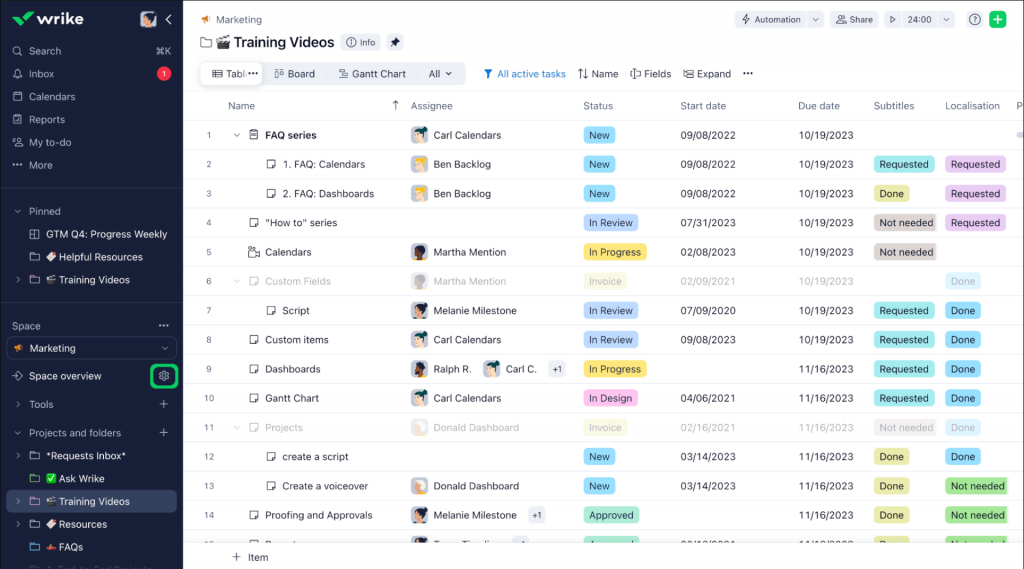
Its powerful automation engine helped me maximize productivity, minimize duplicate work, and reduce time spent on routine administrative tasks. With Wrike’s advanced project workflow software, I could create automatic approvals, request forms, and repeatable blueprints so that our team could focus on their most valuable work.
The software also lets you customize your workspace with the information you need, automatically filter tasks, and pin important to-do lists.
Pros:
- Preconfigured customizable templates for tasks, workflows, and communication
- Kanban, Calendar, and Table views to help you visualize projects in different ways
- Real-time collaboration with @mentions, task assignments, in-line comments, and shared workspaces
- Automates work intake with dynamic request forms and routes requests to one central place
- Generative AI capabilities to create powerful descriptions, project plans, and idea documents
Cons:
- Users report that setting up Wrike and configuring it can be complex and time-consuming
- The free plan has only 2 GB of storage allowance per account
How Does Wrike Compare to Hive?
Both Hive and Wrike offer automation, but Wrike goes deeper. Where Hive’s automation handles basic triggers, Wrike supports multi-step approval chains, dynamic request intake forms, and reusable project blueprints – making it the better fit for operations and marketing teams that run high volumes of recurring work. Wrike’s AI capabilities (generative project descriptions, smart task suggestions) are also more mature than Hive’s. The downside is setup complexity – Wrike takes longer to configure than Hive, and the free plan storage (2 GB) is restrictive. For teams where administrative overhead is the core pain point, Wrike is the most capable Hive replacement.
Pricing: A free plan is available with a limited storage space of 2 GB per account. Paid options start at $9.80/user/month.
6. ClickUp – Best for Generating Detailed Reports
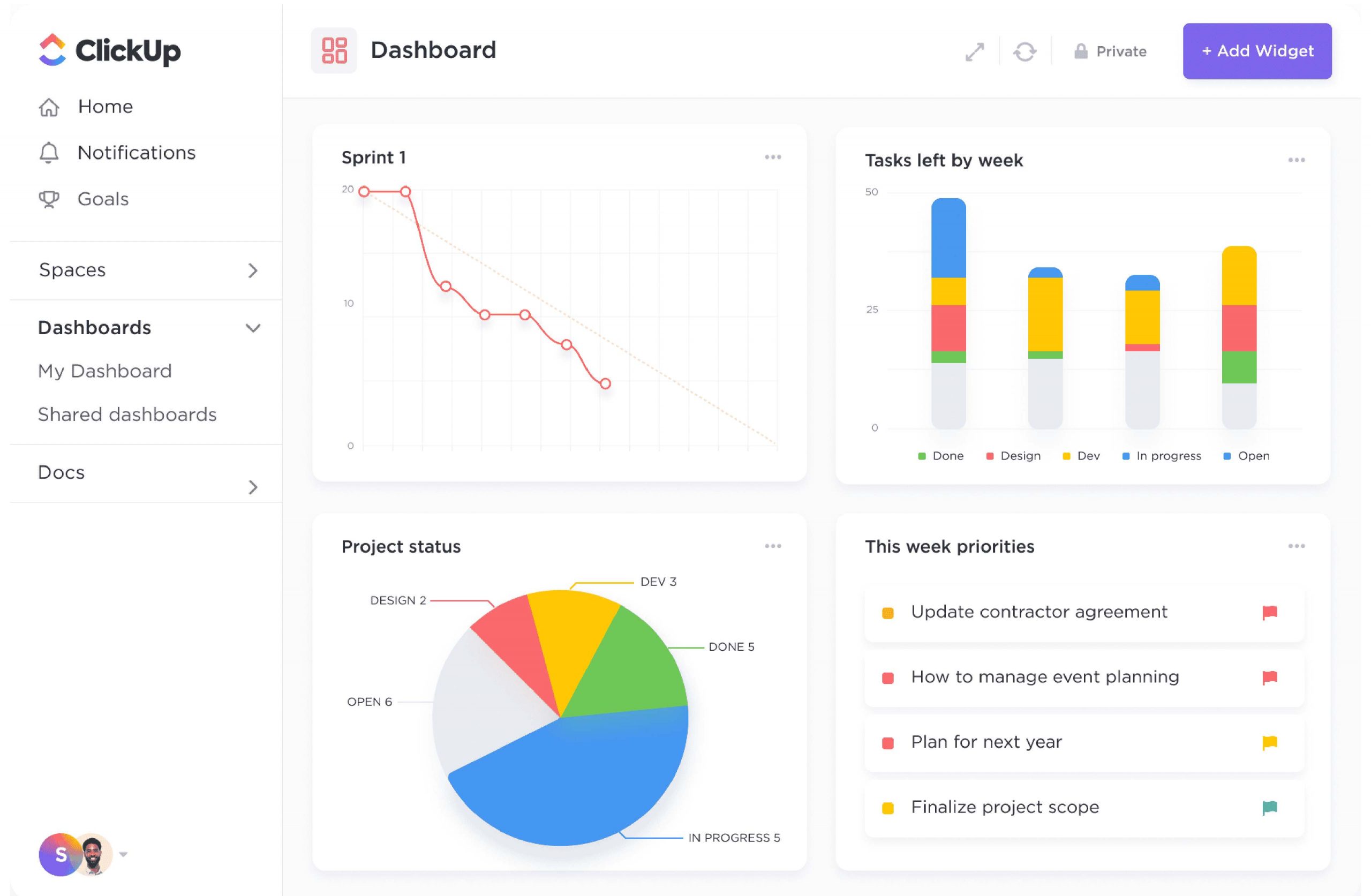
If you’re looking for an alternative to Hive to generate detailed reports, you should consider a tool like ClickUp. The platform offers a wide range of reporting options that can be customized to fit your team’s needs.
(Image Source: ClickUp)
You can create custom dashboards that display real-time data on your projects, tasks, and team members. It can also generate custom reports that provide detailed insights into your team’s performance, progress, and productivity. These reports can be exported in various formats, including PDF, CSV, and Excel.
In addition to its reporting capabilities, the platform also includes unlimited Gantt charts, whiteboards, native time tracking, resource management, and more.
Pros:
- Custom dashboards that display real-time data on your projects, tasks, and team members
- Detailed insights into your team’s performance, progress, and productivity
- Real-time team communication within tasks, comments, and chat, eliminating context-switching
- Offers unlimited Gantt charts to visualize project timelines
- Native resource management tools to help you manage your team’s workload
Cons:
- Does not include a project message board, which some users find inconvenient
- Only 100 MB of storage space in the free plan is too less for regular work
How Does ClickUp Compare to Hive?
ClickUp is the feature-heaviest Hive alternative on this list – it does more than Hive in almost every category, from reporting to views to customization. If your team needs detailed, exportable performance reports for leadership or clients, ClickUp’s dashboards are significantly more powerful than Hive’s. The tradeoff is complexity – ClickUp has so many features that new users often feel overwhelmed, and setup takes time. Its free plan is also limited to 100 MB storage, which is impractical for teams with files. For reporting-heavy teams (marketing, agencies, PMOs), ClickUp is the stronger Hive replacement.
Pricing: A free plan is available with limited storage space. Paid options start at $7/member/month.
7. monday.com – Best for Managing Project Resources
monday.com is one of the most popular Hive alternatives that excels in resource management. I think the platform’s resource management feature is a game-changer.
(Image Source: monday.com)
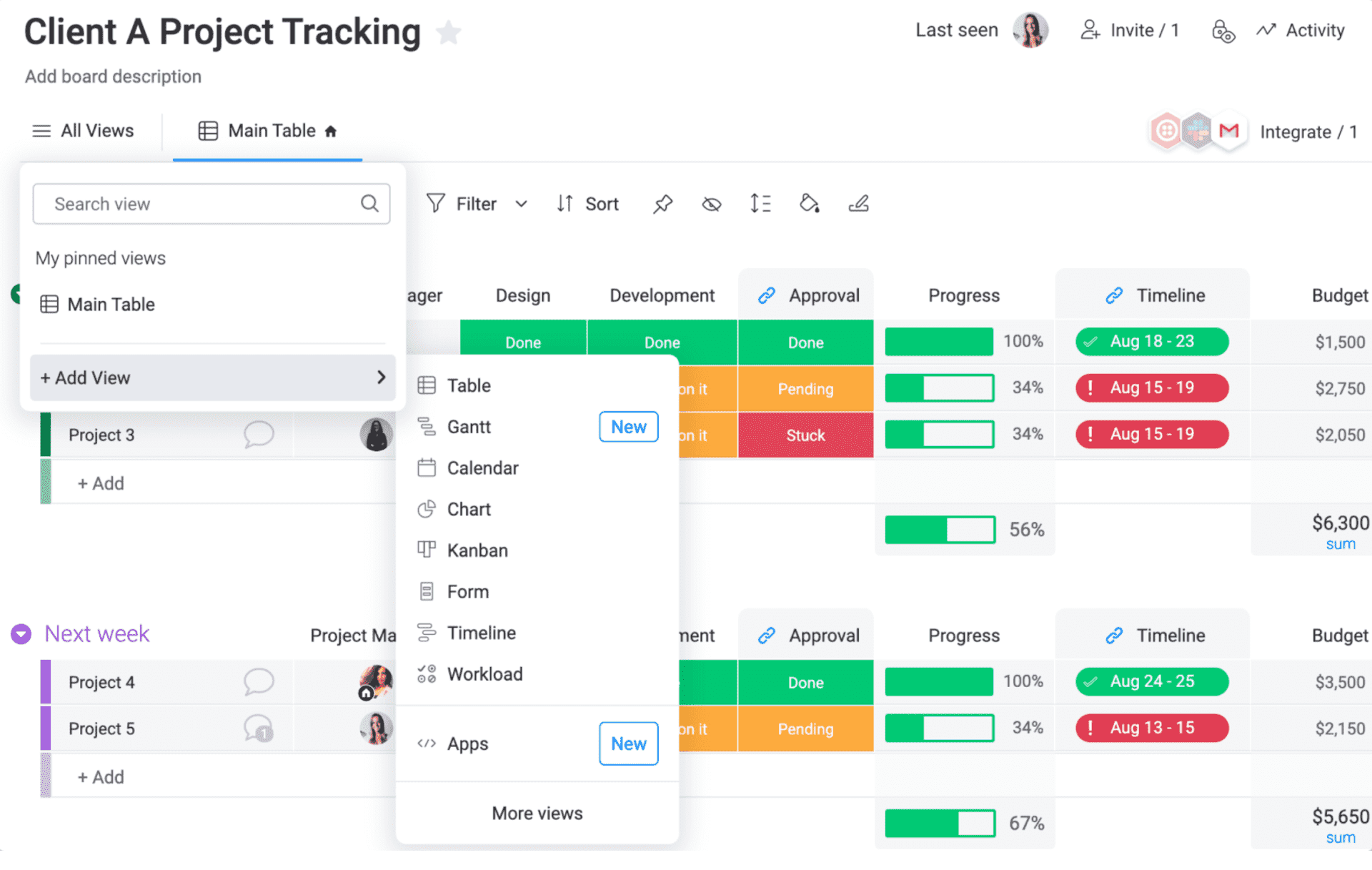
It allows you to plan the use of resources and schedule their allocation. Resources can be anything your business needs to operate effectively, such as employees, equipment, or even your brand assets. With monday.com, you can get a clear overview of and control over projects, set goals, and even plan future projects better.
The platform also provides a clear representation of project timelines, making it easy to visualize key dates, milestones, and deadlines at a glance.
Pros:
- Drag-and-drop interface makes assigning tasks and balancing the team workload a breeze
- Real-time communication and feedback loops with built-in comments, mentions, and file sharing
- Boards and dashboards tailored to your unique team needs and processes
- Insightful reports and data visualizations for valuable insights into team and project performance
- Mobile app for on-the-go project management and collaboration
Cons:
- Pricing plans can be confusing because of a set minimum limitation of seats
- 500 MB of storage space allowance in the free plan is quite a limitation
How Does monday.com Compare to Hive?
monday.com and Hive are closely matched as generalist project management tools, but monday.com wins on resource planning, visual appeal, and mobile experience. Where Hive treats resource management as a secondary feature, monday.com builds it into the core of every board – making it easier for managers to see who is overloaded and who has capacity. monday.com’s pricing model has a minimum seat requirement (3 seats minimum) that can make it more expensive for very small teams. For teams of 5 or more that need strong resource visibility and a polished visual interface, monday.com is a solid Hive alternative.
Pricing: A free plan is available for up to 2 users. Paid options start at $8/seat/month.
Evaluation Criteria
The evaluation of products or tools chosen for this article follows an unbiased, systematic approach that ensures a fair, insightful, and well-rounded review. This method employs six key factors:
- User Reviews / Ratings: Direct user experiences provide a ground-level perspective, including ratings and feedback from reputable sites like G2 and Capterra. This feedback is critical in understanding overall satisfaction and potential problems.
- Essential Features & Functionality: The value of a product is ascertained by its core features and overall functionality. Through an in-depth exploration of these aspects, the practical usefulness and effectiveness of the tools are carefully evaluated.
- Ease of Use: The user-friendliness of a product or service is assessed, focusing on the design, interface, and navigation. This ensures a positive experience for users of all levels of expertise.
- Customer Support: The quality of customer support is examined, taking into account its efficiency and how well it supports users in different phases – setting up, addressing concerns, and resolving operational issues.
- Value for Money: Value for money is evaluated by comparing the quality, performance, and features. The goal is to help the reader understand whether they would be getting their money’s worth.
Personal Experience / Expert’s Opinion: This part of the evaluation criteria draws insightful observations from the personal experience of the writer and the opinions of industry experts.
My Top 3 Picks for the Best Hive Alternative
Finding the best Hive alternatives means taking a sneak peek at your company’s requirements first. You need to understand the present shortcomings to get an idea of which tool fulfills the void.
Here are the top three tools to consider based on your situation:
1. ProProfs Project
Choose this if you run a startup or SMB and need a straightforward, AI-powered tool with no per-user cost surprises. ProProfs Project delivers Gantt charts, time tracking, budget management, and stakeholder reporting in one flat plan. The AI features get your teams productive within hours, not days.
2. Asana
Choose this if your team needs to connect project work to business goals, track KPIs, and report progress to senior leadership. Asana’s “Goals” feature and Salesforce integration make it the right pick for strategy-driven teams.
3. Wrike
Choose this if administrative overhead is eating your team’s time. Wrike’s automation engine – with request forms, approval chains, and repeatable blueprints – is more powerful than any other tool on this list for reducing repetitive work.
See why teams across industries choose ProProfs Project as their go-to Hive alternative.
Find the Best Hive Alternative and Get Your Team Working Without the Chaos
Switching tools always feels like a big decision. But when your current setup is slowing your team down, the real cost is in missed deadlines, confused handoffs, and hours spent chasing updates that should have been visible from the start.
The seven tools in this list each solve that problem in a different way. Some are built for developers, some for large strategic teams, and some for small businesses that just need everything to work without a learning curve.
The best Hive alternative for you is simply the one that fits how your team actually works, not the one with the longest feature list.If you are a small or mid-sized team looking for something straightforward to get started with, ProProfs Project is worth checking out first. It covers the basics well, does not charge per user, and comes with a free trial so you can see if it clicks before spending anything.
Frequently Asked Questions
What is the best free alternative to Hive?
ProProfs Project offers a free plan to test all features before buying. Jira offers the most capable free plan - it supports up to 10 users with full agile board access. For non-developer teams, Asana's free plan or ClickUp's free plan are better fits.
Which Hive alternative is best for small teams?
ProProfs Project is the best Hive alternative for small teams. Its flat-rate pricing at $39.97/month means the cost does not increase as your team grows. It covers all core project management needs - tasks, timelines, reports, and resource management - without complexity.
Is there a Hive alternative with better reporting?
Yes. ClickUp, ProProfs Project, and Asana offer more powerful reporting than Hive. ProProfs Project lets you build custom dashboards and export reports to PDF, CSV, and Excel. Asana connects project data to business goals for leadership-level reporting.
Which Hive alternative is easiest to set up?
ProProfs Project and monday.com are the easiest to set up among all Hive alternatives. Both have drag-and-drop interfaces and require no training. Jira and Wrike have the steepest learning curves and longest setup times.
Does any Hive alternative support external client access without extra cost?
ProProfs Project allows you to share project reports and updates with external stakeholders through secure URLs - without adding them as paid users. This makes it a strong Hive alternative for agencies and consulting teams that work with multiple clients.
Which Hive alternative is best for remote teams?
monday.com and ProProfs Project are the strongest choices for remote teams. Both offer mobile apps, real-time updates, and collaborative dashboards that work across time zones without requiring synchronous meetings.
Why do teams switch from Hive to other tools?
The most common reasons teams switch from Hive include recurring UI bugs, security concerns, limited customization options, and per-user pricing that scales poorly. Teams also switch when they need better mobile access, stronger reporting for leadership, or the ability to add clients and reviewers without paying for extra seats.
How do I choose the right Hive alternative for my team?
Start by identifying your biggest pain point with Hive: if it is cost, look at ProProfs Project or ClickUp; if it is automation, look at Wrike; if it is strategic planning, look at Asana; if it is developer workflows, look at Jira. Then test your top choice using a free trial or free plan before rolling it out company-wide.
FREE. All Features. FOREVER!
Try our Forever FREE account with all premium features!


![10 Ultimate Task Alternatives in 2026 [With Pros & Cons]](https://www.proprofsproject.com/blog/wp-content/uploads/2024/02/Feature.jpg)