I’ve watched projects slow down for a very simple reason: work is spread out everywhere. The plan is in a spreadsheet, updates are in chat, approvals are in email, and the latest file is sitting in someone’s folder. Nothing was wrong with the team. The setup was the problem.
That’s why the benefits of a cloud based system matter so much for project delivery. When tasks, owners, deadlines, files, and updates live in one shared place, work becomes easier to track and harder to miss.
PMI reported that organizations waste 9.9% of every dollar due to poor project performance. If you decide to test this approach with a small pilot, using a cloud tool like ProProfs Project can help you keep tasks and updates in one place without making the process feel complicated.
In this blog, I’ll break down the key benefits, the common challenges teams run into, and what to look for in a tool so the switch feels simple and practical.
Let’s get started!
What Is a Cloud-Based System in Project Management?
A cloud-based system in project management is an online platform that helps teams collaborate, track tasks, and manage projects. Unlike traditional “on-premise” software, which requires manual updates and special connections, cloud-based systems are updated in real-time and accessible from any device with an internet connection.
In practice, this system serves as a central hub for your project: it allows you to assign tasks, monitor progress, store important documents, and provide up-to-date status reports to stakeholders.
If you want to see how a cloud-based project management software works, here’s a short video for you:
Why Do Modern Teams Choose Cloud Systems Over Spreadsheets, Email & Chat?
The “Before vs. After” of moving to the cloud isn’t just a change in tools; it’s a complete shift in how a team operates. In the old world of “invisible work,” project status is something you have to hunt for. In the cloud world, status is a byproduct of the work itself.
Why Spreadsheets and Email Fail
When teams rely on spreadsheets, email, and chat, they are essentially working in data silos.
When teams depend on spreadsheets and messages, work gets split across too many places.
Spreadsheets are “snapshot” documents. The moment someone downloads, edits, or shares a copy, you risk version confusion. And one small error like a broken formula or missed update can quietly throw off plans, budgets, or timelines.
Email and chat are even worse for tracking work. Decisions get buried in long threads, and important updates sit in private messages. So managers end up spending time chasing people for status instead of removing blockers and keeping work moving.
What Changes With a Cloud System
Moving to a cloud-based system like ProProfs Project changes the dynamic from pulling information to having it streamed to you in real-time.
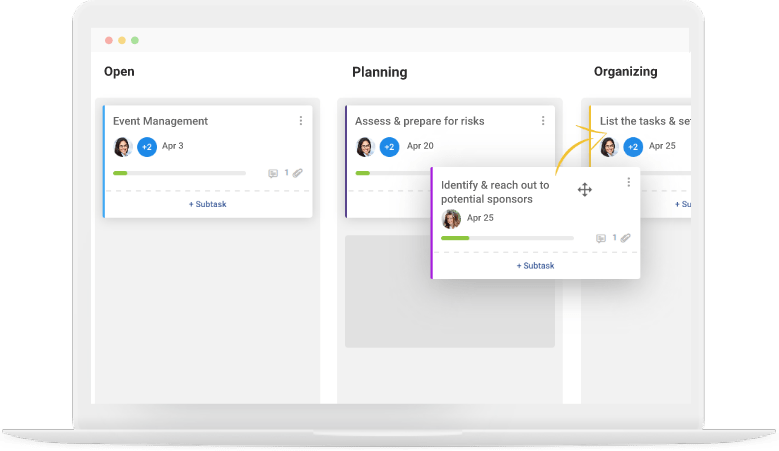
Instead of pulling updates from 10 different people, you check one place. If your team updates tasks as they go, your Kanban board, timeline (Gantt), and dashboards stay current. You do not need a separate status report because the system is the report.
It also creates a single source of truth. No more “final_v3” files floating around. Everyone works from one live project view where comments, files, and deadline changes stay attached to the work, so the whole team stays aligned.
Tools like ProProfs Project take this a step further with AI built into the workflow. Instead of manually building out a project plan, you can describe the project in plain language and let AI set up the tasks, stages, and assignments for you. An AI assistant then stays with the team through execution, answering questions like “which projects are overrunning” straight from live data, so status stops being something anyone has to compile by hand.
What’s the Difference Between Cloud-Based and On-Premise Project Management Software?
Both options help you manage projects, but they work very differently behind the scenes. Here’s a simple side-by-side view so you can quickly decide what fits your team.
| Category | Cloud-Based Project Management | On-Premise Project Management |
|---|---|---|
| Where It Runs | Hosted by the vendor and accessed over the internet | Runs on your company’s own servers |
| Who Manages It | Vendor handles maintenance, updates, and infrastructure | Your internal IT team handles maintenance and updates |
| Setup Time | Usually fast to start | Usually takes longer to set up |
| Access | Easy access from anywhere with internet | Typically best access inside company network (or via VPN) |
| Collaboration | Built for remote and cross-team collaboration | Collaboration depends on your internal setup |
| Cost Style | Subscription-style pricing is common | Higher upfront costs are common (servers, licenses, IT time) |
| Control | Less direct control over infrastructure | More control over infrastructure and hosting environment |
| Compliance Needs | Works well for many teams, but depends on vendor + settings | Often chosen for strict compliance or data sovereignty needs |
| Scaling | Easier to scale users and usage | Scaling can require more hardware and IT effort |
| Lock-In Risk | Can be higher depending on vendor and integrations | Usually lower vendor dependency, but higher internal dependency |
What Are the Benefits of a Cloud-Based System?
This is where the cloud-based project management benefits become very real for delivery teams. You are not just “moving work online.” You are making work easier to see, easier to run, and harder to miss.
1) How does a cloud-based system create real-time visibility for managers and leadership?
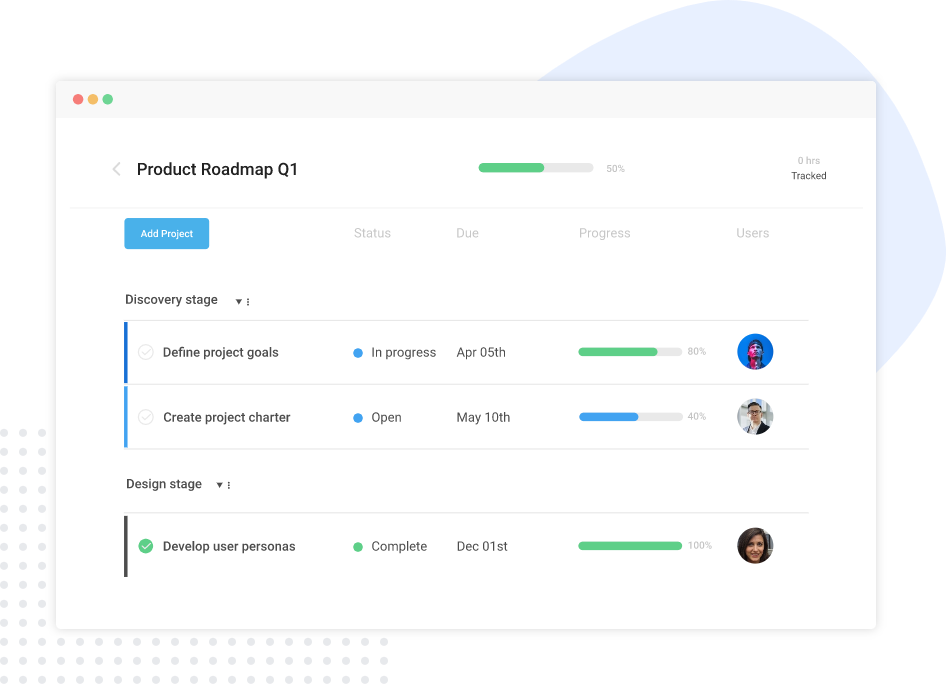
Visibility is usually the first win you feel. When your work lives in one place, you stop guessing and start seeing.
Managers can quickly understand what’s on track, what’s at risk, and what’s already overdue. They can also see who owns what, what’s blocked, and what changed since yesterday, without chasing people for updates.
With AI-powered tools like ProProfs Project, this visibility becomes even more proactive. Instead of scanning dashboards for risk, managers can ask directly, “which projects are overrunning,” and get an instant answer pulled from live data.
2) How does cloud project management improve coordination across remote and cross-functional teams?
Because the system is hosted in the cloud, location doesn’t matter. Whether your team is in the office or working remotely, they can comment on tasks, share files, and tag colleagues instantly.
This centralized communication prevents the “silo effect” where information gets trapped in one department. This is why the benefits of cloud project management often show up as “we move faster” and “we waste less time coordinating.”
3) How does a cloud-based project management tool improve collaboration?
Accountability is not about pressure. It’s about clarity, so work does not fall through the cracks. A cloud-based project management tool helps because ownership and due dates are clearly defined from day one.
The system can nudge people before deadlines slip, and it surfaces overdue work automatically so it gets handled early. This is one of the most practical benefits of using a cloud-based project management tool for PMO teams, Scrum Masters, and team leads who need predictable delivery.
If you also want practical ways to improve how your team works together day to day, read Team Collaboration Strategies You Need to Adopt Right Now.
4) How do cloud-based project management benefits show up in planning views like Kanban and Gantt?
Different teams plan differently. Some think in timelines. Others think in workflow. A cloud system supports both, so you do not have to force everyone into one way of working.
Scrum teams can manage flow in Kanban, while PMOs and program managers can track dependencies in timeline views (Gantt-style). Meanwhile, ops and marketing teams can stay comfortable with lists and calendars. This “multiple views for different brains” is a big reason the benefits of a cloud based system feel bigger than just “access anywhere.”
5) How does time tracking and guest access support clients work?
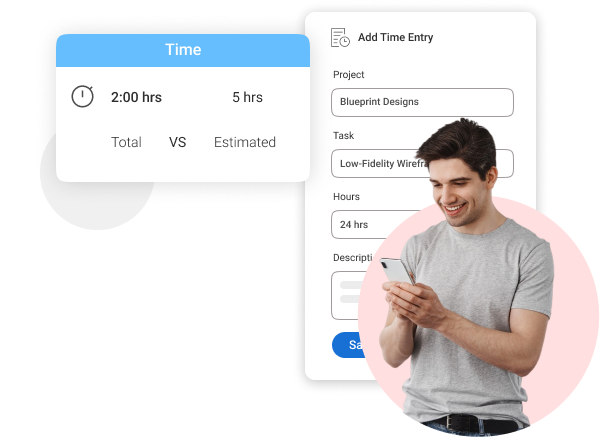
For agencies and consultancies, the benefits of using a cloud-based project management tool include built-in time tracking and secure guest access.
You can invite clients to view specific project milestones without giving them access to your internal team discussions. This builds trust and provides 100% transparency on billable hours.
6) How does cloud elasticity translate into faster delivery for modern teams?
In simple terms, cloud elasticity means you can grow when you need to and shrink when you don’t. For delivery teams, this shows up as fewer delays at the start.
You don’t have to wait for someone to set up servers, install software, or “get things ready” before work can begin. The system is already online, so your team can start planning and executing sooner.
After experiencing the benefits of a cloud-based system, use the New Year as motivation to start planning your rollout. Practical goal-setting tips: Are You Ready for the New Year?.
Challenges to Expect When Adopting a Cloud Based System
Even the world’s leading cloud providers acknowledge that successful adoption requires a realistic strategy for these five hurdles:
1. Internet Dependency and Downtime Risk
Since the “brain” of your project lives on a remote server, access is only as good as your connection. While most top-tier providers boast 99.9% uptime, a local Wi-Fi outage can still lock you out of your workspace.
To mitigate this, choose a tool with an effective mobile app that allows your team to switch to cellular data or access offline cached views.
2. The “Vendor Lock-in” Trap
Vendor lock-in occurs when a platform makes it easy to upload data but nearly impossible to export it in a usable format if you decide to switch services.
You can avoid this by verifying a tool’s export capabilities upfront. Ensure you can pull your projects and tasks into universal formats like CSV or Excel.
3. Scaling and Cost Surprises
Cloud costs can be deceptive; a small pilot program often balloons in price as you add users or storage. Prevent “billing shock” by selecting a provider with transparent, predictable pricing tiers.
4. Integration Complexity
A cloud system is most effective when it syncs with your existing ecosystem, such as email or CRM. If a tool lacks “plug-and-play” connectivity, your team will suffer from “double entry”i.e, manually updating the same info in two places. Look for platforms with native integrations or “Zapier-friendly” hooks.
5. Adoption Friction and Cultural Change
The hardest part of moving to the cloud isn’t the software; it’s convincing a team to abandon familiar spreadsheets. To overcome this, standardize one specific workflow with pre-built templates to make the new system easier to use than the old one.
How to Implement a Cloud-Based Project Management Tool
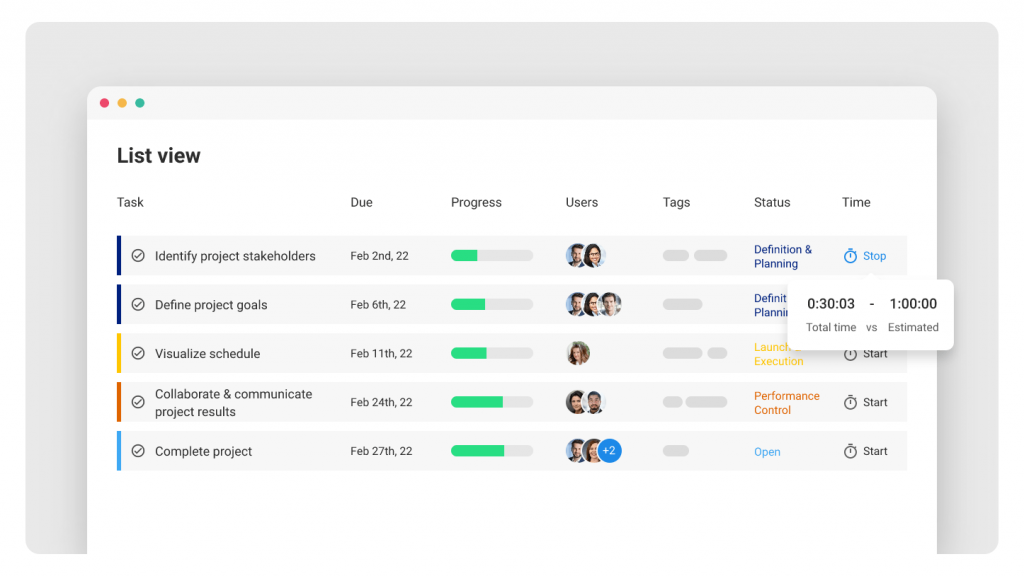
A cloud rollout works best when you treat it like a normal project. You plan it, you test it with a small group, you fix what feels confusing, and then you roll it out to everyone.
Here’s a simple sequence that keeps things smooth and avoids pushing your team into change overload.
1) Pick One Workflow to Pilot
Start small on purpose.
Pick one type of work your team does often, like a campaign launch, client onboarding, sprint delivery, or a hiring pipeline. The goal is to learn how the tool fits your real day-to-day work, not to “set up everything” on day one.
A pilot also makes it easier to get buy-in. When people see a real project running better, they trust the change more.
2) Migrate in Phases, Not All at Once
Do not dump every project into the tool on day one. That usually creates confusion and people fall back to spreadsheets again.
Instead, move a few active projects first. Bring in the tasks, the dates, and the owners. Let the team run those projects inside the tool for a couple of weeks.
You will know the rollout is working when people stop asking, “Where is the latest update?” because the latest update is always inside the system.
3) Define Roles and Permissions Early
This part is important, especially if you have multiple teams or departments.
Decide what each group should see and do:
- What leaders should see (high-level progress, overdue items, workload)
- What contributors can change (task updates, comments, files, status)
- What external people can access (clients, reviewers, consultants)
When roles are clear, people feel safer using the tool. No one worries about “oversharing” or accidentally editing the wrong thing.
4) Build 2–3 Reusable Templates
Templates save time and reduce mistakes.
Instead of building the same project plan again and again, create 2–3 simple templates for repeat work. For example:
- A campaign template with the usual steps and approvals
- A client onboarding template with tasks, due dates, and handoffs
- A sprint template with planning, execution, and review steps
This is customer-friendly because your team does not have to “figure it out” every time. They start with a ready structure and just adjust details.
5) Set a Weekly Operating Rhythm Using Dashboards
This is what makes cloud tools feel powerful.
Instead of running long status meetings where people read updates out loud, use the dashboard as your weekly check. Keep it short and focused:
- What moved forward this week?
- What is blocked right now?
- What is overdue or about to go overdue?
- Who needs help, and what decision is needed?
The point is simple: the meeting becomes about removing blockers, not collecting updates.
6) Scale to Adjacent Teams
Once your pilot feels stable, expand slowly.
Bring in the next team that works closely with you, like marketing + design, product + engineering, ops + finance, or HR + hiring managers.
A good sign you are ready to scale is when the pilot feels “boring.” That means it is running smoothly, people know where to update work, and no one is confused about where the truth lives.
If you want to keep things simple during your pilot, it helps to start with a tool that lets you plan tasks, track progress, and keep updates in one shared place.
That’s where ProProfs Project fits in naturally. It’s a cloud-based project management tool that helps teams plan, track, and deliver work in one place, without making the setup feel heavy. And if your goal is to test the workflow with a small group first, ProProfs Project also offers a Forever Free option for up to 3 users, which makes it easy to run a low-risk pilot before rolling it out wider.
Key Features to Look for in a Cloud-Based Project Management Tool
Not every tool will fit the way your team works. These are the features I’d prioritize if you want smoother delivery, fewer follow-ups, and clearer visibility across projects.
1) Multiple Project Views (Kanban, Timeline/Gantt, Calendar, List)
Different teams prefer different ways to see work. A good tool lets you switch views without rebuilding the plan. You might use Kanban for day-to-day execution, a timeline/Gantt view for dependencies, and a calendar view for deadlines. This flexibility helps everyone stay aligned without forcing one “right” way to work.
2) Roles and Permissions for Internal Separation and Guest Access
Not everyone should see everything. Roles and permissions help you control who can view, edit, or comment. This matters when you have multiple departments, sensitive projects, or outside people like clients, reviewers, or consultants. It keeps collaboration smooth while still protecting what needs to stay private. A password manager can further protect shared project accounts by keeping login credentials secure and unique.
3) Dashboards and Reports for Leadership Visibility
Leaders usually want a quick answer, not a long explanation. Dashboards and reports make it easy to see what’s on track, what’s delayed, and where help is needed. It also saves you from building weekly slides or sending status emails, because the system already shows the real picture.
Increasingly, this extends to AI-generated summaries. Some tools now scan a report the moment you open it and tell you what’s on track, what’s at risk, and where to focus, cutting out the step of interpreting the dashboard yourself.
4) Task Ownership, Due Dates, Reminders, and Audit Trails
This is the “nothing slips” layer. Clear ownership and due dates make responsibilities obvious. Reminders help people stay ahead of deadlines. And audit trails are useful when something changes, like a due date shift, because you can see what changed and when. It makes accountability feel fair and clear, not stressful.
5) Time Tracking Tied to Work Items
If time matters in your work, this feature becomes very valuable. Time tracking connected to tasks helps you understand effort, spot overload early, and measure how long things really take. It’s also important for client services teams that need billable hours and clean reporting.
6) Integrations or Automation Options (Calendar, Chat, Dev Tools, CRM)
Your project tool should fit into how your team already works. Simple integrations like calendar sync or chat notifications reduce manual follow-ups. Automation also helps, like auto-notifying the next person when a task is done. The goal is not “more tools,” but less busywork and fewer missed handoffs.
Realizing cloud-based project management benefits starts with smart vendor selection. Step-by-step guide: The Project Manager’s Guide to Vendor Selection.
Unlock the Benefits of a Cloud Based System for Faster, Smoother Project Delivery
When your projects run on spreadsheets, chat threads, and scattered files, delivery starts to feel like constant follow-up. A cloud-based system fixes that by putting tasks, owners, updates, and timelines in one place, so you spend less time chasing status and more time moving work forward.
The biggest win is consistency. Teams collaborate with less back-and-forth, deadlines are easier to manage, and leaders get a clear view of what’s on track and what needs attention.
If you’re ready to try this without overhauling everything at once, start with a small pilot project and a simple workflow. Tools like ProProfs Project can be a practical place to begin because they keep planning, tracking, and team updates together, making it easier to see if a cloud setup fits your way of working.
Frequently Asked Questions
What happens if the internet goes down during critical work?
If your connection drops, access can pause, which is why internet dependency is a real cloud risk. Most teams reduce impact by using reliable networks, mobile hotspots, and tools that work well on mobile when Wi-Fi is unstable.
How do I move projects from Excel without creating a mess?
Start with a small import, not everything. Bring in one active project, clean up task names and owners, and confirm statuses match reality. Once the team trusts the new “live” workspace, migrate the next set in phases.
How long does it usually take to set up a cloud system for a team?
For most teams, the first usable setup happens fast when you keep it simple. A basic structure with projects, owners, due dates, and one main view can be ready in hours, then improved over 1–2 weeks of real use.
How do I get my team to actually use the tool every day?
Make it the easiest place to work, not “extra work.” Keep statuses simple, use templates, and remove duplicate reporting. When leaders stop asking for updates in chat and start checking the dashboard, adoption becomes natural.
How do cloud systems reduce status meetings without losing control?
They shift updates into the workflow. When tasks get updated where the work happens, your “status” becomes visible anytime. Meetings become shorter and more useful, focused on blockers, decisions, and priorities instead of collecting updates.
How do I include clients or reviewers without giving full access?
Use guest or restricted roles so they only see what matters. This keeps internal work private while still letting clients review files, comment, and approve milestones in-context, without endless email threads.
What integrations matter most for project delivery teams?
Start with the tools your team already checks daily: calendar, email, and chat notifications. Then add what your workflow needs, like CRM for client work, or dev tools for engineering. The goal is fewer copy-pastes and fewer missed handoffs.
When is cloud not the best fit for a team?
Some teams choose on-prem setups when they need maximum control for strict compliance, data residency rules, or very specific infrastructure needs. Even major cloud discussions highlight tradeoffs like reduced control and lock-in, so it’s a deliberate choice.
FREE. All Features. FOREVER!
Try our Forever FREE account with all premium features!