Automotive project management software is a platform built to help automotive teams plan, track, and coordinate vehicle programs, supplier deliverables, and compliance documentation from one place. It replaces scattered spreadsheets and email threads with real time visibility across engineering, production, and procurement.
If you have ever sat in a project review where the design was ready, the supplier was confirmed, and the tooling vendor had already started work, but nobody could answer one simple question, “are we still on schedule,” you already know why this list exists. That gap is rarely about effort, it is about visibility. Finance tracks one version of the numbers, engineering another, and procurement works from emails, so the project looks fine on paper while small delays quietly pile up.
Vehicle programs run across multiple plants, suppliers, and compliance checkpoints, and a missed milestone rarely announces itself, it shows up weeks later as a blown deadline. Tools like ProProfs Project exist to close exactly this gap, giving every team one shared view of tasks, deadlines, and progress. Below, I’ll break down the 10 best automotive project management software tools, how I evaluated them, and my top three picks for teams of different sizes.
What Is Automotive Project Management Software?
Automotive project management software is a platform designed to coordinate engineering, production, supplier, and compliance tasks for vehicle programs and automotive shops. It centralizes planning, budgets, and communication so teams stop relying on disconnected spreadsheets and email chains.
Automotive teams typically use this software to:
- Track design validation, tooling, and pilot production milestones against a single timeline
- Assign and monitor supplier deliverables across Tier 1 and Tier 2 partners
- Maintain document traceability for APQP and PPAP compliance checkpoints
- Manage budgets, resource allocation, and cross-program dependencies
- Generate reports for leadership without manual data pulls
Top 10 Automotive Project Management Software Tools
I reviewed the platforms automotive teams, from OEM program managers to independent shops, actually use to plan and track their work. Here are the 10 best automotive project management software tools, along with what each one is best for, its pricing, and its G2 rating.
| Tool | Best For | Pricing | User Rating (G2) |
| ProProfs Project | Simplest project management tool for SMBs with client invoicing, time & billing | Free plan available. Paid plan starts at $39.97. | 4.4/5 |
| Wrike | Custom workflows and approval chains | Starts at $9.80/user/month | 4.2/5 |
| monday.com | Visual, cross-team project tracking | Starts at $12/seat/month | 4.7/5 |
| Smartsheet | Spreadsheet-style reporting | Starts at $9/user/month | 4.4/5 |
| Float | Resource and team scheduling | Starts at $12/user/month | 4.5/5 |
| Workzone | Organized file and document sharing | Starts at $8/user/month | 4.2/5 |
| ProWorkflow | Task-level time tracking | Starts at $20/user/month | 4.1/5 |
| OpenProject | Secure, on-premise deployment | Starts at $5.95/user/month | 4.6/5 |
| Jira | Agile engineering and software sprints | Starts at $7.53/user/month | 4.3/5 |
| Quickbase | Custom, no-code workflow apps | Starts at $35/user/month | 4.4/5 |
1. ProProfs Project – Simplest Project Management Tool for SMBs With Client Invoicing, Time & Billing
I manage all my automotive projects inside ProProfs Project right now, and the thing I rely on most is how little setup it demands before a team can actually start working. I open the dashboard each morning and get a single-page view of every active project, which matters when you are juggling more than one vehicle program or shop job at once.
What keeps me on it is the reminder system. I set up automated notifications for approaching deadlines, and I no longer have to personally chase down every task owner to ask for a status update. The AI Reports and Insights feature also saves me time I used to spend building status decks by hand, since it pulls milestone and budget data into a ready summary.
I also like that pricing does not punish me for adding people. ProProfs Project charges a flat rate on the Business plan instead of per user, so bringing in a supplier contact or a new hire does not change my bill. For a team that needs structure without the overhead of an enterprise rollout, it has been the easiest tool on this list to actually get a team to use.
Pros:
- Centralized dashboard shows all active projects and milestones in one view
- AI Project Assistant and AI Reports and Insights automate status summaries
- Flat-rate Business pricing does not scale per seat
- Grid, Kanban, Calendar, and Gantt views are all included on one plan
- Task comments and real-time notifications keep teams aligned without extra meetings
Cons:
- Dark mode interface is not currently available
- No dedicated account manager on the free plan
Pricing:
Free plan available. Paid plans start at $39.97.
2. Wrike – Best For Custom Workflows And Approval Chains
When I used Wrike for a multi-supplier tooling project, the custom workflow builder is what stood out first. I set up approval stages so that engineering sign-off had to happen before a task moved to procurement, which cut down on parts getting ordered before specs were finalized.
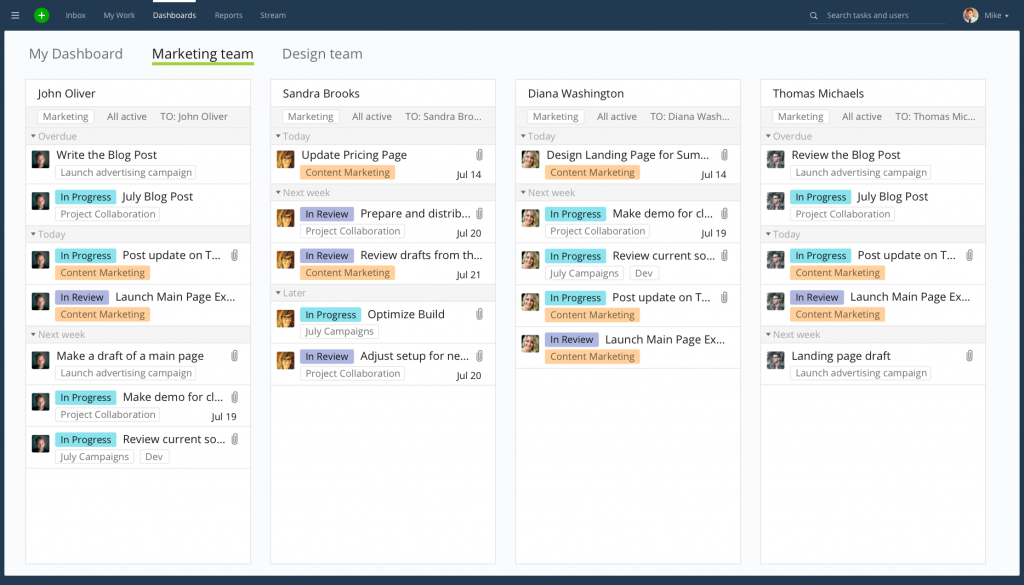
Dashboards were another strong point in my experience. I built cross-project views that let me compare tooling timelines across three supplier programs side by side, without exporting anything to a spreadsheet. The custom fields also let me tag tasks by plant location, which helped when I was reporting up to a regional director.
Where I ran into friction was cost. Once I needed custom fields and request forms, which live on the Business tier, the per-seat price climbed quickly for a team of more than 15 people. It is a capable tool, but I found it easier to justify for larger, well-funded programs than for a lean automotive team.
Pros:
- Custom workflow builder supports multi-stage approval chains
- Cross-project dashboards compare timelines and resource load across programs
- Gantt charts show task dependencies and critical path
- Integrates with Salesforce, Microsoft Teams, and 400+ apps
Cons:
- Pricing rises sharply once custom fields and advanced reporting are needed
- Interface has a learning curve for non-technical team members
Pricing:
Starts at $9.80/user/month
3. monday.com – Best For Visual, Cross-Team Tracking
The first time I set up a board in monday.com for a vehicle program, what struck me was how fast the team adopted it. The color-coded status columns made it obvious at a glance which tasks were on track and which were stuck, without anyone needing training beyond a 10-minute walkthrough.
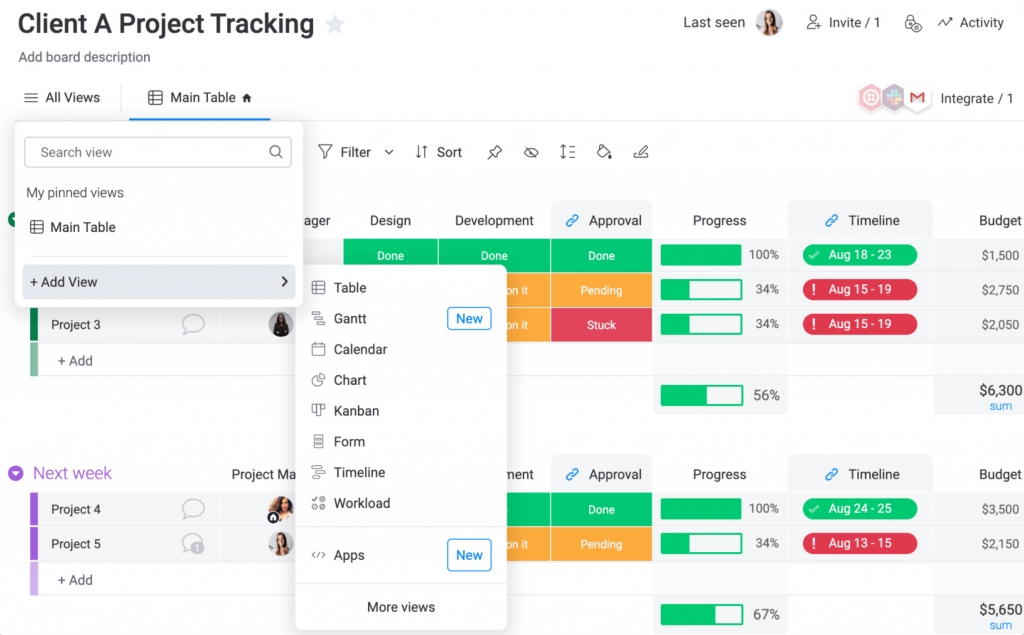
I also used it to coordinate between engineering and a plant team in a different country, and the automation rules helped here. I set a rule so that when a task moved to “Done,” the next team automatically got notified, which cut down on the daily check-in calls we used to run.
The tradeoff I found was that flexibility comes with maintenance. Because almost everything is customizable, I ended up spending real time building and rebuilding board structures as the project scope shifted, which is not ideal when you are trying to move fast on a tight automotive timeline.
Pros:
- Visual boards with color-coded status make progress easy to scan
- Automation rules trigger notifications and status changes without manual work
- Strong cross-team collaboration features for multi-plant coordination
- Wide integration library, including Outlook and Teams
Cons:
- Highly customizable structure requires ongoing setup and maintenance
- Pricing scales per seat and rises quickly for larger teams
Pricing:
Starts at $12/seat/month (3-seat minimum).
4. Smartsheet – Best For Spreadsheet-Style Reporting
I picked Smartsheet for a compliance-heavy automotive project because my finance and quality teams already thought in spreadsheets, and the interface let them keep working that way. I built sheets with formulas and cross-sheet references that mirrored what we used to do in Excel, but now everyone saw the same live version.
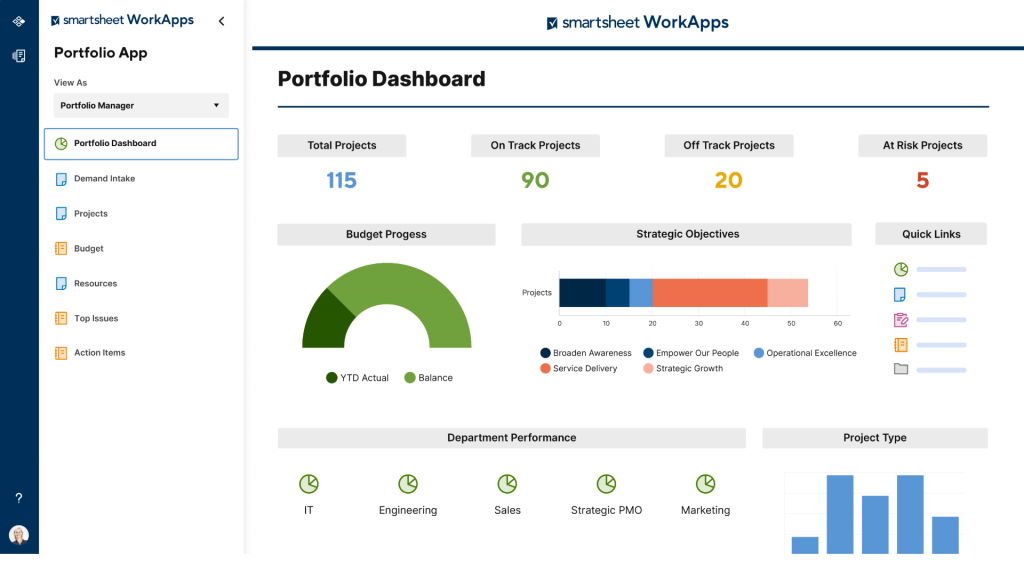
Reporting was where it earned its place on my shortlist. I built dashboards pulling from multiple project sheets to show budget variance and milestone status without manually consolidating anything, which mattered when audits came around and I needed a clean document trail.
What slowed me down was the interface itself. Compared to more visual tools, Smartsheet felt dated, and a few team members who were not used to spreadsheet logic struggled with the initial learning curve more than I expected.
Pros:
- Familiar spreadsheet interface eases adoption for finance and compliance teams
- Cross-sheet automation and reporting reduce manual data consolidation
- Strong compliance certifications suit regulated automotive environments
- Gantt and dependency tracking support complex program timelines
Cons:
- Interface feels dated next to more visual, modern tools
- Recent price increases have caught some users off guard
Pricing:
Starts at $9/user/month.
5. Float – Best For Resource And Team Scheduling
I brought in Float specifically to solve a resourcing problem: engineers were double-booked across two vehicle programs, and nobody had visibility into it until deadlines were already at risk. The drag-and-drop scheduling view fixed that almost immediately. I could see every person’s workload across projects on one timeline.
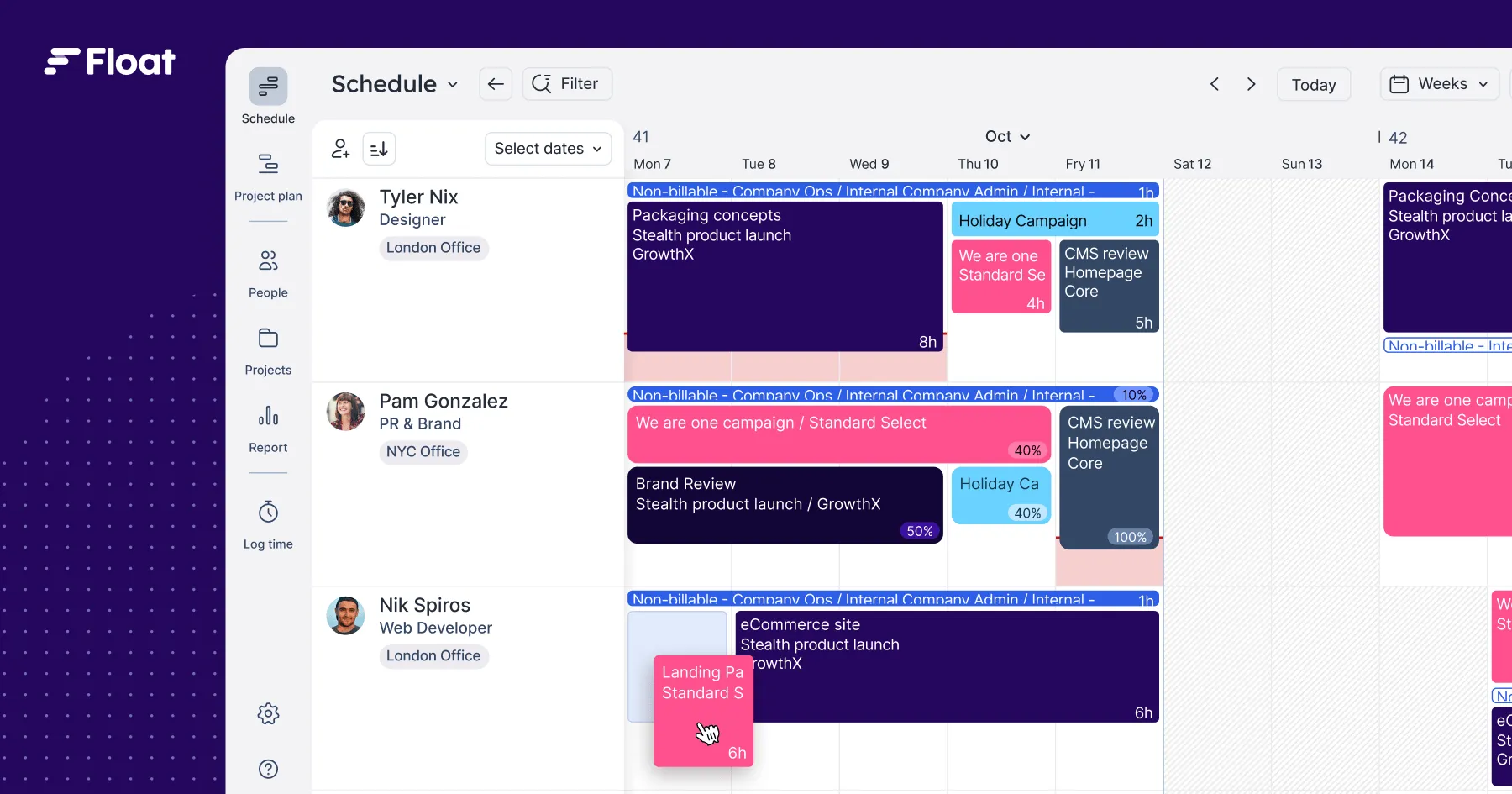
I also used the reporting feature to flag overallocation before it became a crisis. When I saw a technician scheduled for 120% capacity in a given week, I reassigned tasks before the bottleneck hit production. That single feature paid for itself within the first month.
The limitation I ran into was scope. Float is a scheduling tool first, not a full project management platform, so I still needed a second tool for task-level detail, file sharing, and approvals.
Pros:
- Drag-and-drop scheduling shows team capacity across all active projects
- Reporting flags overallocation before deadlines slip
- Real-time schedule updates keep the whole team aligned
- Intuitive interface with a short onboarding curve
Cons:
- Limited task management depth compared to full PM platforms
- No built-in document or file management for compliance records
Pricing:
Starts at $12/user/month.
6. Workzone – Best For Organized File Sharing
I chose Workzone for a project where design specs, compliance documents, and vendor files kept getting lost in email threads. The structured folder hierarchy inside each project fixed that. I stored files with version control, so nobody was ever working off an outdated spec by accident.
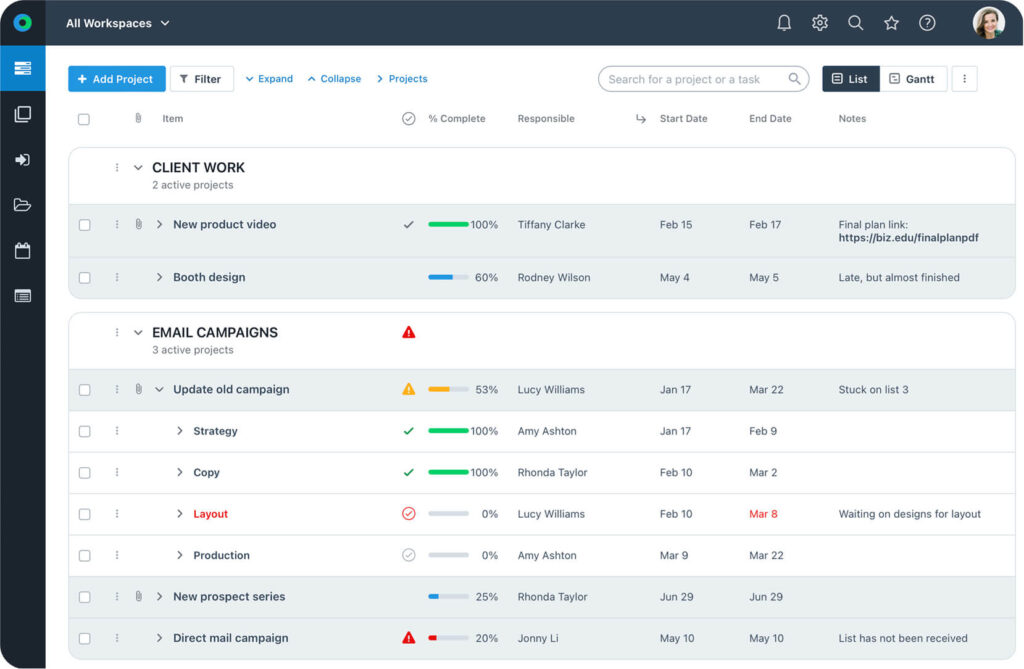
The approvals workflow tied directly into those stored files, which meant reviews stopped happening over scattered email chains. I could see exactly who approved what, and when, which mattered during a supplier audit.
Where I found the gaps were in reporting. The filtering options did not support year-over-year comparisons, which limited how useful the reports were for longer-term program tracking, and there was no dedicated mobile app for checking status on the go.
Pros:
- Structured folder hierarchy organizes files by project and workstream
- Built-in approval workflows tie directly to stored documents
- Cross-project dashboards monitor status across multiple workstreams
- Workload view identifies overallocated team members before deadlines slip
Cons:
- Reporting filters lack year-over-year comparison views
- Less flexible than fully customizable tools for non-standard workflows
Pricing:
Starts at $8/user/month.
7. ProWorkflow – Best For Task-Level Time Tracking
I ran a supplier coordination project through ProWorkflow mainly for its time tracking, and it delivered. I logged hours against specific tasks and could see exactly where the team’s time went across a multi-week tooling review, which helped me justify a resourcing request to leadership afterward.
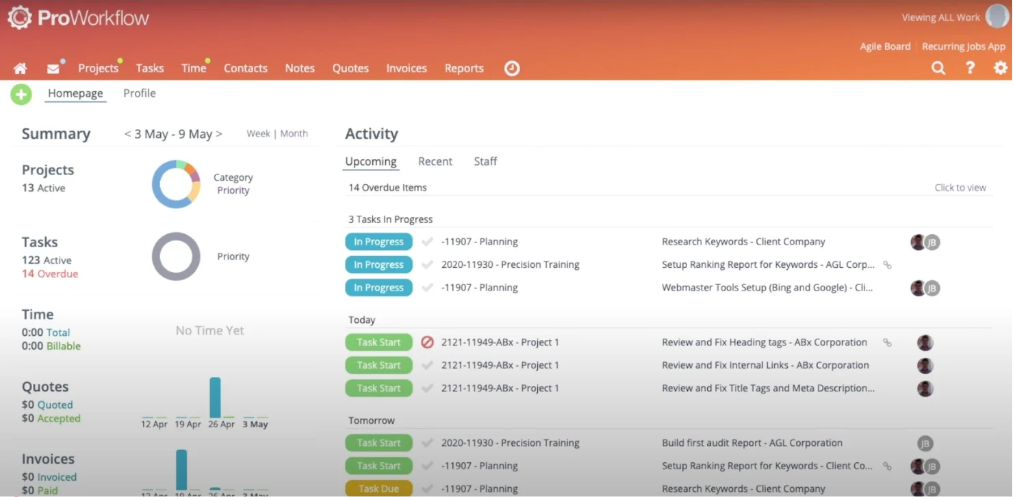
The customizable dashboard was useful too. I set it up to show only the projects relevant to my role, which cut down on noise when I was managing several supplier workstreams at once.
The setup process took longer than I expected, and a few advanced features, like resource allocation rules, had a real learning curve before the team felt comfortable using them without help.
Pros:
- Detailed time tracking ties hours directly to tasks and projects
- Customizable dashboard filters out irrelevant project noise
- Resource allocation tools support workload planning
- Reporting tools generate performance insights for leadership
Cons:
- Initial setup and configuration takes longer than lighter tools
- Higher per-seat pricing than several alternatives on this list
Pricing:
Starts at $20/user/month.
8. OpenProject – Best For Secure, On-Premise Deployment
I brought OpenProject into a program where data residency rules made cloud-only tools a non-starter. Being able to deploy on-premise meant blueprints and testing protocols never left our own servers, which was the deciding factor over every SaaS alternative I evaluated.
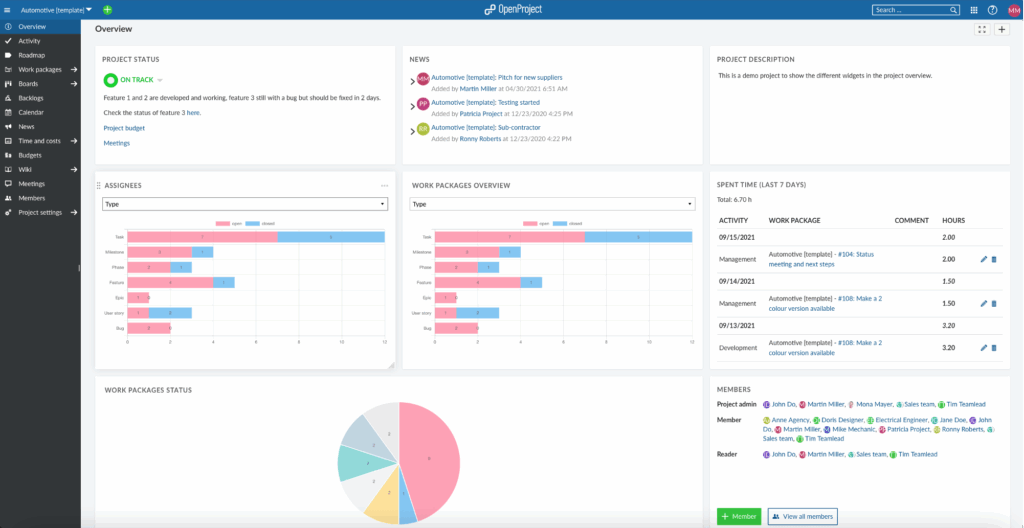
I also used its phase-gate structure to mirror our actual stage-gate process, from concept through production validation, instead of forcing our workflow into a generic template. That flexibility made adoption easier for the engineering team, since the tool matched how they already worked.
The tradeoff was IT overhead. Managing updates and hosting on-premise meant our internal IT team carried more responsibility than they would with a fully managed SaaS platform, which is worth knowing before committing.
Pros:
- On-premise and cloud deployment options meet strict data residency requirements
- Custom workflows adapt to specific stage-gate or APQP-style processes
- Native support for agile, waterfall, and hybrid project methods
- Open source core keeps licensing costs predictable
Cons:
- On-premise deployment adds IT management overhead
- Smaller integration ecosystem than larger commercial platforms
Pricing:
Starts at $5.95/user/month.
9. Jira – Best For Agile Engineering And Software Sprints
I used Jira for the software side of a connected-car program, running sprints for infotainment features while the hardware side stayed on a separate stage-gate timeline. The sprint boards and backlog management were exactly what the software engineers already knew from other projects, so onboarding took almost no time.
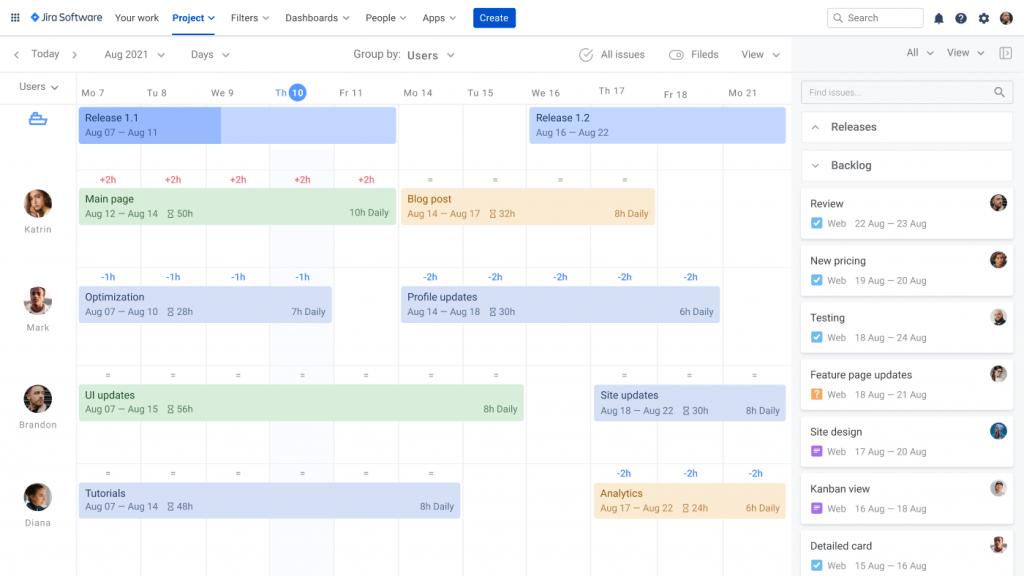
Reporting was another strength in my experience. Burndown charts and velocity reports gave me a clear read on whether the software team would hit its integration deadline, which I could then cross-reference against the hardware timeline running in parallel.
The friction came from using it outside pure software contexts. When I tried applying Jira to supplier and tooling tasks that had nothing to do with sprints, the interface felt like a mismatch, and non-technical team members found it harder to navigate than a general project tool.
Pros:
- Sprint boards and backlog management suit agile software workstreams
- Burndown and velocity reports track engineering progress accurately
- Strong integration ecosystem for engineering and DevOps tools
- Customizable workflows support complex issue-tracking needs
Cons:
- Built for software workflows, so it fits hardware and supplier tasks poorly
- Can require plugins for features other tools include natively
Pricing:
Starts at $7.53/user/month.
10. Quickbase – Best For Custom, No-Code Workflow Apps
I turned to Quickbase when a program needed a workflow no off-the-shelf tool supported, tracking part-level engineering change orders tied to specific project deliverables. Building a custom app without writing code let me match our exact approval chain instead of adapting our process to fit a template.
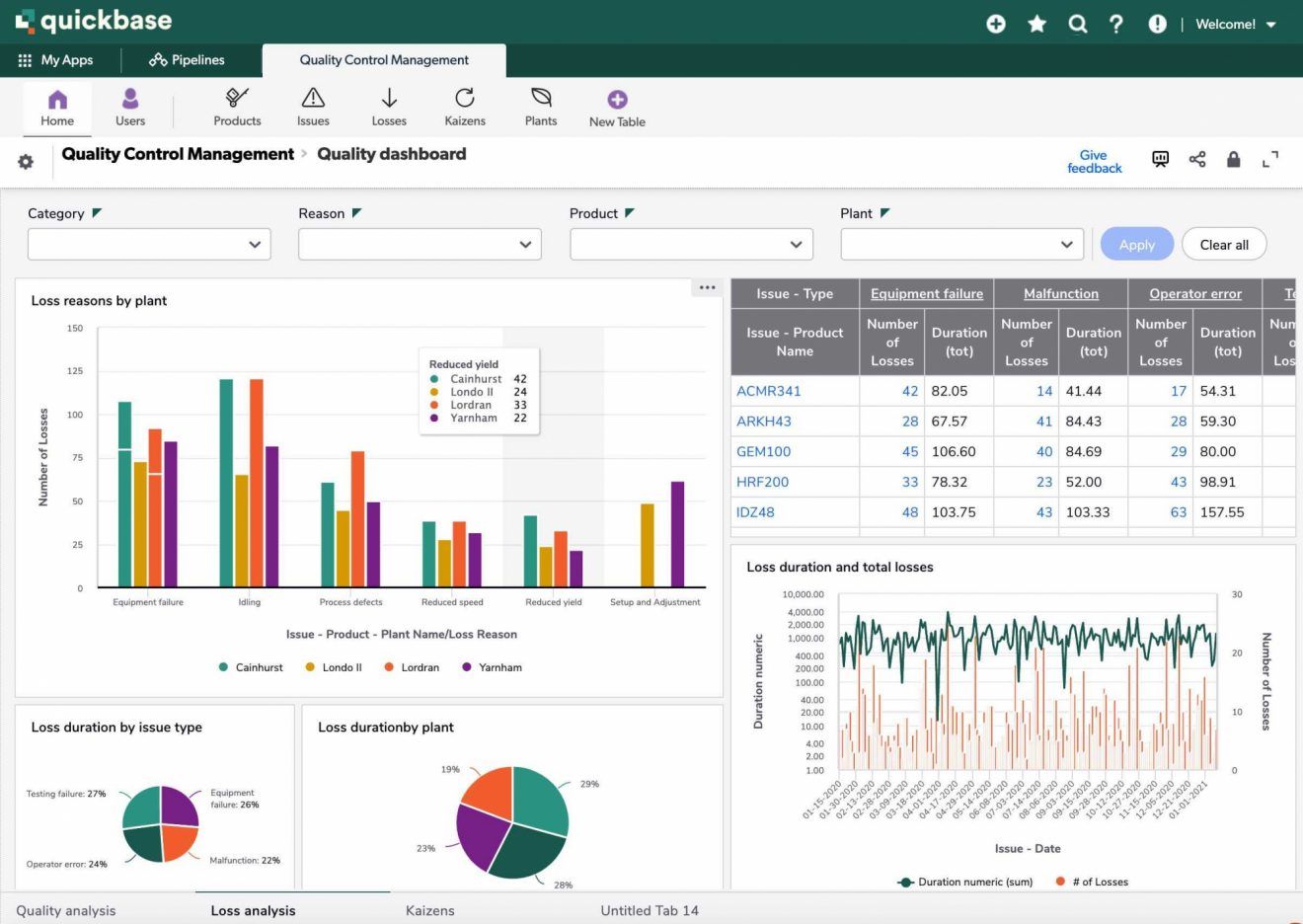
The reporting was flexible enough to pull part-level data into views for both engineering and finance, which meant I was not maintaining two separate systems for the same information.
Cost was the tradeoff. Between the per-user pricing and the time needed to build and maintain custom apps, it made more sense for a well-resourced program than for a smaller automotive team that just needs standard project tracking out of the box.
Pros:
- No-code app builder supports highly specific workflows like ECO tracking
- Flexible reporting pulls data across custom-built apps
- Strong ease-of-setup ratings from verified users
- Role-based access controls protect sensitive engineering data
Cons:
- Higher price point than most tools on this list
- Building and maintaining custom apps takes real time investment
Pricing:
Starts at $35/user/month.
Evaluation Criteria
The evaluation of tools chosen for this article follows an unbiased, systematic approach that ensures a fair and well-rounded review. I used six key factors:
- User Reviews and Ratings: I looked at direct feedback from verified users on G2 and Capterra to understand real satisfaction levels and common complaints for automotive and manufacturing use cases.
- Essential Features and Functionality: I evaluated each tool’s core project tracking, reporting, and collaboration features against what automotive teams actually need, from supplier coordination to deadline management.
- Ease Of Use: I assessed how quickly a mixed team, engineers, project managers, and non-technical staff, could adopt each tool without extensive training.
- Customer Support: I looked at how responsive and helpful each vendor’s support was during setup and ongoing use, since automotive timelines leave little room for support delays.
- Value For Money: I compared pricing against the features and performance delivered, to see which tools would give an automotive team the most for their budget.
- Personal Experience: I drew on hands-on use of each platform, along with patterns from verified reviews, to form an honest, practical view of how each tool performs in real automotive workflows.
My Top 3 Picks For Automotive Teams
If you only read one section of this list, read this one. These are the three tools we would recommend first, depending on your team’s size and complexity.
1. ProProfs Project
ProProfs Project is my top pick overall. It gives automotive teams, whether that is an OEM supplier, a parts manufacturer, or an independent shop, a centralized dashboard, automated reminders, and AI-powered reporting without the setup time or per-seat cost of larger platforms. For a team that wants to be up and running within a day, it is the easiest recommendation on this list.
2. OpenProject
OpenProject is my pick for teams with strict data residency or security requirements. Its on-premise deployment option and flexible stage-gate workflows suit OEMs and Tier 1 suppliers that cannot put sensitive design data on a public cloud, without giving up the ability to run agile or hybrid project methods.
3. Wrike
Wrike is my pick for larger, well-resourced programs that need custom approval chains and cross-project dashboards. It suits teams managing several supplier workstreams simultaneously and are prepared for a steeper learning curve and higher cost in exchange for deeper customization.
What Should You Look For In Automotive Project Management Software?
Before you shortlist a tool, it helps to know which must-have project management software features actually matter for automotive work, versus features that just look good in a demo.
- Multi-Team Task Assignment: the ability to route one project across departments like engineering, quality, and procurement
- Automated Deadline Reminders: alerts for approaching and overdue tasks without manual follow-up
- Real-Time Visibility: every team sees the same update the moment it happens, not after a weekly sync
- File And Document Organization: structured storage for specs, compliance records, and vendor files
- Reporting Tied To Budgets And Milestones: dashboards that support both program tracking and leadership reporting, similar to what you get with reports and analytics
- Integration With Existing Tools: compatibility with Outlook, Teams, or the systems your team already uses daily
Choose the Right Automotive Project Management Software
Every tool on this list solves the same core problem in a different way: it gives your team one place to see what is actually happening, before a small delay turns into a missed launch date. Whether you are coordinating a multi-plant vehicle program or running a single repair shop, the right software should make it easy to answer one simple question at any moment, are we still on schedule.
There is no single best choice for every automotive team. A large OEM juggling supplier compliance and program documentation needs a different tool than a five-person shop that just wants tasks tracked and deadlines met. Start with your team size, your budget, and the one or two features you genuinely cannot work without, then shortlist from there instead of trying to compare all ten tools feature by feature.
If you are still not sure where to start, it rarely hurts to try the simplest option first. ProProfs Project‘s free plan lets a small team test real project tracking, reminders, and reporting without spending anything, so you can see what actually helps before committing to a bigger platform.
Frequently Asked Questions
What is the best project management software for automotive shops?
For small and mid-size automotive shops, ProProfs Project is a strong fit because of its flat-rate pricing and short setup time. Larger shops with complex supplier chains may prefer Wrike or Smartsheet for deeper customization.
How much does automotive project management software cost?
Pricing on this list ranges from $5.95/user/month for OpenProject's Basic plan to $39.97/month flat rate for ProProfs Project's Business plan, which covers unlimited users. Enterprise PPM platforms built specifically for OEM programs typically cost more.
Does automotive project management software integrate with ERP and PLM systems?
Many tools, including ProProfs Project, Wrike, Smartsheet, and Jira, offer native or Zapier-based integrations with common business systems. Direct PLM integrations like Teamcenter or Windchill are more common in enterprise platforms built specifically for automotive programs.
Is there free automotive project management software?
ProProfs Project offers a free plan for up to 3 users, and Jira offers a free tier for up to 10 users. Both work well for small teams testing a tool before committing to a paid plan.
What is the difference between automotive project management software and shop management software?
Project management software tracks tasks, timelines, and team coordination across a program. Shop management software, like inventory and invoicing tools, focuses on day-to-day repair shop operations. Some automotive businesses need both.
How long does it take to set up automotive project management software?
Lighter tools like ProProfs Project or monday.com can be set up in a single day. Enterprise platforms with custom workflows, like Wrike or Quickbase, often take several weeks to configure properly.
Can suppliers and external partners access the same project management tool?
Most tools on this list, including ProProfs Project, Wrike, and OpenProject, support role-based access controls that let suppliers or external partners see specific tasks without exposing the full project roadmap.
FREE. All Features. FOREVER!
Try our Forever FREE account with all premium features!

![An Ultimate Guide on Project Charter [With Examples]](https://www.proprofsproject.com/blog/wp-content/uploads/2024/03/Feature-5.png)