

Project management for logistics is the planning, scheduling, and tracking of projects that change how goods move, such as carrier onboarding, warehouse go-lives, and fleet rollouts.
The last warehouse go-live I worked on had four vendors, two sites, and one cutover weekend. When a carrier pushed its integration test back a week, the site lead found out three days later. The tasks weren’t hard. Keeping everyone on the same dates was.
Most tool lists are written for enterprise PMOs, so I compared 10 tools on what small and mid-sized teams, 3PLs, and freight forwarders need: dependencies, guest access for outside partners, seat minimums, pricing, and client billing. Each entry includes the one catch worth knowing.
What Is Project Management for Logistics?
Project management for logistics is the work of planning, staffing, and tracking the initiatives that change a logistics operation, as distinct from running that operation day to day. Routing today’s loads is operations. Launching a distribution center, onboarding a carrier, or rolling out a new warehouse management system (WMS) is a project, with a start date, a go-live date, and a set of people who each have to deliver on time.
That’s different from logistics project management services, where an outside provider plans and manages a shipment or program on your behalf. This article covers the project management software your own team uses to run the work.
Common logistics projects include:
- Carrier and 3PL onboarding: contracts, system integration, and test shipments before a new partner carries live freight.
- WMS and TMS go-lives: data migration, integration testing, user training, and a cutover weekend.
- Warehouse, DC, or depot launches: fit-out, staffing, and moving stock from the old site.
- Fleet rollouts: new vehicles, driver training, and a phased handover across sites.
- Last-mile pilots: route design, driver onboarding, and a trial in one city before a wider launch.
What these projects share is a dependence on people you don’t manage directly, and that dependence is constant. According to Sphera’s 2025 supplier risk survey, 73% of supply chain leaders dealt with supplier disruptions in the past year. When a vendor date moves, every task that depends on it moves too, and your plan needs to show that the same day, not at the next status meeting.
Here’s how logistics project management plays out in practice:
A 3PL onboarding a new retail client runs tasks across sales, IT, warehouse, and transport teams, while the client’s IT team owns the EDI connection. If that connection test slips by a week, the first live shipment, the staff schedule, and the client’s launch date all slip with it. Good project tracking makes that ripple visible before anyone misses a date.
What Are the Best Project Management Tools for Logistics?
The tools below made the list because they handle task dependencies, give carriers and vendors guest access, and price in a way that works for site-wide teams. ProProfs Project leads for SMBs that bill clients, ClickUp suits large crews on a free plan, and Smartsheet fits teams moving off spreadsheets.
| Tool | Best For | Pricing | G2 Rating |
| ProProfs Project | Simplest Project Management Tool for SMBs With Client Invoicing, Time & Billing | Free plan available. Paid plan starts at $39.97. | 4.4/5 |
| Smartsheet | Spreadsheet-style rollout tracking | Starts at $9/member/month (billed annually); no free plan | 4.4/5 |
| Wrike | Approval-heavy implementation projects | Free plan; paid from $10/user/month (billed annually) | 4.2/5 |
| monday.com | Visual 3PL client onboarding boards | Free (2 seats); paid from $9/seat/month (billed annually, 3-seat minimum) | 4.7/5 |
| ClickUp | Free plans with unlimited users | Free (unlimited users); paid from $7/user/month (billed annually) | 4.6/5 |
| Zoho Projects | Logistics teams already on Zoho | Free (5 users, 3 projects); paid from $4/user/month (billed annually) | 4.4/5 |
| Asana | Cross-functional dependency mapping | Free (2 users); paid from $10.99/user/month (billed annually) | 4.4/5 |
| Microsoft Planner | Teams standardized on Microsoft 365 | Starts at $10/user/month (Planner Plan 1) | 4.2/5 |
| Celoxis | Multi-site portfolio and budget governance | Starts at $10/user/month (billed annually, 5-user minimum); no free plan | 4.6/5 |
| Odoo | Combining inventory, projects, and invoicing in one ERP | One app free; Standard from $31.10/user/month (billed annually) | 4.2/5 |
1. ProProfs Project – Simplest Project Management Tool for SMBs With Client Invoicing, Time & Billing
I set up ProProfs Project for a 3PL onboarding a new e-commerce client. The work covered integration testing with the client’s IT team, a racking change at one warehouse, and staff training before the first live orders. ProProfs Project is the simplest project management tool for SMBs with client invoicing, time & billing. That’s what project management for logistics looks like when you bill for it: the plan, the hours logged against it, and the client invoice all sit in one workspace.
If you bill clients for onboarding or implementation work, the billing comes straight from the project. You log billable and non-billable hours against each task, and the tool turns those hours and any project expenses into client invoices. It also sends payment reminders on a schedule, so you don’t have to chase payments yourself.
The limit to watch is the Free plan: 3 users and 50 open tasks, which fits one carrier onboarding, not a multi-site rollout. If you want the tool to build a project’s tasks, stages, and assignments from a short description, that’s AI project creation, and it’s on the Business plan along with bulk actions, API access, and SSO. Business is $39.97 a month billed annually, with unlimited users.
Pros:
- Time tracking logs billable and non-billable hours per task, manually or automatically, and compares estimated with actual hours, so you can see which part of a go-live ran over.
- Invoicing turns tracked hours and expenses into client invoices and sends payment reminders automatically, which suits 3PLs and consultants who bill for onboarding work.
- The Gantt chart uses task dependencies to shift downstream dates when a vendor date slips, and baselines show how far the plan has drifted.
- Guest access lets clients view or comment on a project, while roles and permissions control what each person can change.
- Email and in-app reminders alert assignees before due dates, so site leads hear about changes without a status call.
Cons:
- No downloadable or on-premise version
- Dark user interface option not available
Pricing:
Free plan available. Paid plans start at $39.97.
The UNDP team in Mexico uses ProProfs Project to track activities run by field staff across the country, and its implementation partners in government and civil society stay up to date on progress.
2. Smartsheet – Best for Spreadsheet-Style Rollout Tracking
I used Smartsheet to track a WMS go-live across three warehouses, with one row per task and columns for site, owner, due date, and status. The ops leads had run everything in Excel before, so they were updating rows on day one without any training.
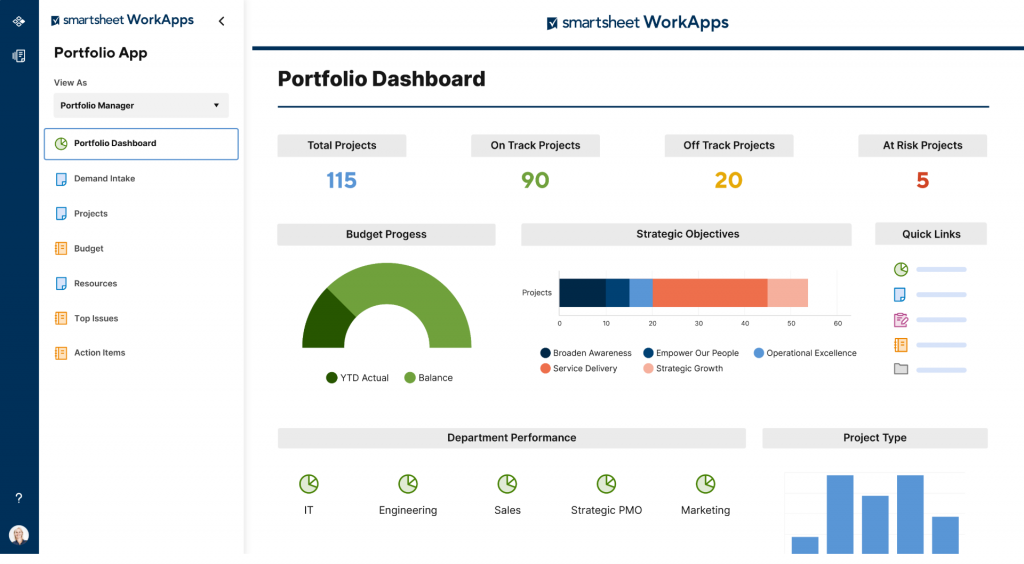
Dependencies are where it beats a plain spreadsheet. Link two rows, and when a vendor pushes back the integration test, the Gantt view moves every downstream task with it. Nobody has to re-date the plan by hand.
The catch is the Pro plan. It caps automations at 250 a month, which a multi-site rollout with daily reminders can burn through. Timeline view, workload tracking, guest access, and API access only come with Business at $19 per member.
Pros:
- Grid view works like a spreadsheet, so teams moving off Excel can start right away.
- Gantt view with dependencies shifts linked tasks when a date changes.
- Card view shows the same rows as a board for site teams that prefer Kanban.
- Automated alerts notify owners when a row changes or a due date gets close.
Cons:
- Pro plan capped at 250 automations a month
- Timeline view, workload tracking, guest access, and API only on Business plan
Pricing:
Starts at $9/member/month (billed annually). No free plan.
3. Wrike – Best for Approval-Heavy Implementation Projects
I ran a TMS rollout in Wrike where IT, procurement, and operations each had to sign off before the cutover date. Each team worked in its own folder inside the same project, so the cross-team picture stayed in one place.
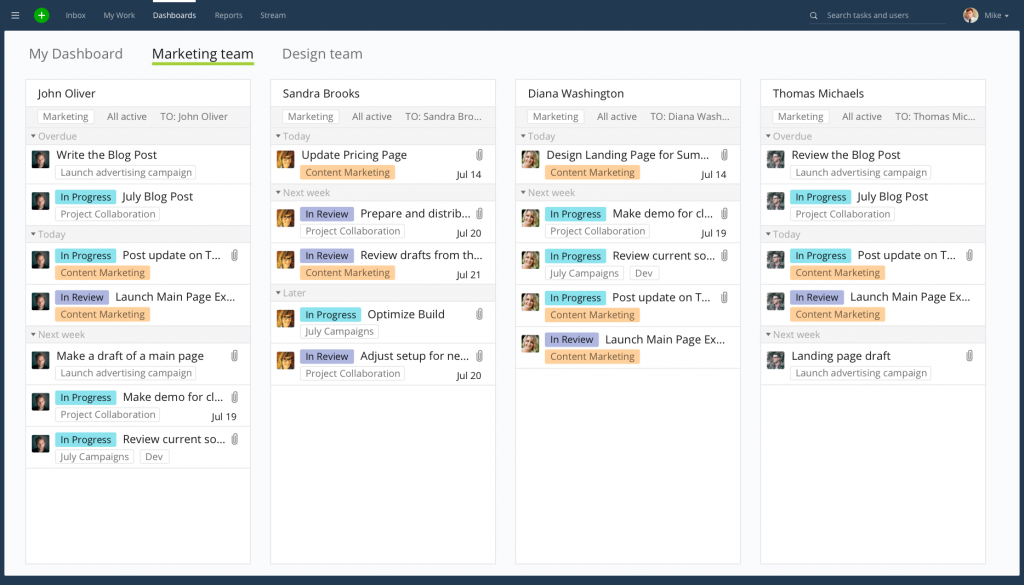
Sign-offs are what Wrike handles best. You send a deliverable for approval, and you can see who has approved it and who is still holding it up. That replaces the reply-all thread where cutover decisions usually get lost.
The catch is that approvals, request forms, and time tracking all sit on Business, at $25 per user with a 5-seat minimum. The Team plan starts at $10 but caps out at 15 users, so a growing ops team runs into a forced upgrade.
Pros:
- Approvals route deliverables to reviewers and record who signed off.
- Request forms turn incoming asks, like a new carrier setup, into structured tasks.
- Gantt chart with dependencies shows how one team’s delay affects the others.
- Free plan covers basic task management for small teams.
Cons:
- Team plan capped at 15 users
- Request forms, approvals, and time tracking only on Business plan
Pricing:
Free plan available. Paid plans start at $10/user/month (billed annually).
Plan Your Next Go-Live With a Ready-to-Use Project Schedule Template
4. monday.com – Best for Visual 3PL Client Onboarding Boards
I used monday.com to run client onboarding for a 3PL, with one board per new client covering contract, system setup, test orders, and go-live. Once the first board was right, I saved it as a template and copied it for every client after that.
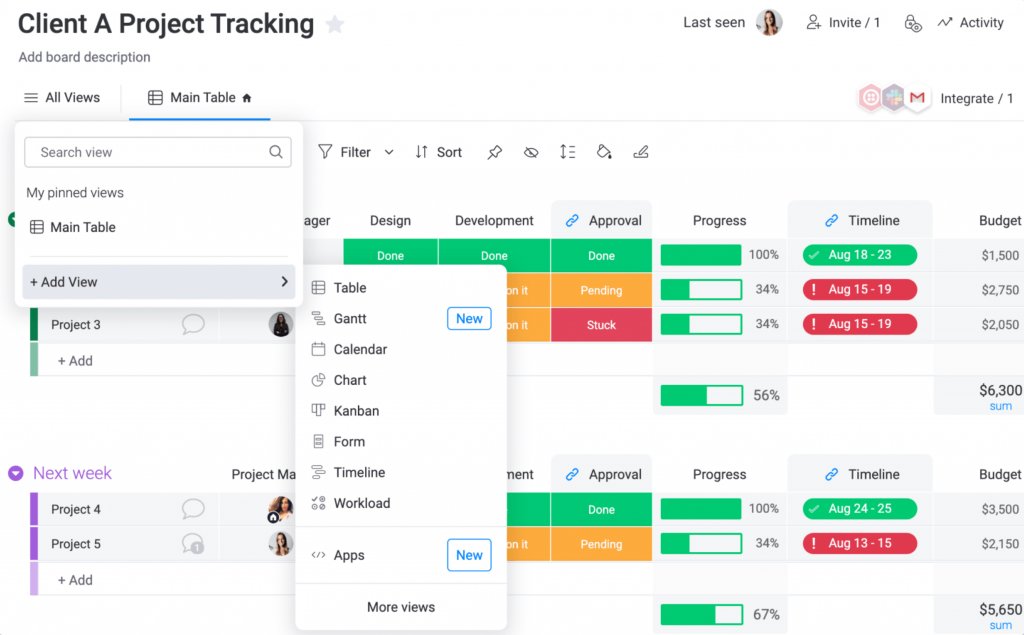
Status is easy to read at a glance. Color-coded status columns show which clients are stuck at system setup and which are ready to go live, so you aren’t scanning a long task list to find the blockers.
The catch is how seats are sold. Paid plans start at 3 seats, so even a 2-person team pays for 3. Gantt view and guest access for clients start on Standard at $12 a seat, and time tracking needs Pro at $19. If that math doesn’t work for your team, these monday.com alternatives are worth a look.
Pros:
- Board templates let you copy a working onboarding process for each new client.
- Color-coded status columns show where every client sits in onboarding.
- Kanban and table views run on the same board data.
- Guest access on Standard lets clients view their own onboarding board.
Cons:
- 3-seat minimum on paid plans
- Time tracking only on Pro plan
Pricing:
Free plan for up to 2 seats. Paid plans start at $9/seat/month (billed annually), with a 3-seat minimum.
5. ClickUp – Best for Free Plans With Unlimited Users
I set up a depot launch in ClickUp with the full site crew on the free plan: supervisors, the fit-out contractor’s lead, and a dozen warehouse staff who only needed to see their own tasks. Adding all of them cost nothing.
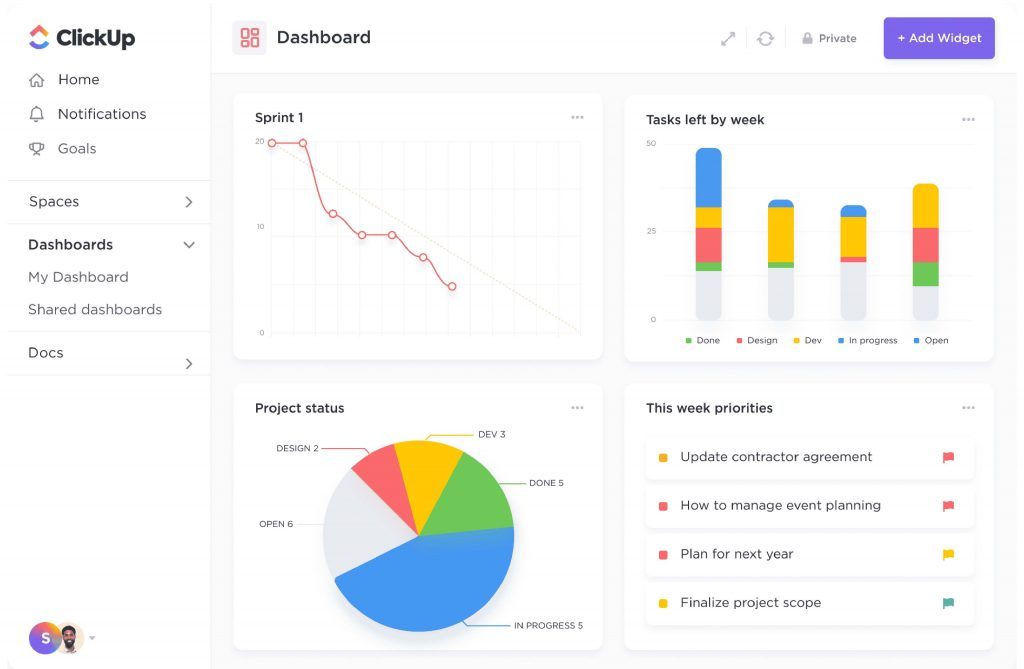
You can view the same tasks as a list, a board, or a calendar. Planners worked from the list while site staff used the board, and nobody had to maintain two versions of the plan.
The catch is storage and AI. The free plan’s storage allowance is small, so photo-heavy site updates fill it fast. The AI features that summarize tasks and draft updates, sold as ClickUp Brain, are a paid add-on.
Pros:
- Free plan with unlimited users.
- List, board, and calendar views of the same tasks.
- Custom fields to track site, carrier, or dock door on each task.
- Docs live alongside tasks for SOPs and handover notes.
Cons:
- Small storage allowance on the free plan
- AI features (ClickUp Brain) sold as a paid add-on
Pricing:
Free plan with unlimited users. Paid plans start at $7/user/month (billed annually).
6. Zoho Projects – Best for Logistics Teams Already on Zoho
I tested Zoho Projects with a small freight forwarding team that already ran its invoicing in Zoho Books. Keeping projects in the same ecosystem meant one login and one vendor to deal with.
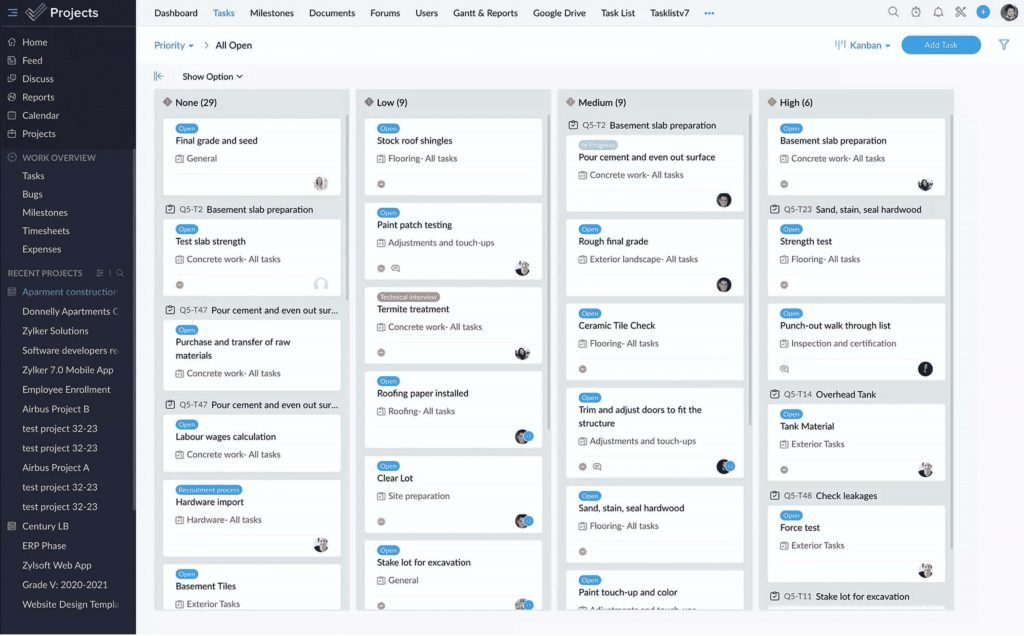
Premium is where it becomes useful for billable work. It adds time logs and timesheets with multi-level approvals, project budgets, and the Zoho Books integration, so logged hours can move into invoicing without re-entry.
The catch is the plan gating. The free plan has no time tracking and allows only 3 projects. Dependencies on Free and Premium stay inside a single project, and cross-project dependencies, critical path, and baselines need Enterprise.
Pros:
- Free plan covers up to 5 users and 3 projects.
- Timesheets with multi-level approvals on Premium.
- Blueprint enforces a fixed sequence of steps for a task type, such as quote, booking, and handover.
- Zoho Books integration on paid plans connects project hours to invoicing.
Cons:
- No time tracking on the free plan
- Cross-project dependencies, critical path, and baselines only on Enterprise
Pricing:
Free plan for up to 5 users. Paid plans start at $4/user/month (billed annually).
7. Asana – Best for Cross-Functional Dependency Mapping
I used Asana to sequence a warehouse go-live across operations, IT, and procurement, where the floor layout couldn’t be finalized until the racking order was confirmed. Setting up task dependencies made the critical handoffs obvious to all three teams.
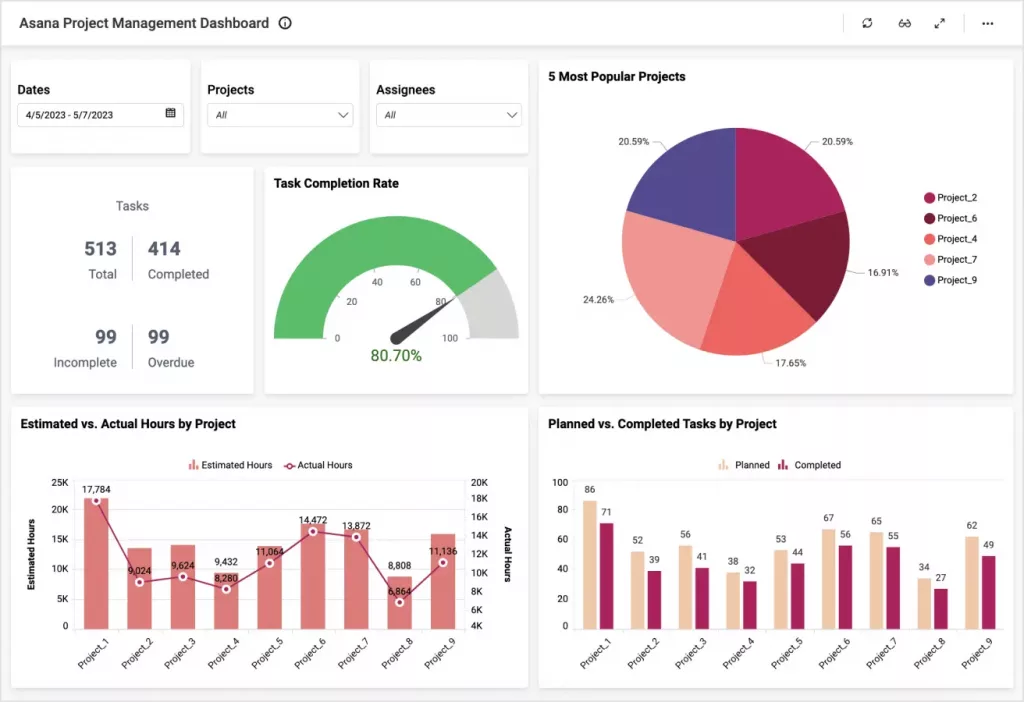
External partners are easy to bring in. Starter includes unlimited free guests, so the racking vendor and the integration partner can see their tasks and comment without taking a paid seat. For a project that depends on outside dates, that keeps the vendor working from the same plan as you.
The catch is where time and resources sit. The free plan has no timeline or Gantt view. Native time tracking and resource management start on Advanced at $24.99 per user, and timesheets and budgets are an Enterprise add-on. If you need to bill for hours, check these Asana alternatives first.
Pros:
- Task dependencies show which tasks are waiting on others across teams.
- Timeline view on paid plans maps the go-live sequence visually.
- Unlimited free guests on Starter for vendors and partners.
- List, board, and calendar views of the same project.
Cons:
- No timeline or Gantt view on the free plan
- Native time tracking and resource management only on Advanced
Pricing:
Free plan for up to 2 users. Paid plans start at $10.99/user/month (billed annually), or $13.49 billed monthly.
8. Microsoft Planner – Best for Teams Standardized on Microsoft 365
I tested Microsoft Planner with a distribution team that already lived in Outlook and Teams. Adding the project plan as a Teams tab meant nobody had to install anything or learn a new login.
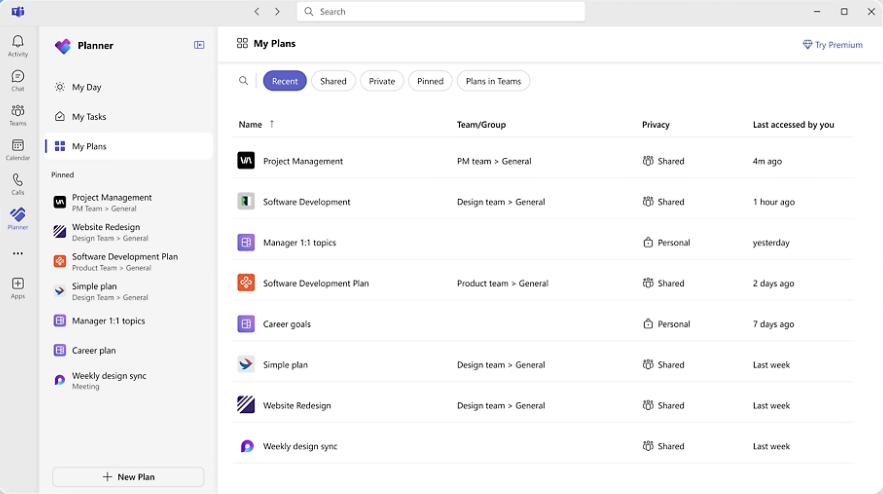
Adoption is the real advantage here. Tasks show up where people already work, and staff who ignore alerts from a separate tool are more likely to see them inside Teams. With Project Online retired on 30 September 2026, Planner is now Microsoft’s main project tool, so teams on Microsoft 365 are being pushed toward it anyway.
The catch is the plan structure. Baselines, critical path, and the desktop app only come with Plan 3 at $30 per user. The AI assistant needs a separate Copilot license, also $30 per user, which roughly doubles the cost for a team that wants both.
Pros:
- Runs inside Teams and Outlook, so there’s no separate app to adopt.
- Board view with buckets organizes tasks by site, phase, or team.
- Uses existing Microsoft 365 accounts for sign-in and access.
- Plan 3 adds baselines and critical path for complex rollouts.
Cons:
- Baselines, critical path, and the desktop app only on higher tiers
- AI features require a separate Copilot license
Pricing:
Starts at $10/user/month.
9. Celoxis – Best for Multi-Site Portfolio and Budget Governance
I looked at Celoxis for a network expansion with several depot projects running at once, each sharing the same engineers and site leads. It handles that portfolio view well: every project rolls up into one dashboard, and you can drill down from there.
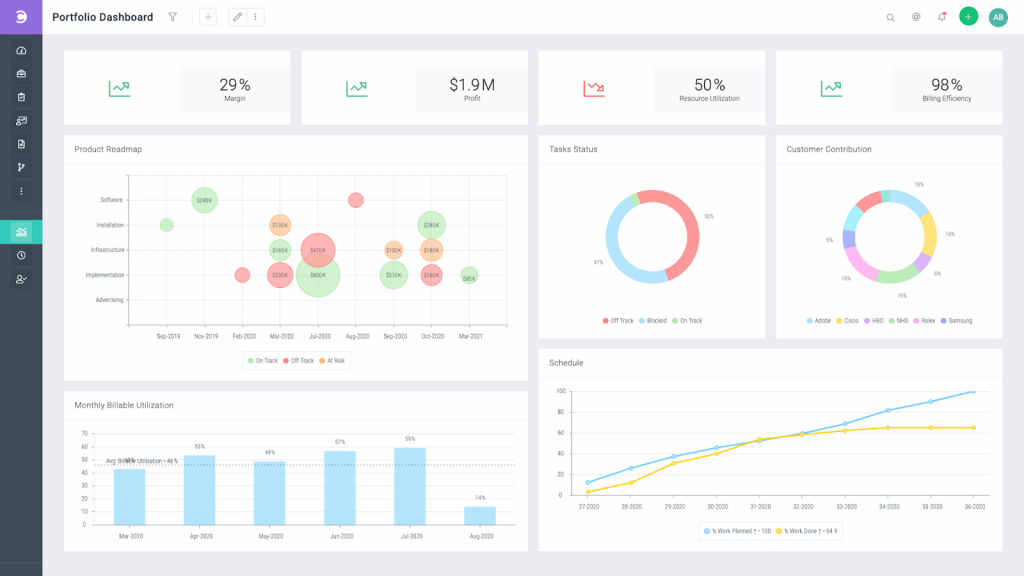
Resource planning sits next to the schedule. Before you commit an engineer to a new depot, you can see whether they’re already booked on another project. Budgets stay tied to milestones, so an overrun shows up while there’s still money left to manage.
The catch is the setup cost in time and seats. There’s no free plan, the minimum is 5 users, and the learning curve is steep, a theme that comes up in 52 G2 reviews. For a team running a few small projects a year, that’s more tool than you need.
Pros:
- Portfolio dashboards roll up status across every project.
- Resource planning shows who is already booked before you assign them.
- Budget tracking tied to milestones surfaces overruns early.
- On-premise deployment on Enterprise for data residency requirements.
Cons:
- 5-user minimum and no free plan
- Steep learning curve reported by the users
Pricing:
Starts at $10/user/month (prepaid annually), with a 5-user minimum.
10. Odoo – Best for Combining Inventory, Projects, and Invoicing in One ERP
I tried Odoo with a small distributor that wanted stock, projects, and invoicing in one system instead of three. A warehouse move could be planned in the Project app while the Inventory app tracked the stock being moved.
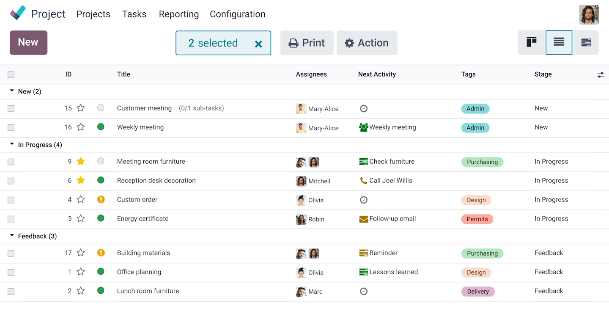
Everything shares one database. Time logged against a project task can feed straight into an invoice, and inventory moves update without being re-entered elsewhere. For a company that wants its ERP and its project tool to be the same system, that’s the main reason to choose it.
The catch is cost and setup. Only one app is free, so adding Project to Inventory or Invoicing puts you on a paid plan. Standard is $31.10 per user, billed annually, with 20% off the first year ($24.90). Most teams also need an implementation partner to configure it.
Pros:
- Project, Inventory, Invoicing, and Timesheets share one database.
- Time logged on tasks can be invoiced to customers directly.
- Inventory app supports multi-warehouse stock tracking.
- One app is free to start, with more added as you grow.
Cons:
- A second app means a paid plan
- Implementation partner usually needed for setup
Pricing:
One app free. Paid plans start at $31.10/user/month (billed annually), or $24.90 in the first year.
How Did I Evaluate These Tools?
Every tool here got the same test: can it run a project that depends on people outside your team, at a price a small or mid-sized team can carry? I scored each one on six criteria, and these are the details that separated good logistics project management software from the rest.
- User Reviews and Ratings: I checked every rating on G2 in October 2026 and read the most recent reviews for patterns, not just the score. Two themes came up again and again: steep learning curves on the heavier tools, and pricing that climbs once you add seats. Where a vendor has several G2 listings, as Odoo does, I used the listing for the product described here.
- Essential Features and Functionality: Logistics projects slip because of outside dates, so dependencies came first. When a carrier’s test date moves, every linked task should move with it. I also checked whether carriers, vendors, and clients can get guest access without a paid seat, and whether time tracking and invoicing are built in. Most tools have all three somewhere, but often only on the second or third paid tier.
- Ease of Use: Dock supervisors and site leads rarely get training time, and they won’t open a tool that slows them down. I favored tools a non-technical user could update on day one, such as a spreadsheet-style grid, Kanban boards, or a tab inside apps the team already uses. Tools known for a steep learning curve lost points, however strong their feature list.
- Customer Support: A go-live weekend is the wrong time to wait two days for an email reply. I looked at how quickly you can reach a person and on which plan, since live phone or chat support is often reserved for higher tiers.
- Value for Money: Per-seat pricing adds up fast once site staff, drivers, and vendors join a project. I compared seat minimums, user caps, and the limits on free project management software, then priced the tier that actually unlocks dependencies, guest access, and time tracking. A cheap entry plan that gates those features costs more than it looks.
- Personal Experience: I ran a real logistics scenario in each tool, including a WMS go-live, a carrier onboarding, a depot launch, and a 3PL client onboarding. I noted where each tool saved time, where it needed a workaround, and which limit I hit first.
What Are My Top 3 Picks?
For project management for logistics on a small or mid-sized team, these three cover the situations you’re most likely to face: billing clients for project work, bringing a large crew in at no cost, and moving off Excel without losing the team.
1. ProProfs Project
Pick ProProfs Project if you bill clients for project work, such as a 3PL onboarding a new account or a consultant running a WMS implementation. It combines project management with invoicing: hours are logged against each task, invoices are generated from those hours and expenses, and clients get guest access to follow progress. The Business plan includes unlimited users, so the price stays the same as site leads and partners join. The Free plan works for testing one project, but expect to upgrade once you pass 3 users or 50 open tasks.
2. ClickUp
Pick ClickUp if your biggest cost problem is headcount. A depot launch or fleet rollout can involve dozens of people who only need to see and check off their own tasks, and the free plan has no user limit. Planners can work from the list view while site staff use the board, so one plan serves both. The trade-off is limited free storage and AI as a paid add-on, so it suits task coordination better than document-heavy projects.
3. Smartsheet
Pick Smartsheet if your team runs projects in Excel today and won’t adopt anything that looks different. The grid keeps the rows-and-columns layout your ops leads already know, and linked dependencies on the Gantt view re-date downstream tasks when a vendor slips. It works best for line-by-line rollout tracking, such as a WMS go-live across several sites. Budget for Business if you need guest access for vendors or more than 250 automations a month, since Pro covers neither.
Bill Clients for Onboarding Work Straight From Logged Hours
Do You Need Project Management Software or a TMS?
You probably need both, because they do different jobs. A transportation management system (TMS) runs the daily movement of freight: routing loads, booking carriers, and tracking shipments. Project management software runs the work that changes that operation, like rolling out the TMS itself.
The daily side is where disruption shows up first. According to Celonis’s 2025 Process Optimization Report, 54% of supply chain leaders experience disruption daily. A TMS helps you respond to those disruptions one load at a time. It won’t plan the six-month carrier onboarding or depot launch behind them.
| Question | Project Management Software | TMS | WMS |
| What does it manage? | Projects with a start and go-live date | Freight movement: routing, carrier booking, shipment tracking | Stock inside the warehouse: receiving, putaway, picking, shipping |
| How long does the work last? | Weeks to months, until go-live | Daily and ongoing | Daily and ongoing |
| Who uses it? | Project managers, ops leads, site leads, vendors | Dispatchers and transport planners | Warehouse supervisors and pickers |
| Logistics example | Onboarding a new carrier or launching a DC | Booking today’s loads with that carrier | Running the new DC once it’s live |
An ERP such as Odoo spans all three, combining inventory, invoicing, and a project app in one system. That works if you want one vendor for everything, but you take on the ERP’s setup and licensing just to get the project features.
Pro Tip: If the work repeats every day, it belongs in an operations system like a TMS or WMS. If it has a go-live date, it’s a project, and that’s where transportation project management software fits.
Run Logistics Projects Without Chasing Carriers by Email
Project management for logistics comes down to one problem: your plan depends on carriers, vendors, clients, and site staff you don’t manage. The right tool keeps everyone on the same dates, moves linked tasks when one slips, and shows that change to the people it affects the same day.
Don’t pick from a feature list. Take one live project, like your next carrier onboarding or warehouse go-live, load it into two tools from this list, and run it for a week. Invite the vendor and one site lead, then watch which tool they actually open. That tells you more than any demo.
If you also bill clients for that work, ProProfs Project is where I’d start, since time tracking, invoicing, and guest access sit alongside the plan. It won’t replace your TMS or WMS, and it isn’t built for enterprise portfolio governance. For a small or mid-sized team that needs projects finished on time and billed correctly, it handles the project side without adding another tool.
Frequently Asked Questions
What does project management for logistics include?
It covers the full life of a logistics project, from approving the work to handing it over to operations. Most projects move through five stages: initiation, planning, execution, monitoring, and closure. Closure matters more than teams expect, because that's where you confirm the new carrier, site, or system is live, document what changed, and hand day-to-day ownership to the people who will run it.
Can project management software replace a TMS?
No. They cover different stages of the same change. Project management software runs the rollout: data migration, carrier setup, testing, and training. Once the TMS goes live and loads are moving through it, the project closes and the TMS takes over the daily work. A good handover point is a go-live checklist in your project tool, signed off by operations, before the old process is switched off.
Which features matter most for logistics projects?
Start with task dependencies and guest access, since outside partners cause many of the delays. After that, look for features that save time on repeat work. Project templates let you reuse a carrier onboarding or client setup instead of rebuilding it, baselines show how far a rollout has drifted from the original plan, and mobile apps let site leads update tasks from the warehouse floor.
What is the best project management software for a small logistics team?
It depends on whether you bill clients for the work. ProProfs Project is the simplest project management tool for SMBs with client invoicing, time & billing. If you don't bill clients, the deciding factors are team size and outside partners. Under five people, most free plans will do, but once carriers and vendors join, look for guest access and pricing that doesn't climb per seat.
Is there free project management software for logistics?
Yes, but free plans suit a pilot more than a full rollout. The limits that break first are usually caps on users, projects, or open tasks, followed by missing features such as Gantt views or time tracking. Before you commit, run one real project on the free plan and note which limit you hit first. That tells you which paid tier you'll actually need.
How do 3PLs track billable project work?
Log every hour against the task it belongs to, and mark it billable or non-billable as you go, not at month-end. Compare estimated with actual hours before you invoice, so you can explain any overrun to the client. In ProProfs Project, tracked hours and project expenses turn into a client invoice directly, which removes the step of copying timesheets into a separate billing tool.
Is Microsoft Project still an option for logistics teams?
Microsoft retired Project Online on 30 September 2026 and now points customers to Planner. If your team depends on baselines, critical path, or the desktop scheduling app, those come with Planner Plan 3 at $30 per user per month. Teams that only need shared task boards inside Teams can stay on Plan 1, but check which features your current plans use before you migrate.
Does ProProfs Project work for carrier onboarding and warehouse go-lives?
Yes. You can build a carrier onboarding once, save it as a project template, and reuse it for every new carrier with the same tasks and dependencies. For a warehouse go-live, the Gantt view tracks dependencies and baselines, guest access lets clients and vendors view or comment on their tasks, and the iOS and Android apps let site leads update progress from the floor.
FREE. All Features. FOREVER!
Try our Forever FREE account with all premium features!