
Running a manufacturing operation isn’t for the faint of heart. As your business grows, so do the challenges—rising costs, shifting supplier timelines, and scattered data that slow everything down.
I remember working with a manufacturer a while back who was juggling multiple systems for inventory, scheduling, and supplier management. Every day, something slipped through the cracks—until they switched to manufacturing project management software.
Suddenly, everything clicked. The team was able to streamline processes, track real-time progress, and get ahead of issues before they became problems. That’s the power of the right tool.
In this guide, I’m going to walk you through the 13 best tools for 2026 that can help you take control of your operations, stay on schedule, and scale with confidence. But first, let’s take a quick look at how this software works—and why it’s essential for efficient, profitable growth.
What Is Manufacturing Project Management Software?
Manufacturing project management software is a specialized, centralized system for planning, assigning, and tracking how your production resources (labor, machinery, materials, and time) are used across specific job orders and product runs.
Instead of wrestling with fragmented task lists, production bottlenecks, and disconnected financial data, this software provides a single, live view of your entire manufacturing operation, linking customer demand to shop floor execution and final financial outcomes.
A strong manufacturing project management software tool helps you:
- Enforce standardized workflows: Utilize automation to ensure every job order follows the correct routing, quality checks, and technical specifications, minimizing scrap and maximizing quality consistency.
- Forecast costs and timelines: Track billable versus non-billable time, compare planned versus actual effort, and spot budget risks early to ensure every SEO project is profitable.
- Track Analytical Data to Tasks: Monitor manufacturing KPIs like Overall Equipment Effectiveness (OEE) and use that real-time data to automatically adjust production schedules and workforce utilization.
- Automate Busywork: Automatically generate material requirements based on the Bill of Materials (BOM), trigger procurement when inventory is low, and notify production managers when bottlenecks are identified.
- Report With Confidence: Generate real-time dashboards showing production capacity, inventory levels (JIT), and lot traceability, which are essential for compliance and rapid problem-solving.
Compare the best manufacturing project management software with the best marketing project management software. Recommendations: Best Marketing Project Management Software.
List of the Best Manufacturing Project Management Software
The best project management software for the manufacturing industry must handle specialized needs like multi-level BOMs and machine capacity planning. Here’s a quick snapshot of the top 13 tools for manufacturing companies:
| Tool | Best for | Pricing | User Rating (G2) |
| ProProfs Project | Simplest Project Management Tool for Smbs With Client Invoicing, Time & Billing | Free plan available. Paid plans start at $39.97/month. | 4.4/5 |
| DELMIAWorks (IQMS) | Discrete/high-volume production & BOM management | Available on request. | 3.9/5 |
| SAP S/4HANA | Large enterprise production & advanced planning | Available on request. | 4.3/5 |
| MRPeasy | SMEs needing integrated MRP/BOM | Starts at $49/user/month. | 4.6/5 |
| Celoxis | Mid-to-Large Manufacturing Enterprises Needing PPM | Starts at $10/user/month | 4.5/5 |
| Acumatica | Project-driven & integrated job costing | Available on request. | 4.5/5 |
| NetSuite | Financial control & complex revenue recognition | Available on request. | 4.0/5 |
| Oracle Agile PLM | Product lifecycle management (PLM) & design control | Available on request. | 4.0/5 |
| ClickUp | NPI planning & workflow customization | Free plan available. Paid plans start at $7/user/month. | 4.7/5 |
| Smartsheet | Data-rich dashboards & automated workflows | Starts at $9/user/month. | 4.4/5 |
| Wrike | Cross-departmental collaboration (non-production) | Free plan available. Paid plans start at $10/user/month. | 4.2/5 |
| monday.com | Visual tracking & simple collaboration | Free plan available. Paid plans start at $9/seat/month. | 4.7/5 |
| Zoho Projects | Workflow automation & ERP integration | Free plan available. Paid plans start at $4/user/month. | 4.3/5 |
Now, let’s break down each tool — what makes it unique and the pros and cons you should know.
1. ProProfs Project – Simplest Project Management Tool for SMBs With Client Invoicing, Time & Billing
As a project manager with experience across multiple manufacturing companies, I’ve found that ProProfs Project is a highly effective tool for planning, managing, and monitoring work with complete transparency. The platform’s centralized structure makes it easy to track everything—from workloads and deadlines to the job costs that directly impact production and profitability.
What I appreciate most is how it breaks down complex projects into manageable, actionable tasks. I can link dependencies between work centers and easily toggle between Gantt, Kanban, and Calendar views to stay on top of production at every stage.
ProProfs Project goes beyond basic task management. The time tracking feature supports managing billable and non-billable hours and enables invoice generation to track clients and costs. Plus, the built-in collaboration environment, with real-time notifications and seamless file sharing, keeps my team aligned, ensuring that time, people, and resources are always in sync across each project.
One addition that’s made setup noticeably faster is the AI layer now built into the platform. Describe a job order or production project in plain language, and the AI Project Designer lays out the tasks, stages, and assignments for you instead of building the structure manually every time a new run kicks off. An AI assistant stays active as the project runs too, flagging blockers and answering direct questions like “which projects are overrunning” without pulling a separate report first.
Pros:
- Clear visibility into workloads and job costs through multiple project views (Gantt, Kanban, Calendar, List).
- Built-in time tracking and invoicing streamline client billing and reduce reliance on external financial tools.
- Profitability and utilization reports make it easier to track the ROI across various job orders.
- AI Project Designer and AI assistant that build out job structures automatically and flag production risk before it escalates
- Custom workflows, roles, and permissions help align specialized manufacturing resources with production priorities.
- Collaboration features—comments, file sharing, notifications—keep communication strictly inside the platform and tied to specific production tasks.
Cons:
- Available only as a cloud-based platform; there is no downloadable or on-premise deployment option for manufacturing firms needing local hosting.
- The interface lacks a dark mode, which may limit comfort for project managers working long hours.
Pricing: Free plan available. Paid plans start at $39.97/month.
User Rating: 4.7 (Capterra)
2. DELMIAWorks (IQMS) – Best for Discrete/High-Volume Production & BOM Management
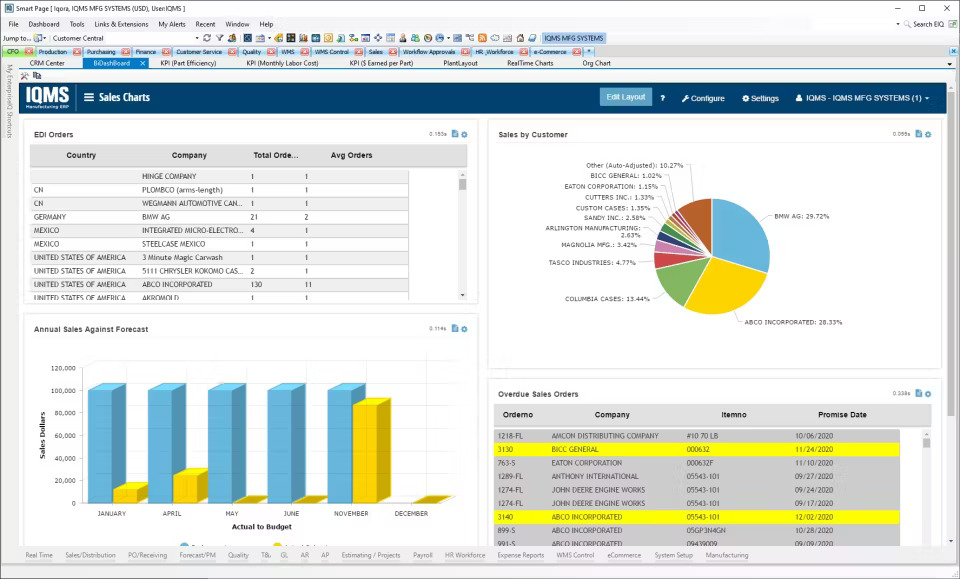
Image source: Capterra
When I looked into DELMIAWorks, I found a system built specifically for manufacturers dealing with complex production challenges. It’s a true all-in-one ERP solution designed to simplify every stage of the manufacturing process.
What really sets this manufacturing project management software apart is its powerful Bill of Materials (BOM) feature. Instead of just listing components, it captures all the details that impact production—like work centers, scrap rates, setup times, and tooling needs. This makes scheduling and cost analysis far more accurate.
DELMIAWorks also helps teams break down data silos and gain complete visibility from design to shop floor, ensuring every decision is based on real-time, connected insights.
Pros:
- Native, specialized Bill of Materials (BOM) management integrates production details like scrap rates and labor.
- A complete A-Z ERP solution specifically tailored for manufacturers using complex BOMs or formulas.
- Designed to eliminate data silos and improve communication between production, engineering, and finance.
- Simplifies complex project administration and equipment tracking tasks directly on the shop floor.
- Provides greater end-to-end visibility and operational control over manufacturing processes.
Cons:
- The subscription model can be expensive, with higher upfront implementation costs that may limit accessibility for smaller teams.
- As a deep ERP platform, it requires careful organizational change management and process redesign to ensure efficient implementation.
Pricing: Available on request.
User Rating: 4.1 (Capterra)
3. SAP S/4HANA – Best for Large Enterprise Production & Advanced Planning
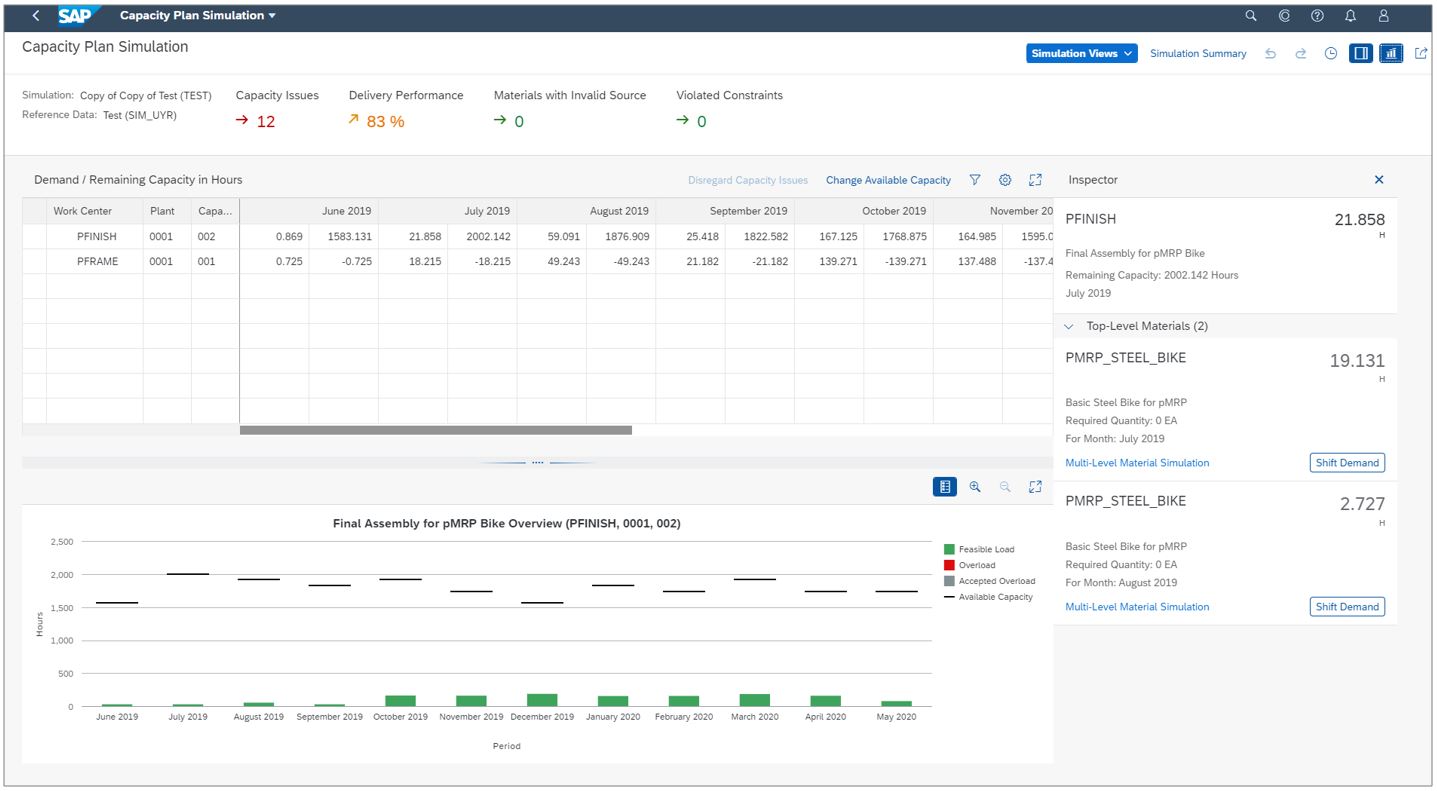
Image source: community.sap.com
I found SAP S/4HANA to be a well-structured system designed for large manufacturers operating across multiple locations and handling complex processes. It manages advanced planning and dynamic scheduling with precision, using AI and machine learning to identify potential production delays and automatically adjust workflows.
The Project Management module enables detailed resource planning for labor, materials, and equipment, while giving managers clear oversight of costs and revenue across major projects.
Its manufacturing module runs real-time Material Requirements Planning (MRP), recalculating material needs based on current sales and production activity. This helps maintain Just-in-Time inventory levels and reduces supply chain risks.
SAP S/4HANA also includes robust quality management tools that ensure every product meets industry standards while keeping administrative work to a minimum.
Pros:
- Features advanced planning and scheduling capabilities for optimal resource usage in large operations.
- Provides comprehensive Project System (PS) features for managing internal, customer, and capital investment projects.
- Leverages machine learning and AI for predictive analysis to automate and proactively solve production issues.
- Offers real-time Material Requirements Planning (MRP) to dynamically link procurement with production schedules.
- Enables stringent quality management and control, ensuring products meet the necessary industrial standards.
Cons:
- SAP systems can be complex databases, requiring skilled and expensive implementation partners to tailor the system to business needs.
- Implementation demands significant organizational effort to define and redesign processes rather than simply transferring existing tasks.
Pricing: Available on request.
User Rating: 4.3 (Capterra)
4. MRPeasy – Best for SMEs Needing Integrated MRP/BOM
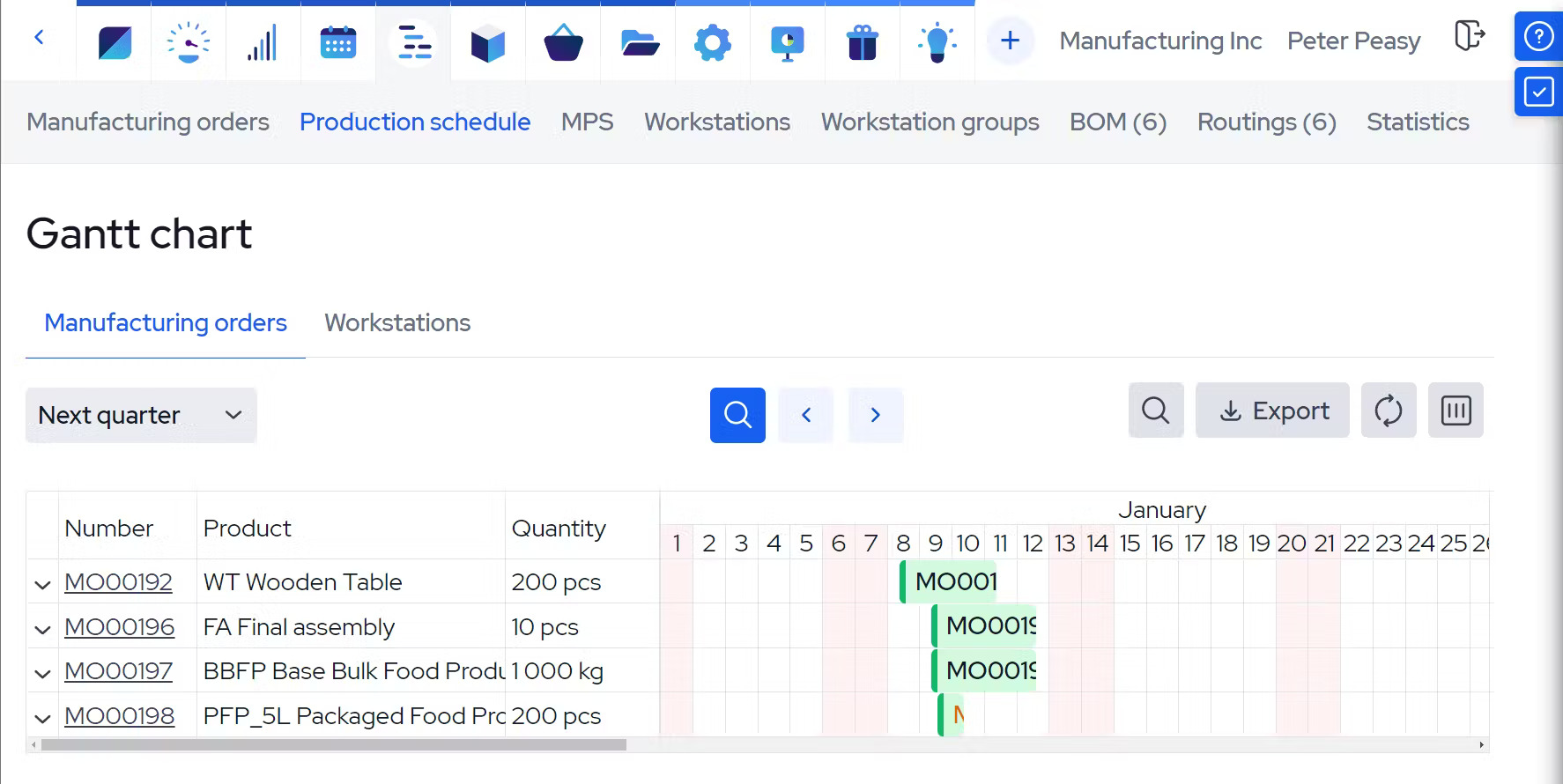
Image source: Capterra
When I explored MRPeasy, it quickly became clear why it’s such a popular choice for small and mid-sized manufacturers. It delivers the analytical power of a full Manufacturing Resource Planning (MRP) system without the high cost or complexity of a traditional ERP suite.
This manufacturing project management software combines strong production planning with essential tools like Bill of Materials (BOM) management and lot traceability. I found its capacity planning especially effective — the equipment loading charts are clear and easy to read, and you can organize workstations based on performance or planned downtime.
The drag-and-drop rescheduling feature is another standout, helping teams adjust production in real time when priorities shift or unexpected disruptions occur. That flexibility keeps schedules balanced, minimizes downtime, and helps prevent stockouts.
Pros:
- Features comprehensive production planning and robust multi-layered Bill of Materials (BOM) management.
- Includes dynamic scheduling with drag-and-drop rescheduling to quickly adapt to production disruptions.
- Provides detailed equipment loading charts and tools for organizing workstations based on performance (Capacity Planning).
- Essential integrated features include lot traceability, supply chain management, and warehouse management (WMS).
- Offers a central, shared, and up-to-date overview of capacity across all production teams.
Cons:
- Focuses more on production management, offering fewer advanced financial and job costing tools compared to larger ERP systems.
- May require some customization or integration for companies with highly complex workflows.
Pricing: Starts at $49/user/month.
User Rating: 4.5 (Capterra)
5. Celoxis – Best for Mid-to-Large Manufacturing Enterprises Needing PPM Without ERP Complexity
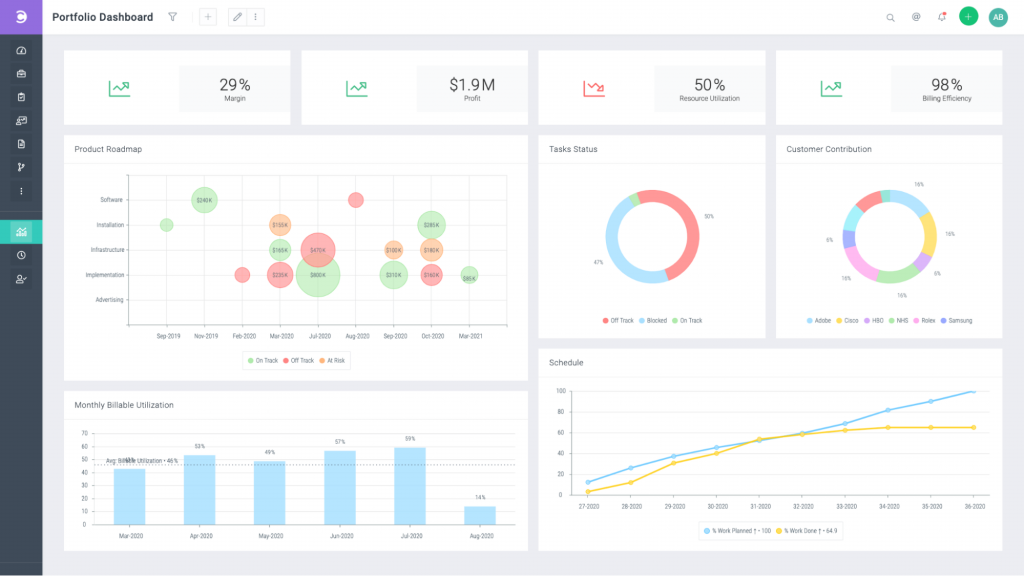
Image source: celoxis.com
Celoxis is a powerful project portfolio management platform designed for manufacturing organizations that manage multiple projects across engineering, production, procurement, and finance. It bridges the gap between lightweight project tools and full-scale ERP systems by combining scheduling, resource planning, and financial tracking into a single, unified system.
What stood out to me is how naturally it connects project execution with financial outcomes. Instead of switching between tools to track costs, timelines, and team capacity, everything is available in one place with real-time visibility. This makes it especially useful for manufacturers handling new product introductions, capital projects, or multi-site operations where coordination and cost control are critical.
Unlike general-purpose tools that focus mainly on task tracking, Celoxis provides deeper operational insight. It allows teams to monitor resource utilization, compare planned versus actual costs, and identify risks early, helping leaders make faster and more informed decisions without relying on manual reporting.
Pros:
- Unified platform that combines scheduling, resource management, and financial tracking in one system
- Strong project portfolio visibility with real-time dashboards across multiple concurrent projects
- Built-in cost and budget tracking with planned vs. actual comparisons
- Advanced resource capacity planning helps prevent over-allocation across teams
- Flexible deployment options, including both cloud and on-premise
Cons:
- May require onboarding time for teams transitioning from simpler task management tools
- Not designed to replace core ERP or shop-floor systems like MES or BOM management
Pricing:
Starts at $10/user/month
User Rating: 4.4 (Capterra)
6. Acumatica – Best for Project-Driven & Integrated Job Costing
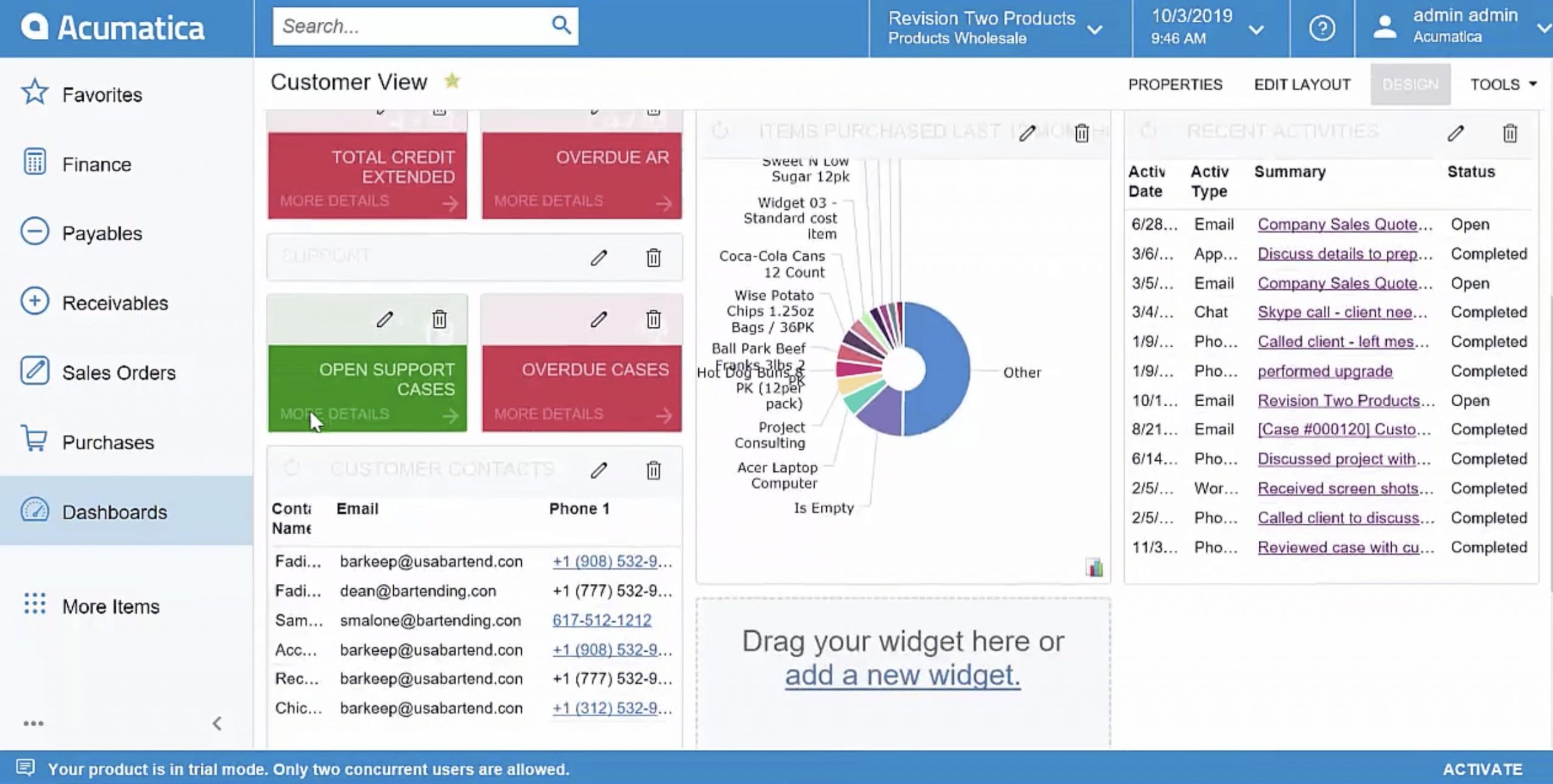
Image source: erpresearch.com
Acumatica is purpose-built for project-based and Engineer-to-Order (ETO) manufacturing, where tracking every cost against a client contract matters. Its structure supports industries that depend on precision planning, detailed cost control, and clear visibility across all project stages.
The system’s job-costing and project accounting modules are especially effective for managing commitments, tracking change orders, and maintaining financial accuracy throughout complex manufacturing cycles. It also handles inventory tracking and costing with notable clarity, simplifying how teams manage raw materials and finished goods.
I found Acumatica’s progress billing and contract invoicing features particularly useful for long-term projects, helping maintain healthy cash flow without manual intervention. Combined with flexible customization and reliable reporting, Acumatica offers manufacturers a system that brings financial control and operational visibility into one cohesive workspace.
Pros:
- Strong job-costing and project accounting modules that support progress billing and contract invoicing.
- Excels in inventory tracking and inventory costing, crucial for managing the raw material lifecycle.
- Supports commitment tracking and managing change orders, essential for custom contract work.
- Provides robust customization capabilities, allowing for greater flexibility in tailoring the software to business needs.
- Features mobile field entry for time and expense tracking, supporting remote installation or service teams.
Cons:
- Revenue recognition may require partner assistance or custom configuration, adding setup complexity.
- Although customizable, adjustments can be slower compared to more flexible, general-purpose tools.
Pricing: Available on request.
User Rating: 4.4 (Capterra)
7. NetSuite – Best for Financial Control & Complex Revenue Recognition

Image source: NetSuite
NetSuite functions as a complete ERP suite that connects project management directly to the financial core, creating a single system for tracking costs, profitability, and performance. It’s well-suited for manufacturers managing complex, multi-location projects that require both precision and transparency. The platform’s built-in job costing links labor, materials, and overhead with accounting, helping teams monitor expenses with accuracy.
When I explored this manufacturing project management software, I found its automated, ASC 606–compliant revenue recognition especially useful for companies handling long-term contracts. It simplifies financial reporting and supports compliance without adding unnecessary manual steps.
As a manufacturing project management software, NetSuite brings all major business processes together, reducing the need for multiple disconnected tools and giving teams a unified, real-time view of operations.
Pros:
- Offers integrated project management features, including detailed project budgeting and resource planning.
- Supports automated, ASC 606–compliant revenue recognition for accurate financial reporting.
- Integrated job costing tracks labor, materials, and overhead directly through the accounting system.
- Features strong general ledger capabilities, including clear journal entries and tagging for financial tracking.
- Designed to combine all business processes, reducing the need for separate systems.
Cons:
- As a large, complex platform, it often requires customization and setup through implementation partners.
- Some users find its inventory tracking and costing tools less straightforward compared to alternatives like Acumatica.
Pricing: Available on request.
User Rating: 4.2 (Capterra)
8. Oracle Agile PLM – Best for Product Lifecycle Management (PLM) & Design Control
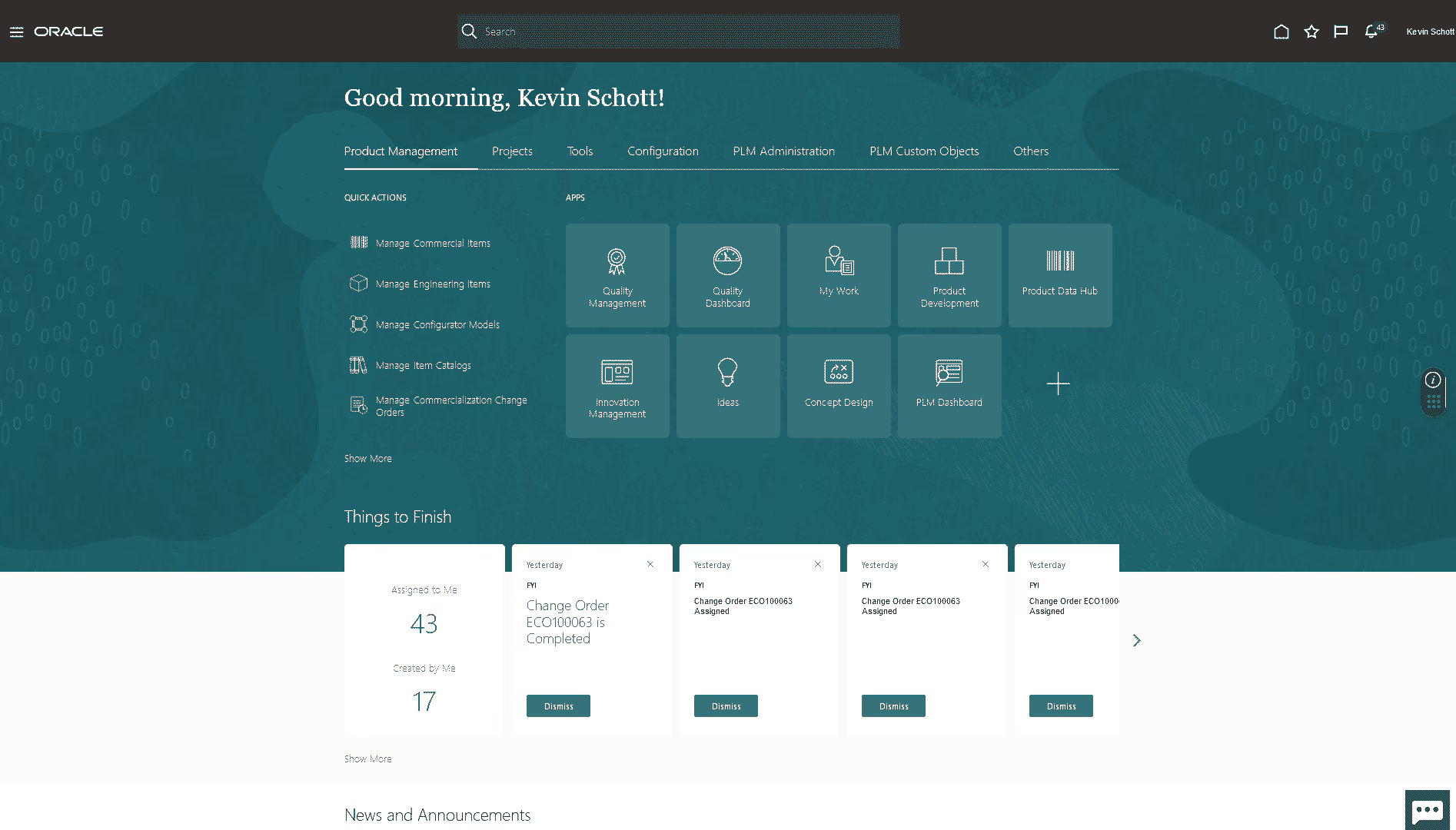
Image source: Oracle
Oracle Agile PLM is built to help manufacturers manage every stage of the product lifecycle with structure and visibility. The platform connects design, engineering, and production teams within a single, collaborative system that speeds up product development and maintains control over quality and change processes.
It manages everything from design data and change requests to Bill of Materials (BOM) tracking, ensuring the original design intent stays consistent through production. When I explored it, I found its quality compliance and supply chain visibility particularly helpful for coordinating engineering and procurement teams.
As a project management software for manufacturing companies, Oracle Agile PLM offers a secure and affordable way for small and mid-sized manufacturers to manage products from concept to launch while improving collaboration across departments.
Pros:
- Accelerates new product design and development by connecting every stage of the value chain.
- Manages the entire product lifecycle, from early design to final production.
- Provides strong quality control and flexible change management tools.
- Links engineering and design projects directly with procurement and manufacturing.
- Affordable and secure option for small and mid-sized teams needing better collaboration.
Cons:
- While effective for product lifecycle management, manufacturers may still need specialized tools like DELMIAWorks for real-time execution.
- As part of a larger suite, setup and customization can be complex for smaller teams seeking a focused solution.
Pricing: Available on request.
User Rating: 4.2 (Capterra)
9. ClickUp – Best for NPI Planning & Workflow Customization
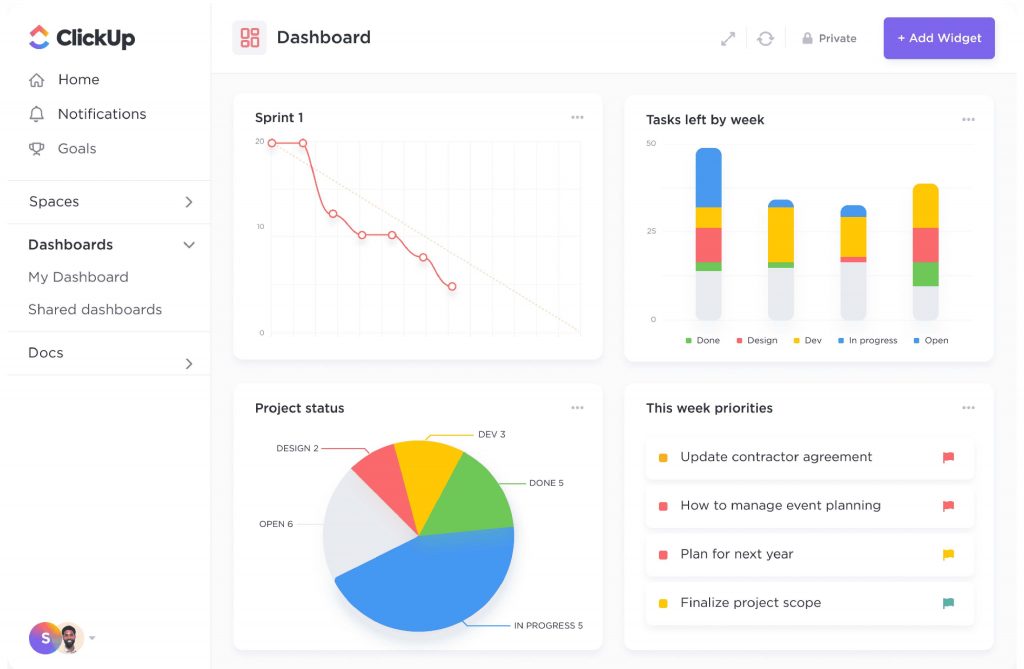
Image source: ClickUp
ClickUp offers a highly adaptable approach to managing manufacturing and administrative projects, making it especially useful for New Product Introduction (NPI) planning. It provides a level of flexibility rarely seen in traditional tools, with over 1,000 templates— including dedicated Manufacturing Project Plan templates— that can track the entire order cycle, from raw material requests to purchase orders, all within one configurable workspace.
During my review, I found the integrated AI tools particularly valuable for mapping complex processes and summarizing strategy documents, which saves significant time during NPI planning. Its flexibility also supports managing repeat purchases and raw materials efficiently, though replicating full ERP precision would require custom API integrations.
One of the best project management software for manufacturing, ClickUp bridges administrative, design, and planning teams under one unified, easy-to-adjust platform.
Pros:
- Offers high configurability and over 1,000 templates, including for manufacturing planning.
- Built-in AI tools simplify process mapping and summarize strategy documents for NPI planning.
- Customizable fields and recurring tasks simplify repeat purchases and raw material tracking.
- Provides multiple view options to improve visibility into resource allocation for non-production teams.
- Allows the organization to manage the full order cycle, from raw materials to purchase orders, in one workspace.
Cons:
- Lacks native, multi-level Bill of Materials (BOM) management for complex production structures.
- Depends on custom API integrations for real-time synchronization with external ERP or MES systems, which can affect data consistency.
Pricing: Free plan available. Paid plans start at $7/user/month.
User Rating: 4.6 (Capterra)
10. Smartsheet – Best for Data-Rich Dashboards & Automated Workflows
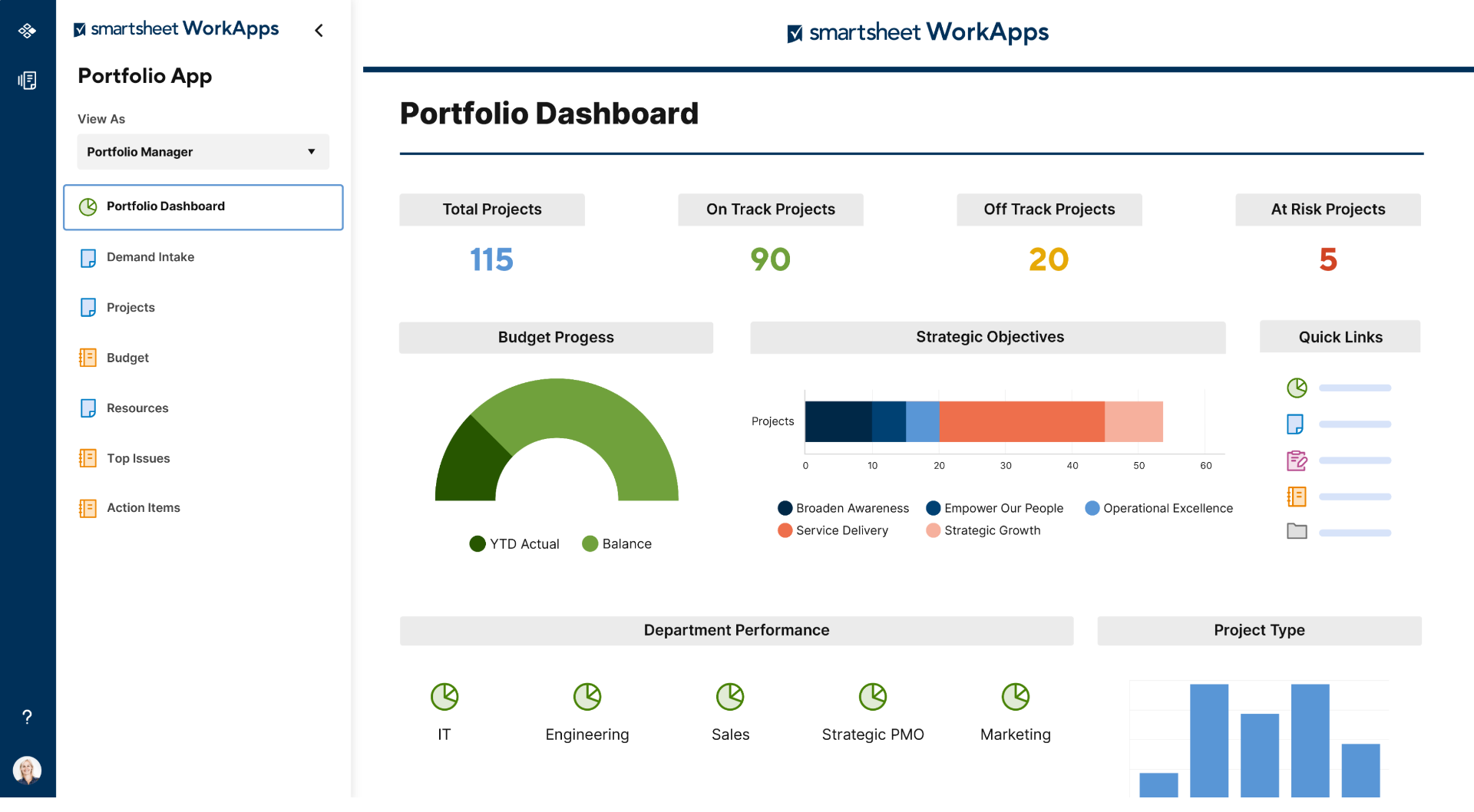
Image source: Smartsheet
Smartsheet is widely used in manufacturing environments where teams rely on data-driven coordination and need the flexibility of a spreadsheet-based platform. It combines the familiarity of traditional grids with powerful workflow automation and reporting tools, helping managers organize complex production processes with greater speed and precision.
In my review, I found its dashboards particularly effective for bringing together resource availability, approvals, and task progress in one centralized view. The ability for different team members to collaborate in a familiar layout, while managers maintain complete oversight, makes it a practical choice for production teams managing multiple moving parts.
For manufacturers seeking custom manufacturing project management software, Smartsheet offers a balance between simplicity and structure, though achieving deeper data centralization may require additional paid extensions.
Pros:
- Flexible platform for creating automated workflows and managing approval processes.
- Data-rich dashboards give managers real-time visibility into project progress.
- Simplifies task prioritization and is easy to use compared to many enterprise systems.
- Custom workflows can be built using blueprints and process management templates.
- Strong collaboration tools enable clear, cross-functional communication.
Cons:
- Full data centralization often requires paid add-ons like Dynamic View or Data Shuttle, which increase overall cost.
- Lacks native multi-level BOM and advanced capacity scheduling features found in dedicated ERP or MRP systems.
Pricing: Starts at $9/user/month.
User Rating: 4.5 (Capterra)
11. Wrike – Best for Cross-Departmental Collaboration (Non-Production)
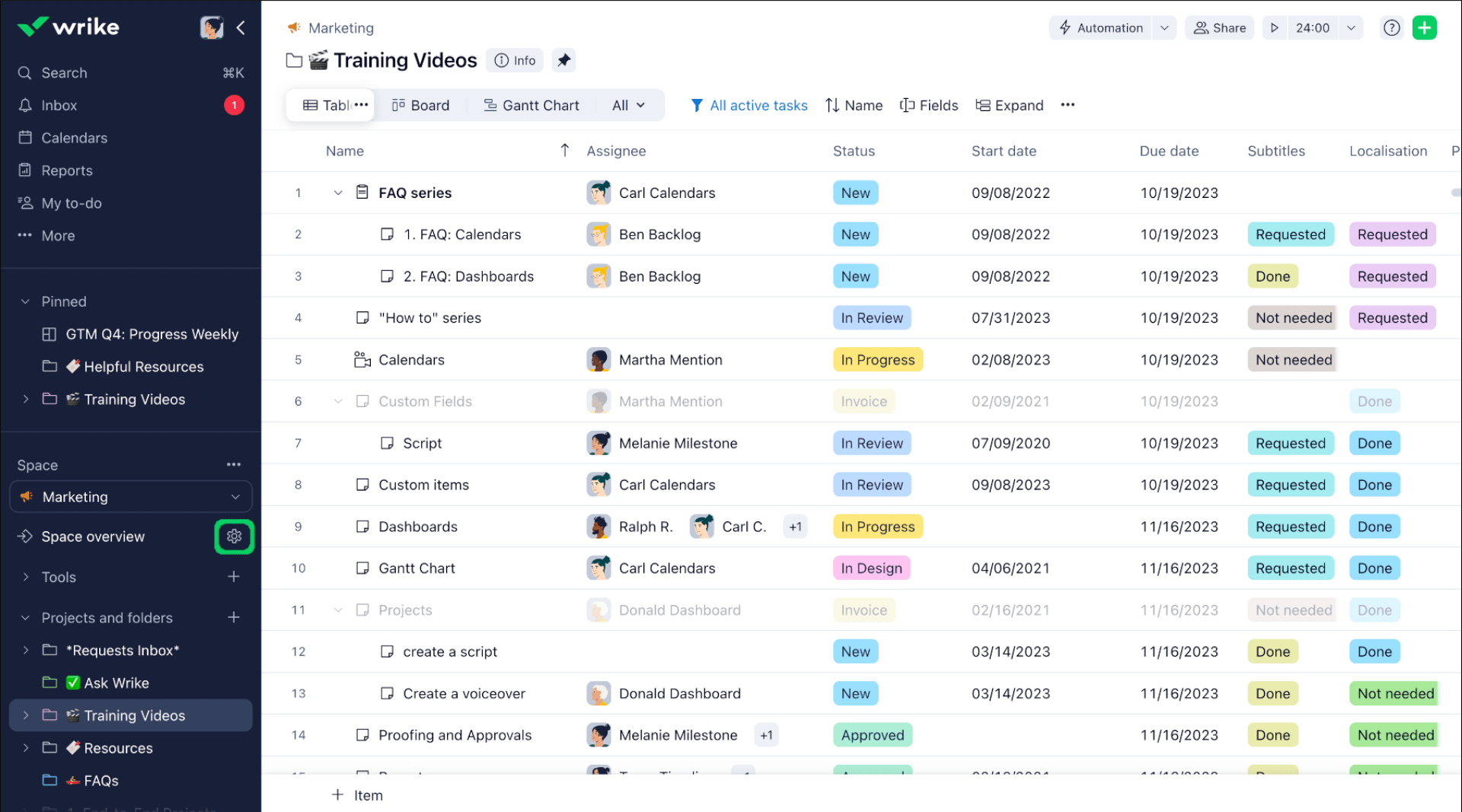
Image source: Wrike
Wrike offers a structured yet flexible way to manage enterprise-wide projects that involve multiple departments and complex dependencies. It’s especially effective for non-production operations such as IT system upgrades, facility expansions, or compliance initiatives—areas that demand coordination rather than manufacturing-level precision. The platform brings project scheduling, resource planning, and collaboration together in a unified workspace.
I find Wrike to be particularly effective for teams responsible for strategic and administrative initiatives. It provides the visibility needed to plan, prioritize, and track tasks across different departments, helping leaders maintain control without overwhelming teams with unnecessary complexity.
As a project management software for manufacturing companies, Wrike complements production-focused systems by managing the administrative and strategic projects that keep operations running smoothly behind the scenes.
Pros:
- Robust platform for managing enterprise and cross-departmental projects.
- Offers strong scheduling, resource management, and collaboration features.
- Includes built-in tools for budgeting, expense tracking, and contact management.
- Provides a free version suitable for smaller teams handling operational upgrades.
- Consistently rated high for overall user satisfaction and functionality.
Cons:
- Does not integrate natively with ERP or MES systems for real-time production monitoring.
- Slightly less intuitive than some alternatives, requiring a bit more setup and onboarding time.
Pricing: Free plan available. Paid plans start at $10/user/month.
User Rating: 4.4 (Capterra)
12. monday.com – Best for Visual Tracking & Simple Collaboration
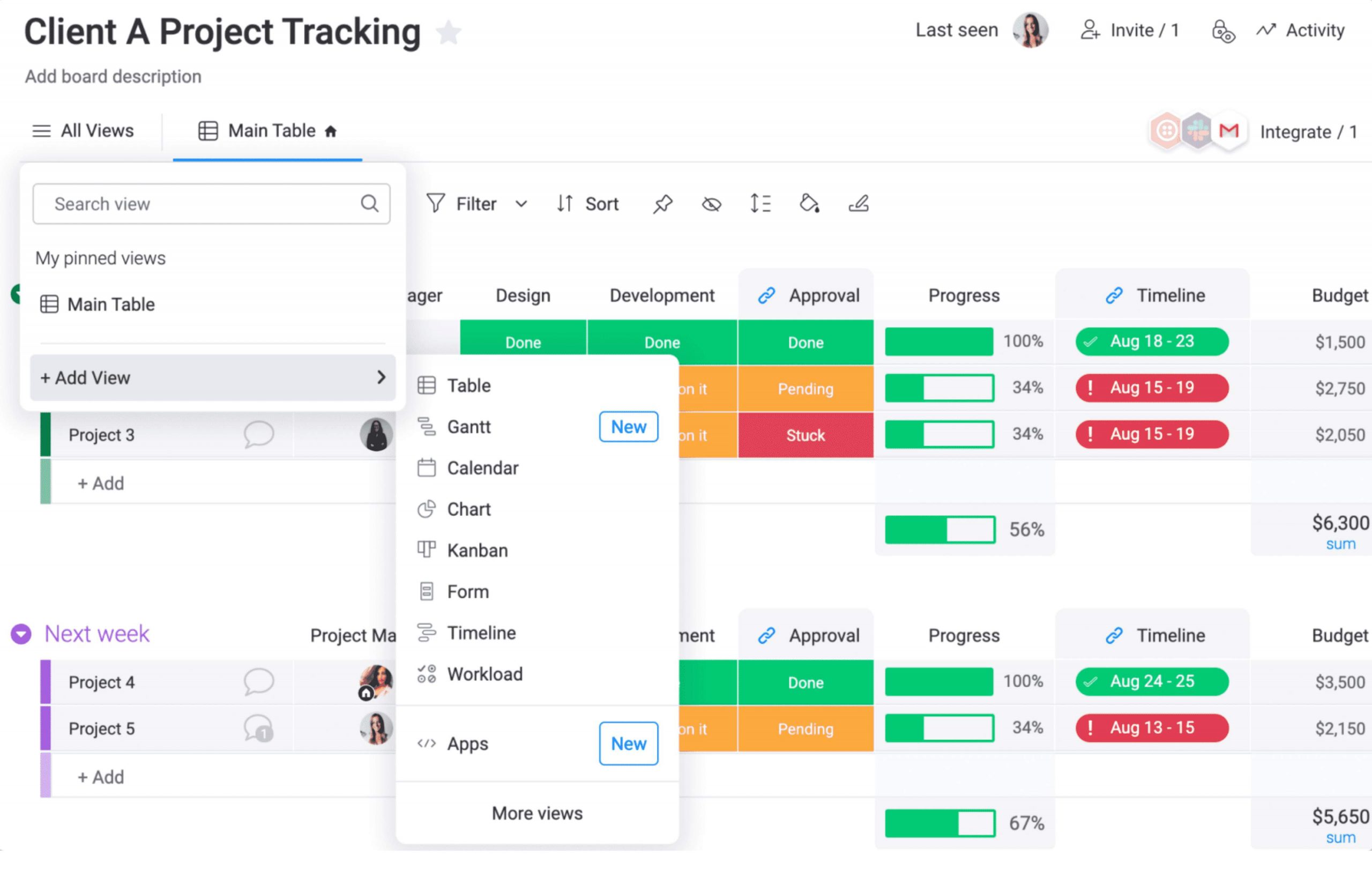
Image source: monday.com
monday.com is defined by its clean, visual design and flexibility, making it a strong fit for smaller, cross-functional teams managing creative or operational projects. Its customizable boards and wide range of templates make it easy to visualize workloads, timelines, and resource allocation—especially helpful for coordinating design reviews, marketing campaigns, or new product launches.
During my review, I found the platform’s automation tools particularly effective. They cut down on repetitive updates, kept team communication consistent, and made tracking progress more efficient across departments.
Overall, monday.com works best for teams that prioritize clarity and collaboration over complex manufacturing control. It’s an intuitive option for managing fast-moving projects that require transparency and simplicity.
Pros:
- Clean interface with customizable boards and dashboards for visual project tracking.
- Large template library with over 200 options suited for creative and operational workflows.
- Multiple view types, including calendar and Kanban, for flexible project tracking.
- Built-in notifications and task comments improve team communication.
- A strong fit for smaller teams needing high visibility and ease of use.
Cons:
- Requires a full license for each external collaborator, which raises costs for large-scale projects.
- Dashboards may load slowly on complex projects with heavy data or integrations.
Pricing: Free plan available. Paid plans start at $9/seat/month.
User Rating: 4.6 (Capterra)
13. Zoho Projects – Best for Workflow Automation & ERP Integration
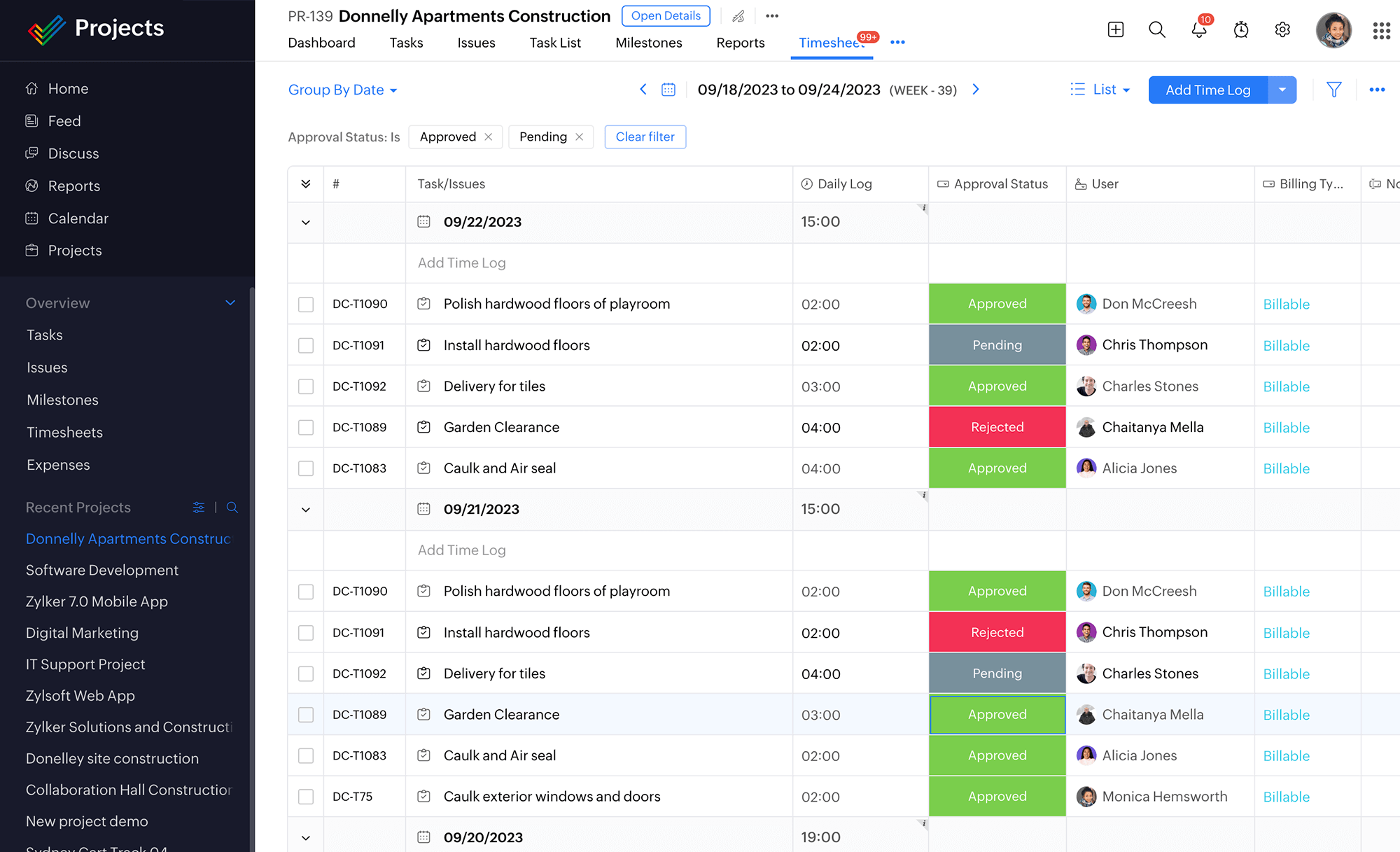
Image source: Zoho Projects
Zoho Projects brings together workflow automation and project management to help manufacturers streamline production and handle operational challenges with greater efficiency. It’s designed to keep processes consistent, minimize disruptions, and maintain product quality through structured workflows and risk control.
This manufacturing project management software also integrates with Zoho Creator, offering tools that enhance order fulfillment by improving inventory visibility and lot traceability.
In practice, the automation features make a noticeable difference—reducing manual oversight and keeping projects on schedule, even when priorities shift unexpectedly. This balance of flexibility and control makes it a strong fit for teams aiming to boost productivity while maintaining compliance standards.
Zoho Projects also adapts well to both process and discrete manufacturing environments, making it a versatile option for companies with varied production needs.
Pros:
- Automates complex workflows and helps manage operational disruptions effectively.
- Zoho Creator integration improves order fulfillment with better inventory visibility and traceability.
- Supports consistent product quality through managed workflows and risk tracking.
- Works across both process and discrete manufacturing setups.
- Integrates smoothly with ERPs, payment gateways, and other third-party systems.
Cons:
- Core project tools are less specialized for BOM management compared to dedicated MRP solutions.
- Full effectiveness depends on integration with existing ERPs, which can be challenging outside the Zoho ecosystem.
Pricing: Free plan available. Paid plans start at $4/user/month.
User Rating: 4.5 (Capterra)
Draw lessons from the best manufacturing project management software for the best legal project management software. Guide: Best Legal Project Management Software.
How to Choose the Right Manufacturing Project Management Software
Finding the right software for manufacturing projects is about more than just tracking tasks. The goal is to choose a tool that helps your team stay organized, control project costs, and keep production running smoothly.
Whether you’re managing shop-floor operations or cross-departmental projects, here are a few things to look for before making your decision.
1. Financial Integration (Job Costing Test)
A good system should help you track every cost—labor, materials, and overhead—in one place. If you have to rely on a separate tool to see your true costs, it’ll be harder to get a clear picture of project profitability. Look for a platform that connects production and financial data automatically.
2. Bill of Materials (BOM) Management
If your team builds physical products, make sure the software supports detailed BOMs. It should let you manage parts, scrap rates, and tooling information, not just a basic list of components. The more detail you can include, the easier it is to plan accurately and avoid production delays.
3. Real-Time Scheduling
The best tools update schedules automatically as workloads or resources change. This helps spot bottlenecks early and keeps projects moving without confusion. Avoid tools that only handle simple task lists—they won’t adapt well to real manufacturing demands.
4. System Integration
Choose software that connects planning, production, and reporting instead of keeping each function separate. When your data flows between systems automatically, everyone—from finance to operations—works with the same up-to-date information.
5. Ease of Use and Adoption
Even the best software won’t help if your team finds it hard to use. Try out free trials or demos before committing, and let your key users test how intuitive it feels. A clean interface and simple navigation will make adoption smoother and keep productivity high.
6. Scalability and Vendor Reputation
Pick a platform that can grow with your business. As your operations expand, you’ll need more integrations and stronger support. Check real user reviews on Capterra and G2 to see how the tool performs in real-world settings and whether the company provides reliable updates and customer support.
Key Features to Look for in a Manufacturing Project Management Software
Once you’ve chosen a few options that seem like a good fit, the next step is understanding how the right software should actually function on the factory floor and in daily operations. Here’s what to expect from a well-built system.
1. Unified Task and Workflow Management
Manufacturing projects often involve multiple departments and timelines. A good platform lets you plan, assign, and monitor tasks in one place so that every team knows what needs to happen next, without relying on endless spreadsheets or email threads.
2. Visual Dashboards for Real-Time Monitoring
Dashboards should give a clear snapshot of production progress, resource availability, and deadlines. Visual tools like Gantt Charts, Kanban Boards, etc., make it easy to spot potential slowdowns early and give managers a real-time understanding of what’s happening across facilities.
Watch: What Is a Gantt Chart for Project Management?
3. Document and Revision Control
Production often involves multiple design files, drawings, and process documents. The software should organize these files with built-in version control so teams always work with the latest information and avoid costly mix-ups.
4. Collaboration and Communication Tools
Smooth collaboration between departments is critical. Look for shared workspaces, instant updates, and commenting features that keep engineers, procurement, and production teams aligned without constant back-and-forth communication.
5. Reporting and Analytics
Comprehensive reporting tools help turn data into actionable insights. The best systems provide quick access to production stats, performance metrics, and cost summaries so managers can make informed decisions faster.
6. Security and Access Controls
Since manufacturing projects involve sensitive data, ensure the software offers customizable permissions and secure access controls. This keeps proprietary designs and supplier information protected while still allowing collaboration across teams.
Benefits of Using Manufacturing Project Management Software
Adopting a dedicated manufacturing project management system transforms how teams plan, track, and deliver projects. It replaces spreadsheets and disconnected systems with unified visibility, helping businesses operate with more speed, accuracy, and confidence.
1. Stronger Financial Control
Real-time job costing lets you track labor, materials, and overhead against project budgets. This helps spot cost overruns early and improve profitability over time.
2. Improved Production Agility
With live insights into capacity and bottlenecks, managers can adjust schedules instantly, keeping production on track even when disruptions occur.
3. Better Quality Management
Built-in quality and traceability tools help maintain standards and quickly isolate defective materials, reducing the risk of waste or recalls.
4. Smarter Inventory Planning
Connected data across departments supports Just-in-Time (JIT) operations, helping teams reduce excess inventory and minimize carrying costs.
5. Reliable, Unified Data
When engineering, procurement, and operations share the same information, decisions become faster and more accurate. Unified data also eliminates errors caused by manual updates or outdated spreadsheets.
My Top 3 Manufacturing Project Management Software
After testing and analyzing multiple platforms, I narrowed the list down to three that truly deliver on what manufacturers need most—clarity, control, and efficiency.
1. ProProfs Project
ProProfs Project is an excellent choice for manufacturers managing custom jobs or smaller production projects. It offers built-in time tracking, job costing, and task management in a clean, easy-to-navigate interface. The platform helps teams ensure every work order remains profitable while avoiding the technical complexity and high costs often associated with full-scale ERP systems.
2. SAP S/4HANA
SAP S/4HANA is designed for large-scale manufacturers that need precision, automation, and deep visibility into operations. With real-time Material Requirements Planning (MRP) and predictive analytics powered by AI and machine learning, it helps teams forecast demand, optimize supply chains, and maintain control over high-volume, multi-location production environments with exceptional accuracy and consistency.
3. Acumatica
Acumatica stands out for project-driven manufacturers who prioritize financial accuracy and resource tracking. Its integrated job costing, progress billing, and inventory management modules make it easier to manage costs and maintain profitability throughout long production cycles. The platform’s flexibility and reporting depth make it particularly effective for Engineer-to-Order (ETO) and custom manufacturing operations.
Drive Growth With the Right Project Management Software
The right manufacturing project management software gives your team the structure to plan smarter, balance workloads, and keep production schedules on track. More importantly, it helps shift your operations from reactive problem-solving to proactive profitability management.
By choosing a platform with built-in BOM management, dynamic capacity planning, and integrated job costing, you gain the visibility and control to strengthen margins and outpace competitors.
To find the right fit, test a few specialized platforms on a live project. A short trial will quickly show which system aligns with your workflows and offers the financial clarity your operation needs. Platforms like ProProfs Project, with its intuitive workflows, real-time collaboration tools, and detailed reporting, can help streamline your processes and keep everything on track.
Ready to explore project management? Get started free and see how ProProfs Project can make a difference.
Frequently Asked Questions

What’s the biggest risk when implementing a new ERP or project management system?
Many teams try to automate broken processes instead of improving them first. Software won’t fix inefficiency by itself. Before implementation, define clear workflows, set measurable goals, and make sure the team is ready to adapt to new ways of working.
Should manufacturers choose a subscription or perpetual license model?
Subscription (SaaS) models are generally preferred because they have lower upfront costs, faster setup, and automatic access to updates and new features. This flexibility helps manufacturers keep up with new technologies like AI and automation. Perpetual licenses require higher investment and separate payments for upgrades.
Why is lot traceability important in manufacturing project management?
Lot traceability allows manufacturers to track materials through every stage of production. If a defect occurs, the team can quickly trace it back to a specific batch rather than recalling all products. It’s a key safeguard for quality control, compliance, and reducing liability risks.
FREE. All Features. FOREVER!
Try our Forever FREE account with all premium features!