
Every SEO campaign I have ever seen stall out had one thing in common: the strategy was solid, but the execution was a mess.
Keyword research sat in one sheet. Content briefs lived in another folder no one could find. Technical audit findings were buried in a Slack thread. Someone was waiting on a task that no one knew was assigned to them. Sound familiar? That is the reality for most SEO agencies and in-house teams operating without dedicated SEO project management software, and the cost is real.
A study by GanttPRO in 2025 found that the global SEO market is expected to surpass $122 billion by 2028, making structured execution a non-negotiable competitive advantage, not a nice-to-have.
I have spent time evaluating the tools that actually help SEO teams move from reactive firefighting to proactive, scalable delivery. In this guide, I cover 10 platforms that genuinely change how agencies and in-house teams plan and execute SEO work, with honest pros, cons, and pricing for each.
What Is SEO Project Management Software?
SEO project management software is a specialized system that centralizes the planning, execution, and tracking of SEO campaigns. Instead of toggling between Ahrefs, Slack, and five different spreadsheets, your entire team works from one structured view of what is planned, in progress, and complete.
A strong SEO project management tool helps teams:
- Assign keyword research, content, and technical tasks with clear owners and deadlines
- Track progress across multiple client campaigns from a single dashboard
- Log time against deliverables and connect that data to client billing
- Enforce standardized workflows so every campaign follows the same repeatable process
- Generate reports that show stakeholders exactly where things stand, without manual effort
10 Best SEO Project Management Software for Agencies and Teams
Here is a quick snapshot of the tools covered in this list:
Here is the updated table with the User Rating column added:
| Tool | Best For | Pricing | User Rating (Capterra) |
| ProProfs Project | Simplest Project Management Tool for SMBs With Client Invoicing, Time & Billing | Free plan available. Paid plan starts at $39.97 | 4.7/5 |
| Bonsai | Financial management and client invoicing | Starts at $9/user/month | 4.6/5 |
| ClickUp | Customizable workflows and scalability | Free plan available. Paid plans start at $7/user/month | 4.6/5 |
| Scoro | Real-time profitability and budget burn tracking | Starts at $19.90/user/month | 4.6/5 |
| SEMrush | Generating tasks directly from SEO audit data | Starts at $117.33/month | 4.6/5 |
| ProofHub | Predictable cost and unlimited users for growing teams | Starts at $45/month | 4.5/5 |
| Asana | Standardized intake and rules-based automation | Free plan available. Paid plans start at $10.99/user/month | 4.5/5 |
| Ahrefs | Deep analytical reporting and SEO task management | Starts at $129/month | 4.7/5 |
| Celoxis | All-in-one PM with native time tracking and budgeting | Starts at $10/month | 4.4/5 |
| monday.com | Clean interface and visual workflow management | Free plan available. Paid plans start at $9/seat/month | 4.6/5 |
1. ProProfs Project – Simplest Project Management Tool for SMBs With Client Invoicing, Time & Billing
ProProfs Project gives SEO agencies a clear, centralized way to manage people, tasks, timelines, and costs, all in one place. It is purpose-built for teams that need real accountability across multiple client campaigns, not just a to-do list with a Gantt chart bolted on.
What stands out most is the AI project management layer. Type in a project description, assign the team, and AI builds the full project structure with tasks, stages, and assignments ready in seconds. The AI assistant stays active throughout the campaign lifecycle.
Beyond AI, the time tracking connects naturally to billing. Every hour logged by an SEO specialist flows directly into the invoicing module, letting managers compare planned versus actual effort in real time and catch budget overruns before they become client conversations. The Kanban boards, Gantt views, and Calendar views let the team see content deadlines, technical task queues, and link-building pipelines from different angles.
Pros:
- AI automatically builds full project structures from a simple description, cutting setup time and removing the manual work of creating tasks and assignments from scratch.
- Multiple project views, Gantt, Kanban, Calendar, and List, give SEO managers full visibility across all client campaigns from a single screen.
- Built-in time tracking connects directly to invoicing, reducing billing errors and eliminating the need for separate financial tools.
- Profitability and utilization reports make it easy to track ROI across SEO campaigns and spot resource gaps early.
Cons:
- Dark mode interface is not currently available
- No dedicated account manager on the free plan
Pricing:
Free plan available. Paid plans start at $39.97.
User Rating: 4.7/5 (Capterra)
2. Bonsai – Best for Financial Management and Client Invoicing
When I tested Bonsai, the first thing that struck me was how seamlessly it handled the financial fragmentation that plagues most SEO agencies. Most tools make you choose between task tracking and billing. Bonsai refused to make me choose.
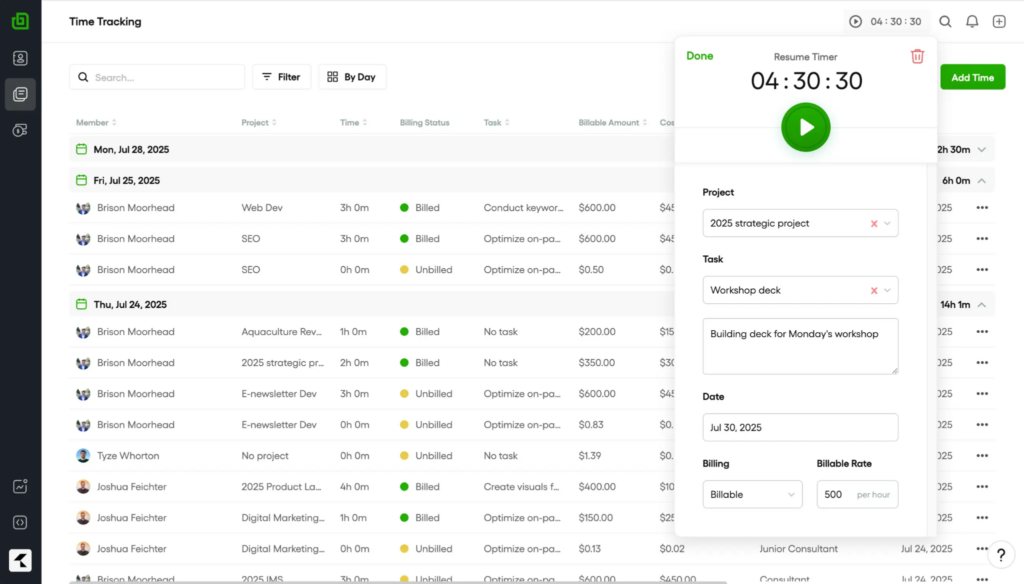
Image source: Bonsai
Tracking time against a specific SEO deliverable, generating a custom quote, and sending the invoice, all happened inside the same interface without switching apps. For agencies managing retainer-based SEO clients, that consolidation saves hours every month that used to disappear into moving data between a PM tool and a billing system. The client management layer is also genuinely strong: storing contact history, project notes, and contract terms alongside the active campaign timeline made it easy to see the full relationship at a glance, not just the current sprint.
Where Bonsai showed its limitations was in cross-team workflow depth. For agencies where the SEO workload involves coordinating larger, specialized teams, technical leads, content teams, outreach specialists, the task management layer felt lighter than dedicated project management platforms.
Pros:
- Integrates project management, client management, and financial tools into one cohesive system, reducing overall tech stack complexity.
- Built-in invoicing and budgeting tools streamline client billing specifically for retainer-based SEO services.
- Advanced quoting features allow detailed breakdowns of SEO deliverables by effort and role, improving cost transparency.
- Comprehensive time tracking connects directly to profitability reports, making every project’s margin visible.
Cons:
- Native SEO analytical features are limited, meaning teams still need separate tools like Ahrefs or SEMrush for audit and research work.
- Task management depth may feel lightweight for larger agencies coordinating multiple specialized SEO teams simultaneously.
Pricing:
Starts at $9/user/month.
User Rating: 4.6/5 (Capterra)
3. ClickUp – Best for Customizable Workflows and Scalability
ClickUp was the most configurable tool I tested, and for SEO agencies that have outgrown rigid platforms, that flexibility is genuinely valuable. The sheer range of views, List, Board, Calendar, Workload, and Gantt, meant I could track keyword research pipelines, content production deadlines, and technical SEO queues all in the same workspace, just filtered differently.
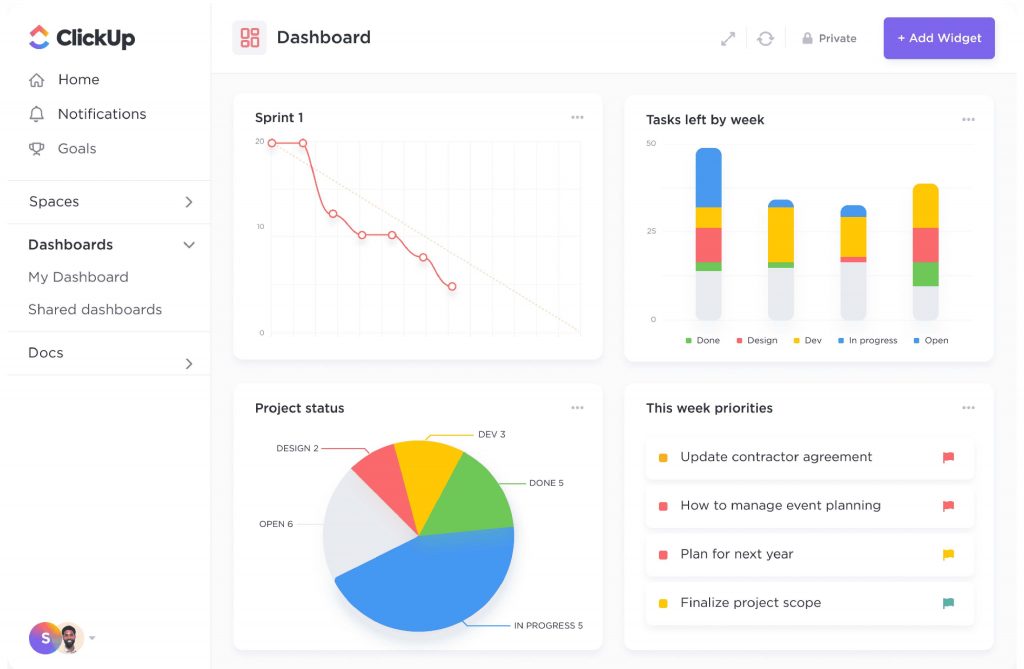
The native in-app time tracking was a significant differentiator. Unlike Asana, which pushes you toward a third-party integration for billable hours, ClickUp handles it natively, which matters for agencies that need clean billing data without extra configuration.
The ability to add most team members as unlicensed guests was also a meaningful cost advantage for agencies managing multiple client stakeholders without wanting to pay full per-seat rates for each. The main friction I encountered was navigation: the platform’s depth is also its complexity, and new team members needed real onboarding before they felt comfortable finding what they needed.
Pros:
- Native time tracking is built in at all paid tiers, supporting clean billing and resource tracking without third-party integrations.
- Unlicensed guest access allows most client stakeholders to participate in campaigns without driving up per-seat costs.
- Multiple project views, List, Board, Gantt, Workload, and Calendar, provide flexible visibility across complex SEO campaign portfolios.
- Highly configurable custom fields, statuses, and automations allow agencies to replicate their exact SEO workflow inside the platform.
Cons:
- Navigation complexity can slow onboarding for new team members, particularly those unfamiliar with hierarchical workspace structures.
- The breadth of features creates a learning curve that may frustrate smaller teams looking for a quick, lightweight setup.
Pricing:
Free plan available. Paid plans start at $7/user/month.
User Rating: 4.6/5 (Capterra)
4. Scoro – Best for Real-Time Profitability and Budget Burn Tracking
Scoro felt less like a project management tool and more like a financial command center for SEO operations. Testing it made one thing immediately clear: this platform was built for agencies that treat profitability as a first-class metric, not an afterthought reviewed at month-end.
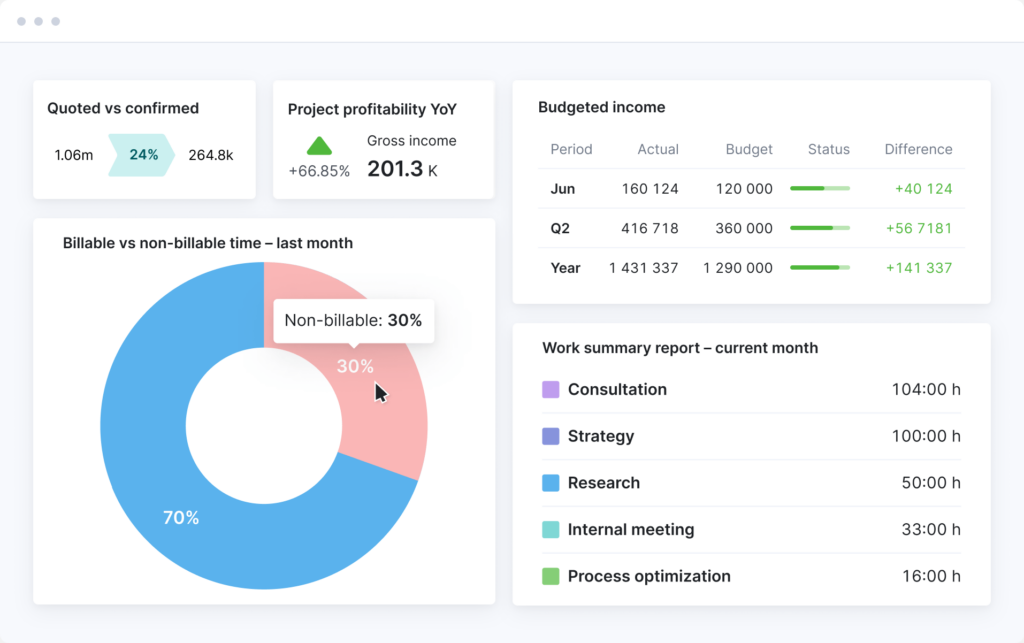
The advanced quoting matrix was the standout feature. I could break down an SEO retainer by individual role and estimated effort, content strategist hours, technical SEO hours, outreach hours, and instantly see the cost and margin before signing off on the scope. Budget burn tracking updated in real time as tasks were completed, which meant I could flag a project going over budget while there was still time to adjust, not after the invoice had already gone out.
The trade-off is cost. Scoro sits at a higher price point than general PM tools, and the full financial feature set is gated behind higher tiers. For small agencies or freelance consultants, the pricing structure may not justify the depth. For mid-sized to larger SEO agencies managing complex, high-value retainers where margin visibility is critical, Scoro is difficult to match.
Pros:
- Real-time budget burn tracking at the role and project level gives SEO managers early warning on overruns before they affect client relationships.
- Advanced quoting and estimating features provide full cost and margin visibility during proposal and scoping stages.
- Integrates project management, time tracking, resourcing, and automated invoicing into a single platform.
- Modern, intuitive interface supports adoption across both technical and non-technical SEO team members.
Cons:
- Higher pricing, particularly for advanced financial features, places it out of reach for smaller agencies or solo consultants.
- The depth of financial management features may feel excessive for in-house SEO teams that do not bill clients directly.
Pricing:
Starts at $19.90/user/month.
User Rating: 4.6/5 (Capterra)
5. SEMrush – Best for Generating Tasks Directly from SEO Audit Data
SEMrush approached SEO project management from a completely different angle than every other tool on this list, and for certain teams, that angle is exactly right. The core innovation here is the data-to-task loop: running a deep technical audit and having the platform automatically generate actionable tasks from the findings, without manual transfer to a separate PM system.
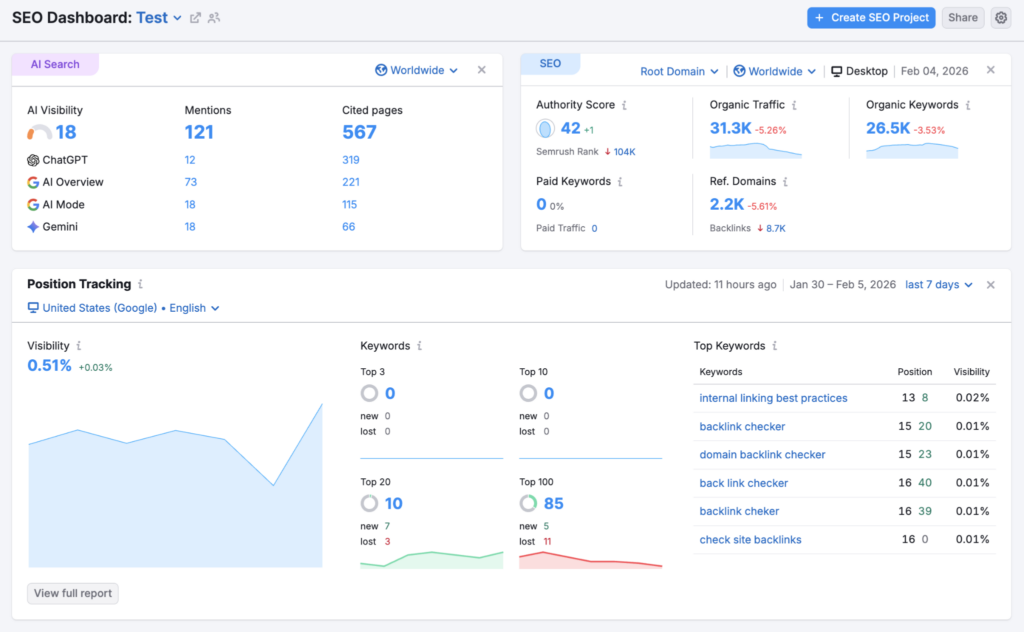
Image source: SEMrush
That capability alone saves meaningful time for agencies running monthly audits across multiple client sites. Instead of exporting audit results to a spreadsheet, triaging them manually, and then recreating them as tasks in another tool, the whole cycle happens inside SEMrush. The time tracking and budgeting features that exist within the platform surprised me.
They are more capable than I expected from a tool primarily known for keyword research. The limitation is the collaboration layer. SEMrush was clearly designed for analytical depth, not for managing cross-functional teams. Workflow coordination, task handoffs between writers and developers, and team communication are areas where dedicated PM tools pull ahead.
Pros:
- Native SEO audit feature generates actionable tasks directly from technical findings, eliminating the need to manually rebuild them in a separate tool.
- Built-in time tracking and budgeting exist within the core SEO analytical toolkit, supporting basic project financial management.
- Comprehensive keyword research, rank tracking, and competitor analysis features make it a complete analytical environment.
- Deep integration with Google Analytics, Search Console, and social platforms supports multi-channel campaign tracking.
Cons:
- Collaboration and cross-team workflow management features are significantly less robust than dedicated project management platforms.
- The pricing entry point is higher than general PM tools, making it less accessible for small agencies or solo practitioners.
Pricing:
Starts at $117.33/month.
User Rating: 4.6/5 (Capterra)
6. ProofHub – Best for Predictable Cost and Unlimited Users for Scaling Teams
The thing that drew me to ProofHub immediately was the pricing model. Flat-rate, unlimited users, no per-seat calculations as the team grows. For SEO agencies in a growth phase, adding five new hires or onboarding ten client stakeholders does not trigger a pricing conversation.
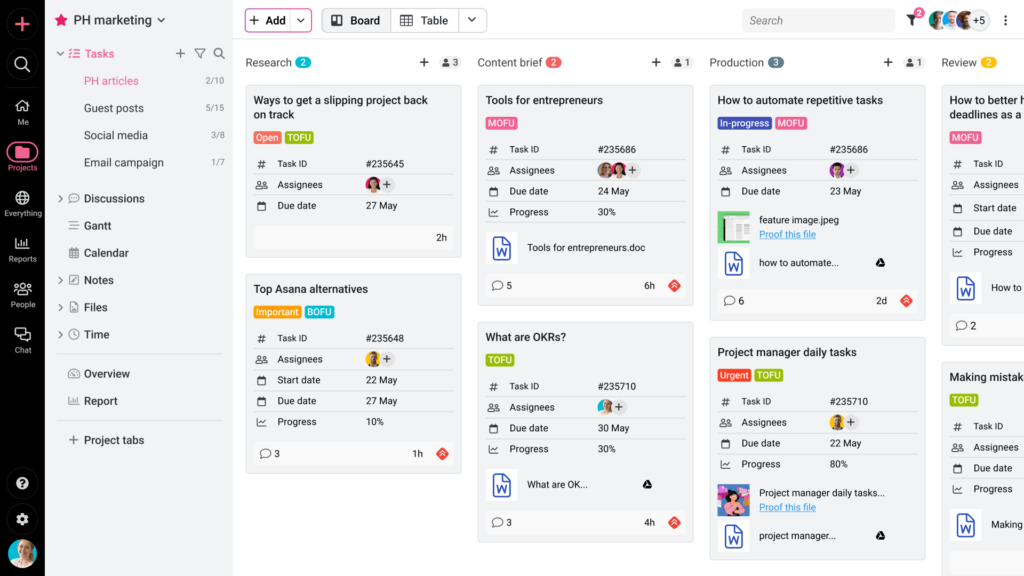
Image source: ProofHub
Inside the platform, I found a solid centralized hub for managing SEO projects. Task management, time tracking, file sharing, and real-time team chat were all present and functional. The workflow customization let me create distinct project structures by client, content audits in one pipeline, link-building in another, technical tasks in a third, which kept campaigns from blending into each other as the workload grew.
Where ProofHub showed its ceiling was financial management. There is no native budgeting module, which means agency leads still need a separate tool to track whether client engagements are profitable. Recurring tasks also require manual setup, which adds friction for teams running the same monthly audit and reporting cycle across multiple clients.
Pros:
- Flat-rate pricing with unlimited users eliminates per-seat scaling costs, making it highly predictable for fast-growing SEO agencies.
- Built-in task management, time tracking, file sharing, and real-time chat centralize all collaboration without requiring additional tools.
- Workflow customization and custom roles allow agencies to create distinct project pipelines for different client types and service offerings.
- Client-facing project views provide transparency without requiring clients to hold full licensed seats.
Cons:
- Lacks a native budgeting module, requiring a separate financial tool to track profitability at the project level.
- Recurring tasks must be set up manually, adding overhead for agencies running standardized monthly SEO audit and reporting cycles.
Pricing:
Starts at $45/month.
User Rating: 4.5/5 (Capterra)
7. Asana – Best for Standardized Intake and Rules-Based Automation
Asana’s greatest strength is the one thing many SEO agencies get wrong first: intake. Setting up a custom form that every new content request or technical audit passes through meant that by the time a task landed in the project board, it already had the right fields populated, the right assignee, and the right deadline logic applied. No back-and-forth to figure out what the requester actually needed.
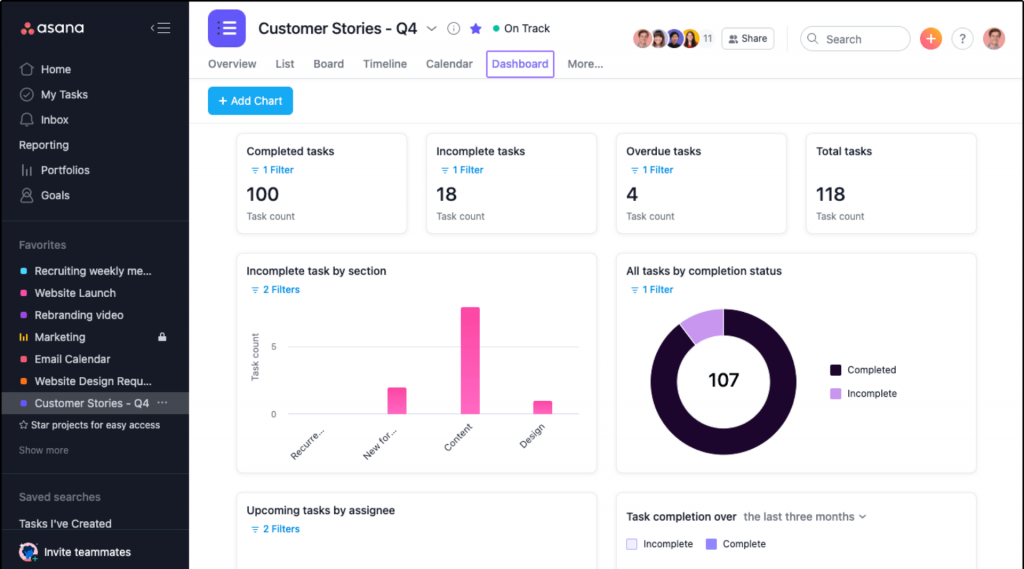
The rules-based automation built on top of that intake flow was equally impressive. Task handoffs between keyword research, brief writing, content review, and publication stages happened automatically based on status changes, without a project manager manually moving cards. The integration ecosystem, with over 100 connected apps, made Asana a strong hub for teams already invested in specific SEO tools.
The critical gap for agency use is the absence of native time tracking. Without built-in billable hour logging, agencies managing client retainers have to layer on a third-party time tracking tool, which introduces the exact kind of data fragmentation the platform is otherwise designed to eliminate.
Pros:
- Customizable intake forms enforce standardized SEO workflows from the moment a new campaign or task request enters the system.
- Rules-based automation handles repetitive task handoffs and status updates, freeing the team to focus on higher-value SEO work.
- Over 100 app integrations connect Asana to the SEO tools, communication platforms, and reporting systems teams already use.
- Portfolio-level dashboards provide real-time visibility into campaign health, task ownership, and deadline status across multiple clients.
Cons:
- Lacks native time tracking, requiring a third-party integration for billable hour management, a significant gap for client-billing agencies.
- Interface design can feel unintuitive for non-technical team members, with a learning curve that slows initial team adoption.
Pricing:
Free plan available. Paid plans start at $10.99/user/month.
User Rating: 4.5/5 (Capterra)
8. Ahrefs – Best for Deep Analytical Reporting and SEO Task Management
Ahrefs approached task management the same way it approaches backlink analysis: with a level of depth that rewards teams who are willing to go beyond the surface. Testing it felt less like using a general PM platform and more like stepping into an environment built specifically for the way SEO professionals actually think about their work.
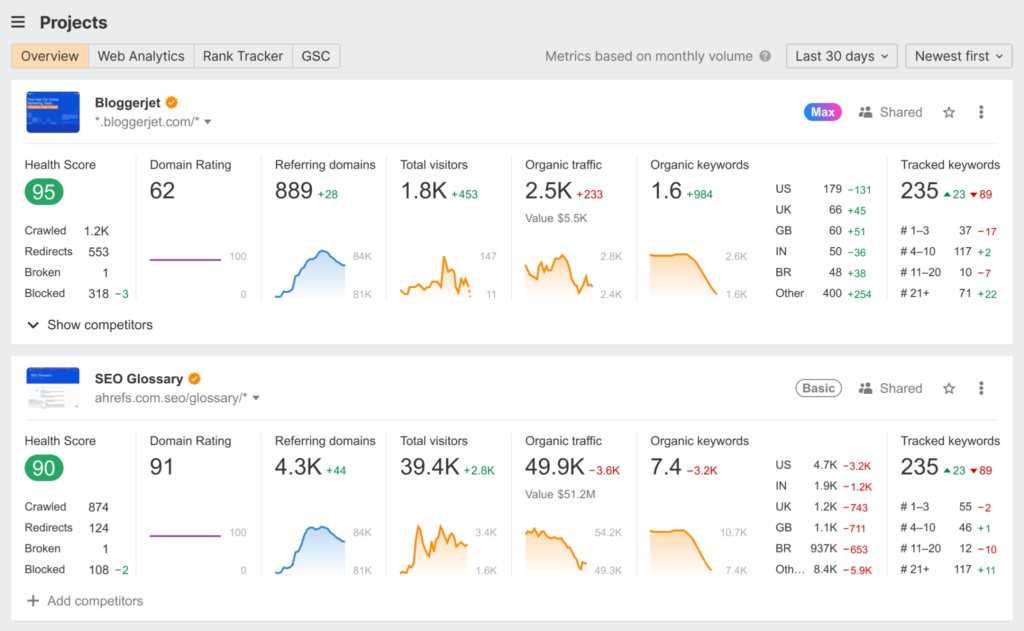
The analysis-to-action workflow was seamless. Audit findings, ranking drops, and content gap data all translated naturally into prioritized task queues. The platform supports project management, task assignment, and workflow tracking with enough structure to keep medium-sized teams organized across multiple campaigns. Where Ahrefs did not match dedicated PM tools was in financial management and team collaboration depth.
There is no native invoicing, no billable hour tracking connected to billing, and the communication layer is lighter than platforms built explicitly for agency team coordination. For teams that use Ahrefs as their primary SEO analytical tool and want task management layered on top, rather than the other way around, it is a logical and cost-efficient choice.
Pros:
- Deep SEO analytical capabilities, site audits, rank tracking, backlink analysis, and content gap identification, all inform task creation directly.
- Project management, task assignment, and workflow views provide enough structure for mid-sized SEO teams running multiple campaigns.
- The analysis-to-action workflow minimizes context switching between research and execution environments.
- Supports a wide range of SEO-specific project types, from technical audits to content refresh cycles and link-building campaigns.
Cons:
- Collaboration features are less robust than dedicated PM platforms, limiting its effectiveness for large, cross-functional agency teams.
- Lacks native financial management, no invoicing, no budget tracking, requiring separate tools for agency billing workflows.
Pricing:
Starts at $129/month.
User Rating: 4.7/5 (Capterra)
9. Celoxis – Best for All-in-One PM With Native Time Tracking and Budgeting
Celoxis solved a frustration I had encountered repeatedly during this evaluation: most tools that handle time tracking well do not handle budgeting well, and vice versa. Celoxis had both, natively, without requiring a third-party integration bridge between them.
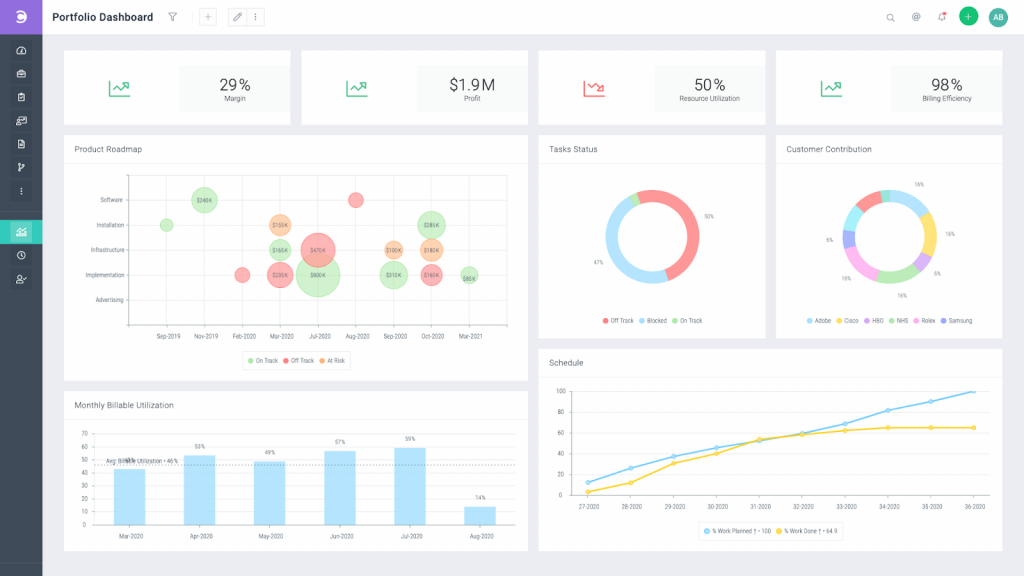
Setting up a new SEO campaign in Celoxis meant I could define the budget, assign resources with their billing rates, and have the platform automatically calculate cost against time logged as the work progressed. Resource management was also notably strong. The workload view made it immediately clear when a technical SEO specialist was at capacity and when a content strategist had room for additional assignments.
That visibility prevented the guesswork that leads to burnout and missed deadlines. The English-only support is a legitimate limitation for international SEO agencies, and the per-user pricing model means costs scale linearly with team size, unlike the flat-rate models offered by ProofHub or ProProfs Project.
Pros:
- Native time tracking, resource management, and budgeting exist within a single platform, eliminating the need to reconcile data across multiple tools.
- Resource allocation views provide real-time workload visibility, helping managers assign SEO tasks based on actual team capacity.
- Easy setup and intuitive interface support quick adoption across teams with mixed levels of project management experience.
- Budget-to-actual comparisons update in real time, flagging cost overruns before they affect campaign profitability.
Cons:
- English-only customer support limits its suitability for international SEO agencies with multilingual teams.
- Per-user pricing model may result in higher costs for rapidly growing agencies compared to flat-rate alternatives.
Pricing:
Starts at $10/month.
User Rating: 4.4/5 (Capterra)
10. monday.com: Best for Clean Interface and Visual Workflow Management
monday.com was the most immediately approachable platform I tested. The visual interface, the drag-and-drop boards, the color-coded status columns, everything was designed to make project status obvious at a glance, without requiring training to interpret it. For SEO managers who need to show campaign progress to a non-technical executive or client during a weekly check-in, that visual clarity is genuinely valuable.
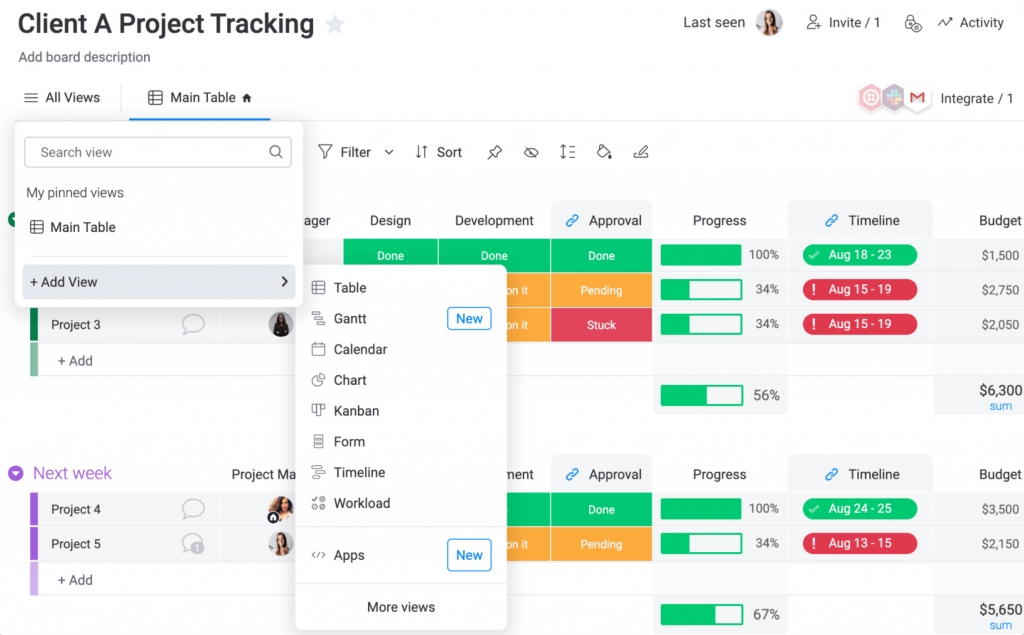
The template library was extensive, and several templates mapped well to SEO workflows. Content calendars, audit trackers, and campaign launch boards all had solid starting-point structures I could adapt quickly. The notification and comment system tied discussions to specific tasks, keeping communication in context rather than loose in a general Slack channel.
The limitation that stood out most for agency use was the client licensing model: every external client stakeholder who needs to participate in a workspace must hold a full paid license. For agencies managing 20 or 30 active clients, that cost structure becomes unsustainable quickly.
Pros:
- Clean, visually intuitive interface makes campaign status immediately clear to both technical team members and non-technical stakeholders.
- Extensive template library, over 200 templates, includes several directly applicable to SEO content calendars, audit workflows, and campaign tracking.
- Multiple project views, Calendar, Kanban, and Gantt, give managers flexible ways to visualize work across campaigns.
- Automated notifications and task-level comments keep team communication tied directly to specific SEO deliverables.
Cons:
- Full paid license required for each client participant, making it cost-prohibitive for agencies managing large numbers of external client stakeholders.
- Dashboard loading speed can slow significantly for larger projects involving substantial data across multiple SEO campaign boards.
Pricing:
Free plan available. Paid plans start at $9/seat/month.
User Rating: 4.6/5 (Capterra)
How Did I Evaluate These SEO Project Management Tools?
Evaluating SEO project management software follows an unbiased, systematic approach that ensures a fair, insightful, and well-rounded review. Here is the methodology I applied across all 10 tools:
- User Reviews and Ratings: I analyzed direct user feedback from Capterra, G2, and other reputable review platforms to understand real-world satisfaction and recurring pain points.
- Essential Features and Functionality: I assessed each tool’s core capabilities, task management, time tracking, workflow automation, reporting, and billing, against the specific operational needs of SEO agencies and in-house teams.
- Ease of Use: I evaluated the design, interface intuitiveness, and onboarding friction. A tool that takes three months to configure is a liability, not an asset, for teams that need to move fast.
- Customer Support: I examined support availability, response quality, and the depth of documentation, factors that determine how smoothly a team recovers when something breaks.
- Value for Money: I compared pricing models against the feature depth at each tier, with specific attention to how costs scale as team size and client count grow.
- Personal Experience and Expert Opinion: This evaluation reflects hands-on testing of each platform against real SEO agency workflows, combined with industry research on what practitioners consistently flag as the make-or-break factors.
My Top 3 Picks for the Best SEO Project Management Software
With ten strong options on the table, three platforms stand out based on what most SEO agencies and in-house teams actually need in 2026.
1. ProProfs Project
ProProfs Project earns the top spot because it solves the two problems that create the most friction for SEO agencies: task visibility and billing. The project tracking features give managers a real-time view of workloads, deadlines, and campaign dependencies across every active client. The built-in billing and invoicing module connects directly to logged time, eliminating the reconciliation overhead that drains agency ops teams every month. The AI layer handles project setup from a simple description, flags deadline risks proactively, and answers direct questions from live campaign data.
2. Bonsai
For agencies whose biggest operational bottleneck is financial fragmentation, separate tools for quoting, invoicing, and tracking, Bonsai is the most complete answer. It brings client management, advanced quoting, time tracking, and automated invoicing into a single cohesive system that is specifically designed for the financial precision retainer-based SEO work demands. If you consistently struggle to know whether a client engagement is profitable until the end of the month, Bonsai’s real-time margin visibility will change how you operate.
3. ClickUp
ClickUp is the right choice for agencies that expect significant growth in team size or client count over the next year and need a platform that can scale without per-seat pricing becoming a budget line item. Native time tracking, unlicensed guest access, and strong workflow configurability make it one of the most cost-effective choices for growing operations, provided the team is willing to invest in a proper onboarding and setup period.
What Are the Key Features to Look for in SEO Project Management Software?
Not all project management tools are built for how SEO actually works. Generic platforms handle task lists and deadlines, but SEO workflows are continuous, cross-functional, and tied to client budgets in ways that most tools were never designed to accommodate. Here are the features that make a measurable difference when managing real SEO campaigns:
Integrated Time Tracking
Billable versus non-billable hours, planned versus actual time, this must be built into the platform, not bolted on through a third-party app. When time tracking lives in a separate tool, the data never perfectly syncs with task records, and billing reconciliation becomes a monthly headache.
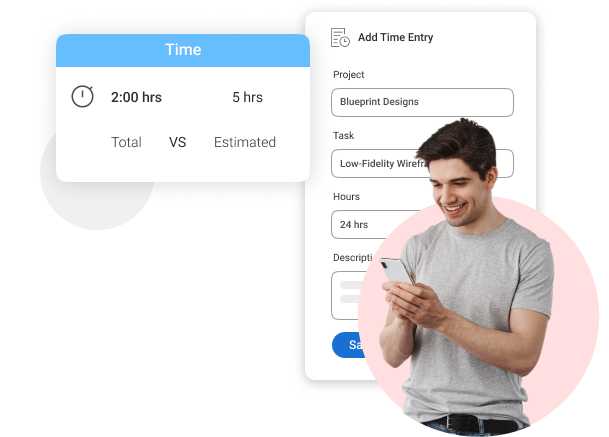
Native time tracking means every hour logged by a content writer, technical SEO, or outreach specialist is already connected to the right project, client, and deliverable.
Financial Integration
Time data should flow directly into invoicing and budget reports without requiring a manual export. Without this connection, agency leads have no reliable way to know whether a client retainer is profitable until the month is over.
Look for platforms that show planned budget versus actual spend in real time, at the task and project level.
Multi-Project Dashboard
A consolidated view across all active client campaigns, not just within individual project folders. For SEO managers running eight to fifteen clients simultaneously, the ability to see campaign health, overdue tasks, and workload distribution across the entire portfolio from a single screen is not a nice-to-have.
It is what separates proactive management from reactive firefighting.
Custom Workflow Enforcement
Forms, rules, and custom fields that standardize the SEO process from content brief to technical deployment across every campaign. Consistency is what allows agencies to scale without quality degrading.
When every new campaign kicks off with the same intake form, the same task stages, and the same approval gates, onboarding a new client takes hours instead of days.
Task Dependencies
The ability to link tasks so that a content brief cannot move to writing until keyword research is marked complete, or a page cannot be published until the technical review is signed off.
Dependencies prevent the most common SEO execution failure: tasks being worked on in the wrong order, or handed off before the upstream work is actually done.
Client Access Controls
Role-based permissions that let clients see progress reports and deliverable status without requiring full paid seats. For agencies managing external stakeholders, this is a significant cost factor.
Platforms that charge full per-seat rates for every client viewer become expensive quickly as the client roster grows.
Reporting and Analytics
Real-time dashboards showing workload distribution, utilization rates, and campaign health, not just static exports that require a spreadsheet to interpret.
The best platforms give agency leads a live view of which projects are on track, which are at risk, and where the team is over- or under-allocated, without a single manual data pull.
AI-Powered Project Setup and Risk Detection
Increasingly, the strongest platforms in this category include AI that can build project structures from a simple description, flag deadline risks before they materialize, and answer direct questions from live campaign data.
For agencies managing high volumes of parallel projects, AI oversight replaces a significant amount of manual status-checking and reduces the cognitive load on project managers.
What Are the Benefits of Using SEO Project Management Software?
Switching from spreadsheets and scattered tools to a dedicated system changes how SEO work gets planned, executed, and reported on. The impact is not gradual. Most teams feel it within the first few weeks.
Financial Control and Profitability Visibility
Time data flows directly into budgets and invoices, keeping spending aligned with forecasts and making profitability visible at the project level, not just at month-end.
For agencies running retainer-based SEO services, knowing in real time whether a client engagement is over budget is the difference between a profitable month and an uncomfortable client conversation. Project profitability becomes a metric managers can actually act on, not just report.
Clear Resource Allocation
Dashboards make team availability and workload obvious, so managers assign tasks based on actual capacity rather than instinct. When a content strategist is already at 95% utilization and a new client brief comes in, the workload view shows that immediately.
Overloading team members is one of the fastest routes to missed deadlines and, eventually, burnout. Structured project time tracking gives managers the data to make smarter assignment decisions every week.
Faster Response to Change
SEO campaigns shift constantly. Rankings drop. A client adds three new priority pages. A technical audit surfaces an issue that needs to jump to the front of the queue.
When tasks and dependencies live in a dedicated platform, a manager can reprioritize and reassign in minutes rather than spending an hour manually updating five different spreadsheets.
Client Transparency That Builds Trust
A study by monday.com in 2026 found that agencies offering real-time transparency tend to retain clients twice as long as those providing only monthly static reports.
When clients can see campaign progress through a live dashboard or a structured progress report, they do not need to chase the agency for updates. That shift alone reduces friction significantly in the client relationship.
Consistent Process at Scale
Standardized workflows ensure every client campaign follows the same repeatable steps, reducing errors and keeping output quality consistent as the team grows. When the intake form, task stages, and approval gates are the same for every campaign, onboarding a new team member or launching a new client becomes a predictable process rather than a scramble.
This is what separates agencies that scale smoothly from those that plateau because growth creates chaos rather than momentum.
Reduced Administrative Overhead
Workflow automation handles the low-value work: routing tasks between team members when a stage is complete, sending reminders when deadlines approach, updating stakeholders when deliverables are ready for review.
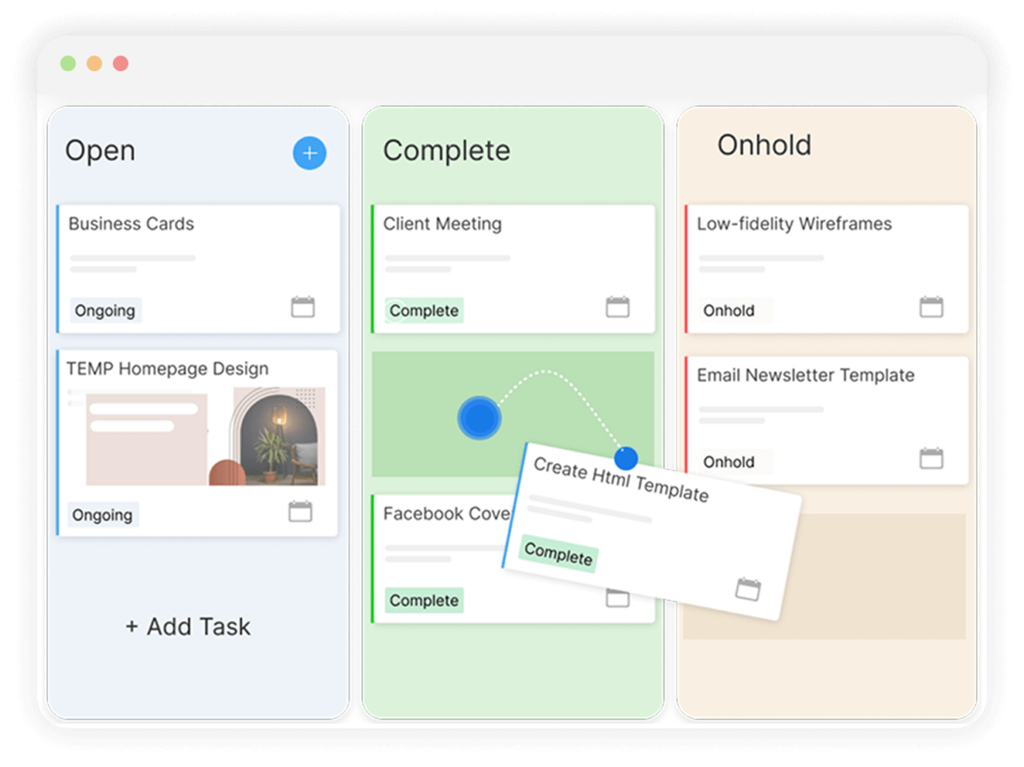
That freed-up time goes back to the SEO work that actually moves rankings and generates results for clients.
Pick the Right SEO Project Management Software and Let Your Results Speak
Most SEO agencies lose clients not because their strategy is wrong, but because their execution looks messy from the outside. Missed updates, unclear timelines, and reactive communication are the real churn drivers, and none of them are strategy problems. They are systems problems.
The good news is that systems are fixable. When your team works from a single platform where tasks are assigned, deadlines are visible, and time connects automatically to billing, the work becomes easier to do and easier to show. Clients see progress. Leadership sees profitability. The team knows what is on their plate without needing a status meeting to find out.
If you are not sure where to start, ProProfs Project offers a free plan with everything you need to run real SEO campaigns, including task tracking, Gantt views, time logging, and built-in billing. It is worth running a couple of active projects through it before making any long-term decision. That hands-on test usually makes the choice obvious.
Frequently Asked Questions
What is SEO project management software?
SEO project management software is a centralized platform for planning, assigning, tracking, and reporting on SEO campaigns. It replaces disconnected spreadsheets, email chains, and separate billing tools with a single system where task management, time tracking, workflow automation, and client reporting all operate together. The goal is to give SEO teams and the managers overseeing them full visibility into what is in progress, who owns it, and whether it is on track.
Why do SEO teams need a dedicated project management tool?
SEO is cross-functional and continuous. Keyword research, content production, technical fixes, link building, and performance reporting involve multiple team members with interdependent tasks running simultaneously across multiple clients. Generic to-do list tools do not handle that complexity well. Dedicated SEO project management software provides the workflow structure, cross-project visibility, and financial tracking that SEO-specific operations require.
What is the difference between SEO tools like Ahrefs and SEO project management software?
SEO tools like Ahrefs and SEMrush focus on data: they surface keyword opportunities, identify technical issues, and track rankings. SEO project management software focuses on execution: it organizes the people, tasks, deadlines, and budgets needed to act on that data. The strongest workflows connect both, using audit findings from Ahrefs to generate tasks in a PM platform, then tracking completion and billing from within that platform.
What features should I prioritize when choosing SEO project management software?
Prioritize native time tracking, financial integration (billing and budget tracking), cross-project dashboards, custom workflow enforcement, and client access controls. If your agency bills clients by the hour or by deliverable, native time-to-billing connectivity is the most critical feature to validate before committing.
Is a free plan sufficient for managing SEO projects?
Free plans work well for solo consultants or very small teams managing two or three campaigns with straightforward workflows. Once an agency is managing multiple simultaneous clients, tracking billable hours, or needing portfolio-level reporting across campaigns, a paid plan becomes necessary to access the features that make those operations manageable.
How does SEO project management software help agencies retain clients?
A study by monday.com in 2026 found that agencies offering real-time transparency tend to retain clients twice as long as those providing only monthly static reports. Dedicated SEO project management software enables real-time dashboards and client-facing progress views that make campaign status visible without requiring a weekly status call, building the kind of ongoing trust that drives retention.
What is the best SEO project management software for a small agency?
ProProfs Project is the strongest choice for small SEO agencies. The free plan is available with all premium features, making it easy to start without a pricing barrier. Built-in time tracking, invoicing, Gantt views, and multi-project dashboards give small teams the financial and operational visibility that usually requires multiple separate tools.
How long does it take to implement SEO project management software?
Implementation typically takes one to four weeks depending on team size and workflow complexity. Platforms with intuitive interfaces and SEO-ready templates, like ProProfs Project and ClickUp, significantly reduce setup time. The teams that implement most successfully define their core SEO workflow first, the stages from keyword research to publication to reporting, and then configure the platform to match that process, rather than adapting their process to fit the default tool structure.
FREE. All Features. FOREVER!
Try our Forever FREE account with all premium features!