If you’ve ever managed a construction project, you already know the truth: blueprints don’t cause chaos. People, processes, and poor coordination do. That’s precisely why choosing the right construction project management software has become a survival strategy.
After working with multiple contractors, suppliers, and field teams for over a decade, I’ve seen everything from million-dollar delays caused by missing RFIs to subcontractors arguing over outdated plans pulled from someone’s inbox archive.
And here’s the funny part: most teams don’t struggle because they lack tools; they struggle because they’re using the wrong ones.
The best construction platforms don’t just track tasks; they bridge the gap between the office and the field, keep change orders manageable, prevent costly rework, and bring so much-needed order to an industry known for daily surprises.
This guide breaks down the top tools that actually solve real-world construction problems, rather than just listing features. Let’s start!
What Is Construction Project Management Software?
For those new to the concept, project management software for construction is a digital platform that helps teams plan, coordinate, and track every phase of a build, including scheduling, budgeting, resource allocation, field updates, and compliance.
Unlike generic tools, it supports construction-specific needs, such as blueprint/version control, RFIs, daily logs, change orders, and subcontractor coordination, keeping both office and field teams perfectly aligned.
Think of a commercial remodel where a revised drawing is uploaded once, and everyone — the site supervisor, subcontractors, and stakeholders – instantly sees the update, understands its impact, and adjusts without the need for endless emails or miscommunication.
10 Best Construction Project Management Software
From software applications that cater to large enterprises to those that offer plenty for small firms, I’ve made a list of the 10 best platforms. Please note that these tools have received positive ratings and are utilized by reputable companies.
Oh, and I also listed the pros and cons of each tool so that you know what you’re getting into before making your decision. Here’s a quick summary of my top 10 construction management software:
| Best Construction Project Management Software | Best For | Pricing | G2 Rating | |||
|---|---|---|---|---|---|---|
| ProProfs Project | Planning, collaborating on & delivering projects on time | Offers a free plan for growing teams. Paid plans start at $39.97/month | 4.4/5 | |||
| Oracle Aconex | Connecting teams & improving productivity | Custom (enterprise-level) | 4.5/5 | |||
| Procore | Real-time visibility & collaboration | Custom (based on business size & modules) | 4.6/5 | |||
| Autodesk Construction Cloud | Design-to-build collaboration & document management | Custom pricing | 4.4/5 | |||
| Buildertrend | Residential construction & homebuilding workflows | Custom pricing | 4.3/5 | |||
| Fieldwire | On-site coordination & task tracking | Custom pricing | 4.5/5 | |||
| Wrike | Enterprise-level planning & cross-department coordinations | Offers a free plan; paid plans start at $10/user/month | 4.2/5 | |||
| Smartsheet | Spreadsheet-style project tracking & field collaboration | Offers a free plan; paid plans start at $9/member/month | 4.4/5 | |||
| Asana | Simple scheduling & task coordination | Offers a free plan; paid plans start at $10.99/user/month | 4.4/5 | |||
| Monday.com | Customizable boards & visual construction tracking | Paid plans start at $12/seat/month | 4.7/5 |
1. ProProfs Project
Best for planning, collaborating on & delivering projects on time
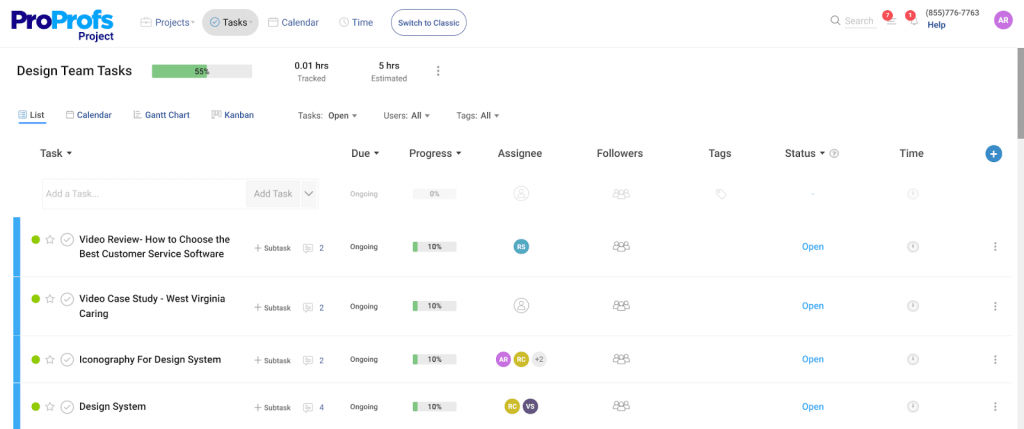
Having managed multiple construction projects over the years, I’ve found ProProfs Project to be one of the most reliable tools for keeping timelines and team coordination on track. What I appreciate most is how effortlessly it turns complex, multi-team construction workflows into simple, visual task structures that everyone can follow without confusion.
When I’m dealing with contractors, suppliers, and on-site teams, it helps me centralize every task, dependency, and update in one place. I can assign work, set start and due dates, and monitor progress in real time, which has significantly reduced delays and miscommunication.
What really stands out is the built-in automation and collaboration features. I can automate repetitive follow-ups, track billable and non-billable hours, and share files such as blueprints, material specifications, and inspection reports, all without needing external tools.
More recently, the tool has brought AI directly into that setup process too. Describe a project in plain language, whether it’s a commercial remodel or a multi-phase build, and its AI Project Designer builds out the tasks, stages, and assignments for you automatically, cutting into the setup time that eats into a project manager’s day before ground even breaks. There’s also an AI assistant available throughout the project, so instead of calling the site supervisor to check status, you can ask it something like “which projects are overrunning” and get a direct answer from live data.
Pros:
- The Gantt charts help map out phases like design, procurement, site preparation, and installation with absolute clarity
- AI Project Designer and AI assistant that build project structures and flag schedule risk automatically, cutting down field-to-office status calls
- Simple interface reduces training time for field crews who don’t have bandwidth for complex tools
- Built-in time tracking helps construction teams monitor billable hours and prevent cost overruns
- Centralized task comments & file sharing stop the chaos of scattered drawings and email threads
- Automated reminders help crews stay on schedule, especially when managing deadlines for subcontractors.
Cons:
- No downloadable or on-premise version
- Dark user interface option not available.
G2 Rating: 4.4/5
Pricing: Offers a free plan for growing teams. Paid plans start at $39.97/month.
2. Oracle Aconex
Best for connecting project teams & improving productivity
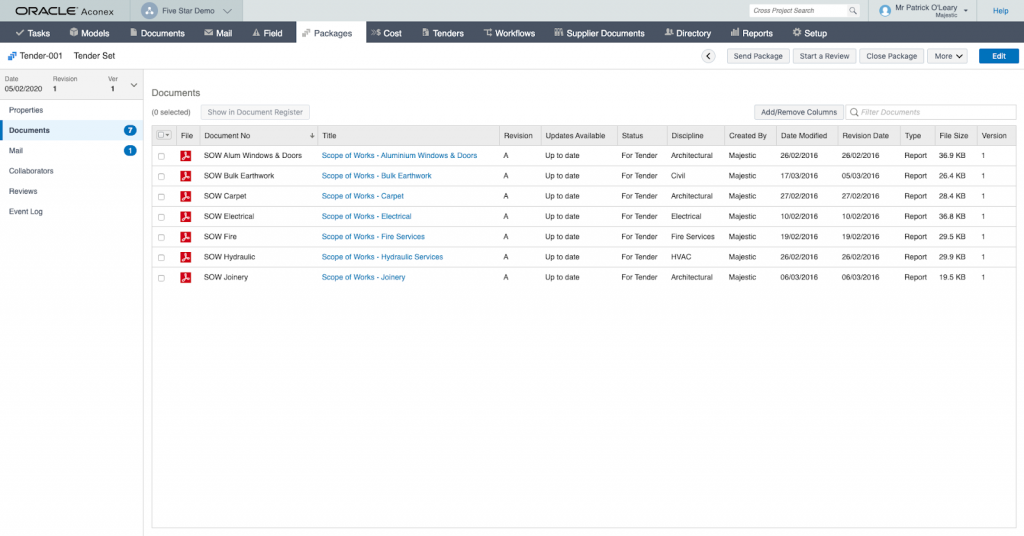
Oracle Aconex is a construction-focused platform designed to streamline collaboration across contractors, engineers, architects, and owners. It centralizes project information—including RFIs, design documents, inspections, and workflows so every stakeholder stays aligned.
Its biggest strength lies in handling large-scale construction documentation with strict version control. Teams gain real-time visibility into what’s approved, what’s pending, and what needs revision, reducing delays and compliance risks.
Aconex also provides strong audit trails and project controls, making it a reliable option for infrastructure, commercial construction, and government projects.
Pros:
- Rigorous document control prevents teams from building from outdated drawings
- Strong audit trails help meet compliance requirements on regulated job sites
- Multi-contractor support ensures architects, contractors & owners stay aligned without manual chasing
- Clear version tracking reduces rework caused by mismatched plans or specs.
Cons:
- Steeper learning curve for new users
- Configuring workflows can be time-consuming.
G2 Rating: 4.5/5
Pricing: Custom (enterprise-level).
3. Procore
Best for real-time visibility & collaboration across construction projects
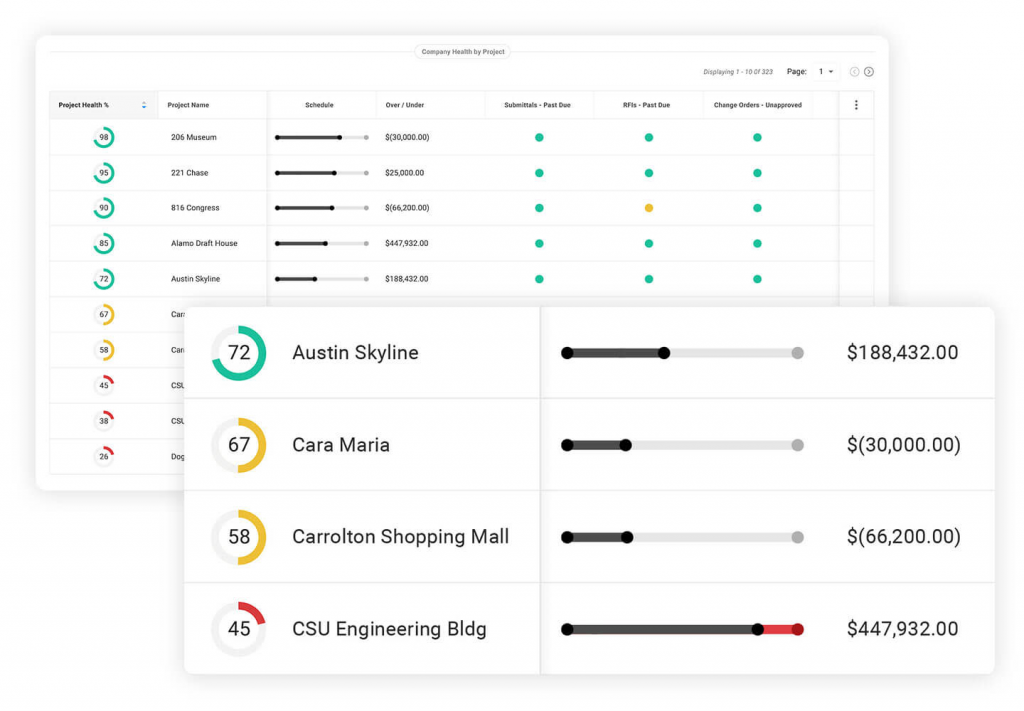
Procore is one of the most widely used construction management platforms, offering end-to-end oversight of projects—from planning to handover. It connects field teams, back-office staff, and leadership through a single source of truth.
With tools for scheduling, financials, field reports, RFIs, and inspections, Procore brings operational clarity to even the most fast-moving construction environments. Its mobile app is particularly strong, enabling real-time updates directly from job sites.
The platform also integrates deeply with ERPs and construction tools, making it a robust fit for companies managing multiple large projects at once.
Pros:
- Excellent mobile app enables field teams to update progress instantly, reducing site-office miscommunication
- RFI and inspection tools resolve issues faster, preventing project delays
- Deep integrations connect scheduling, financials, and field data—solving the “multiple disconnected tools” problem
- Real-time visibility helps spot risks early before they escalate into costly change orders.
Cons:
- Setup and onboarding can be intensive
- Occasional performance issues with large files.
G2 Rating: 4.6/5
Pricing: Custom (based on business size & modules).
4. Autodesk Construction Cloud
Best for design-to-build collaboration & document management
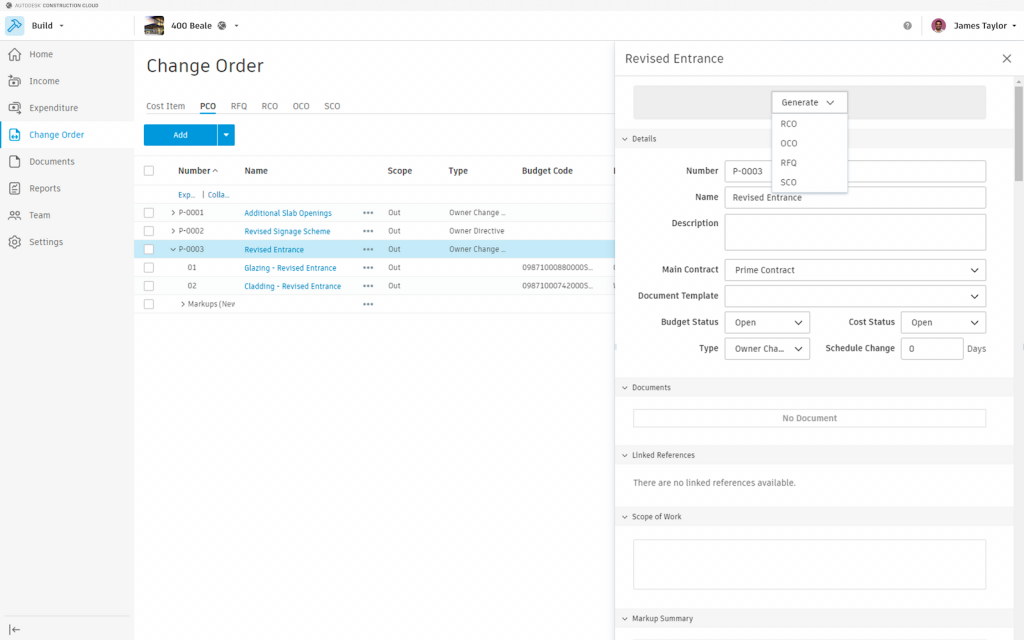
Autodesk Construction Cloud unifies design, planning, and field execution, enabling teams to work from a single source of truth. Its strong BIM capabilities help catch design conflicts before they reach the site—saving time, labor, and rework.
Construction teams benefit from seamless document control, RFIs, and issue tracking, all tied to project drawings. Field updates automatically sync back to Office Teams for real-time decision-making.
Its ecosystem works exceptionally well for companies already using Autodesk tools, offering end-to-end visibility across the construction lifecycle.
Pros:
- BIM-powered clash detection reduces costly on-site collisions between MEP, structural, and architectural elements
- Version-controlled drawings ensure crews always build from the latest set, avoiding rework
- Centralized RFI & issue tracking prevents gaps between design intent and field execution
- Mobile access helps crews log issues instantly, reducing delays caused by late reporting.
Cons:
- Setup can feel heavy for smaller construction teams
- Learning curve is steeper compared to lightweight PM tools.
G2 Rating: 4.4/5
Pricing: Custom pricing.
5. Buildertrend
Best for home builders, remodelers & residential contractors
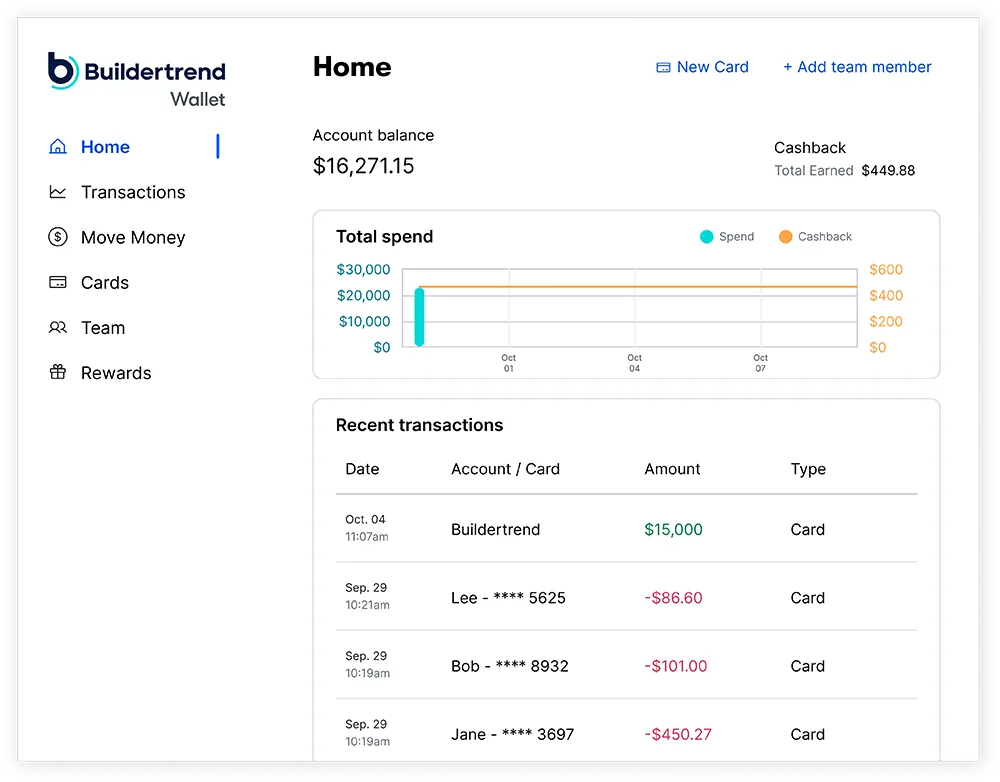
Buildertrend is designed for residential construction teams that want a streamlined way to manage bids, schedules, client communication, and financials in one place. The interface is simple enough for field crews while still offering powerful back-office tools.
Its customer portal stands out—keeping homeowners fully informed without the need for endless phone calls, photos, and message threads. Schedules, selections, and change orders are stored in a single, accessible hub.
The tool also integrates well with accounting systems, helping small to mid-size construction companies stay profitable and organized.
Pros:
- Client portal reduces homeowner call-backs by giving them a clear view of progress & selections
- Integrated scheduling helps avoid subcontractor overlaps and wasted labor hours
- Photo & daily logs from the field keep office staff instantly updated, minimizing miscommunication
- Built-in estimating tools reduce errors that commonly occur in residential bid prep.
Cons:
- Mobile app can lag with large photo uploads
- Customization options are somewhat restricted.
G2 Rating: 4.3/5
Pricing: Custom pricing.
6. Fieldwire
Best for field coordination & task management on-site
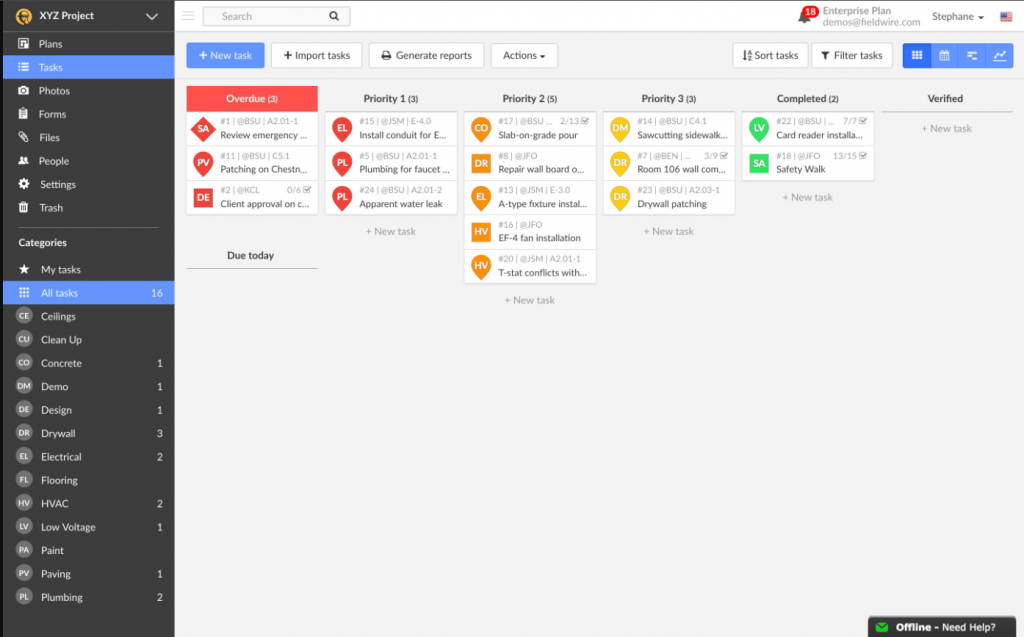
Fieldwire focuses on giving field crews the tools they need to coordinate work, resolve issues, and stay aligned with project plans. Its strength lies in the simplicity and speed of task creation, assignments, and plan markups.
Construction teams can quickly pull up drawings, add annotations, attach photos, and communicate issues—right from the job site. This eliminates back-and-forth calls and helps office teams stay informed without manual updates.
Its offline mode is especially valuable for teams working on remote sites or in areas with unreliable connectivity.
Pros:
- Instant plan markups help crews flag issues on-site before they become expensive mistakes
- Clear task assignments keep subcontractors accountable and reduce idle time
- Offline mode ensures crews can access drawings even in areas with weak connectivity
- Photo documentation helps track work quality and reduces disputes with owners or subs.
Cons:
- Document storage feels basic for large-scale builds
- Reporting features could be more customizable.
G2 Rating: 4.5/5
Pricing: Custom pricing.
7. Wrike
Best for enterprise-level planning & cross-department coordination
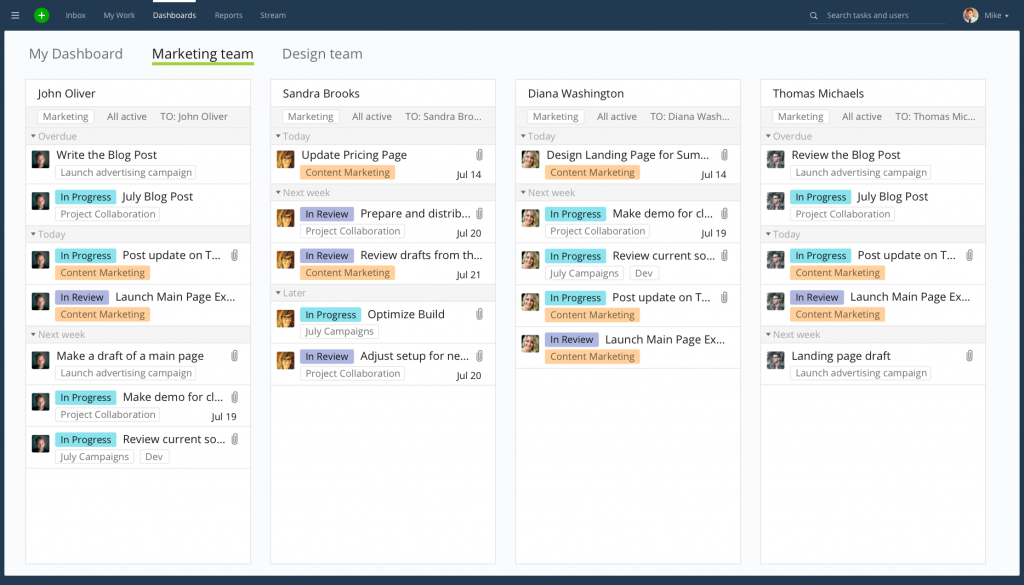
Wrike works well for large construction firms juggling multiple projects, departments, and stakeholders. Its customizable workflows let teams standardize approvals, documentation, and communication across office and field staff.
The platform’s real-time dashboards enable leaders to track progress, identify bottlenecks, and maintain accountability among subcontractors. This is especially helpful when coordinating large teams working across different phases of a complex build.
Because Wrike integrates with major business tools, it becomes a central hub for scheduling, task management, and reporting—ideal for firms scaling their operations.
Pros:
- Automated workflows reduce delays caused by manual approvals and paperwork
- Real-time dashboards help spot schedule slippage early, minimizing cost overruns
- Centralized communication prevents lost instructions between office and onsite teams
- Resource views help avoid overbooking subcontractors across parallel projects.
Cons:
- Requires customization to fit construction-specific workflows
- Offline capabilities are limited for field teams.
G2 Rating: 4.2/5
Pricing: Offers a free plan. Paid plans start at $10/user/month.
8. Smartsheet
Best for spreadsheet-style project tracking & field collaboration
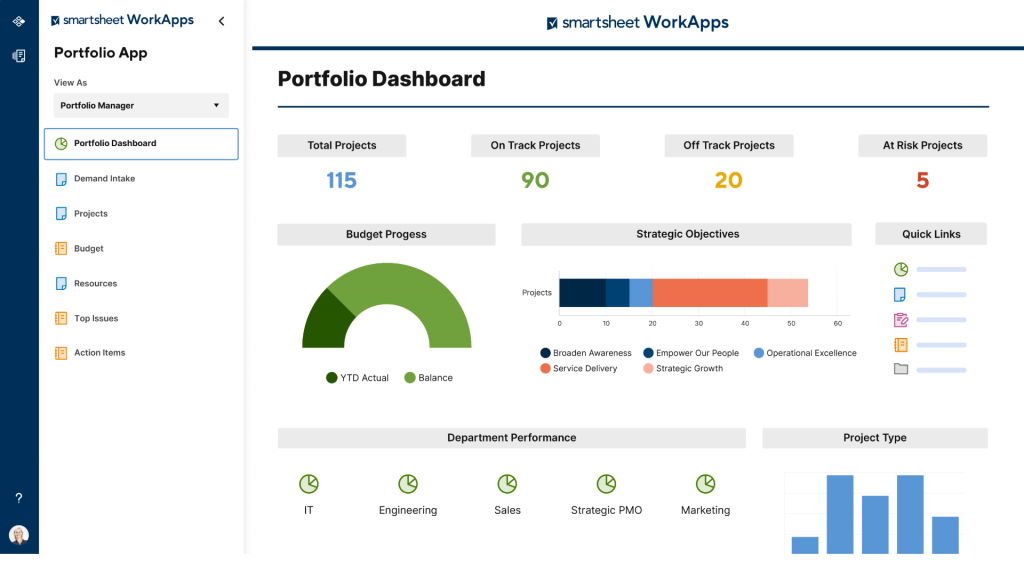
Smartsheet is popular among construction teams that love spreadsheets but need more automation, visibility, and collaboration. It transforms traditional Gantt charts and schedules into dynamic, interactive project boards.
Construction managers use it to centralize timelines, RFIs, punch lists, and safety checklists. Field teams can update tasks on mobile devices, giving managers immediate insights into progress and site conditions.
Its strong automation capabilities make it easy to streamline repetitive tasks—from sending reminders to tracking status changes across large projects.
Pros:
- Familiar spreadsheet layout reduces onboarding time for field and office staff
- Automated alerts help prevent missed inspections or material deliveries
- Mobile forms simplify capturing onsite data like safety checks and punch items
- Centralized sheets reduce errors that occur when using scattered Excel files.
Cons:
- Can get cluttered without careful template management
- Advanced features require paid tiers
- Permission settings can be complex for large teams
- Not a full construction suite—needs integrations for financials.
G2 Rating: 4.4/5
Pricing: Offers a free plan. Paid plans start at $9/member/month.
9. Asana
Best for simple scheduling & task coordination
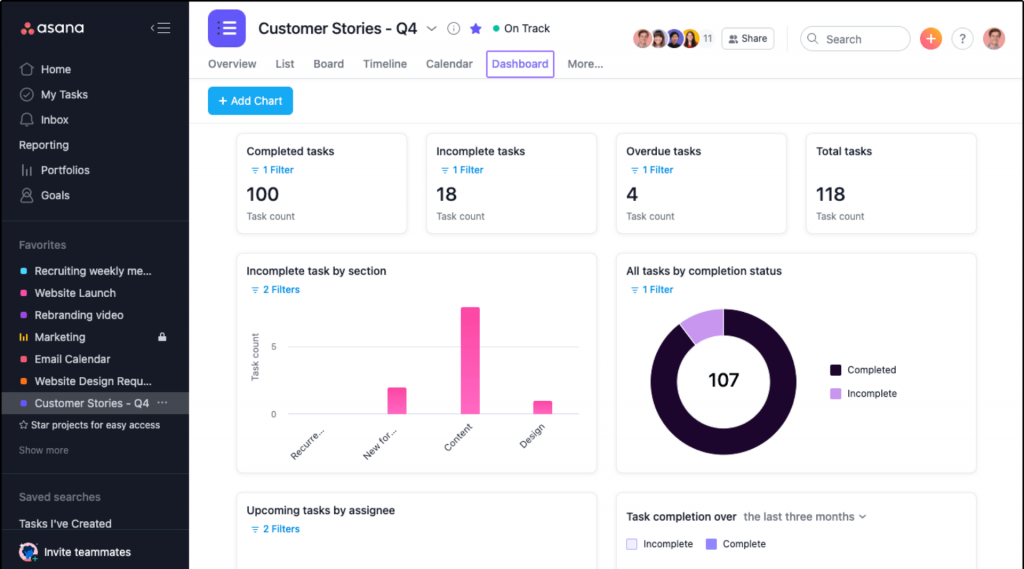
Asana is a clean, easy-to-use choice for construction companies that need basic project planning and communication, rather than heavy-duty construction features. It works well for smaller contractors or firms that manage many short-duration projects.
Its visual boards and timelines make it easy to assign and track tasks across multiple crews, vendors, or office teams. With quick updates and reminders, teams stay aligned without relying on endless calls or WhatsApp threads.
Because Asana offers a lightweight structure, it’s great for teams that want flexibility without spending time configuring highly technical systems.
Pros:
- Clear task visibility helps ensure subcontractors know what’s expected each day
- Timeline views prevent overlaps between trades working in the same zones
- Simple updates reduce miscommunication between field supervisors and office staff
- Automated reminders help teams avoid forgetting small but critical tasks.
Cons:
- Lacks construction-specific features like RFIs or drawings
- No built-in document versioning for plan sets.
G2 Rating: 4.4/5
Pricing: Offers a free plan. Paid plans start at $10.99/user/month.
10. Monday.com
Best for customizable boards & visual construction tracking
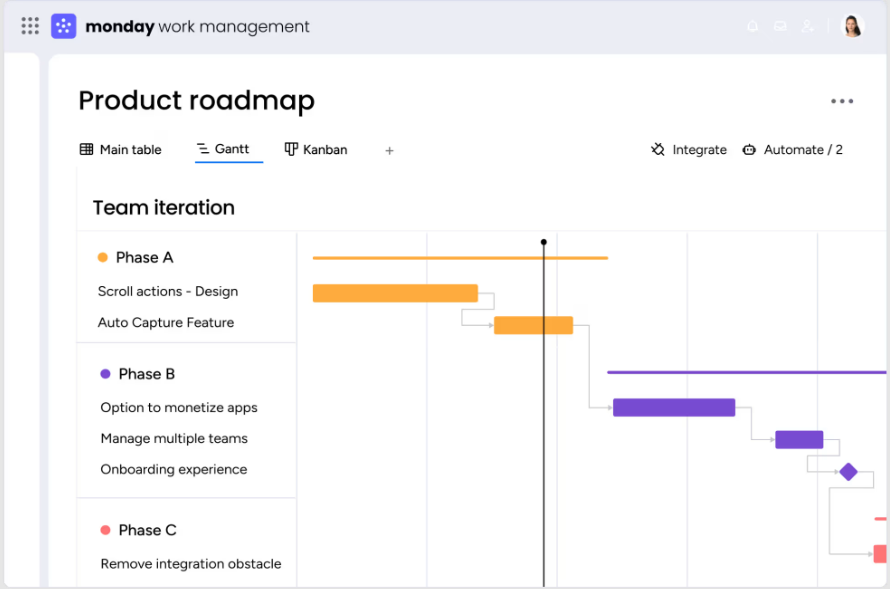
Monday.com offers flexible project boards that can be tailored to construction workflows, including job scheduling, equipment tracking, inspections, and client updates. Its highly visual interface helps teams get a quick read on project progress.
Construction teams can automate repetitive tasks, create forms for field input, and centralize documents and communication. The platform supports both simple and complex builds with customizable columns and workflows.
It’s especially effective for companies that need adaptability rather than rigid construction-specific templates.
Pros:
- Visual boards make it easy to track installation phases across multiple zones
- Field forms help capture onsite issues immediately, reducing follow-up delays
- Automations reduce manual coordination between office and site teams
- Status labels give project managers instant clarity on which tasks are behind schedule.
Cons:
- Customization takes time to set up for construction workflows
- Limited built-in tools for RFIs or plan management.
G2 Rating: 4.7/5
Pricing: Paid plans start at $12/seat/month.
My Top 3 Project Management Software for Construction
If you want the safest bets without overthinking the list, here are my top three recommendations.
1. ProProfs Project
ProProfs Project stands out for construction teams that need clarity, predictability, and seamless collaboration.
Its simple interface, powerful scheduling tools, and automation make it ideal for keeping field and office teams aligned without the usual software complexity.
A great choice if you want a tool you can set up and start using the same day. Its AI-driven setup takes that same-day promise even further, since describing the project is often enough to get the initial schedule and task breakdown in place.
2. Oracle Aconex
Oracle Aconex is designed for large, multi-stakeholder construction projects that require extensive documentation.
Its strengths lie in document control, compliance, and connecting contractors, architects, and owners within a single, transparent workflow.
Choose it if your projects demand rigorous tracking, auditability, and enterprise-level coordination.
3. Procore
Procore delivers unmatched visibility across job sites, financials, and project performance.
Its mobile-friendly workflows make it a favorite for teams that live on-site, ensuring updates, RFIs, and change orders never slip through the cracks.
Ideal if you want a platform that integrates deeply into your construction ecosystem.
How to Choose the Right Project Management Software for Construction
Finding the right tool comes down to matching real on-site challenges with the capabilities that actually move your projects forward. Use this checklist to evaluate any software effectively:
- Prioritize Field-Friendly Features: Look for mobile apps, offline access, and quick reporting tools your on-site teams will actually use.
- Check Coordination & Subcontractor Management: Ensure it supports multi-vendor scheduling, document sharing, and real-time updates to avoid rework or delays.
- Evaluate Change Order & RFI Workflows: Choose software that streamlines approvals, tracks revisions, and keeps a clear audit trail.
- Assess Integration Compatibility: Ensure it integrates smoothly with existing accounting tools, CRMs, BIM platforms, and scheduling apps within your ecosystem.
- Review Collaboration & Document Control: Look for centralized drawings, version control, and permissions to reduce miscommunication on job sites.
- Consider Scalability for Future Projects: Your needs will grow—pick a tool that can handle larger teams, complex portfolios, and multiple locations.
- Analyze Reporting & Compliance Tools: Safety logs, inspections, incident reports, and compliance tracking should be easily generated and shared.
- Compare Learning Curve & Adoption Rate: Construction teams are busy—select a platform that’s intuitive enough for quick onboarding.
Watch this video to learn more about choosing the best project management software out there:
Fit the best construction project management software into the best enterprise project management software landscape. Guide: Best Enterprise Project Management Software.
Construction Challenges These Tools Must Solve (Context for Choosing)
Before comparing features, it’s essential to understand the real-world problems construction teams face every day — the ones your construction project management tools must address to be worth the investment.
1. On-Site Safety & Compliance Tracking
Construction teams must adhere to strict safety regulations, undergo regular inspections, maintain accurate incident logs, and complete all necessary compliance documentation. Missing even a single record can lead to delays or penalties.
The software must: streamline safety reporting, standardize inspections, and keep compliance data organized and accessible.
2. Managing Change Orders Without Chaos
Frequent design revisions, scope changes, and unexpected site conditions make change orders a constant challenge. Without a structured workflow, they often result in cost overruns and disputes.
The software must: provide clear approval steps, track revision history, and maintain transparency for all stakeholders.
3. Coordinating Subcontractors & Vendors
Subcontractors often operate on different timelines, communication styles, and document management habits. Misalignment leads to rework or scheduling conflicts.
The software must: centralize schedules, assignments, and updates so every party stays aligned.
4. Handling Field–Office Communication Gaps
Phone calls, WhatsApp messages, and siloed spreadsheets leave room for miscommunication. Field staff and office teams need real-time clarity on priorities and progress.
The software must: offer mobile access, real-time updates, and shared workspaces to close the gap.
5. Real-Time Project Tracking (Cost, Schedule, Materials)
Construction projects involve fluctuating budgets, delivery delays, and shifting deadlines. Stale or manual reporting leads to poor decision-making.
The software must: give live visibility into cost burn, timelines, material availability, and resource usage.
6. Document Control (Blueprints, RFIs, Permits, Punch Lists)
With hundreds of documents circulating, outdated versions or lost files can hinder progress.
The software must: centralize document management with version control, permissions, search, and easy sharing.
Compare construction tools with the best creative project management software. Recommendations: Best Creative Project Management Software.
Handling Change Orders Effectively With the Right Software
Change orders are unavoidable in construction — but when they aren’t managed properly, they quickly derail budgets, timelines, and team coordination.
Why Change Orders Derail Timelines
Change orders often involve multiple stakeholders, design revisions, material adjustments, and updated cost approvals.
When these steps happen through emails, calls, or scattered documents, miscommunication takes over. The result? Work pauses, crews wait, schedules slip, and costs spike.
How Software Helps Automate Approvals, Track Revisions & Maintain Documentation
Robust construction project tracking software centralizes the entire change-order workflow.
Automated approval routing ensures nothing gets missed, revision history keeps changes transparent, and organized documentation prevents disputes later on.
Everyone, from field supervisors to office admins, sees exactly what changed, when, and why.
Mini-Checklist: What Great Tools Should Offer for CO Management
- Clear, customizable approval workflows
- Audit trails for revision history
- Side-by-side comparison of original scope vs. updated scope
- Document and attachment management for drawings, costs & notes
- Mobile access so field teams can submit & approve COs on-site
- Real-time status tracking for pending, approved, and rejected COs.
Coordinating Subcontractors Without Miscommunication
Subcontractor coordination is one of the most significant sources of project delays, primarily because crucial updates are often lost across emails, phone calls, and outdated PDFs.
a. Common Subcontractor Issues: Missed Deadlines, Outdated Plans, Unclear Responsibilities
Subcontractors often juggle multiple jobs, making it easy for them to work off old drawings, misunderstand the scope, or miss critical schedule updates. These gaps create rework, sequencing conflicts between trades, and unnecessary downtime.
The Fix: Use a construction PM tool that maintains a single source of truth — with up-to-date blueprints, schedules, and task details accessible on any device. Features like real-time notifications and version control prevent subcontractors from acting on outdated information.
b. How Construction PM Tools Help With Scheduling, Task Assignments, Centralized Docs & Accountability
Modern construction project management software streamlines subcontractor collaboration by offering role-based schedules, task assignments with clear ownership, and centralized documentation.
Automated alerts ensure subcontractors never miss changes, while activity logs and progress tracking reinforce accountability and keep timelines on track.
Practical Checklist: What to Look for During Trials/Demos
Before committing to any construction project management software, the trial or demo phase is your chance to stress-test whether the tool can handle real job-site complexity—not just look good in a presentation.
Use this checklist to assess how well each platform aligns with your day-to-day workflows.
- Test Mobile Accessibility: Ensure field teams can access schedules, drawings, and tasks easily from mobile devices.
- Check Real-Time Field Updates: Verify that changes made onsite instantly sync across office dashboards.
- Try Scheduling & Change-Order Workflows: Simulate a real change order—does it update timelines, notify stakeholders, and log the revision?
- Evaluate Blueprint/Document Versioning: Upload plans and observe how the software manages versions, approvals, and prevents outdated files.
- Review Safety & Compliance Tracking: Look for incident logs, checklists, audits, and automated reminders.
- Try Subcontractor Assignment Flows: Assign tasks to subcontractors and assess clarity, notifications, and accountability tools.
- Confirm Integration Compatibility: Verify that it integrates smoothly with tools such as Procore, QuickBooks, Slack, or your CRM.
- Assess Ease of Onboarding/Training: Evaluate whether your teams—especially field crews—can start using it without long training cycles.
Speed Up Construction Execution & Delivery With Project Management Software
Modern construction projects move too fast—and involve too many people—to rely on spreadsheets, siloed tools, or “hope it works” communication.
The right construction project management software brings order to the chaos by centralizing schedules, documents, change orders, subcontractor workflows, and real-time field updates.
The tools on this list address real problems encountered on job sites every day, from ensuring safety compliance and maintaining blueprint versioning to facilitating coordination between field crews and office teams.
However, if you’re looking for a platform that combines simplicity with powerful, construction-ready features, ProProfs Project provides an intuitive way to plan, track, and deliver projects on time—without the steep learning curve.
FREE. All Features. FOREVER!
Try our Forever FREE account with all premium features!