I have spent over a decade helping project managers move from chaos to clarity. And one thing I keep seeing is the same pain repeated across industries: teams are drowning in spreadsheets, email threads, and manual follow-ups while calling it “project management.” It is not their fault. They just have not had the right tools yet.
AI in project management changes that completely. In my experience working with teams across real estate, IT, marketing, biotech, and government, the ones that adopt AI tools stop chasing status updates and start actually leading. They catch problems before they explode. They make decisions with real data, not gut feel.
In this guide, I am going to walk you through everything you need to know about AI in project management: what it actually means, how it works in practice, where it helps the most, and how to choose the right tool for your team. Whether you are managing two people or two hundred, this is the most practical breakdown you will find.
What Is AI in Project Management?
AI in project management means using artificial intelligence to help teams plan smarter, execute faster, and catch problems before they turn into disasters. Instead of managing everything on a spreadsheet or chasing updates through Slack, AI tools do the heavy lifting: tracking progress, flagging risks, balancing workloads, and automating reports, automatically.
In plain terms: AI handles the repetitive, time-consuming parts of running a project so you can focus on the work that actually moves things forward.
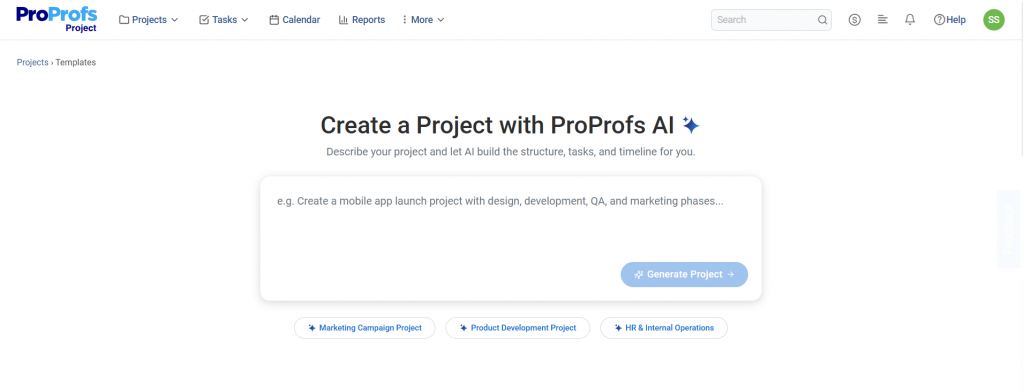
If you have ever missed a deadline because no one noticed a task was slipping, or spent Friday afternoon manually building a status report for leadership, AI in project management is built to fix exactly those problems.
Who Should Use AI for Project Management?
AI project management tools are not just for large enterprises or tech companies. Based on real customer data, teams that benefit the most include:
- Project managers who currently track tasks in spreadsheets or memory
- Operations managers who need a high-level overview of multiple ongoing projects
- IT and software teams managing sprints, dependencies, and integrations
- Small business owners who are scaling up and onboarding contractors or subcontractors
- Marketing teams running campaigns with many moving parts and internal reviewers
- Government and non-profit teams managing multiple initiatives with limited staff
- Executives who need real-time visibility without sitting in daily standups
If your team manages projects with more than three to five people and more than a handful of tasks, AI project management software will save you time from day one. A good read on this is the guide on challenges faced by project managers and how the right systems can address them.
How Does AI Actually Work in Project Management?
Most people imagine AI as a chatbot or a magic button that instantly organizes everything. The reality is more practical and more powerful. AI in project management works by continuously reading your project data: who is doing what, when things are due, where delays are forming, and how resources are distributed. It then acts on that data automatically so you do not have to.
Think of it as a very attentive project coordinator that never sleeps, never forgets, and never misses a deadline. It does not replace your decision-making. It gives you the information you need to make better decisions, faster.
Here is a step-by-step look at what happens when AI is built into your project management workflow:
Step 1: You Create A Project
You set the goal, timeline, and team. AI analyzes the scope and can suggest a task list based on similar past projects.
Step 2: AI Assigns And Schedules Tasks on Your Behalf
Based on team members’ availability, skills, and current workload, AI recommends who should do what and by when. This is directly connected to project scheduling best practices.
Step 3: Automated Reminders Go Out
Instead of you chasing people, AI sends reminders automatically when deadlines are approaching or tasks are overdue.
Step 4: AI Monitors Progress In Real Time
The system watches task completion rates, identifies bottlenecks, and surfaces risks before they become problems.
Step 5: Stakeholders Get Auto-Updated Reports
Leadership and clients see real-time dashboards without anyone manually compiling data.
Step 6: You Make Decisions With Data
AI surfaces insights: which projects are behind, which resources are overloaded, and where the budget is heading.
No more guesswork. No more end-of-week status meetings just to figure out where things stand.
Pro Tip: The quality of AI output depends directly on the quality of your task data. Before enabling AI features, spend an hour standardizing how tasks are named and scoped across your team. Vague tasks like “work on website” produce vague insights. Specific tasks like “write homepage copy, due Friday, assigned to Sarah” give AI something real to work with.
What Are the Key Use Cases of AI in Project Management?
AI is reshaping how project teams plan, execute, and report — not by replacing managers, but by handling the repetitive, time-consuming work that gets in the way of actual decision-making. Here are the six areas where it makes the biggest difference.
1. AI Project Scheduling
AI project scheduling replaces the back-and-forth of manually building timelines. The system analyzes task dependencies, team availability, and project deadlines to auto-generate a realistic schedule.
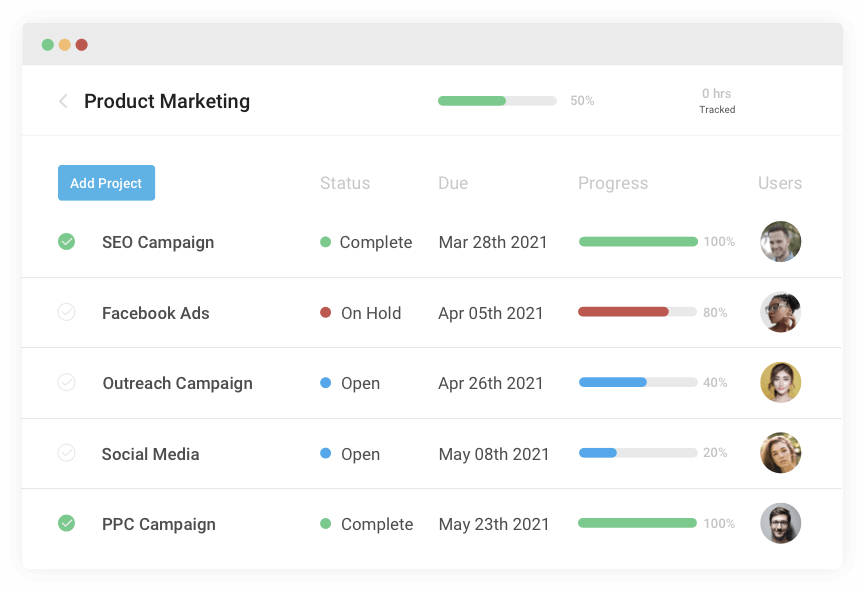
A study by Epicflow in 2026 found that AI-powered project management tools can predict risks and bottlenecks, forecast due date performance based on current data, and provide real-time performance insights, allowing project leaders to prevent delays before they happen.
Practical example: A real estate team managing multiple renovation projects no longer needs to manually update Gantt charts every time a contractor changes. AI adjusts the timeline automatically when one task shifts.
Key capabilities:
- Gantt chart automation with dependency tracking
- Drag-and-drop rescheduling with AI impact analysis
- Project timeline forecasting based on current pace
2. AI-Driven Project Risk Management
Predictive risk management is one of AI’s most powerful capabilities in project management.
Traditional risk management is reactive. You find out a project is in trouble when it is already in trouble. AI flips this. It analyzes patterns across your current and historical projects and flags risks early, so you can act before things go wrong. This connects directly to the broader discipline of project risk assessment and building a proactive risk management plan.
A study by TechTarget in 2025 highlighted that AI-driven risk detection is shifting project management from reactive to predictive, with real-time alerts allowing quick interventions before situations worsen.
Key capabilities:
- Early warning alerts for tasks falling behind
- Budget variance monitoring with auto-alerts
- Scenario modeling for contingency planning
- Risk scoring across the entire project portfolio
Pro Tip: Set up AI risk alerts with specific thresholds that match your team’s capacity. For a small team, even a two-day delay can cascade quickly. Calibrate your alert sensitivity accordingly rather than using the default settings.
3. AI-Powered Resource Planning
Resource utilization is where many teams silently lose money. Someone is overloaded. Someone else is underused. No one has a clear picture until it is too late.
A study by McKinsey in 2025 found that automating repetitive work like scheduling and status reporting allows managers to dedicate 28% more effort to critical thinking and problem-solving. That is time that goes back into actually leading your team rather than administering it.
AI resource planning solves the overload problem by:
- Mapping workload across every team member in real time
- Flagging when someone is over-capacity before they burn out
- Recommending task reassignments based on availability
- Giving managers a single dashboard view across all projects
This is especially valuable for teams managing multiple workstreams at once. The guide on resource planning for multiple projects goes deeper into structuring this well.
As AI adoption grows, many organizations also rely on an AI consulting company to evaluate their project management workflows, identify automation opportunities, and implement AI solutions that align with their business objectives.
4. Automated Stakeholder Reporting
Manual status reporting is one of the biggest time drains in project management. Managers spend hours compiling updates that are often outdated by the time they are shared.
AI automates this entirely. A stakeholder reporting dashboard built on AI gives executives and clients real-time project status without asking for updates, progress metrics by project or team, customizable views based on role and permission level, and auto-generated summaries ready to share in one click.
You can pair this with a solid project management communication plan to define who sees what and when.
5. Task Dependency Tracking
Task dependency tracking is what separates a realistic project timeline from an optimistic one.
When Task B cannot start until Task A is done, and Task A is running late, everything downstream shifts. Manually tracking this across dozens of tasks is nearly impossible, and the mistakes are expensive. For a deep dive on structuring this well, see the guide on task dependencies in project management.
AI handles task dependency tracking automatically:
- Visualizes the full dependency chain in real time
- Alerts teams when upstream delays will impact downstream tasks
- Suggests timeline adjustments to minimize the cascade effect
- Keeps the critical path visible at all times
6. Workflow Automation
Workflow automation means you set the rules once, and AI handles the execution. A study by Capterra in 2025 confirmed that AI in project management software is now used across three core areas: predicting risks, automating workflows, and optimizing schedules.
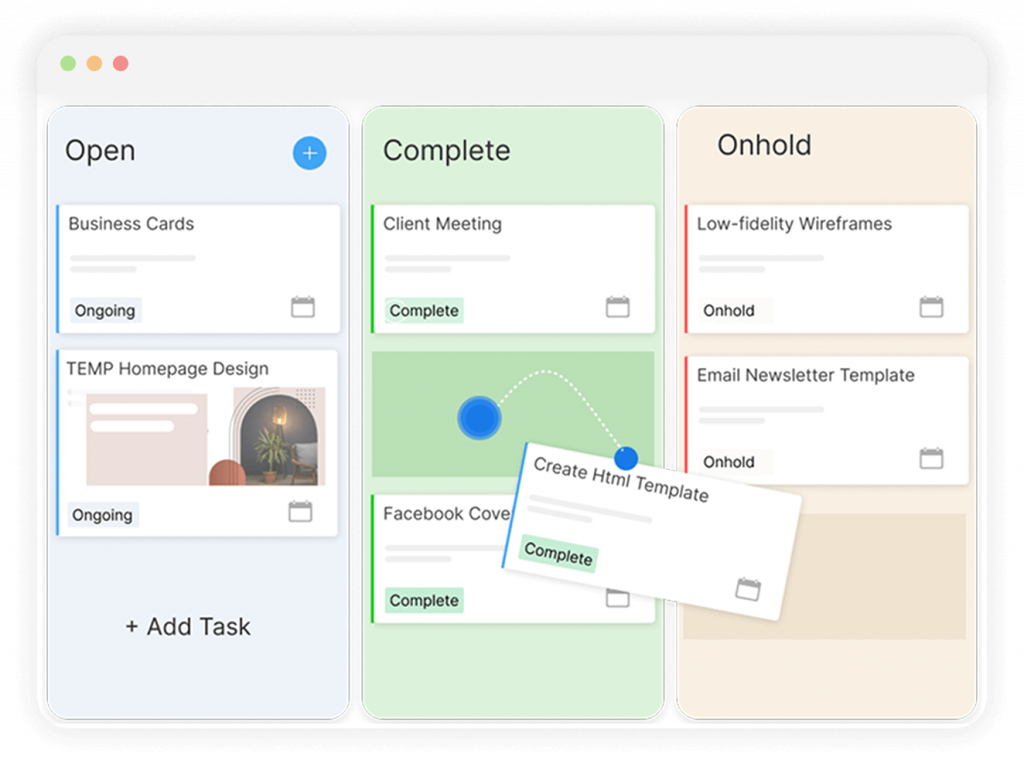
- When a task is marked complete, the next task is automatically assigned
- When a deadline passes, the responsible person gets an escalation alert
- When a new project starts, a template is applied and the team is notified
- When a budget threshold is crossed, the project manager is alerted immediately
This is especially useful for teams with recurring projects. See the full breakdown on recurring task management and workflow automation for practical setup guidance.
Pro Tip: Map your most repeated project type on paper before configuring automation. Identify the five to ten steps that always happen in the same order. Those are your automation triggers. Starting with a clear template reduces setup time and produces better AI recommendations from day one.
What Are the Proven Benefits of AI for Project Managers?
The benefits of AI in project management go well beyond saving a few hours a week. When AI is properly embedded in your workflow, it shifts how your entire team operates: from reactive and administrative to proactive and strategic. Here is what that looks like in practice.
| Benefit | What It Means in Practice |
| Fewer missed deadlines | AI sends automatic reminders and flags slipping tasks before they are late |
| Less time in meetings | Real-time dashboards replace most status update meetings |
| Better resource utilization | AI shows who is overloaded and who has capacity |
| Smarter risk management | Risks are flagged early, not discovered after the damage is done |
| Faster onboarding | New team members see task assignments and context immediately |
| Cleaner stakeholder communication | Auto-generated reports replace manual deck-building |
| Stronger audit trails | Every task, comment, and update is logged and searchable |
A study by Project.co in 2024 found that 84% of project managers reported improved project efficiency after incorporating AI into their project management practices. Additionally, 68% said AI positively impacted communication and collaboration within their business, and 63% said it improved project timelines and resource utilization.
AI Project Management vs. Traditional Project Management: What Is the Difference?
If you have been running projects for years without AI, this comparison is not meant to make you feel behind. It is meant to show you specifically where time and money are leaking out of your current process, and what fixing it actually looks like.
| Factor | Traditional Project Management | AI Project Management |
| Status tracking | Manual updates via email or chat | Real-time, automated dashboards |
| Risk detection | Reactive: found when it is too late | Proactive: flagged before it happens |
| Resource allocation | Managed by gut feel or spreadsheet | Data-driven, based on capacity and skills |
| Reporting | Hours of manual work | Auto-generated in seconds |
| Scheduling | Built manually, updated manually | Auto-adjusted based on real-time data |
| Deadline reminders | Someone has to remember to chase | Automated escalations and notifications |
| Decision-making | Based on incomplete, delayed data | Based on live project intelligence |
Traditional project management is not wrong. It is just slow and prone to human error at scale. AI does not replace the project manager. It removes the parts of the job that nobody enjoys. For context on where modern project management is heading, the project management trends guide covers the shift in depth.
Real-World Use Cases: Which Teams Benefit Most From AI in Project Management?
AI in project management is not a one-size-fits-all solution. The way it helps a five-person marketing team is different from how it helps a 300-person IT firm. Here are real examples of teams that made the switch and what changed for them.
Marketing Teams
A B2B marketing team managing campaigns across collateral, design requests, and full-scale launches uses AI dashboards so senior leadership can see project status by product line, without any manual reporting. The result is fewer update meetings, clearer ownership, and faster approvals.
Customer story: Emma Cook, Senior Graphic Designer at Cleveland University, shared that ProProfs Project helped her team track progress, focus on projects, and stay organized. The team moved away from scattered task management and into a single, visible system that everyone could follow.

For teams running campaigns with many moving parts, the marketing project management guide is a useful companion to this section.
IT and Software Development Teams
An IT consulting company moves away from Jira’s expensive per-seat model to a tool with webhooks, API integrations, and sprint planning built in, at a fraction of the cost. AI helps the team track sprint progress, catch dependency conflicts early, and keep client projects on schedule without daily standups.
For IT teams evaluating alternatives to their current stack, the why use project management software in IT teams article covers the decision well.
Creative and Design Agencies
Josh Latham of Pxlvue Creative Imaging noted that ProProfs Project is easy to use for both his creative team and clients, with a simple interface that lets him schedule projects like a digital calendar. That kind of visibility, without the complexity, is exactly what AI-powered tools bring to creative workflows.
For agencies managing client deliverables, the creative project management guide has practical structure advice.
Client-Facing and Consulting Teams
DeepSeas used ProProfs Project to streamline client communication by organizing client groups and saving significant time. Gina Mitchell, Project Manager at DeepSeas, noted that the tool simplified how her team handles communication across multiple client accounts.
For teams juggling multiple external stakeholders, pairing AI with a strong client project management approach makes a measurable difference.
Government and Non-Profit Teams
María Franco Avalos, Geographical Information Systems Specialist at the United Nations Development Programme, described ProProfs Project as easy to use and offering everything needed for close activity monitoring of remote staff.
Her team saw an immediate increase in the number of progress reports and improved accountability across implementation partners in government, civil society, and international organizations.
Small Business and Real Estate Teams
Small teams managing property research, renovations, and rentals use AI project management to move away from spreadsheets and toward a centralized hub where every contractor, task, and deadline is visible in one place. The project management in small business guide covers what this transition looks like in practice.
What Are the Challenges of Using AI in Project Management?
AI is not perfect. Here are the real challenges teams face and how to address them.
1. AI Needs Clean Data To Work Well
When working with AI-driven tools, the rule is “garbage in, garbage out.” If your tasks are vague or your timelines are unrealistic, AI will reflect that back to you.
Fix: Standardize how tasks are named, scoped, and assigned before you start using AI features. Even a simple naming convention goes a long way.
2. AI Can Occasionally Be Wrong
AI systems can sometimes generate inaccurate information, making it important to critically review outputs, especially for high-stakes decisions like resource allocation or timeline commitments.
Fix: Use AI as a first draft, not a final answer. Human judgment still matters.
3. Team Adoption Takes Time
A study by Capterra in 2025 found that 41% of project managers said AI adoption is a challenge, 39% reported a lack of AI skills on staff, and 36% said integrating new tools into existing workflows is a significant hurdle.
Fix: Start with one use case like automated reminders or status dashboards before rolling out the full feature set. Small wins build team confidence faster than a full tool migration.
4. Privacy And Data Concerns
Some teams worry about project data being used in ways they do not control.
Fix: Choose tools that clearly state their data handling policies and give you control over your data. Ask the vendor directly before committing.
Pro Tip: The biggest adoption mistake I see is rolling out every AI feature on day one. Pick the one thing your team complains about most, whether that is missed deadlines, manual reporting, or resource confusion, and solve that first. Once they see it working, they will ask for more.
How to Choose the Right AI Project Management Software
Choosing the wrong tool costs you more than choosing none at all. Here are the six questions to ask before you commit. For a broader framework, the guide on choosing project management software walks through the full evaluation process.
- Does it handle your project type? Waterfall, Agile, or mixed? Make sure the tool supports how your team actually works. If you run sprints, check for Agile support. If you manage fixed-scope client projects, look for Gantt and milestone features.
- Can external stakeholders participate without extra cost? Guest access for clients and reviewers matters if you work with external partners. Per-seat pricing for external users can get expensive fast.
- How fast can you get started? Enterprise tools can take weeks to configure. Look for tools that are live in under an hour. If it requires an implementation consultant, it is probably not the right fit for a mid-size team.
- Is the pricing transparent and scalable? Per-user pricing gets expensive as your team grows. Look for plans that scale without penalizing growth.
- Does it integrate with your existing tools? Check for connections to Slack, Outlook, Teams, or any tools your team already uses daily. A tool that lives in isolation creates more friction, not less.
- Can non-technical users figure it out on their own? If only your most technical team member knows how to use it, adoption will stall. Look for tools with short learning curves and good in-product guidance.
Start Managing Projects Smarter With AI Today
The case for AI in project management is not theoretical anymore. The data is in, the tools are available, and the teams using them are already ahead.
A study by Breeze PM in 2026 found that knowledge workers spend 60% of their time on “work about work”: status chasing, reporting, and handoff confusion. AI helps most when it reduces this overhead so people can spend more time doing the actual project work.
If your team is still managing projects through spreadsheets, Slack threads, or memory, you are spending time and energy on the wrong things. Every week you wait is another week of missed deadlines, manual reporting, and avoidable resource conflicts.
ProProfs Project gives you the AI-powered features that make a real difference, without the setup headache, the enterprise price tag, or the need to become a power user before you see results.
Start your free trial of ProProfs Project today and run your first AI-powered project in under 10 minutes.
Frequently Asked Questions
How much does AI project management software cost?
Pricing varies widely. Enterprise tools like Jira or MS Project can run into hundreds of dollars per user per month. SMB-focused tools like ProProfs Project start at around $39.97 per month for a full team, with no per-user penalties for guest access.
Can small teams use AI project management tools?
Yes. AI project management tools are not just for large organizations. Teams as small as two to five people benefit from automated reminders, task tracking, and real-time dashboards. Many tools are specifically designed for small and growing teams.
What is the biggest risk of using AI for project management?
The biggest risk is data quality. AI analyzes what you give it. If your task data is vague, incomplete, or outdated, the AI's recommendations will be unreliable. Starting with clean, consistent task structures removes most of this risk.
How do I start using AI in my project management workflow?
Start small. Pick one pain point, like missed deadlines, manual status reports, or resource overload, and implement an AI tool that solves just that. Once your team sees the value, expanding to full AI-powered project management becomes natural.
How does AI help with project risk management?
AI monitors your project data continuously and identifies patterns that typically precede problems: tasks falling behind, budgets trending over, or key milestones being missed. It sends early alerts so teams can act before small issues become project-killing crises.
What is the difference between AI project management and traditional project management?
Traditional project management relies on manual updates, reactive problem-solving, and human memory. AI project management is proactive. It tracks everything automatically, flags issues before they become critical, and gives every stakeholder a live, accurate view of project health.
FREE. All Features. FOREVER!
Try our Forever FREE account with all premium features!