The project life cycle is the path every project follows from idea to sign-off, in five phases: initiation, planning, execution, monitoring and control, and closure. Each phase produces something the next one needs, which keeps the team aligned and the project on track.
A familiar scene: the deliverables ship on time and everyone moves on. Weeks later, the client hasn’t signed off, half the hours were never logged, and nobody owns the final invoice. The work is done. The project isn’t. The project life cycle is built to close that gap.
I’ll walk through each project life cycle phase: what happens, what it produces, and where small teams slip. You’ll also see why some sources count four to six phases, how Waterfall, Agile, and hybrid differ, and how one client project moves through every stage.
What Is the Project Life Cycle?
The project life cycle is the series of phases a project moves through from start to finish: initiation, planning, execution, monitoring and control, and closure. Each phase has a clear goal and produces specific outputs, such as a project charter or a client sign-off, that the next phase depends on.
The Project Management Institute (PMI) defines the project life cycle as “the series of phases that a project passes through from its start to its completion.” The Association for Project Management (APM) describes it as a framework of “distinct high-level stages” that turn an idea into reality in an orderly, efficient way.
In practice, the life cycle answers three questions for everyone on the project: Where are we now? What has to be true before we move on? What comes next? When the team lead, the client, and a part-time contributor all have the same answers, handoffs stop being guesses.
It applies to any piece of work with a start date, an end date, and a defined result, whether that’s a website launch, an office move, a client implementation, or an event. Phase names and level of detail change with the size of the project, but the basic arc stays the same.
Who Manages the Project Life Cycle?
The project manager owns the life cycle day to day, but every phase involves other people too:
- Project sponsor: Approves the project during initiation, secures the budget, and signs off at closure.
- Project manager: Builds the plan, coordinates the team, tracks progress, and closes the project.
- Project team: Does the work during execution and reports progress against the plan.
- Client or stakeholders: Set the requirements, review deliverables, and give final acceptance.
On small teams, these roles often collapse into one or two people. A team lead might be the project manager, a contributor, and the client’s main contact all at once. That works fine as long as someone clearly owns each phase transition: who decides planning is done, and who gets the client’s sign-off.
What Does a Project Life Cycle Diagram Show?
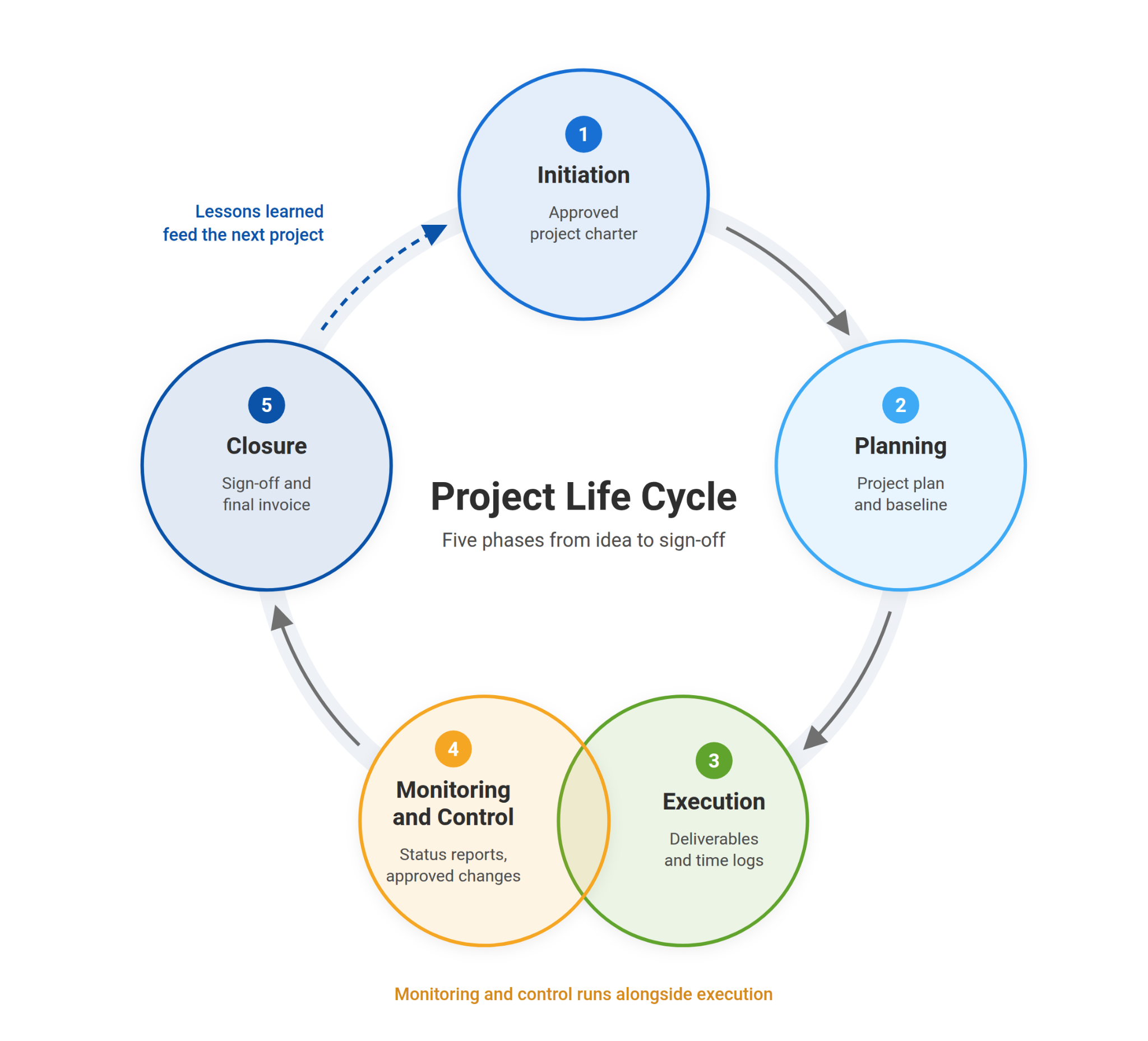
A project life cycle diagram is a visual map of the phases in order. It’s usually drawn as five connected stages, with monitoring and control running alongside execution rather than after it. It gives the whole team one picture of where the project stands and what comes next.
A good diagram helps you:
- Clarify goals and scope before work starts
- Show who owns each phase
- Track progress and spot risks against the plan
- Keep delivery on schedule
One detail most diagrams get wrong: they draw monitoring as a separate box after execution. In reality, you monitor while the work is happening, which is why it overlaps execution in the diagram below.
Project Life Cycle vs. Project Management Life Cycle: What’s the Difference?
The project life cycle describes the stages the work itself goes through, such as feasibility, design, build, and handover. The project management life cycle describes how you manage that work: initiating, planning, executing, monitoring and controlling, and closing. Most guides, including this one, blend the two into one five-phase model.
Most people use the two terms interchangeably, and for day-to-day work, that’s fine. The distinction only matters when you read formal sources, because they use the terms differently.
PMI is explicit about it. Its life cycle phases are feasibility, design, build, test, deploy, and close, and it notes that project management process groups are not project phases. The process groups (initiating, planning, executing, monitoring and controlling, closing) are the management activities you repeat within each phase. A software build phase, for example, still needs its own planning, tracking, and wrap-up.
| Project Life Cycle | Project Management Life Cycle | |
| What it describes | The stages of the work | The steps for managing the work |
| Typical names | Feasibility, design, build, test, deploy, close | Initiating, planning, executing, monitoring and controlling, closing |
| Changes by industry? | Yes. Construction, software, and events each use their own stage names | Mostly no. The same five steps apply to almost any project |
| Best for | Matching phases to how your industry delivers work | Running and tracking the project day to day |
For a small team, the practical takeaway is simple. Use the five management phases as your backbone, and rename them to match your work if your industry already has its own vocabulary.
Why Do Some Sources List 4, 5, or 6 Phases?
Sources disagree because they describe different things. Four-phase models fold monitoring into execution and closing. Five-phase models list monitoring and control separately. Six-phase models, like PMI’s, name the stages of the work itself instead of the management steps. For most small teams, the five-phase model is the most practical.
Here’s how the common versions line up:
- 4 phases: Initiating, planning, executing, and closing. Coursera’s guide uses this model and treats monitoring and controlling as an optional fifth phase.
- 5 phases: Initiation, planning, execution, monitoring and control, and closure. This is the most widely taught version and the one used in the rest of this guide.
- 6 phases: Feasibility, design, build, test, deploy, and close. This is PMI’s naming for the stages of the work, separate from the management steps.
None of these is wrong. They’re different lenses on the same journey. I recommend the five-phase model for most teams because it gives monitoring its own place. That’s the phase small teams skip most often, and it’s where missed updates and late surprises usually start.
Turn a Short Description Into a Full Project Plan With AI
What Are the 5 Phases of the Project Life Cycle?
The five phases of the project life cycle are initiation, planning, execution, monitoring and control, and closure. Initiation decides whether the project is worth doing, planning maps the work, execution delivers it, monitoring keeps it on track, and closure secures sign-off and captures lessons for the next project.
Every project follows this path, whether you’re building an app, planning a product launch, or rolling out new software for a client. To make each phase concrete, I’ll follow one example through all five: a team launching a new e-learning product.
Here’s the full life cycle at a glance:
| Phase | Goal | Key Deliverables | Ready to Move On When… |
| 1. Initiation | Decide if the project is worth doing | Project charter, stakeholder list, success criteria | The sponsor approves the charter |
| 2. Planning | Map how the work will get done | Project plan, schedule, budget, risk plan | The team and stakeholders agree to the plan at kickoff |
| 3. Execution | Produce the deliverables | Completed tasks, deliverables, time logs | All planned deliverables are finished |
| 4. Monitoring and Control | Keep the project on schedule, budget, and scope | Status reports, change requests, updated plan | Deliverables meet acceptance criteria and open changes are resolved |
| 5. Closure | Formally finish and learn from the project | Client sign-off, final report, lessons learned | The client accepts the work and contracts are closed |
Phase 1: Initiation (Decide Whether the Project Is Worth Doing)
Initiation is the discovery and decision-making stage. You figure out what problem the project solves, whether it’s feasible, and how it supports your business goals. Nothing gets planned in detail yet. The goal is a clear yes or no.
For a step-by-step walkthrough of this phase, read our guide to project initiation.
Scenario: You’re about to launch a new e-learning product. Before anyone writes a line of course content, you check market demand, available people and budget, and whether the product fits where the company is heading.
Key Tasks:
- Identify the business need: Name the problem you’re solving, whether it’s a gap in the market or an internal process that wastes time.
- Check feasibility: Confirm the project is technically, financially, and operationally realistic.
- Create a project charter: Summarize the objectives, scope, timeline, and initial budget in one document.
- Identify and engage stakeholders: List everyone who will influence the project or be affected by it.
- Set high-level goals: Make them SMART: specific, measurable, achievable, relevant, and time-bound.
What This Phase Produces: A project charter, a stakeholder list, and agreed success criteria. Larger projects may also need a formal business case or feasibility study.
Ready to Move On When: The sponsor has approved the charter, scope and success criteria are written down, and every key stakeholder knows the project exists.
Pitfalls to Avoid:
- Skipping stakeholder alignment. It’s one of the most common causes of disputes in the middle of a project.
- Starting to plan before success criteria are defined. If nobody agrees on what “done” looks like, nobody can agree on the plan.
On a small team, the charter doesn’t need to be a 10-page document. A one-page summary that the client or sponsor has signed off on does the job, and project templates can save you from starting from a blank page.
Phase 2: Planning (Map the Work Before Anyone Starts It)
Planning is the heart of the project life cycle. Every task, resource, risk, and milestone gets mapped out, so the team knows exactly what to do, when, and in what order. An hour spent planning here saves many hours of rework later.
Scenario: The e-learning product is approved. Now you set the milestones that matter: wireframe approval, beta release, and launch date. Then you work backward to figure out what has to happen before each one.
Key Tasks:
- Build a work breakdown structure (WBS): Break the project into deliverables, then break each deliverable into tasks small enough to assign and estimate.
- Create the project plan: Add owners, durations, dependencies, resource needs, and budget to every task.
- Draft a risk plan: List what could go wrong, how likely it is, how much it would hurt, and who owns each risk.
- Set communication rules: Decide where updates live, how often you report, and who needs which information.
- Hold a kickoff meeting: Walk the team through goals, roles, and expectations so everyone starts from the same picture.
For a deeper guide to building a plan that holds up, see our post on project planning.
What This Phase Produces: A project plan with a schedule, budget, risk plan, and communication plan. It also produces a baseline: a saved snapshot of the original schedule and estimates that you’ll measure progress against during monitoring.
Ready to Move On When: The team and key stakeholders have agreed to the plan at kickoff, every task has an owner, and the baseline is saved.
Pitfalls to Avoid:
- Unrealistic timelines or underestimated budgets.
- Unclear ownership, where two people each assume the other has a task.
- Ignoring small risks that can snowball into big ones.
Following project management best practices helps here: add time buffers to risky tasks and use a RACI chart to make ownership explicit before work begins.
For small teams, a Gantt chart is usually the easiest way to see the whole plan at once, since it shows tasks, dependencies, and dates on one timeline. If you don’t want to build one from scratch, start with a project schedule template.
Phase 3: Execution (Turn the Plan Into Deliverables)
Execution is where the work gets done. Tasks are assigned, the team starts producing, and the plan meets reality. It’s usually the longest phase and the one where most of the budget gets spent.
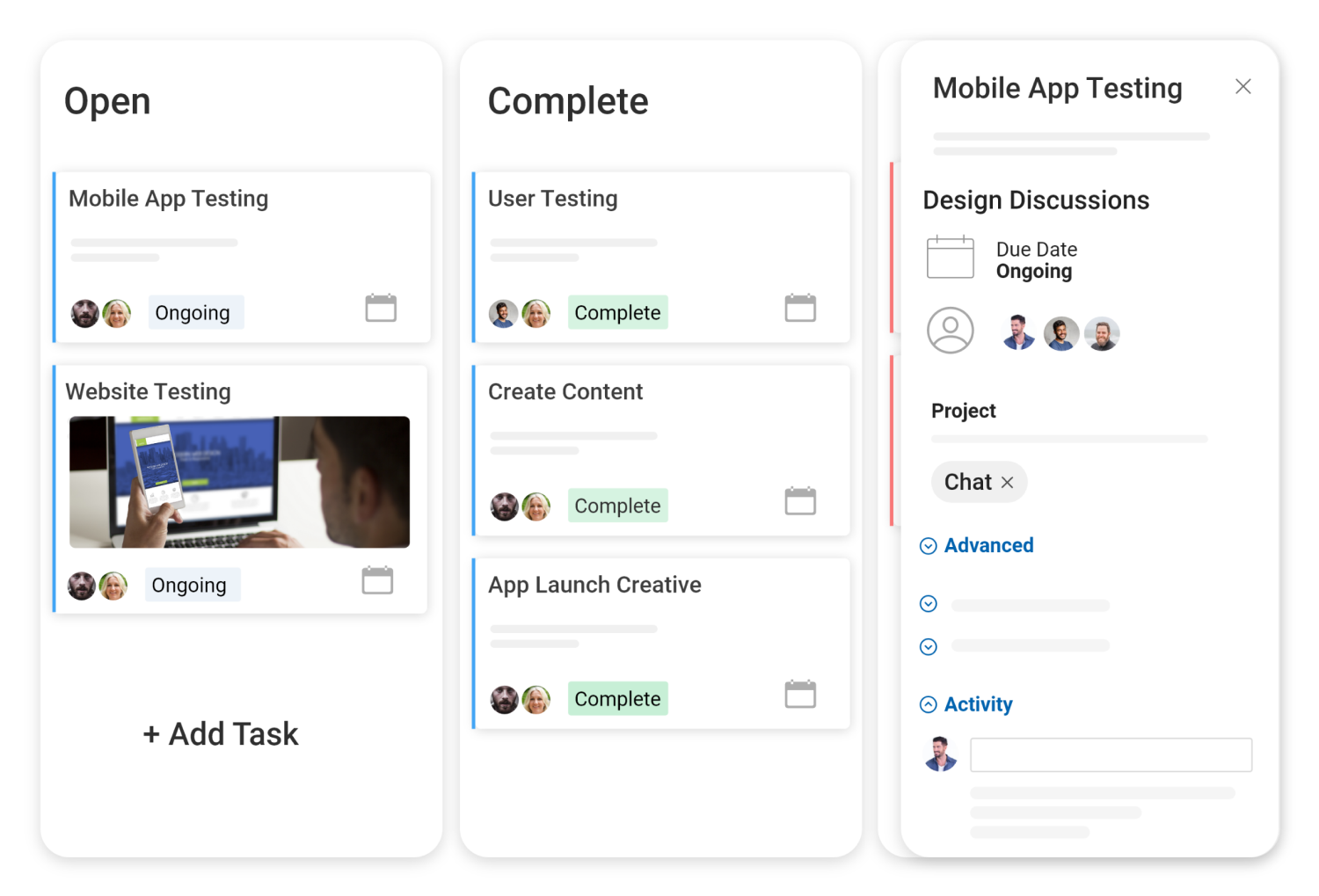
Scenario: The developers start building course modules. At the same time, marketing preps the landing page and launch emails, and QA writes test cases for the beta.
Key Tasks:
- Assign and track tasks: Give every task an owner, a deadline, and any dependencies, so nobody waits on work they don’t know about.
- Track time and spend: Log hours and expenses as you go, not at the end of the month when nobody remembers.
- Keep collaboration in one place: Keep task comments, shared files, and status updates where the work lives, not scattered across email and chat.
- Run quality checks: Review work against the requirements regularly, not just before delivery.
Tools That Help:
- Gantt charts: Show the big picture, including dates, dependencies, and what’s at risk of slipping.
- Kanban boards: Show day-to-day progress as tasks move from to-do to done.
- Time tracking: Records billable and non-billable hours against each task.
Pro Tip: Automate repetitive work like task reminders, status emails, and invoice drafts. Every manual follow-up you remove is one less thing that can slip.
What This Phase Produces: Completed tasks and deliverables, plus time and expense logs.
Ready to Move On When: All planned deliverables are finished and ready for client or stakeholder review.
Pitfalls to Avoid:
- Letting updates live in people’s inboxes instead of on the task itself.
- Logging hours from memory days later, which makes estimates and invoices unreliable.
Phase 4: Monitoring and Control (Catch Problems While They’re Small)
Monitoring and control runs alongside execution, not after it. While the team works, you compare progress to the plan, spot drift early, and adjust before a small delay turns into a missed deadline.
Scenario: Halfway through, you notice course content is coming in slower than planned. You have three options: extend the deadline, bring in a freelancer, or drop low-priority modules from the first release. Because you caught it at the midpoint, you still get to choose.
Key Tasks:
- Compare progress to the baseline: Check whether you’re on schedule, within budget, and still inside the agreed scope.
- Adjust the plan: Reassign work, shift deadlines, or reprioritize deliverables when reality changes.
- Review risks: Revisit the risk plan and add new risks as they appear.
- Report to stakeholders: Share progress with clients and sponsors using real data, not “we’re on track.”
- Resolve issues fast: Remove blockers and handle scope or timeline changes through an agreed change process.
Tools That Help:
- Real-time dashboards: Show what’s on track, at risk, or overdue across the project.
- Project tracking: Shows each task’s progress and how it compares to the plan.
- Automated reminders: Flag approaching and overdue deadlines without anyone chasing.
Pro Tip: Replace scheduled check-ins with live visibility. Many teams still chase status in a meeting every week or two, and by then problems are already late. In ProProfs Project, for example, every update is visible to the whole team as it happens. Email and in-app reminders flag deadlines before they slip, and comparing estimated vs. actual hours shows which tasks are running over while there’s still time to act.
What This Phase Produces: Status reports, approved change requests, and an updated plan.
Ready to Move On When: Every deliverable meets its acceptance criteria, and all open changes are resolved, so the project is ready to close.
Pitfalls to Avoid:
- Treating monitoring as a monthly report instead of a daily habit.
- Approving scope changes informally, without updating the timeline or budget.
- Sending alerts nobody reads. If the team ignores notifications, cut them back to what actually needs action.
Phase 5: Closure (Get Sign-Off and Capture What You Learned)
Closure is where you formally finish the project. Delivering the work isn’t enough. You need written acceptance, settled finances, and a record of what you learned. Skip this phase and projects stay half-open for weeks: the client hasn’t signed off, hours aren’t billed, and the same mistakes repeat on the next project.
Scenario: The e-learning product is live, and the first customers are onboarded. Now you confirm every deliverable was accepted, wrap up the budget, and sit down with the team to review what worked and what didn’t.
Key Tasks:
- Confirm deliverables: Verify that every output was delivered, reviewed, and accepted by the client or stakeholders.
- Get formal sign-off: Collect written acceptance and attach it to the project, along with any handover documents.
- Close out time and billing: Make sure every hour is logged, every expense is recorded, and the final invoice goes out. For client work, the project isn’t done until it’s billed.
- Evaluate results: Compare the outcome to the success criteria from initiation: time, budget, scope, and quality.
- Run a retrospective: Talk through wins, bottlenecks, and surprises with the team while they’re still fresh.
- Document lessons learned: Save them where the next project team will actually find them.
- Close contracts and celebrate: Formally end vendor and freelancer agreements, archive project files, and thank the team.
Tools That Help:
- Billing and invoicing: Generates the final invoice from tracked hours and expenses, so nothing billable gets missed.
- Project reports: Compare budget, hours, and results against the plan for the final review.
- Shared project files: Keep sign-off documents, deliverables, and lessons learned in one place for future reference.
What This Phase Produces: Client sign-off, a final project report, a final invoice for client work, and a lessons-learned record.
Ready to Close When: The client has accepted the work in writing, all hours and expenses are billed, contracts are closed, and lessons learned are saved.
Pitfalls to Avoid:
- Treating delivery as closure. A verbal “looks good” isn’t sign-off.
- Letting final hours go unlogged, which shrinks your margin and skews the estimates for your next project.
- Holding a retrospective nobody acts on. Pick one or two changes to carry into the next project.
Pro Tip: Closure isn’t just paperwork. It protects your margin, preserves what the team learned, and gives everyone a clear finish line. That last part does more for morale than most teams expect.
How Does the Project Life Cycle Work on a Client Project?
On a client project, the life cycle runs from winning the work to getting paid for it. The team books and plans the project, assigns tasks down to individual members, logs hours as work happens, reviews progress on live dashboards, and closes only after the client signs off and the invoice goes out.
Here’s how that looks for an IT services team that delivers network, security, and telephony projects for business clients. The workflow below is based on how one such team described its process. Before switching tools, it ran this workflow in software its own developers knew well but found too complex for the business side of the work.
| Phase | What Happens | How It Runs in ProProfs Project |
| Initiation | The client awards the project, and the team books it with scope, timeline, and budget. | The project is created from a template, or on the Business plan, the AI Project Designer builds the task structure from a short project description. Scope, dates, and client details sit in one place. |
| Planning | The project is assigned to department leads, who break it into tasks for their team members. | Tasks and subtasks get owners, due dates, dependencies, and estimated hours. The Gantt view shows the full timeline. |
| Execution | Engineers do the work, often on-site in client data centers, and log their hours when they’re back. | Members add time entries manually after field work and attach notes and files to each task. |
| Monitoring and Control | Leaders track what’s closed and what’s still in progress, and use monthly summaries to spot capacity gaps. | Dashboards and reports show progress, hours, and workload. AI Reports & Insights answers questions like “which projects are running over?” |
| Closure | The client reviews the work, signs off, and the project is billed. | The client reviews deliverables through guest access, the sign-off document is uploaded to the project, and the invoice is generated from tracked hours and expenses. |
The monitoring data does a second job, too. Monthly summaries of closed vs. in-progress work give the team leaders hard numbers when they ask leadership for more headcount.
This is where most generic project tools fall short. They cover planning and execution well, but time tracking, client sign-off, and invoicing end up in separate tools or spreadsheets. ProProfs Project is the simplest project management tool for SMBs with client invoicing, time & billing. Tasks, logged hours, client review, and invoices all sit on the same project, so closure happens in the same place where the work was done.
What Are the Different Types of Project Life Cycles?
The main types of project life cycles are predictive (Waterfall), Agile, iterative, incremental, and hybrid. They all move through the same basic phases. What changes is how much you plan upfront, how often you deliver, and how easily the plan can change once work starts.
Your choice depends on three things: how clearly the requirements are defined, how likely they are to change, and how closely the client wants to be involved while the work is happening.
- Predictive (Waterfall): Each phase is completed in order before the next one starts. Scope, schedule, and budget are fixed early, and the full result is delivered at the end.
- Agile: Work is delivered in short cycles, often called sprints, and the plan is updated after each one based on feedback. Scrum and Kanban are the best-known Agile approaches.
- Iterative: The team builds a rough version of the whole product, gets feedback, and refines it through repeated cycles until it’s right.
- Incremental: The product is delivered in finished, usable pieces. Each piece is complete when it ships, and the next piece adds to it.
- Hybrid: Combines a predictive structure with Agile execution. For example, the scope and milestones are fixed upfront, while the work inside each milestone runs in flexible cycles.
Here’s how Waterfall, Agile, and hybrid compare side by side:
| Criteria | Waterfall (Predictive) | Agile (Adaptive) | Hybrid |
| Approach | Linear. Each phase finishes before the next begins. | Flexible. Work is delivered in short cycles and reviewed constantly. | Fixed overall plan, with flexible cycles inside each milestone. |
| Planning | Detailed upfront. Requirements are locked early. | Ongoing. Plans change based on feedback. | High-level plan upfront, detailed planning per milestone. |
| Client Involvement | Mostly at the start and the end. | High. Clients review progress every cycle. | At milestone reviews, plus check-ins as needed. |
| Delivery | One final result at the end. | Usable pieces every few weeks. | Deliverables at each milestone. |
| Best For | Clear scope and low uncertainty, such as infrastructure upgrades or event planning. | Changing requirements or creative work, such as software or marketing campaigns. | Client projects with a fixed contract but evolving details, such as website builds or software rollouts. |
Which Life Cycle Model Should a Small Team Use?
Most small teams do best with a hybrid life cycle: fixed scope, budget, and milestones agreed upfront, with flexible, Agile-style execution inside each milestone. Choose pure Waterfall when requirements are locked by contract, and lean Agile when the client expects to change direction as they see the work.
You’re not alone if you land on hybrid. The Association for Project Management notes that project professionals most often combine features of different life cycles into a hybrid that fits their context.
A few quick questions help you decide:
- Is the scope fixed in a contract or regulation? Lean Waterfall. Changing course mid-project will cost you.
- Will the client only know what they want once they see something? Lean Agile or iterative. Plan for feedback rounds.
- Is the budget and deadline fixed, but the details are still open? Go hybrid. Lock the milestones, and keep the work inside them flexible.
- Can the work be split into pieces the client can use right away? Consider incremental delivery, so the client gets value before the whole project is finished.
Whatever you pick, the five phases still apply. In an Agile or hybrid project, you simply run through planning, execution, and monitoring more than once, while initiation and closure still happen once for the whole project.
Spot Overrunning Projects Early With AI Reports & Insights
Why Does Following the Project Life Cycle Matter?
Following the project life cycle matters because it turns a project into a series of clear checkpoints. Each phase has a defined goal and output, so problems surface early, everyone knows who owns what, and the client sees steady progress instead of surprises at the end.
Delivering on time is still the exception, not the rule. A study by Wellingtone in 2026 found that only 36% of organizations mostly or always complete projects on time. Following a structured life cycle doesn’t guarantee you’ll land in that group, but it removes the most common reasons projects slip: unclear scope, unclear ownership, and problems spotted too late.
Here’s what it changes in practice:
- Better control: Breaking the work into phases shows you where the project stands and what needs attention next. You find out during planning that a timeline is unrealistic, not halfway through execution.
- Clearer roles: Each phase makes ownership explicit, from who approves the charter to who collects the client’s sign-off. Fewer tasks fall between two people who each assumed the other had it.
- Fewer surprises: Risk planning and ongoing monitoring catch issues while they’re still small. If a key person is overbooked next month, you can reassign work now instead of scrambling later.
- Less rework: A well-scoped plan with a clear work breakdown lets people work in parallel instead of waiting on each other or redoing work built on wrong assumptions.
- Higher client trust: Regular updates, visible milestones, and a formal sign-off show the client exactly what they’re getting and when. For client work, that trust is what leads to repeat projects and referrals.
What Are the Most Common Project Life Cycle Challenges?
The most common project life cycle challenges are uncontrolled scope changes, resource gaps, stakeholder clashes, miscommunication, and resistance to new processes. Most of them start in one phase and show up in another, which is why catching them early in planning and monitoring matters more than fixing them late.
Even with a solid plan, real projects rarely go exactly as expected. Here’s how to spot each challenge and stop it before it derails the project.
1. Uncontrolled Scope Changes
The Problem: The client keeps asking for “just one more thing,” and the project quietly doubles in size without any extra time or budget.
What It Leads To: An overworked team, missed deadlines, and a project that loses money.
How to Prevent It:
- Agree on scope in writing during initiation, ideally in a signed project charter.
- Route every new request through a simple change process, even if it’s just a short form.
- Show the client how each change affects the deadline and cost before you say yes.
2. Resource Gaps
The Problem: You planned for three people. One is out sick, another gets pulled onto a different project, and a colleague’s leave lands half their work on your desk.
What It Leads To: Delays, burnout, and tasks that quietly get dropped.
How to Prevent It:
- Build buffers into the plan for critical roles and tasks.
- Check each person’s workload across all projects before assigning new work.
- When resources are tight, protect the high-impact tasks first and move the rest.
3. Stakeholder Clashes
The Problem: Marketing wants to launch next week, the developers say the product isn’t ready, and leadership is stuck in the middle.
What It Leads To: Conflicting goals, last-minute changes, and an unhappy client.
How to Prevent It:
- Align on goals and priorities at kickoff, before work starts.
- Use a RACI chart so everyone knows who decides, who does the work, and who just needs updates.
- Share regular progress updates so nobody is surprised by a delay.
4. Miscommunication
The Problem: Someone assumed task A was done. Someone else thought task B wasn’t needed. The tool sent alerts, but the team had learned to ignore them. Now everyone’s scrambling.
What It Leads To: Rework, delays, and frustration on every side.
How to Prevent It:
- Decide who communicates what, when, and where, and write it into the plan.
- Keep tasks, files, and discussions in one place instead of spread across email and chat.
- Cut notifications back to the ones that need action, so the important ones get read.
5. Resistance to Change
The Problem: You introduce a new process or tool, and the team slides back into old habits within a few weeks. It’s often driven by the one person who finds new tools hardest to use.
What It Leads To: Split workflows, missing data, and low morale.
A lot of that lost time goes into chasing status. A study by Wellingtone in 2026 found that 72% of project professionals spend half a day or more each month just collating reports.
How to Prevent It:
- Involve the team in choosing the process or tool, not just in learning it.
- Offer hands-on training and pair less technical teammates with someone who can help.
- Show how the change saves them time, not just how it helps the project manager.
Run Your Next Project With a Clear Life Cycle
The project life cycle isn’t paperwork. It’s a simple promise that every phase ends with something concrete: a decision, a plan, a deliverable, a status check, or a signed-off result. When each phase has a clear finish line, projects stop drifting, and nothing falls through at handoff.
You don’t need to overhaul everything at once. Pick your next project and get two phases right that most small teams skip: write down what “done” looks like during initiation, and get formal sign-off before you call it closed. Once those habits stick, add a saved baseline and regular check-ins during monitoring.
If you’d like one place to run all five phases, from the first task to the final invoice, I’d suggest trying ProProfs Project. It keeps planning, time tracking, client review, and billing on the same project. It won’t fix a fuzzy scope or a missing sign-off for you, but it makes both much harder to overlook. There’s a free plan for up to 3 users, so you can run one real project through all five phases before deciding.
Frequently Asked Questions
What are the 5 phases of the project life cycle?
The five phases are initiation, planning, execution, monitoring and control, and closure. Initiation decides if the project is worth doing, planning maps the work, execution delivers it, monitoring keeps it on track, and closure secures sign-off and captures lessons learned.
Which phase of the project life cycle takes the longest?
Execution is usually the longest phase, because that’s when the team produces the actual deliverables and spends most of the budget. Monitoring and control runs alongside it for the same stretch, tracking progress and handling changes until the work is complete.
What is the most important phase of the project life cycle?
Planning has the biggest impact on success, because mistakes made there, like unrealistic timelines or unclear ownership, get more expensive in every later phase. That said, small teams most often skip closure, which is where unbilled hours and missing sign-offs come from.
Can project life cycle phases overlap?
Yes. Monitoring and control always overlaps execution, since you track progress while the work happens. In Agile and hybrid projects, planning, execution, and monitoring repeat in short cycles, while initiation and closure still happen once for the whole project.
What is a phase gate in the project life cycle?
A phase gate is a checkpoint at the end of a phase where the sponsor or client decides whether the project moves forward, changes course, or stops. It usually checks that the phase’s deliverables are complete, such as an approved charter before planning begins.
How is the project life cycle different from the software development life cycle?
The project life cycle applies to any project, from events to office moves, and focuses on managing the work. The software development life cycle (SDLC) is specific to building software, with stages like requirements, design, coding, testing, and deployment.
How long does a project life cycle take?
There’s no standard length. A small internal project might move through all five phases in a few weeks, while a large client implementation can take a year or more. The size of the scope, the team, and the approval process decide the timeline.
Can one tool manage the entire project life cycle?
Yes, as long as it covers planning, task tracking, time logging, reporting, and client sign-off. Many tools stop at task management and push billing into separate software. ProProfs Project keeps all five phases, including time tracking and invoicing, on the same project.
FREE. All Features. FOREVER!
Try our Forever FREE account with all premium features!