Running more than one project at a time is normal. The real test starts when you are handling ten, twenty, or fifty at once, and people keep asking the same questions: what are we working on, when is the deadline, and so on.
That is where the right project portfolio management software earns its place. Instead of scattered spreadsheets and endless status calls, you get a single view of priorities, capacity, and results.
I have spent years leading teams, delivering projects, choosing tools, and living with the consequences when the wrong platform slowed us down. I have used several of the products in this list in real portfolios, not just in demos.
In this blog, I will walk you through the top 10 project portfolio management tools, with clear pros, cons, and pricing, so you can pick the one that fits your business’s unique needs.
What Is Project Portfolio Management (PPM) Software?
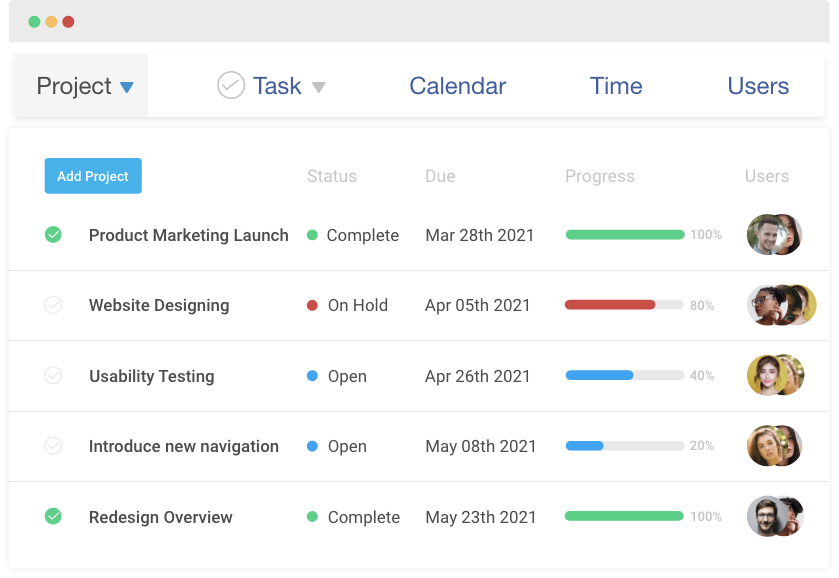
Project portfolio management software helps you manage all your projects together at a strategic level, instead of looking at each one in isolation.
Traditional project management tools answer questions like “Is this project on track” or “Are we meeting this deadline”. PPM software goes one step higher and focuses on questions such as:
- Are we working on the right projects?
- Do these projects support our business goals?
- Are our people, budgets, and timelines being used in the best possible way
A good PPM software brings every project, program, and initiative into one place. You can see timelines, risks, budgets, and workloads across the entire portfolio. This makes it easier to:
- Compare priorities and decide what to start, pause, or stop
- Balance workloads and avoid burning out key people
- Track costs and value at a portfolio level, not just per project
- Give leadership a clear, real time view of what is happening
If you often feel you are juggling multiple projects without a clear picture of how they fit together, PPM software is what connects day-to-day execution with long-term strategy.
Incorporate strong best resource management software into best project portfolio management software. Guide: Best Resource Management Software.
List of the 10 Best Project Portfolio Management Software
I made this list of project portfolio management tools by combining my own experience, extensive research, and recommendations from peers. I also reviewed detailed feedback from independent platforms and real users to understand how these tools perform in everyday use, not just in demos.
| Tool | Best for | Pricing | User Rating (G2) |
|---|---|---|---|
| ProProfs Project | Simplest Project Management Tool for SMBs With Client Invoicing, Time & Billing | Free plan available. Paid plans start at $39.97/month | 4.5 |
| Smartsheet | Data analysis | Starts at $9/user/month. | 4.4 |
| Celoxis | Executive-ready reporting & portfolio visibility | Starts at $10/user/month. | 4.5 |
| Planview | Portfolio tracking & file management | Available at request. | 4.1 |
| ProjectManager | Customizable portfolio dashboards | Starts at $14/user/month. | 4.4 |
| Wrike | Project forecasting | Free plan available. Paid plans start at $10/user/month. | 4.2 |
| monday.com | Portfolio visualization | Free plan available. Paid plans start at $12/seat/month. | 4.7 |
| Zoho Projects | Planning & scheduling projects | Free plan available. Paid plan starts at $4.21/user/month. | 4.3 |
| Kantata | Resource allocation | Available at request. | 4.2 |
| Proggio | Extracting financial metrics | Free plan available. Paid plans start at $3/user/month. | 4.4 |
1. ProProfs Project – Simplest Project Management Tool for SMBs With Client Invoicing, Time & Billing
ProProfs Project is a modern project portfolio management software that simplifies activity management across multiple projects, offering a unified collaborative workspace for efficient project portfolio delivery.
The tool helps me track all my ongoing projects in one place, including product launches, marketing campaigns, client onboarding initiatives, internal process improvements, and cross-functional IT projects—all within a single portfolio view.
I was particularly impressed by the seamless ability to prioritize essential tasks across various projects using tags, as well as the effortless automation of repetitive work, such as creating recurring tasks, sending due date reminders, and reusing task structures across similar projects.
Also, the tool’s task comments feature enables team members to engage in instant discussions, tackle roadblocks, share feedback, and offer valuable suggestions. And yes, one of the biggest advantages of using ProProfs is that it eliminates the need for manual follow-ups. With real-time task statuses, you can track project progress effortlessly. It’s also brought AI into portfolio-level oversight. Describe a project in plain language and its AI Project Designer builds out the tasks, stages, and assignments for you. An AI assistant stays with the team through execution, flagging blockers and answering questions like “which projects are overrunning” directly from live data, so you don’t have to dig through every project individually to spot what’s at risk across the portfolio.
Pros:
- You can easily create, prioritize, and track tasks using interactive Gantt charts, Kanban boards, Calendar, and List views
- AI Project Designer and AI assistant that automate project setup and flag portfolio-wide risks in real time
- Ability to generate daily, weekly, and monthly reports for all your projects
- File sharing, task comments, and real-time alerts facilitate collaboration
- Real-time alerts and notifications to keep everyone updated
- Time tracking capabilities streamline the client billing process for different projects and clients
Cons:
- There’s no downloadable or on-premise version since it is fully cloud-based.
- No option to switch to a dark mode
User Rating: 4.5 (G2)
Pricing: Free plan available. Paid plans start at $39.97/month.
2. Smartsheet – Best for Data Analysis
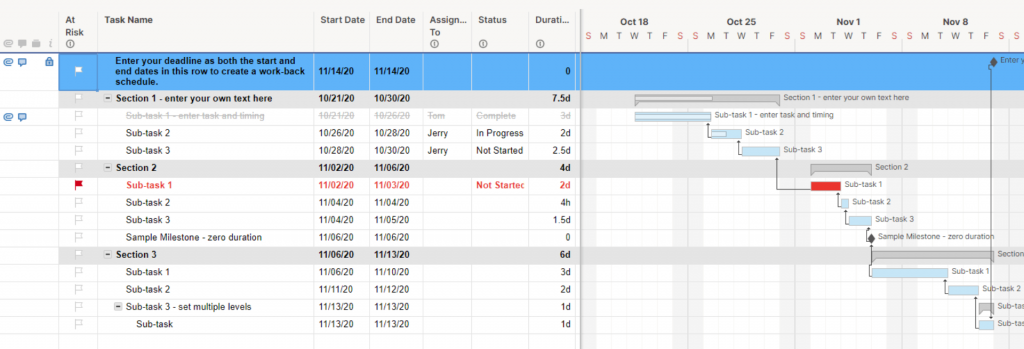
Smartsheet, a popular portfolio management tool, provides essential features to facilitate effective decision-making.
With its on-demand data analysis capabilities, it empowers you to gather requests and plan projects collaboratively. Plus, its widget-based view simplifies the visualization of portfolio data, making it easily digestible.
In addition to its core functionalities, Smartsheet offers customization and automation options through formulas and workflows. I loved Smartsheet’s ready-to-use templates that allowed me to kickstart projects without delay.
You can customize the platform to create personalized reports and streamline your operations effortlessly. And you can also use automation to offload your time-consuming tasks, saving valuable time and effort.
Pros:
- Automated reporting to prioritize tasks and focus on what’s important
- Gantt, Grid, Card, and Calendar views to monitor project portfolios in real time
- Baselines to compare and analyze performance against established metrics
- Document Builder and proofing features to collaborate with team members
Cons:
- It has a steep learning curve
- Does not offer in-built time tracking
User Rating: 4.4 (G2)
Pricing: Starts at $9/user/month.
3. Celoxis – Best for Executive-Ready Reporting & Portfolio Visibility
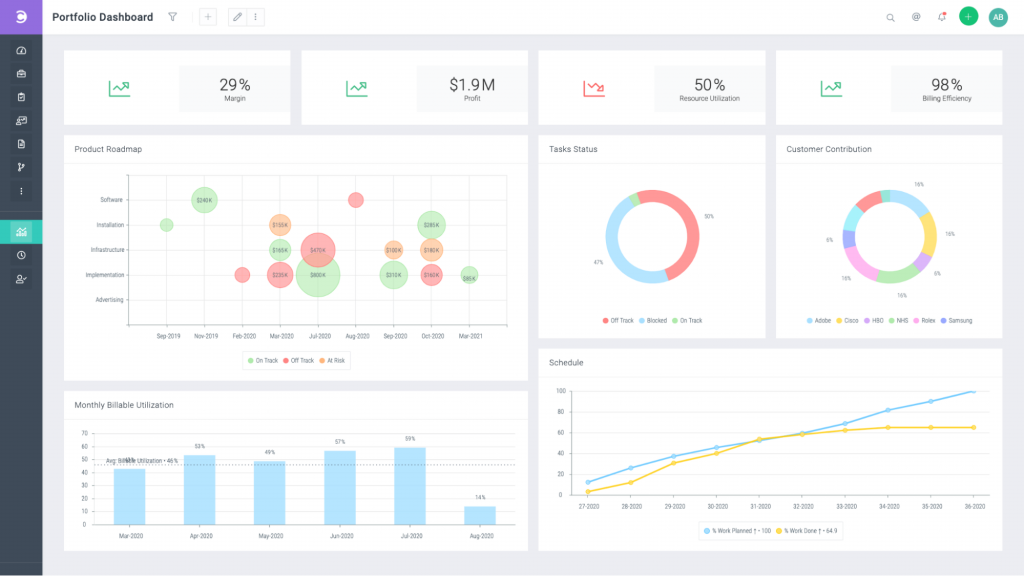
Celoxis is a robust all-in-one Project Portfolio Management (PPM) software built to give enterprises and growing organizations complete control over projects, resources, and financials in one unified platform. With its unified view of schedules, financials, risks, and resources, it’s designed to give teams clarity and leaders the kind of executive-grade reporting they need to make faster, smarter decisions.
What stood out to me was the BI-quality dashboards. They’re not just pretty charts; they let you drill down into real-time data, while the unified portfolio view makes it easy to track portfolio performance at an executive level.
I particularly appreciated how smooth the onboarding experience was – its zero-stress trial and guided walkthroughs made it simple for our team to get value from day one. Plus, the platform balances ease of use with enterprise-grade depth, making it a strong choice for serious PPM teams.
Pros:
- All-in-one PPM platform with a unified view of schedules, financials, risks, and resources
- Executive-grade reporting and BI-quality dashboards that provide real-time, drill-down insights
- Guided onboarding and a zero-stress trial to help teams see value quickly
- Holistic portfolio tracking across projects, budgets, and resources in one place
Cons:
- No forever-free plan, so it’s best suited for growing teams and enterprises
- Advanced customization may require an initial setup time for larger organizations
User Rating: 4.5 (G2)
Pricing: Starts at $10/user/month (SaaS) with volume discounts. On-premise option available for organizations needing full control.
4. Planview – Best for Portfolio Tracking & File Management
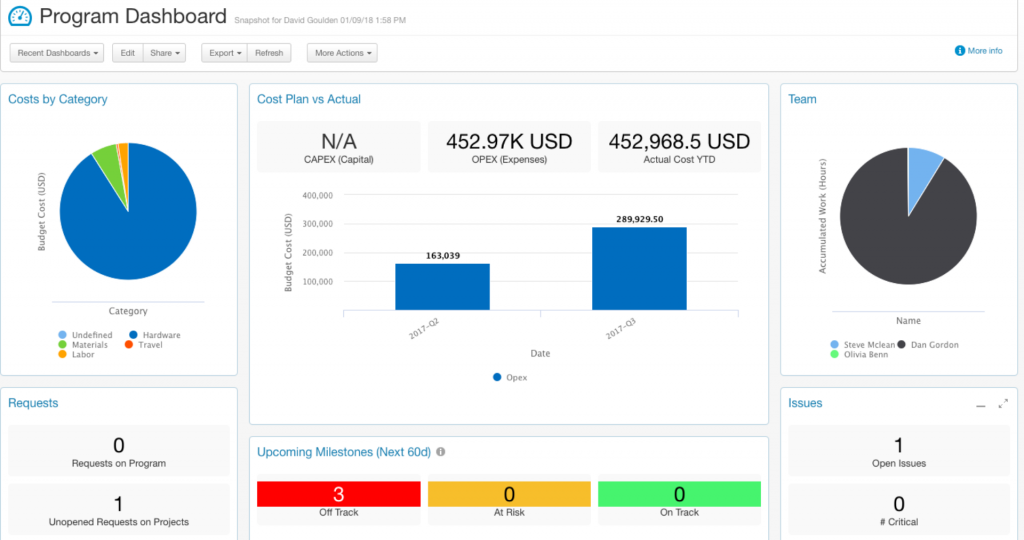
Planview is a comprehensive portfolio management tool designed to help businesses smoothly move projects from the request stage to execution and delivery.
With Planview, you can track your portfolios effortlessly using interactive Gantt Charts and user-friendly Kanban boards. It also offers a secure and easily accessible repository to efficiently organize project files.
Plus, you can prioritize tasks and projects with ease to ensure immediate focus on your project’s most vital components.
One feature that really benefited my team was the ability to compare actual task time with initial estimates, keeping us on top of deadlines and resource allocation.
Pros:
- Planview is easy to navigate and boasts a clean interface
- Industry-specific solutions for product developers, service providers, and finance professionals
- The tool helps gather ideas, requests, and suggestions from employees, customers, and partners, making it easier to classify, align, and plan for them
- Quick integration with Microsoft Teams, Dropbox, and Google Drive
Cons:
- Advanced reporting features like Ad Hoc reporting could be enhanced
- It can be challenging to transfer large files within the platform
User Rating: 4.1 (G2)
Pricing: Available at request.
5. ProjectManager – Best for Customizable Portfolio Dashboards
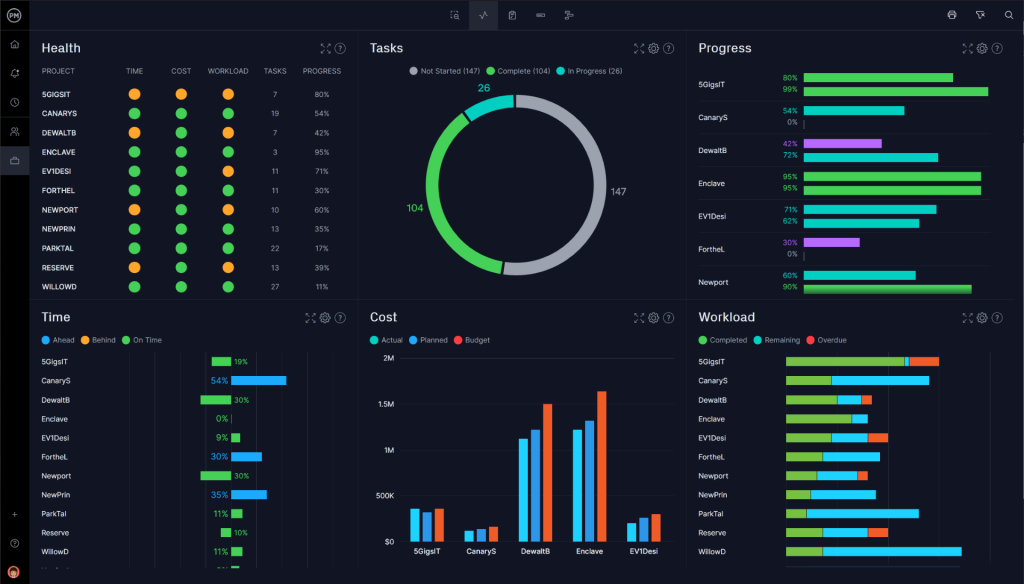
Next up on our list of the best portfolio management systems is ProjectManager.
It’s great because it gives you customizable portfolio dashboards that let you see how all your projects are doing in one place. This way, you can quickly check the overall health of your project portfolio.
I’ve had firsthand experience using this tool, and it’s truly incredible. I could create detailed project plans with tasks, dependencies, and timelines, making it super easy to schedule projects and ensure they run smoothly in the right order.
Oh, and the best part? They have a mobile app, so you can manage your projects and portfolios even when you’re on the move.
Pros:
- The tool ensures that your teams are adequately staffed and workloads are balanced
- Collaboration features like document sharing, comments, and task assignments
- Gantt charts, Kanban board, and tasks lists for visualizing projects efficiently
- In-depth reports and dashboards help track performance
Cons:
- Limited portfolio views
- Lacks forecasting capabilities
User Rating: 4.4 (G2)
Pricing: Starts at $14/user/month.
6. Wrike – Best for Project Forecasting
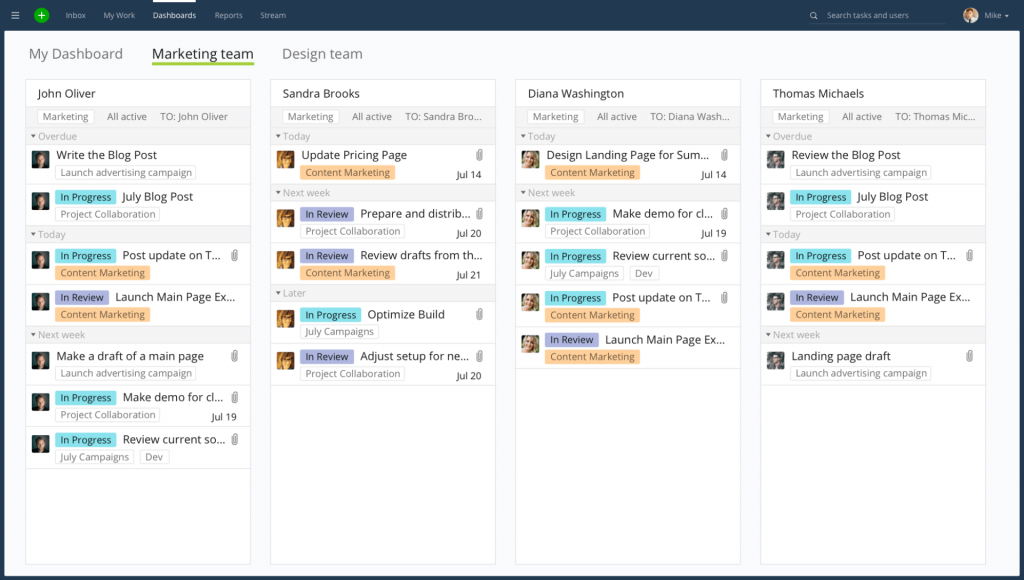
I’ve had a chance to try out Wrike, and let me tell you, it’s excellent when it comes to managing project portfolios. The platform lets your team work together seamlessly and ensures your projects hit the bullseye every time.
One of the coolest things about Wrike is how it gives you real-time insights into key project performance indicators (KPIs). With this data, you can forecast correctly and plan your resources, timelines, scope, and budget with pinpoint accuracy.
And if you’re itching to get started right away, Wrike offers ready-to-use templates that can kickstart your projects in a snap.
Pros:
- Gantt and Kanban views for increased visibility into portfolios
- Automated workflows to avoid repetitive work
- Ability to manage team workload across different portfolios with resource and workload management
- Integration with popular third-party apps such as Dropbox, Evernote, and Box
Cons:
- Task prioritization is not easy
- UI can be a bit overwhelming owing to too many features
User Rating: 4.2 (G2)
Pricing: Free plan available (No analytics view or templates). Paid plans start at $10/user/month.
7. monday.com – Best for Portfolio Visualization
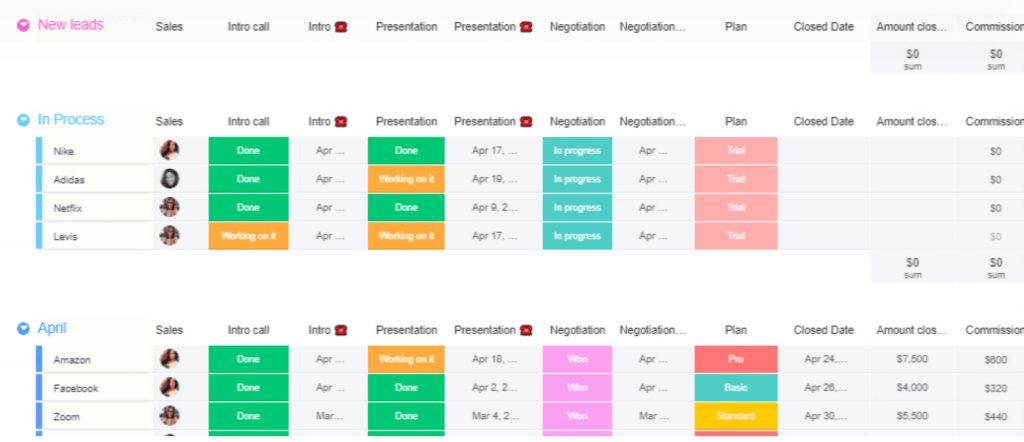
This visually appealing portfolio management solution empowers you to effortlessly craft and tailor project boards to oversee tasks, timelines, and the advancement of your projects. You have the flexibility to establish distinct boards for each project in your portfolio.
You can effortlessly allocate and oversee resources across multiple projects with monday.com, optimizing resource utilization within your project portfolio.
The platform equipped me with reporting and analytics capabilities to oversee the overall health of my project portfolio. I could create custom reports and dashboards to gain valuable insights into crucial metrics.
Pros:
- Dependencies and relationships to visualize connections between tasks and projects
- Collaboration features such as comments, notifications, and file sharing
- Whether your portfolio is small or extensive and intricate, monday.com scales effortlessly to meet your organization’s evolving needs
- Personalized workflows for tracking and overseeing a diverse range of projects
Cons:
- Its interface may seem cluttered sometimes
- Users may find an excessive number of notifications bothersome
User Rating: 4.7 (G2)
Pricing: Free plan available (limited to 2 seats). Paid plans start at $12/seat/month.
8. Zoho Projects – Best for Planning & Scheduling Projects
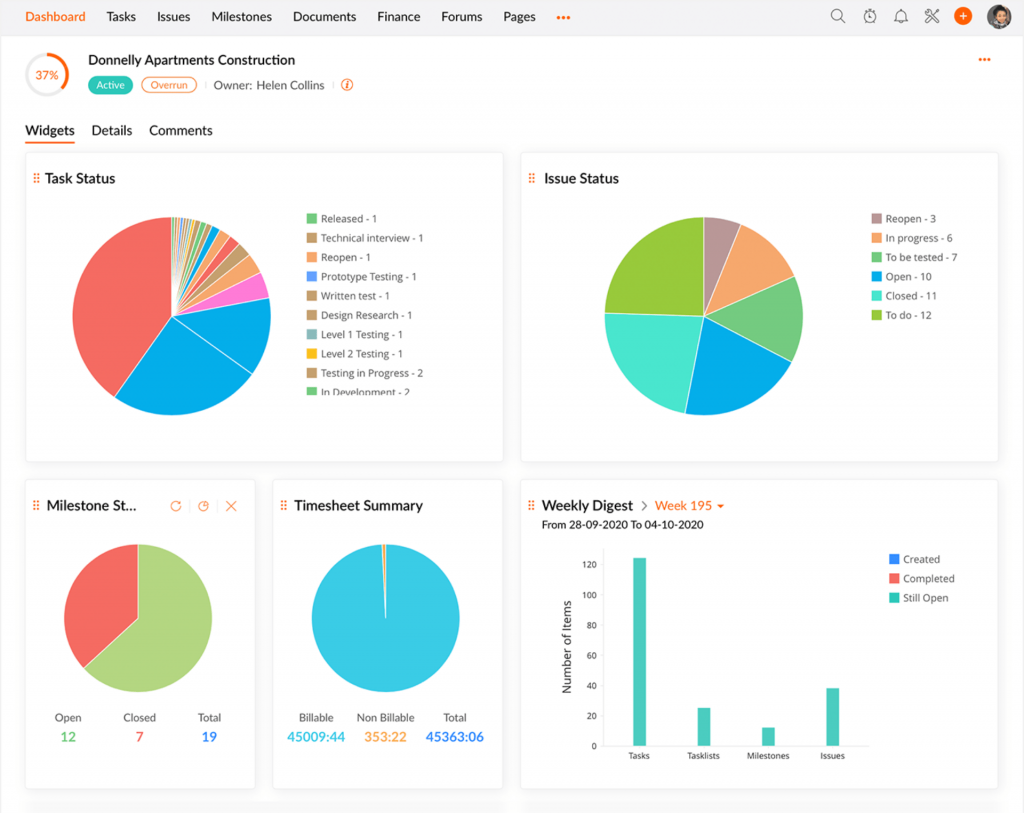
With Zoho Projects, you can effortlessly plan and schedule your projects, allocate resources, set task dependencies, and define key project milestones. It’s like having a smart assistant by your side!
One of my favorite features is the ability to create tasks and assign them to your team members. You can even set task priorities, and the best part is, you can track the progress of each task in real-time.
And that’s not all!
The time tracking features helped us monitor how much time our team members were spending on each task and project. This really helped us improve resource allocation and work more efficiently.
Pros:
- Seamlessly integrate with other Zoho tools like Zoho Books and Zoho Analytics
- Security features like role-based access control and multi-factor authentication to protect project data, ensuring it is safe and accessible only to authorized users
- You can automate tasks using Blueprint to save time while also ensuring consistency and accuracy across projects
- Inter-project dependencies help track how one project affects another
Cons:
- Search capability can be improved
- Users may face occasional bugs
User Rating: 4.3 (G2)
Pricing: Free plan available (up to 5 users). Paid plan starts at $4.21/user/month.
9. Kantata – Best for Resource Allocation
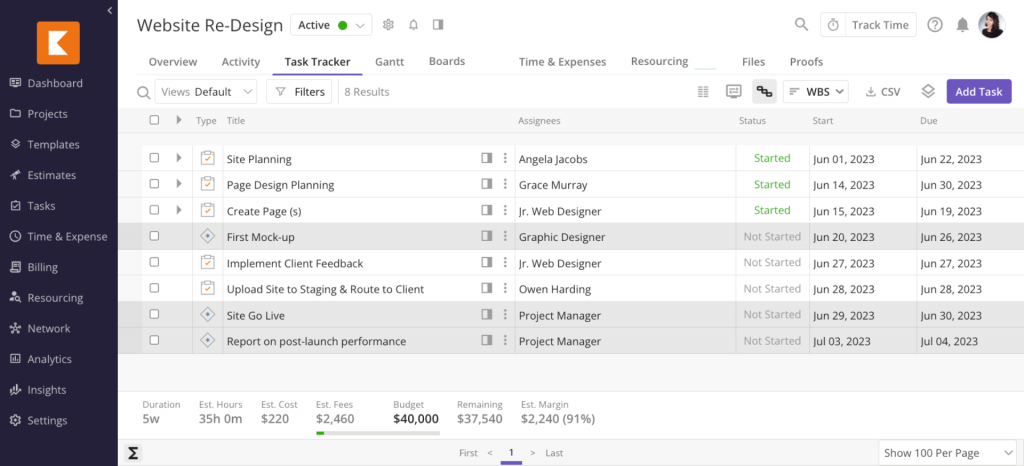
Next up is Kantata. Using it, you can effortlessly prioritize your project needs and align your resources. This way, you can ensure that you meet all your project timelines and budget goals.
One of the key features of Kantata is its real-time data insights. These insights gave me and my team the ability to keep a close eye on how our projects were progressing. It was like having a radar that showed us where we needed to step in and tweak workflows for the better.
Overall, Kantata helped us align schedules, scopes, and budgets seamlessly, which, in turn, led to continuous improvement in our projects.
Pros:
- Customizable dashboards that suit user preferences, displaying relevant project metrics for quick and easy monitoring
- Ability to track task and deliverable statuses at a glance
- Real-time project insights with dynamic Gantt charts
- Seamless integration with GSuite, Jira, and Slack
Cons:
- The interface can be slow and clunky
- Invoicing capabilities can be improved
User Rating: 4.2 (G2)
Pricing: Available at request.
10. Proggio – Best for Extracting Financial Metrics
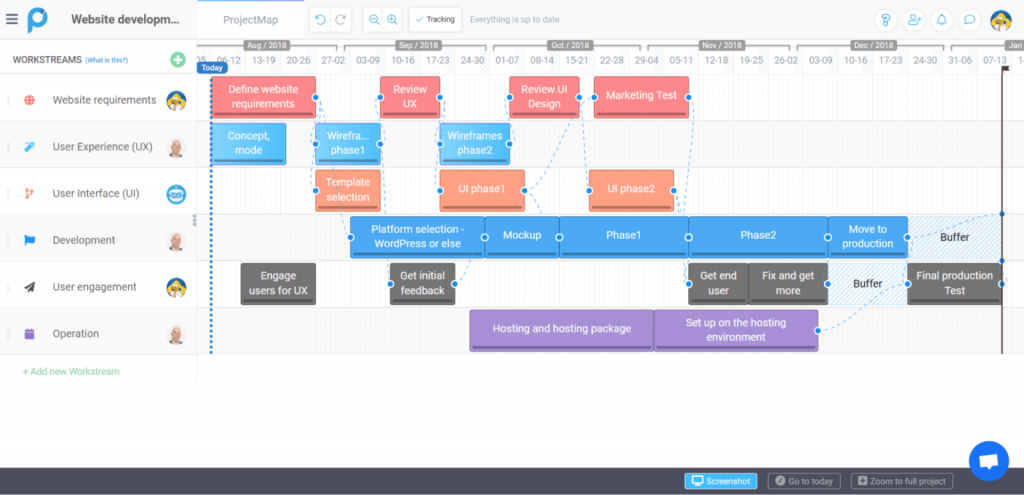
With Proggio’s interactive dashboards, you can easily keep an eye on ongoing project workflows. It’s super helpful for optimizing resources across different tasks.
One thing I found really handy is its access to financial metrics for your projects. This comes in clutch for keeping your budgets in check.
Plus, Proggio helps you track key performance indicators with its nifty “Saved views” feature.
If you’re focused on prioritizing important tasks, Proggio makes it easy to do so. And when it comes to keeping stakeholders in the loop, Proggio’s got your back with its “board sharing” feature.
Pros:
- Project maps that enable you to track project schedules, resources, and project deliverables effectively
- Information feed to store and manage every little detail related to your project portfolios
- Ability to achieve your goals with dedicated focus with goal setting and OKRs
- Customized fields to sort and access data the way you want
Cons:
- It lacks advanced reporting functionality
- Attaching files to tasks and assignments is not very easy
User Rating: 4.4 (G2)
Pricing: Free plan available (No reports or dashboard customization). Paid plans start at $3/user/month.
Manage flow within portfolios using project pipeline management. Guide: Project Pipeline Management.
How to Choose the Best Project Portfolio Management Software
After going through the tools, the next step is deciding which one actually fits your world. I like to combine a simple step by step approach with a clear set of evaluation criteria, so the decision feels structured and not just “this looks nice”.
1. Start With Your Real Needs
Before you compare tools, write down a quick snapshot of your situation:
- How many projects and teams you manage at the same time
- Whether you work mostly with internal teams, external clients, or both
- Whether you only need visibility and planning or also time tracking, billing, and financial reporting
This prevents you from being impressed by features you will never use and keeps the focus on what matters.
2. Shortlist Tools That Match Your Use Case
From your list of PPM tools, identify the ones that clearly support your scenario. For example:
- A consulting or agency team might care more about time tracking, invoicing, and profitability per client
- An internal PMO may focus more on portfolio dashboards, capacity planning, and integrations with ERP or HR systems
Once you have two or three strong candidates, you can evaluate them more deeply instead of trying to test everything in the market.
3. Use These Key Criteria to Evaluate Each Tool
For this article, I used a simple six point framework to review every product. You can use the same criteria when you run trials or talk to vendors:
- User reviews and ratings: Look at recent reviews on trusted sites to spot recurring issues, hidden strengths, and any pricing surprises.
- Essential features and functionality: Check how well the tool supports core PPM needs like portfolio visibility, multiple views (Gantt, Kanban, Calendar), resource management, reporting, and, if needed, time and budget tracking.
- Ease of use: Make sure the interface is clean, navigation is intuitive, and new users can quickly find and update their work without feeling overwhelmed.
- Customer support: Evaluate how easy it is to get help during setup and day to day use, and whether documentation, chat, or email support actually solves problems.
- Value for money: Compare features, limits, and scalability against the price, not just the starting number. You should feel you are getting solid value without constantly hitting paywalls.
- Personal experience and expert opinion: Add what you and your team see in a real trial. Involving project managers, team leads, and at least one executive will surface practical insights you will not find in marketing copy.
4. Test Your Shortlist With Real Projects
Once you evaluate tools against these six criteria, pick one or two and run a short pilot.
Set up a few real projects, invite a small group from different roles, and use the tool for normal work for a couple of weeks. At the end, ask three simple questions:
- Did the tool make it easier to see what is going on across projects
- Did people actually use it without constant reminders
- Did the reports and dashboards help answer the questions leadership usually asks
If you get a clear “yes” to those, you are very close to the right PPM software for your organization.
My Top 3 Picks for the Best Project Portfolio Management Software
Selecting the right project portfolio management software can be challenging because there are numerous excellent options, each with its own unique advantages.
But don’t worry, I’ve got you covered!
Here are my top three choices:
1. ProProfs Project
ProProfs is a modern project portfolio management software that streamlines activity management across multiple projects, fostering collaboration for efficient delivery. Notably, it enables task prioritization through tags and automates repetitive tasks, saving time. The tool’s task comments feature facilitates problem-solving, feedback sharing, and suggestions. Plus, it eliminates the need for manual follow-ups with real-time task status tracking. Its AI Project Designer and assistant take this further, building out project structures and flagging portfolio-wide risks automatically.
2. Planview
This portfolio management tool facilitates project progression from request to delivery. Its features include interactive Gantt Charts and user-friendly Kanban boards for effortless portfolio tracking and a secure file repository. Also, the tool allows comparison of actual task time with initial estimates, enhancing deadline and resource management.
3. Proggio
Proggio offers interactive dashboards for monitoring project workflows and optimizing resource allocation. It provides access to financial metrics to manage project budgets effectively. The “Saved views” feature helps track key performance indicators. Additionally, Proggio supports stakeholder communication, ensuring efficient project management.
Overall, I’d recommend ProProfs Project as a highly effective solution for portfolio management. Its user-friendly interface, along with its collaboration, reporting, and time tracking features, is precisely what your business needs for consistent project success.
Key Challenges And Risks When Implementing PPM Software
Choosing the software is only half the journey. Even the best PPM tool can fail if the implementation is rushed or handled as a pure “IT project” without thinking about people and process.
Here are the main risks I see teams run into after they buy.
1. Low Adoption and Shelfware
The most common story is simple. A tool is purchased, accounts are created, a few projects are added, and then users drift back to spreadsheets and email. Updates slow down, data becomes unreliable, and nobody trusts the dashboards.
This usually means either the tool feels too complex, the setup does not match how people actually work, or the benefits were never clearly explained role by role. If team members see the tool as extra admin instead of something that removes chaos, they will resist it.
2. Vendor and Pricing Surprises
Licensing and pricing can change over time. What starts as a good deal can become expensive if user limits, storage, or key features move into higher plans.
Because your projects, workflows, and integrations are tied to the platform, switching away later is not trivial. It is worth thinking about long term value and vendor stability early, rather than reacting under pressure later.
3. Data Silos and Poor Integrations
PPM tools are often sold as the central hub for projects, but they still need to play nicely with the rest of your stack. If it is hard to connect the tool to your ERP, CRM, issue tracker, or accounting system, you may end up manually copying data between systems.
When the numbers in your PPM reports do not match what finance or leadership sees elsewhere, trust drops quickly. That is why integrations and clean data export options matter as much as the front end features.
4. Overcomplicated Setups
It is tempting to turn on every option and create many custom fields, workflows, and statuses. In reality, a cluttered setup makes it hard for people to know what to fill, what to ignore, and which views to use.
A simpler configuration that reflects how you actually run projects is a better starting point. You can always add more layers later once people are comfortable and adoption is strong.
5. Change Fatigue in the Team
If your organization has already gone through a few tool changes, people may be tired of hearing about “the new system”. A PPM rollout that feels like yet another top down decision will meet resistance.
You can reduce this by involving a few users early, using their feedback to shape the setup, and showing small but real wins like fewer status meetings, clearer priorities, or better workload balance. Once people see that the tool helps them, not just management, it becomes much easier to get everyone on board.
Drive Better Results With the Right PPM Software
Managing a portfolio of projects is no longer about updating a few Gantt charts. It is about choosing a system that gives you a clear picture of priorities, capacity, and results, without drowning everyone in admin.
The tools in this list all do that in slightly different ways. Your next step is to pick two or three, run a short real-world trial, and see which one your team actually uses and which dashboard your leadership trusts.If you want a balanced option to start with, ProProfs Project is worth putting on that shortlist.
It combines portfolio visibility with everyday task management, collaboration, and time tracking, so you can move from reacting to calmly steering your entire project portfolio.
Frequently Asked Questions

Why is project portfolio management software important?
Project portfolio management (PPM) software is crucial because it allows organizations to strategically select and prioritize projects that align with their objectives. It helps optimize resource allocation, minimize risks, and improve decision-making. PPM software provides a holistic view of all projects, ensuring that project resources are used efficiently and that the organization achieves its goals effectively.
What are the features of a portfolio management software?
Portfolio management software typically includes features like project views, collaboration tools such as task comments and file sharing, project reports, and customization options. These features help users organize and track their projects efficiently, collaborate with teams, and tailor the software to their specific needs.
How to choose the best project portfolio management software?
To choose the best project portfolio management software, prioritize user-friendly navigation for easy adoption. Consider price and long-term affordability to ensure it fits your budget. Also, look for options offering free trials and positive reviews from users. Assess vendor support to ensure timely assistance when needed.
What’s the difference between project management and project portfolio management software?
Project management software is designed to help teams plan, execute, and track individual projects. It focuses on tasks, timelines, and team collaboration. In contrast, project portfolio management (PPM) software oversees a collection of projects. PPM prioritizes projects, allocates resources, and assesses their alignment with business goals, providing a high-level view of an organization's project landscape.
FREE. All Features. FOREVER!
Try our Forever FREE account with all premium features!