
If you’re figuring out how to reduce project status meetings, take the updates out of them and put progress where your team can see it anytime, so the meeting has nothing left to report.
I’ve watched project managers spend Monday mornings going around the table with the same question: where does this stand? Most answers could fit in a two-line update. Still, the meeting runs every week because the manager has no other way to see the work.
Every status meeting answers three questions: what got done, what’s stuck, and what’s next. In this guide, I’ll walk through seven ways to move those answers out of the meeting, which meetings are worth keeping, and how to make the switch without losing track of a single deadline.
What Is a Project Status Meeting?
A project status meeting is a recurring check-in where a project manager and the team review what got done, what’s stuck, and what’s next. Its job is to keep everyone working from the same picture of the project, so deadlines, risks, and handoffs don’t slip between updates.
In my experience, these meetings come in two kinds, and it helps to tell them apart before you cut anything:
- Team status meetings: The project manager checks progress with the people doing the work. These usually run weekly, and on fast-moving projects, sometimes daily.
- Stakeholder status meetings: The project manager reports progress up to leadership or out to clients. Some teams call this a project status review meeting, and it often repeats what the team meeting already covered.
Both kinds answer the same three questions. The only difference is who’s asking. That difference matters, though, because each audience needs a different replacement, and the seven ways below cover both.
Let the AI Project Assistant Flag Blockers Before Your Next Status Meeting
Why Do Teams Hold So Many Status Meetings?
Teams hold so many status meetings because progress isn’t visible anywhere else. When updates live in people’s heads, inboxes, and spreadsheets, the meeting becomes the only place to find out what got done, what’s stuck, and what’s next.
The pattern usually feeds itself. A deadline slips because nobody saw the blocker in time, so the manager adds another check-in. That check-in takes hours away from the actual work, which leads to the next slip. One project manager we work with was covering for colleagues on leave while managing multiple projects at once. They ended up reviewing every task by hand every two weeks, simply because there was no other way to know where things stood.
The cost goes beyond the hour on the calendar. According to Microsoft’s Work Trend Index special report in 2025, half of all meetings happen between 9 and 11 am or 1 and 3 pm. Those are the hours when many people do their most focused work. A status readout in that slot uses up the team’s best hours on information that could have been read in two minutes.
That’s why the most reliable way to reduce project meetings isn’t a stricter meeting policy. It’s giving those three answers a home outside the meeting.
What Are 7 Ways to Reduce Project Status Meetings Without Losing Visibility?
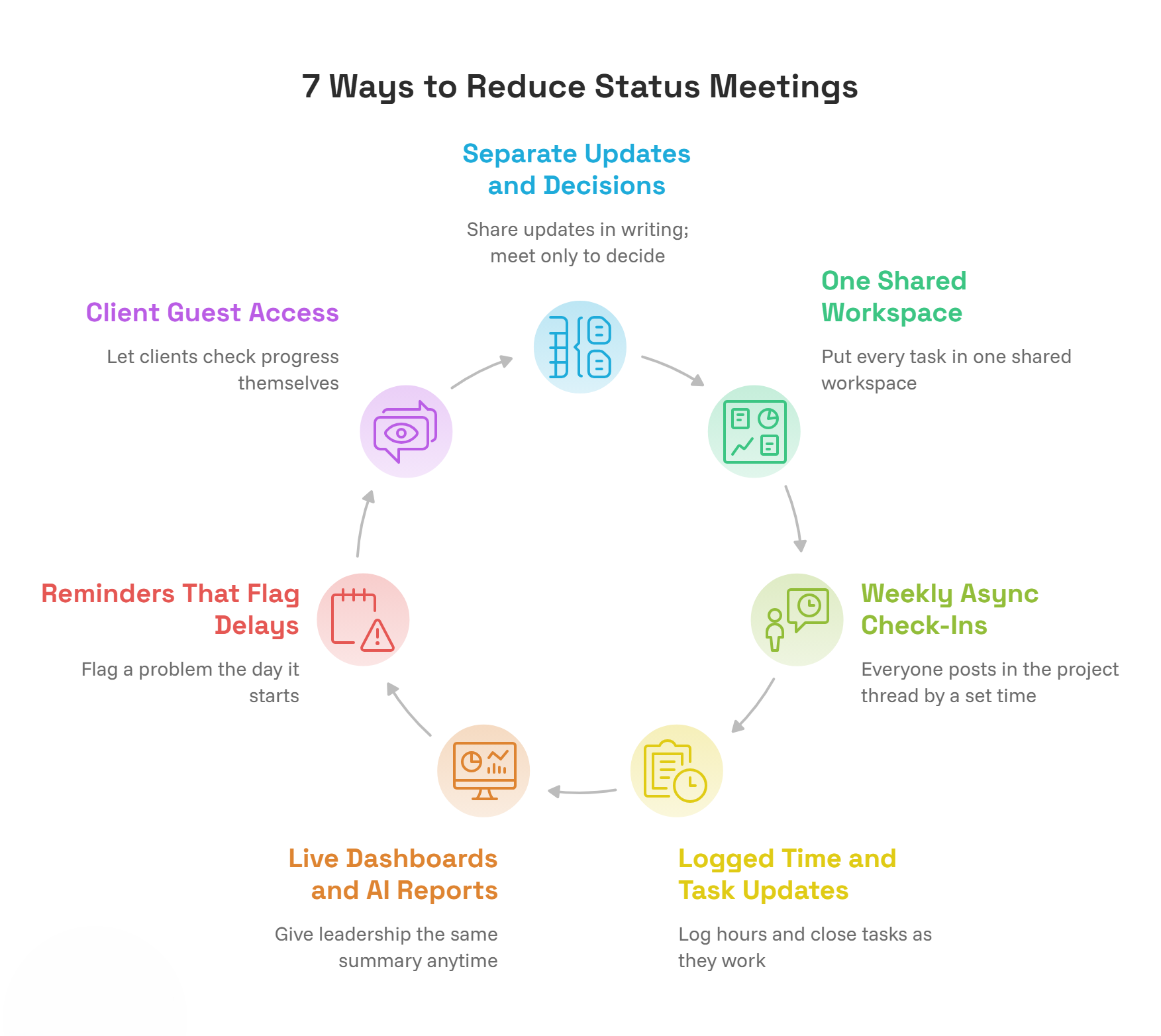
Seven methods cut status meetings without losing track of the work. Separate updates from decisions, and keep every task in one shared workspace. Switch to weekly async check-ins, and let logged time show progress. Report to leadership through live dashboards. Set reminders that flag delays early, and give clients guest access to project status.
1. Separate Status Updates From Decisions
Most status meetings mix two jobs. One is sharing updates on what got done, what’s stuck, and what’s next. The other is making decisions as a group. Updates work fine in writing, so only decisions need a room.
- Share updates in writing: Post what got done, what’s stuck, and what’s next before the meeting.
- Meet only to decide: Use the time for group decision-making on:
- Blockers one person can’t clear
- Deadlines that need to move
- Tradeoffs between priorities
- Cancel when there’s nothing to decide: Some weeks, the agenda will be empty. That’s the goal.
2. Put Every Task in One Shared Workspace
Written updates only work if they land in one place. When tasks live in spreadsheets, progress in email, and blockers in chat, people still call a meeting to piece it all together. One shared workspace answers “what’s next” and “what’s stuck” before anyone asks.
- Give every task three fields:
- An owner
- A due date
- A current status
- Keep it all in one place: A shared task management setup lets anyone see what’s next and what’s stuck without asking.
- Make it real-time: A project manager we work with put it simply: when someone makes a change, everyone should see it right away. A stale board loses trust fast.
3. Replace the Round-Table With Weekly Async Check-Ins
A task status shows where work stands. It doesn’t explain why a deadline moved or what someone needs from another team. A weekly written check-in adds that context in a few minutes, without pulling everyone into the same time slot.
- Pick one day each week: Everyone posts in the project thread by a set time.
- Answer the same three questions:
- What did you finish? Link the tasks.
- What’s stuck, and who can help? Name the person.
- What’s next? List the top two or three priorities.
- Let people post on their own time: This suits teammates in other time zones or out in the field.
Want a ready-made version? Download the free check-in template and rollout checklist.
Status Meeting Replacement Pack
4. Let Logged Time and Task Updates Show Progress
The best status update is one nobody has to write. When people log hours and close tasks as they work, the record answers “what got done” on its own. One IT services team we’ve worked with handles it this way:
- Log time after each job: Engineers record hours when they return from client sites.
- Close tasks with proof: They attach the client’s sign-off when the work is done.
- Read the logs, skip the roundup: Their manager reviews the logs each month instead of asking for weekly updates.
This works best when time and tasks live in one tool. Then nobody has to reconcile them in a meeting. ProProfs Project is the simplest project management tool for SMBs with client invoicing, time & billing.
- Hours on tasks: Team members log billable and non-billable time on each task.
- Team timesheets: They fill in from those entries through time tracking.
- Estimated vs. actual hours: Overruns show up before anyone has to report them.
5. Use Live Dashboards and AI Reports for Leadership Updates
Many status meetings exist only so leadership can get a summary. The team already knows where things stand, so the meeting just repackages that information for people higher up. A live dashboard gives leadership the same summary anytime, for every project, without anyone preparing slides.
- Set up dashboards once: Reports and dashboards in ProProfs Project stay current on their own.
- Ask instead of digging: Type “Which projects are overrunning?” and get an answer from live data through AI Reports & Insights.
- See risk at a glance: When a report opens, AI Report Summary shows what’s on track and what’s at risk.
UNDP’s office in Mexico uses ProProfs Project to track field staff activities across the country. After the switch, the team saw more progress reports come in, and its main partners stayed up to date on project progress.
6. Set Reminders That Flag Delays Before the Next Meeting
Many status meetings exist to catch problems before they grow. Reminders do the same job sooner, because they flag a problem the day it starts, not the day of the meeting. But they only work if people read them, and most teams tune out noisy alerts.
- Keep alerts few and sharp:
- A reminder before each due date
- A notice when a task goes overdue
- An @mention when you need a specific answer
- Use built-in reminders: ProProfs Project sends due-date reminders by email and in the app through notifications and reminders.
- Let AI watch for blockers: The AI Project Assistant can review progress and flag blockers across a project. It’s one practical way to use AI in project management.
7. Share Progress With Clients Through Guest Access
The weekly client call is often the hardest status meeting to cut. Clients want the same three answers as your team, and a call is the easiest way to give them. A direct view of the project lets clients check progress themselves, so the call can focus on things that need a conversation.
- Give clients a direct view: With guest access in ProProfs Project, clients can follow progress and comment on tasks. They don’t have to join as full team members.
- Set expectations: Tell clients what they’ll see and how often it updates.
- Keep calls for real conversations:
- Approvals
- Scope changes
- Feedback on deliverables
Which Status Meetings Should You Keep?
Keep a status meeting only when it needs a live conversation, such as a decision the group has to make, a blocker no one can clear alone, or a problem that’s hard to explain in writing. If a meeting only shares what got done, what’s stuck, and what’s next, replace it.
Before you cancel anything, run each recurring status meeting through this quick test:
| Decision | When It Applies | What to Do |
| Keep it | Most of the time goes to decisions or unblocking work. | Keep it, but cut the readouts and run it with the habits below. |
| Replace it | Most of the time goes to updates people read out loud. | Move the updates to the shared workspace, weekly check-ins, or a dashboard. |
| Cut it | Nobody would notice if it stopped. | Cancel it. It has outlived the problem it was set up to solve. |
This test is also the most honest way to reduce unnecessary meetings without swinging too far the other way. Teams still need some face time, especially early in a project or after a setback.
For the meetings you keep, a few habits keep them short. Share the written updates ahead of time instead of reading them out loud. Put only decisions and blockers on the agenda, and end the meeting once those are done, even if that’s ten minutes in. Cap it at 15 to 30 minutes, and give it an end date, such as “until launch,” so it doesn’t keep running out of habit.
Ask AI Reports for Project Status, Not a Meeting
How Do You Cut Status Meetings Without Losing Track of Work?
Start small. Pick one project and one recurring status meeting, replace it with written updates for two weeks, and then check whether the team still knew what got done, what’s stuck, and what’s next. If it did, cut the next meeting the same way.
Here’s how the two weeks can run:
- Set up before you cancel: Organize the project in one shared workspace, with an owner, due date, and status for every task. Then agree on a weekly check-in day.
- Week one, shrink the meeting: Keep the calendar slot, but cut it to 15 minutes for decisions and blockers only. All updates go in writing first.
- Week two, free the slot: Cancel the meeting unless someone flags a decision that needs the group. Most weeks, nobody will.
At the end of week two, test the result against the three answers:
- What got done: Could anyone see finished work without asking?
- What’s stuck: Did blockers come up before they caused a delay, or only after?
- What’s next: Did anyone miss a deadline they didn’t see coming?
If something slipped, look for the gap instead of bringing the meeting back. Usually it’s a task that never made it into the workspace, or a reminder nobody saw.
What Mistakes Should You Avoid When Cutting Status Meetings?
The most common mistakes are picking a tool the team won’t update, cutting every meeting at once, replacing meetings with a flood of messages, and dropping face time altogether. Each one breaks the flow of those three answers, and the status meeting creeps back.
- Picking a tool the team won’t update: If updating a task feels like work, people stop doing it, and the workspace goes stale within weeks. One remote team we worked with had a member who struggled with spreadsheets and chat apps, so the tool had to be simple enough for everyone. Choose the simplest setup your least tech-savvy teammate will use every day.
- Cutting every meeting at once: When all the meetings disappear in the same week, nobody knows which change caused a problem. Cut one meeting, run the two-week check, and then move to the next.
- Swapping meetings for a flood of messages: A canceled meeting often turns into twenty pings asking the same questions. Point every question back to the workspace or the weekly check-in instead of answering it in chat, so updates stay in one place.
- Dropping face time altogether: Written updates handle status well, but they don’t build trust. According to Gallup’s workforce study in 2026, only 37% of U.S. employees strongly agree that someone at work cares about them as a person. That’s down from 47% in March 2020, and engagement fell most among remote and hybrid workers. Keep a short call for decisions, kickoffs, and the moments after a setback, when people need to talk things through.
Turn Tracked Hours Into Progress Updates and Invoices
Start Cutting Status Meetings With One Project This Week
Status meetings stick around for one reason: they’re the only place many teams can find out what got done, what’s stuck, and what’s next. Give those three answers a home outside the meeting, and most status meetings stop earning their spot on the calendar.
You don’t need to overhaul everything at once. Pick one project and one recurring meeting this week. Move the tasks into a shared workspace, start a weekly written check-in, and keep a short slot only for decisions and blockers. After two weeks, check whether anything slipped through, and fix that gap before you cut the next meeting.
If you want a single place to run that test, I’d start with ProProfs Project. It keeps tasks, logged time, reminders, and AI reports together, so your team can see where work stands without asking. It won’t remove every meeting, and it shouldn’t. The ones that remain should be about decisions, not updates.
Frequently Asked Questions
What is the 40/20/40 rule for meetings?
The 40/20/40 rule splits the effort behind a meeting into three parts: 40% on preparation, 20% on the meeting itself, and 40% on follow-through. Graham Allcott and Hayley Watts describe it in their 2021 book How to Fix Meetings. For status meetings, the rule shows why written updates work so well. When preparation and follow-through happen in a shared workspace, the middle 20% often isn’t needed.
How often should you hold project status meetings?
Hold them only as often as the work changes in ways the team can’t see. Fast-moving projects with tight deadlines may need a short weekly check-in. Steady projects with live task tracking can usually move to every two weeks or drop the meeting entirely. Review the schedule each month, and lower the frequency whenever written updates are covering progress well.
Who should attend a project status meeting?
Only people who need to make a decision or clear a blocker on the agenda should attend. Everyone else can read the written updates afterward. A smaller group moves faster and keeps the meeting short. If someone attends only to report progress, move their update to writing and free up their time. Invite stakeholders only when a decision needs their input.
Can project management software replace status meetings?
Project management software can replace the update part of a status meeting, but not the decisions. It shows task progress, deadlines, and hours without anyone presenting them. ProProfs Project goes further with AI Reports & Insights, which answers questions like which projects are overrunning from live data. Teams still need short conversations for tradeoffs, approvals, and problems nobody can solve alone.
Should remote teams still hold daily standups?
Most remote teams can replace daily standups with a short written update posted at the start or end of each day. This works better across time zones, since nobody has to join at an awkward hour. In ProProfs Project, team members can update tasks from the iOS or Android app, and reminders flag due dates. Keep a live call for weekly planning or urgent issues.
What should you do when team members stop posting updates?
Start by making updates part of the work itself, such as closing a task or logging time. Keep the format short so it takes minutes, not an hour. Then stop asking for status in meetings or chat, so the workspace becomes the only place updates live. If someone still falls behind, talk with them one-on-one about what’s getting in the way.
Does ProProfs Project work for small teams that want fewer status meetings?
Yes. ProProfs Project gives small teams one place to track tasks, log time, and see progress without a weekly meeting. The free plan covers up to 3 users and 50 open tasks, with all four views and AI reports included. That’s enough to move one real project’s updates online and test whether the status meeting can go. Larger teams can move to the Business plan for unlimited users.
FREE. All Features. FOREVER!
Try our Forever FREE account with all premium features!