
Event project management software is a tool that helps you plan, assign, and track every task, vendor, and deadline tied to an event from one shared dashboard. It replaces scattered email threads and spreadsheets with a single source of truth your whole team, and sometimes your vendors, can see in real time.
Planning an event is really a string of small deadlines stacked on top of each other. Book the venue. Confirm the caterer. Chase the AV team. Send the run-of-show to your speakers. Miss one of those, and the whole event feels it. That is exactly why so many event teams turn to project management software instead of juggling a dozen spreadsheets and group chats. A study by Mosaic in 2025 shows that 77% of high-performing projects use dedicated project management software, and event planning is one of the most deadline-heavy, multi-stakeholder types of work out there.
In this guide, I am going over the best project management software for events, what each one is best for, how much it costs, and how to pick the right one for your team. Let’s get into it.
What Is Event Project Management Software?
Event project management software is a platform that lets you plan tasks, timelines, budgets, and vendor communication for an event in one place. Unlike dedicated event management platforms (think ticketing or attendee registration), it focuses on the internal work of getting an event ready, not on running the event itself.
Event teams use this kind of software as a general project management tool applied to a specific, deadline-heavy use case. So instead of buying a separate app just for events, most planners use the same project management software their marketing or ops teams already rely on, then set up boards, task lists, or Gantt charts specific to each event.
Top Project Management Software for Events
I tested and compared 10 of the best project management software options that event teams actually use for planning, task tracking, and vendor coordination. ProProfs Project tops this list for the way it prices unlimited users on one flat plan, which matters a lot once vendors, interns, and seasonal staff start needing access.
| Tool | Best For | Pricing | G2 Rating |
| ProProfs Project | Simplest project management tool for SMBs with client invoicing, time & billing | Free plan available. Paid plan starts at $39.97. | 4.4/5 |
| monday.com | Visual, color-coded event boards | Starts at $9/user/month | 4.7/5 |
| ClickUp | All-in-one docs and task views | Starts at $7/user/month | 4.7/5 |
| Asana | Timeline view and workflow rules | Starts at $10.99/user/month | 4.4/5 |
| Trello | Simple Kanban task boards | Starts at $5/user/month | 4.4/5 |
| Wrike | Gantt charts and resource planning | Starts at $10/user/month | 4.2/5 |
| Smartsheet | Spreadsheet-style project tracking | Starts at $9/user/month | 4.4/5 |
| Basecamp | Flat-rate team communication | Starts at $15/user/month | 4.1/5 |
| Airtable | Custom event databases | Starts at $20/user/month | 4.6/5 |
| Teamwork.com | Client-facing agency work | Starts at $9.99/user/month | 4.4/5 |
1. ProProfs Project – Simplest Project Management Tool for SMBs With Client Invoicing, Time & Billing
I currently use ProProfs Project whenever I am running more than one event at a time, mostly because the pricing does not change when I add another vendor or a seasonal hire to the workspace. Everyone from the caterer to the intern managing check-in gets a seat on the same flat plan, so I am not doing seat math every time the guest list of collaborators grows.
Inside the tool, I set up each event as its own project, break it into task lists by category (venue, catering, AV, marketing), and assign an owner and due date to every single one. The Gantt and Kanban views make it easy to see what’s overdue at a glance, and the built-in expense tracking lets me log vendor costs against the budget as invoices come in, instead of reconciling everything after the event is over. ProProfs Project also ships with AI Project Designer, which take a lot of the manual setup and reporting work off my plate.
What I appreciate most is how little training new collaborators need. Vendors and clients who have never touched the tool before can usually find their tasks and leave a comment within a few minutes, which matters a lot when half your “team” only logs in twice a year.
Pros:
- Flat-rate pricing covers unlimited users on the Business plan, so adding vendors or clients does not raise the bill
- Grid, Kanban, Calendar, and Gantt views are all included on one plan
- Built-in budget and expense tracking compares estimated versus actual spend by category
- AI Project Designer and AI Project Assistant help set up task lists and timelines faster
Cons:
- Dark mode interface is not currently available
- No dedicated account manager on the free plan
Pricing:
Free plan available. Paid plans start at $39.97.
2. monday.com – Best for Visual, Color-Coded Event Boards
I picked up monday.com for a multi-track conference where I had AV, catering, and speaker logistics all running in parallel, and the color-coded board view made it easy to spot which workstream was falling behind at a glance. The AI features flagged tasks that were at risk of slipping before they actually cascaded into a real timeline problem, which saved me from a few last-minute scrambles.
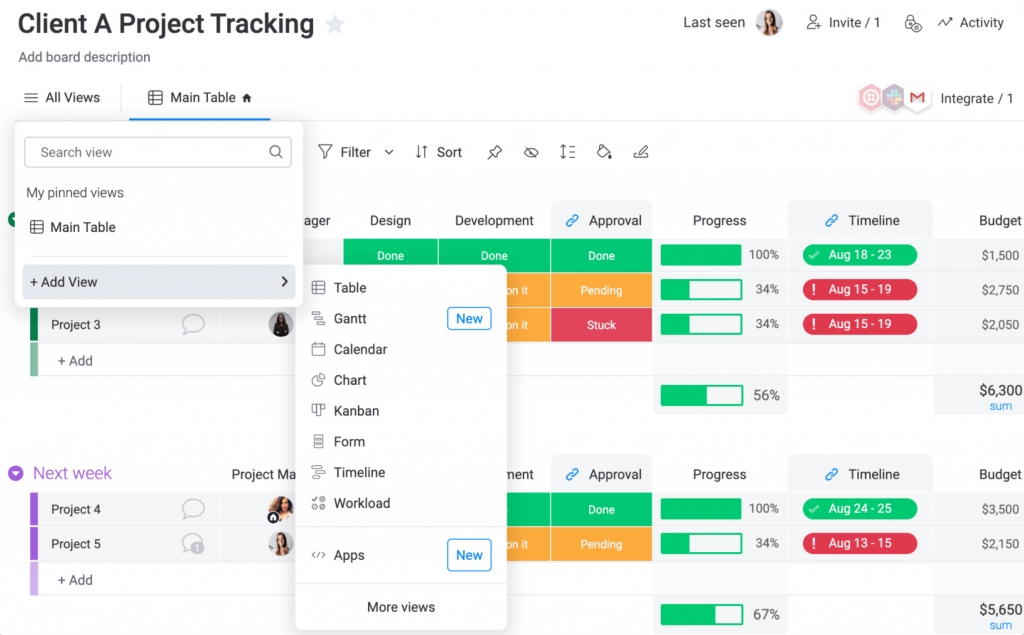
I also used the portfolio dashboard to keep an eye on more than one event at once, which pulled status updates from every board into a single view instead of making me click into each one individually. Role-based permissions let me give vendors and sponsors their own limited view without exposing internal notes or budget details.
Setup took longer than I expected, mostly because the event templates needed real customization before they matched how my team actually works. If the per-seat cost adds up once vendors are in the mix, it’s worth browsing a few monday.com alternatives before you commit.
Pros:
- Portfolio dashboards aggregate status across multiple simultaneous events
- AI flags at-risk tasks across dependent workstreams before deadlines slip
- Role-based permissions support secure collaboration with vendors and sponsors
- Hundreds of native integrations, including Slack, Zoom, and Google Workspace
Cons:
- Event templates require significant setup before they are ready to use
- No built-in vendor contract or e-signature tools
Pricing:
Starts at $9/user/month (billed annually).
3. ClickUp – Best for All-In-One Docs and Task Views
I moved to ClickUp for a two-day summit because I wanted task lists, a shared run-of-show document, and a whiteboard for floor plan brainstorming without switching between three separate apps. Everything lived in one workspace, which cut down on the number of tabs I had open during the final planning week.
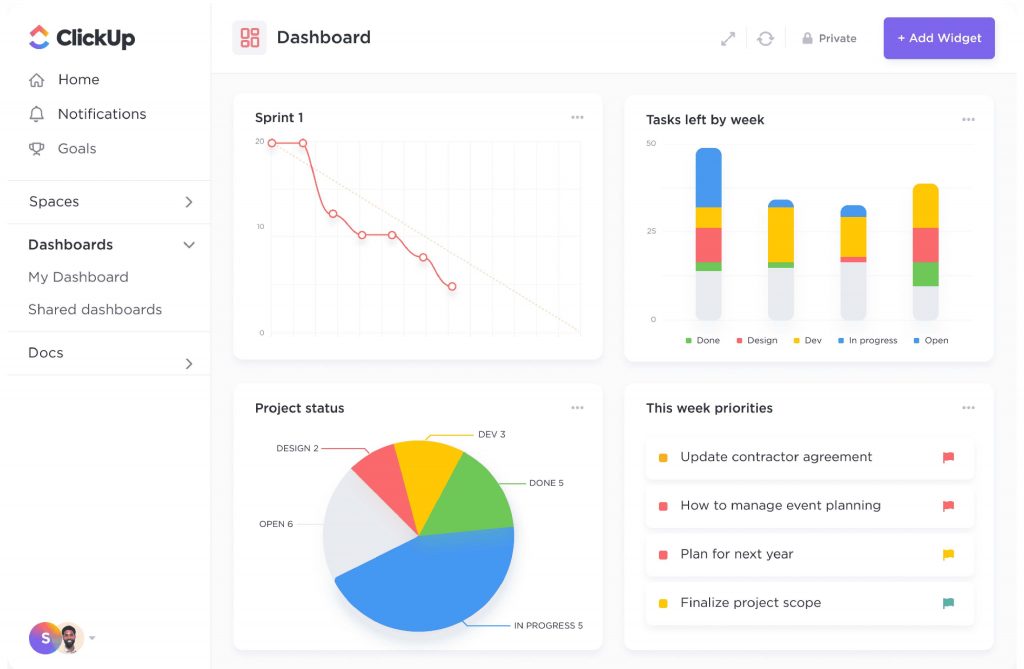
I liked being able to switch between list, board, and calendar views for the same task list depending on who was looking at it. My ops lead preferred Kanban for vendor tasks, while I stuck to the calendar view to track deadlines against the event date. ClickUp Brain, the built-in AI assistant, was handy for summarizing long comment threads on vendor negotiations.
The one thing that slowed me down was the sheer number of settings and customization options. It took my team a couple of weeks to feel fully comfortable in the tool.
Pros:
- Docs, whiteboards, and task management live in a single workspace
- Multiple task views (list, board, calendar, Gantt) on the same data
- ClickUp Brain summarizes long comment threads and drafts task updates
- Custom fields let you track vendor contacts, contract status, and budgets side by side
Cons:
- The depth of settings creates a real learning curve for new teams
- Core features like Goals and Workload are locked behind the Business tier
Pricing:
Starts at $7/user/month (billed annually).
4. Asana – Best for Timeline View and Workflow Rules
I ran a quarterly product launch event through Asana, and the Timeline view became my default screen for the six weeks leading up to it. Seeing every workstream, from venue setup to press outreach, laid out against the event date made it obvious where two teams were about to collide on the same deadline.
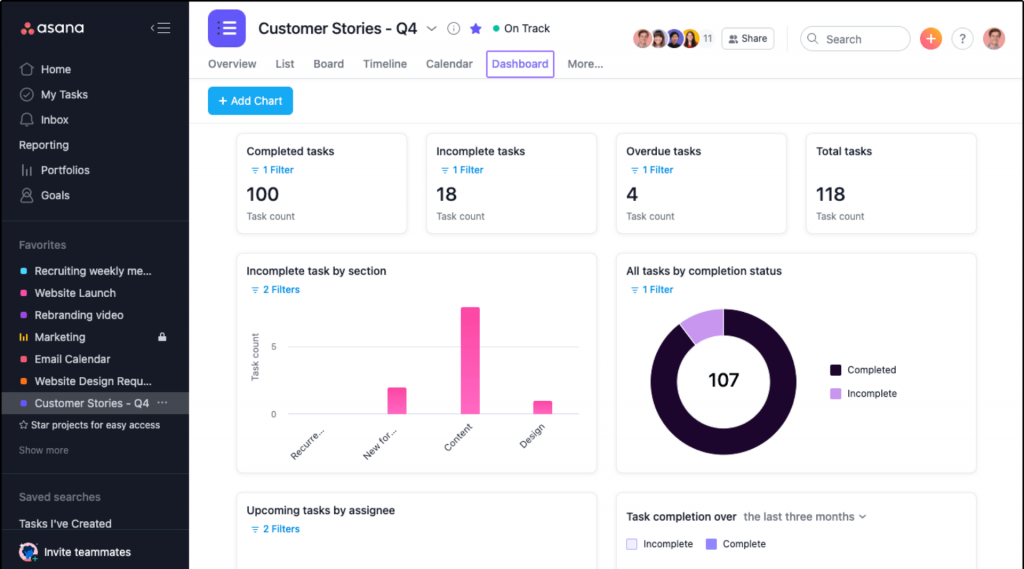
Workflow automation handled the repetitive parts I used to do by hand, like moving a task to “In Review” and notifying the right person once a vendor confirmed a deliverable. Portfolios (on the Advanced plan) let me track more than one event at a time without building a separate dashboard for each.
Asana’s pricing sits a bit higher than some competitors, and I did find myself hitting feature walls on the entry-level plan more than once.
Pros:
- Timeline and Gantt views make cross-team scheduling conflicts easy to spot
- Workflow Builder automates status updates and notifications
- Custom fields and forms standardize how vendor and task data get collected
- Wide integration library, including Slack, Google Drive, and Microsoft Teams
Cons:
- Advanced features like Goals and Portfolios require the pricier Advanced plan
- Paid plans start at 2 seats, so solo planners pay for unused capacity
Pricing:
Starts at $10.99/user/month (billed annually).
5. Trello – Best for Simple Kanban Task Boards
I reached for Trello on a smaller, single-day event where I mostly needed a shared to-do list my team could glance at without any onboarding. Each card became a task on a simple Kanban board, cards moved from “To Do” to “Done” as vendors confirmed, and that was really all the structure the event needed.
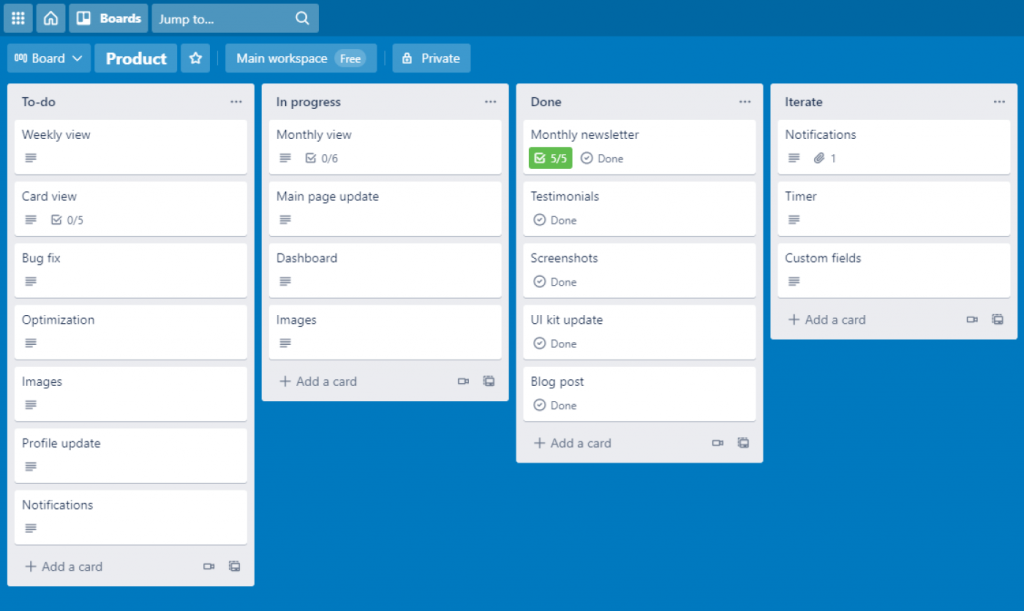
Power-Ups let me bolt on a calendar view and a Google Drive integration without paying for a heavier tool. Because the interface is so visual, new volunteers and part-time staff picked it up in minutes, which mattered for an event with a mostly seasonal crew.
Where Trello started to strain was once the task list passed around 50 cards. Dependencies between tasks are not native, so I had to track those manually in card descriptions.
Pros:
- Kanban board interface requires almost no onboarding for new users
- Unlimited Power-Ups add calendar, voting, and third-party integrations
- Butler automation handles repetitive card-moving and notification rules
- Mobile app makes it easy for on-site crews to update task status
Cons:
- No native task dependencies, which matters for multi-vendor timelines
- Becomes harder to manage once a board grows past 50 or so tasks
Pricing:
Starts at $5/user/month (billed annually).
6. Wrike – Best for Gantt Charts and Resource Planning
I brought in Wrike for a series of trade show appearances that ran back to back across a quarter, mainly because I needed to see staff workload across all of them at once. The Gantt chart view showed task dependencies clearly enough that I could tell exactly which vendor confirmation was blocking the print deadline for signage.
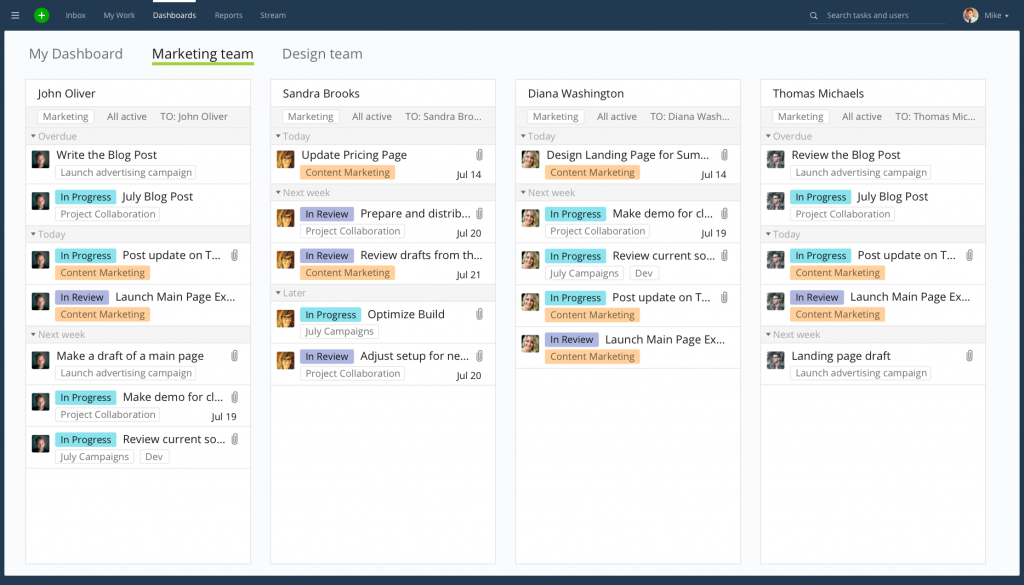
Resource management gave me a workload chart per team member, which made it obvious when one coordinator was overloaded while another had room for more tasks. Custom request forms also standardized how new event requests came in from other departments.
The interface has a real learning curve, and I would not recommend it for a team running its very first event with no project management experience.
Pros:
- Gantt charts show task dependencies across multiple, overlapping events
- Workload charts distribute tasks evenly across the planning team
- Custom request forms standardize how new event asks come in
- Advanced reporting and dashboards suit teams that need detailed data
Cons:
- Business-tier pricing requires a 5-user minimum, raising the real floor cost
- Some report types are locked behind a jump to a higher pricing tier
Pricing:
Starts at $10/user/month (billed annually).
7. Smartsheet – Best for Spreadsheet-Style Project Tracking
I switched a finance-heavy client event over to Smartsheet because half my planning committee lived in Excel and did not want to learn a brand-new interface. The grid view looks and feels like a spreadsheet, which meant almost zero ramp-up time for anyone who had ever used a budget tracker before.
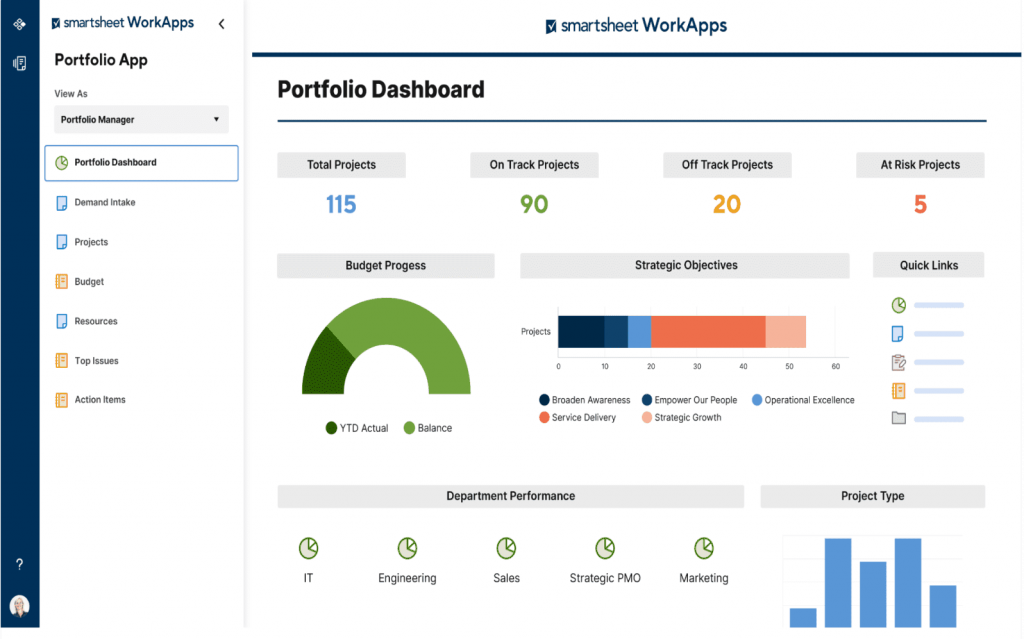
Dashboards pulled live status from the sheet into visual charts I could screenshot straight into a stakeholder update. Automated workflows sent reminder emails to vendors a set number of days before their deposit was due, without me having to manually chase each one.
The tradeoff is that Smartsheet’s more advanced project views, like the Calendar and Card views, sit on a higher-priced plan than the entry tier.
Pros:
- Grid view mirrors a spreadsheet, so non-technical stakeholders adapt quickly
- Dashboards turn raw sheet data into shareable visual reports
- Automated workflows send deadline reminders without manual follow-up
- Supports Gantt, Card, and Calendar views for different planning styles
Cons:
- No permanent free plan, only a time-limited trial
- Advanced views and automation depth are gated behind the Business plan
Pricing:
Starts at $9/user/month (billed annually).
8. Basecamp – Best for Flat-Rate Team Communication
I used Basecamp for a nonprofit gala where the planning committee was mostly volunteers who did not want to learn a complicated tool. Message boards replaced our group email chain, to-do lists replaced the shared spreadsheet, and automatic check-ins nudged people for updates without me having to ask directly.
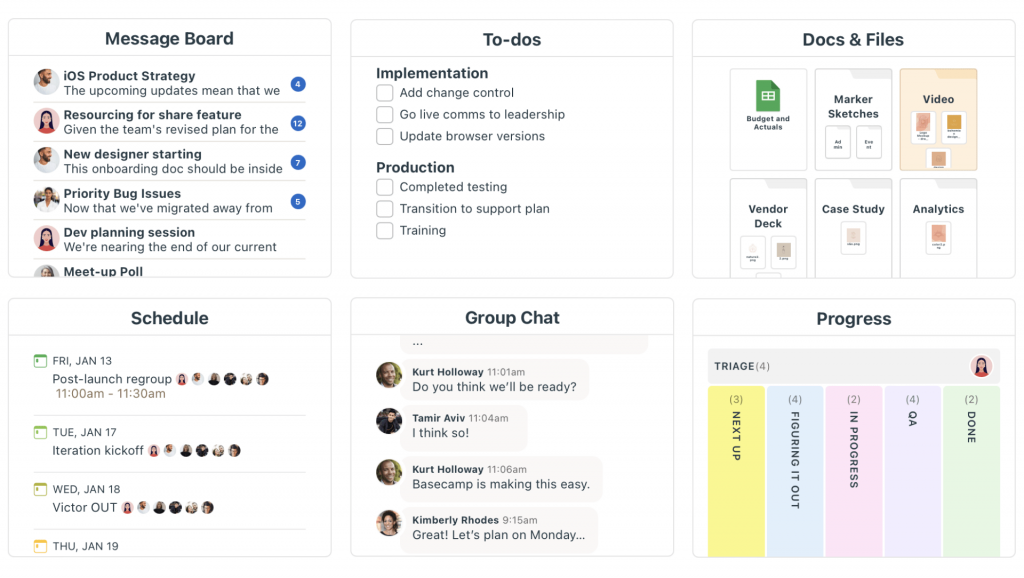
What stood out was the flat-rate Pro Unlimited plan, which let me add every volunteer and vendor at no extra per-seat cost. That mattered a lot for an event with more casual contributors than paid staff. The Campfire chat feature also kept day-of communication in one place instead of spilling into text messages.
Basecamp intentionally skips advanced features like Gantt charts and task dependencies, so it worked well for this event but would not have been enough for a multi-track conference.
Pros:
- Message boards, to-dos, and file storage live in a single, simple interface
- Automatic check-ins collect status updates without manual follow-up
- Clients and vendors can be added to projects at no extra cost
- Minimal learning curve for volunteers or part-time event staff
Cons:
- No Gantt charts, task dependencies, or advanced reporting
- Per-seat Plus plan gets expensive fast as the team grows
Pricing:
Starts at $15/user/month.
9. Airtable – Best for Custom Event Databases
I set up Airtable for a multi-day festival where I needed to track vendors, sponsors, and speakers as separate but linked databases rather than one flat task list. Being able to build a custom view for each stakeholder group, filtered to show only what mattered to them, made status meetings a lot shorter.
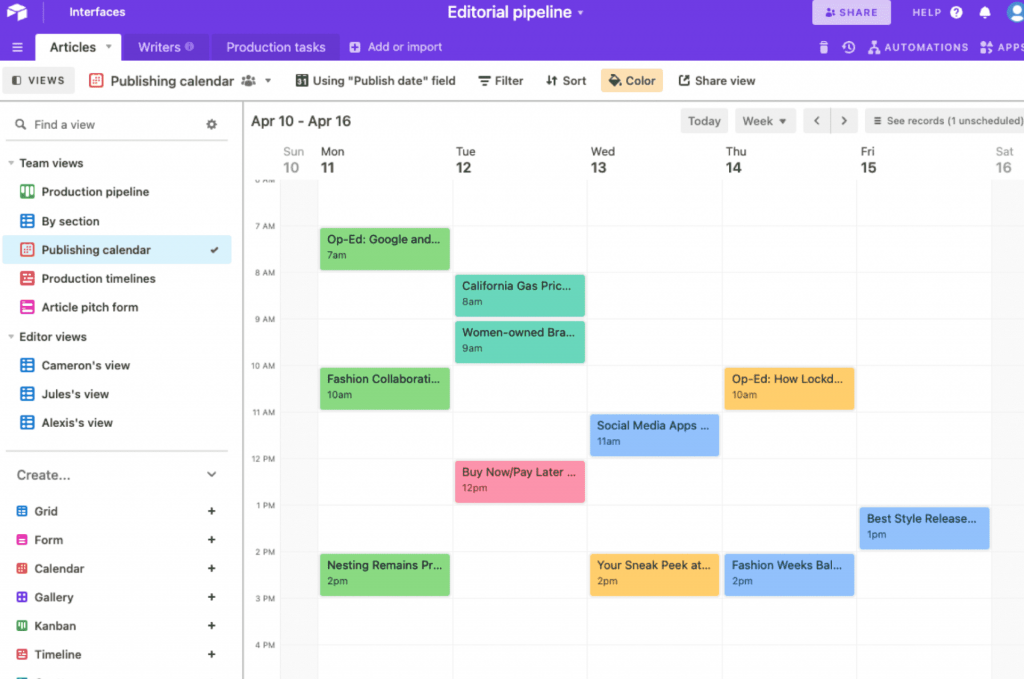
The Interface Designer let me put together a simple dashboard for our director without exposing the underlying database, and automations moved sponsor records between stages as contracts got signed. Gantt and Timeline views covered the scheduling side once I had the data structured the way I wanted.
Airtable’s per-editor pricing adds up quickly, and I had to be careful about who actually needed edit access versus who just needed to view. If seat costs are a concern, a few Airtable alternatives are worth comparing first.
Pros:
- Relational databases link vendors, sponsors, and speakers in one system
- Interface Designer builds simple, stakeholder-specific dashboards
- Automations move records between stages as contracts and approvals land
- Gantt and Timeline views support event-day scheduling
Cons:
- Per-editor pricing gets expensive as more team members need edit access
- Record and automation limits can force an unexpected upgrade
Pricing:
Starts at $20/user/month.
10. Teamwork.com – Best for Client-Facing Agency Work
I used Teamwork.com when running events on behalf of clients rather than in-house, mostly because billing and time tracking were built directly into the same tool I used for task management. Every hour my team logged against a task rolled straight into a client invoice at the end of the event.
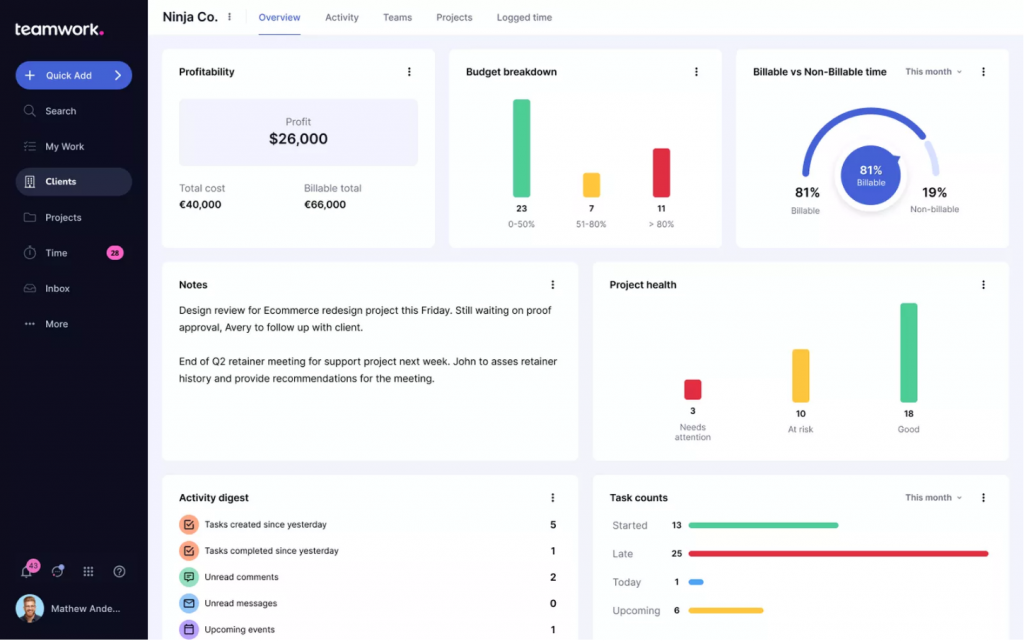
Client access permissions let my clients see progress on their event without touching internal notes or margins, which cut down on a lot of status-update emails. The proofing tools also came in handy for getting sign-off on printed signage and marketing assets before they went to print.
The jump from the entry plan to the plan with workload and capacity features was steeper than I expected, so I’d recommend mapping out which features you actually need before committing.
Pros:
- Built-in time tracking ties directly to client billing and invoicing
- Client permissions allow external stakeholders to view progress safely
- Proofing tools speed up sign-off on signage and marketing assets
- Multiple project views, including Gantt, board, and list
Cons:
- Meaningful jump in cost between the entry plan and the plan with workload features
- Free plan caps out at 5 users and 5 projects
Pricing:
Starts at $9.99/user/month (billed annually).
Evaluation Criteria
Here’s how I evaluated each project management software on this list, using six factors:
- User Reviews and Ratings: I pulled G2 ratings and read through real user feedback to understand what actually frustrates or delights event teams day to day, not just what the marketing page promises.
- Essential Features and Functionality: I looked at task management, budget tracking, timeline or Gantt views, and vendor or guest access, since these are the features event planning leans on most.
- Ease of Use: I paid attention to how quickly a new user, including a vendor who has never seen the tool before, could find their tasks and leave an update.
- Customer Support: I checked what support channels each tool offers and how G2 reviewers rate the actual response quality, not just the advertised support hours.
- Value for Money: I compared what each pricing tier unlocks against its cost, with extra attention to how the bill changes as more vendors and collaborators get added.
- Personal Experience: Where I’ve directly used a tool for event planning, I’ve shared what worked and what didn’t, alongside patterns I noticed across other event planners’ reviews.
Pick the Best Project Management Software for Events
If you’re still working through how to choose project management software for your events, start here. These are the three tools I’d point most event teams toward first, based on price, ease of use, and how well they handle vendors and clients alongside your internal team.
1. ProProfs Project
ProProfs Project is my top pick because it gives event teams unlimited users on one flat monthly price, so the bill does not grow every time you add a vendor, sponsor, or seasonal hire to the workspace. Between the Grid, Kanban, and Gantt views, the built-in budget tracking, and the AI Project Assistant that helps set up task lists faster, it covers most of what a mid-sized event team needs without a steep learning curve.
2. monday.com
If your events run as multiple parallel workstreams, such as a conference with AV, catering, and speaker logistics happening at once, monday.com’s portfolio dashboards and AI risk flagging are hard to beat. It costs more per seat than ProProfs Project once vendors are added, but the visual board layout makes cross-team status checks fast.
3. Trello
For a smaller event or a team that just needs a shared to-do list without a learning curve, Trello is still one of the easiest tools to get a volunteer or part-time staffer using within minutes. It will not replace a dedicated budget tracker or Gantt chart, but for straightforward events, that simplicity is the whole point.
Start Planning Events Without Missing a Deadline
At the end of the day, the right project management software just means fewer things falling through the cracks. No more digging through email for the latest vendor quote, no more finding out a deposit was due yesterday, and no more wondering who actually owns the AV setup. Pick one tool, get your team and vendors into it, and let the software carry the reminders you used to carry in your head.
Start small if you’re not sure yet. Most of the tools on this list, including ProProfs Project, offer a free plan or a trial, so there’s no need to commit to a full year before you know it fits how your team actually works. You can always move to a bigger plan once the event calendar gets busier.
One thing worth planning for early: once the event is live, questions from attendees and vendors tend to pile up fast, and they rarely belong on the same board as your internal task list. A lightweight tool like ProProfs Help Desk can catch that day-of traffic and keep it separate from your planning boards, so your event team isn’t digging through a shared inbox while they’re supposed to be running the show.
Frequently Asked Questions
What is event project management software?
It's a tool that helps event teams plan tasks, timelines, budgets, and vendor communication for an event in one shared dashboard, separate from attendee-facing tools like ticketing or registration.
Is project management software the same as event management software?
No. Project management software handles internal planning and task tracking, while event management software (like Cvent or Whova) handles attendee-facing needs like registration, ticketing, and check-in.
Can I use free project management software to plan an event?
Yes, for smaller events. Trello, ClickUp, and ProProfs Project all offer free plans, though free tiers usually cap the number of users or limit reporting and automation features.
What features should event project management software have?
Look for task assignment, a shared calendar or timeline view, budget tracking, file sharing, and role-based access for vendors or clients who should not see internal notes.
Which project management software is best for small event teams?
Trello and ProProfs Project both work well for small teams. Trello suits very simple task lists, while ProProfs Project adds budget tracking and reporting without a steep learning curve.
How much does event project management software typically cost?
Per-seat pricing ranges from about $5 to $20 per user per month across the tools on this list. Flat-rate options like ProProfs Project's Business plan or Basecamp's Pro Unlimited plan can cost less overall once several vendors or clients are added.
Can vendors and clients access the same project management tool as my internal team?
Most tools on this list, including ProProfs Project, monday.com, and Asana, support guest or client access with limited, role-based permissions so external stakeholders see only what's relevant to them.
Does ProProfs Project work for event planning specifically?
Yes. Event teams use ProProfs Project to break an event into task lists by category, assign owners and due dates, track budget versus actual spend, and give vendors or clients limited access, all on one flat, unlimited-user plan.
FREE. All Features. FOREVER!
Try our Forever FREE account with all premium features!