

A solar farm doesn’t fail because the panels stop working. It fails because a permitting update never made it from the compliance folder to the field crew’s calendar, and by the time anyone noticed, the interconnection window had already closed. That is the version of project failure I keep running into when I talk to renewable energy teams, and it is exactly why the search for project management software for renewable energy has picked up so much urgency lately. The technology side of clean energy has matured. The coordination side, the part where budgets, permits, contractors, and construction schedules all have to stay in sync across multiple sites, is still held together with spreadsheets and group chats for a lot of teams.
I have spent enough time around project managers in this space, from small developers juggling three or four solar sites to teams overseeing wind and storage portfolios, to notice a pattern. The tools that work best are not always the flashiest ones. They are the ones that give a project lead a single, honest view of what is due, what is late, and who is holding up the next milestone, without forcing the team through a six-week onboarding process first. A study by Boston University’s Institute for Global Sustainability in 2025 shows that the average energy infrastructure project costs 40 percent more than expected and takes nearly two years longer than planned, and coordination gaps, not equipment failures, are consistently named as a leading cause.
That is the lens I used to build this list. I looked at flat-rate and per-user tools, general-purpose platforms and renewable-specific ones, and weighed each against what a real solar, wind, or storage project actually needs: scheduling, budget visibility, task ownership, and reporting that does not require a week of manual spreadsheet-wrangling before every leadership update. Whether you are running a two-person development team or managing multiple projects across fifty active sites, one of the ten tools below should fit.
What Is Renewable PM Software?
Renewable energy project management software is a type of project management software that plans, schedules, and tracks solar, wind, storage, or hydro projects from site development through construction and commissioning, giving teams one shared view of tasks, budgets, timelines, and vendor commitments instead of scattered spreadsheets and email threads.
It typically includes:
- Task and milestone tracking across multiple project sites
- Gantt charts or timeline views for scheduling dependencies
- Budget and expense tracking against planned costs
- File sharing for permits, contracts, and compliance documents
- Team collaboration tools such as comments and notifications
- Reporting dashboards for leadership and investor updates
Some platforms, like Sitetracker and Celoxis, are built specifically for capital-intensive infrastructure and add permitting, interconnection, and portfolio-level financial modeling. Others, like ProProfs Project, are general project management tools that renewable teams configure for their own workflow, which works well for smaller portfolios that do not need industry-specific modules.
Top Renewable Energy PM Tools
Picking the right tool comes down to team size, portfolio complexity, and how much of your budget you want to spend on software versus construction. I have grouped these ten so you can scan for your situation quickly: flat-rate and small-team tools first, then renewable-specific and enterprise platforms, then the general-purpose tools most teams already have on their radar.
| Tool | Best For | Pricing | G2 Rating |
| ProProfs Project | Simplest Project Management Tool for SMBs With Client Invoicing, Time & Billing | Free plan available. Paid plan starts at $39.97. | 4.4/5 |
| Celoxis | Enterprise portfolio management | Starts at $10/user/month | 4.6/5 |
| Sitetracker | Purpose-built renewable asset tracking | Custom pricing, contact sales | 4.3/5 |
| Jira | Engineering and compliance workflows | Free (up to 10 users) / starts at $7.91/user/month | 4.3/5 |
| Monday.com | Visual, customizable team workflows | Starts at $12/seat/month (3-seat minimum) | 4.7/5 |
| Asana | Cross-functional task coordination | Free (up to 2 users) / starts at $10.99/user/month | 4.4/5 |
| Smartsheet | Spreadsheet-native teams | Starts at $9/user/month | 4.4/5 |
| Wrike | Resource and workload management | Free plan available / starts at $10/user/month | 4.2/5 |
| Basecamp | Simple, communication-first PM | Starts at $15/month flat, unlimited users | 4.3/5 |
| Microsoft Project | Detailed Gantt-based scheduling | Starts at $10/user/month | 4.0/5 |
1. ProProfs Project – Simplest Project Management Tool for SMBs With Client Invoicing, Time & Billing
I use ProProfs Project to run our own content and cross-team projects, and the thing that keeps me on it is the flat pricing. Once a renewable energy team grows past three or four users, per-seat pricing on other tools starts adding up fast, and ProProfs Project’s Business plan charges one flat rate regardless of how many people join. For a small solar developer running two or three concurrent sites, that alone changes the math on what software actually costs over a year.
The Gantt chart and project tracking views are where I spend most of my own time, because they make it obvious at a glance which milestone is at risk before it becomes a missed deadline. I also lean on the AI Project Assistant when I am setting up a new project from scratch. It helps draft an initial task breakdown so I am not starting from a blank board every time, and the AI Report Summary saves me from manually compiling status updates before a leadership check-in.
For renewable teams specifically, the built-in time tracking and invoicing matter more than they might for a typical marketing or software team, since so much of the work involves contractor hours and billable field time. Being able to log hours, generate an invoice, and share files with a contractor or EPC partner without leaving the platform keeps the whole workflow in one place instead of scattered across three tools.
Pros:
- Flat-rate pricing regardless of team size, unlike most per-seat competitors
- Gantt charts, Kanban boards, and calendar views cover different planning styles
- Built-in time tracking and invoicing support contractor and field billing
- AI Project Assistant helps draft task breakdowns for new project setups
- File sharing integrates with Dropbox, Google Drive, and Box for permit and contract documents
Cons:
- Dark mode interface is not currently available
- No dedicated account manager on the free plan
Pricing:
Free plan available. Paid plans start at $39.97.
2. Celoxis – Best for Enterprise Portfolio Management
A colleague who runs delivery for a mid-sized infrastructure firm switched her team to Celoxis after outgrowing a patchwork of spreadsheets and a basic Monday.com board. What she liked most was the portfolio-level view: budget, schedule, and resource status across every active project in one dashboard, instead of compiling five files before every leadership update.
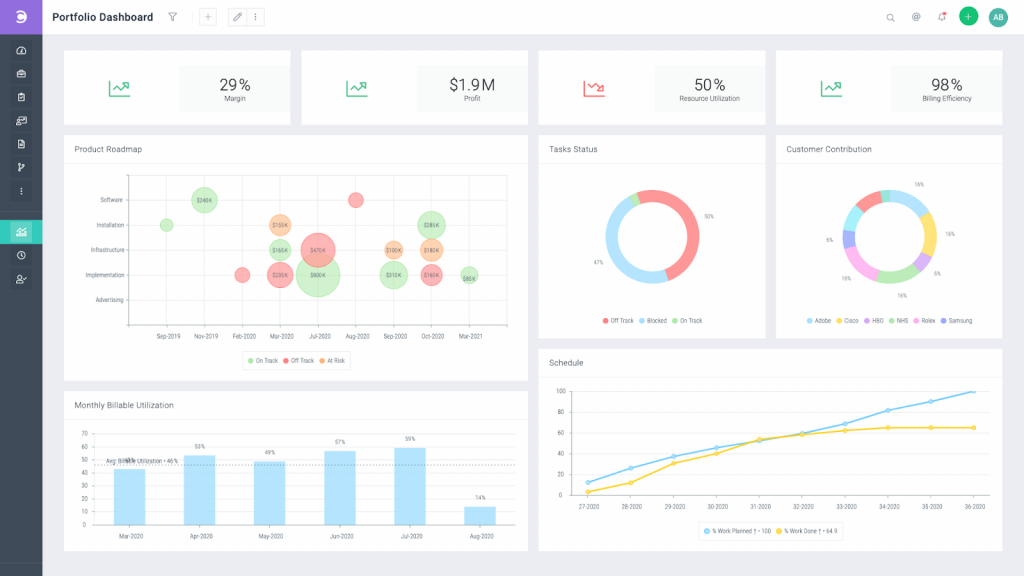
Celoxis leans heavily into resource management and capacity planning, which matters once a renewable portfolio grows past a handful of sites and the same engineers start getting double-booked across projects. The interactive Gantt chart with real dependency logic, not just a visual timeline, was the feature she mentioned most when comparing it to what her team used before.
Pros:
- Portfolio dashboards show budget, schedule, and resource status across every project
- Resource capacity planning surfaces overallocation before it causes a missed milestone
- Real dependency logic in Gantt charts, not just a static visual timeline
- Continuous actuals-versus-plan financial tracking
Cons:
- Steeper learning curve than lightweight task tools
- Pricing climbs quickly for larger teams needing advanced modules
Pricing:
Starts at $10/user/month.
3. Sitetracker – Best for Renewable Asset Tracking
Sitetracker is built specifically for infrastructure deployment, in the same way a construction project management software is purpose-built for physical builds, and it shows in the details. It supports and centralizes contract and document management, and it tracks obligations across the full project and asset lifecycle, which is exactly the kind of milestone-heavy tracking solar, wind, and EV charging deployments need. It is Salesforce-native, so teams already running Salesforce for their broader operations tend to find it a smoother fit.
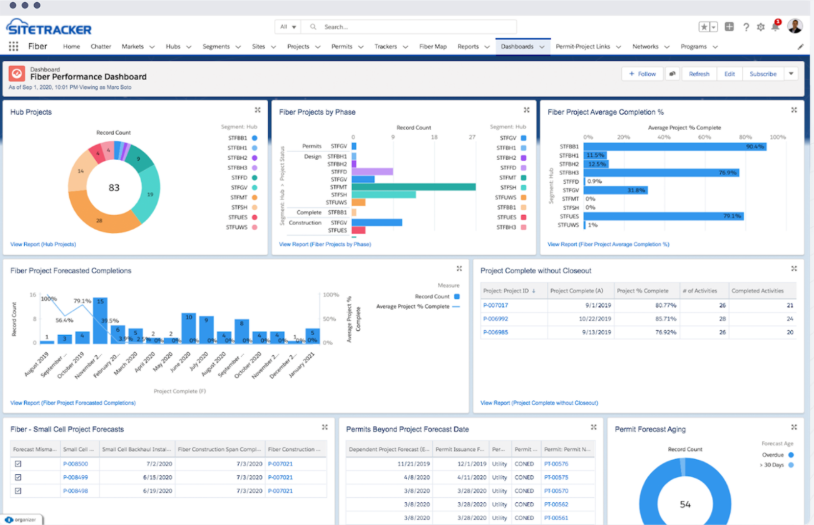
I have not run a project through Sitetracker myself, but the pattern in its reviews is consistent: strong workflow automation and milestone tracking, with the trade-off being that it needs a dedicated administrator to get real value from the customization options.
Pros:
- Purpose-built for multi-site renewable and infrastructure deployment
- Salesforce-native integration for teams already on that ecosystem
- Centralized contract and document management tied to project milestones
- Mobile app support for field-based audits and updates
Cons:
- No public pricing, so budgeting requires a sales conversation upfront
- Requires a dedicated Salesforce-savvy administrator for full value
Pricing:
Custom pricing, contact sales.
4. Jira – Best for Engineering and Compliance Workflows
Jira shows up on a lot of renewable energy shortlists because engineering teams already know it from software development, and its configurable issue workflows translate well to compliance-heavy processes like change requests and approval chains. A technical lead I spoke with uses it to track interconnection study issues the same way her team once tracked software bugs, with custom fields for regulatory status.
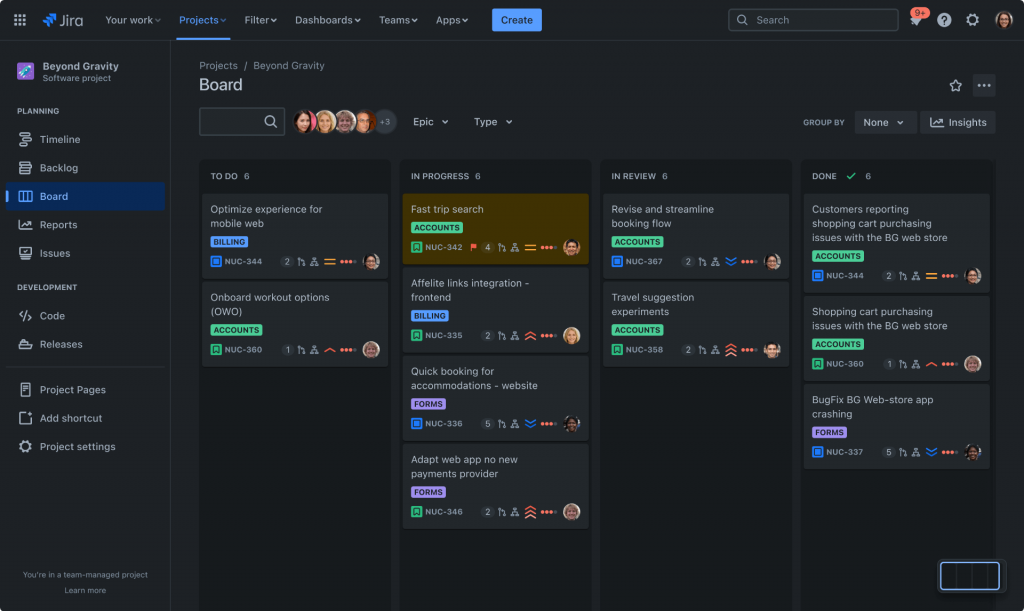
Where Jira tends to fall short for renewable teams is financial tracking and portfolio-level budgeting. It was built for tracking work, not managing capital, so most renewable teams pair it with a separate tool for budget and resourcing, or look at Jira alternatives built with construction-style budgeting in mind.
Pros:
- Highly configurable issue workflows and custom fields
- Strong audit trail for change requests and approvals
- Familiar to any team with a software or engineering background
- Wide integration ecosystem through the Atlassian marketplace
Cons:
- No native budget or financial tracking
- Interface feels built for developers, not field or construction teams
Pricing:
Free for up to 10 users. Standard plan starts at $7.91/user/month.
5. Monday.com – Best for Visual Team Workflows
Monday.com’s biggest strength is how quickly a team can get a board running without a steep learning curve. I have watched non-technical project coordinators set up a working project tracker in under an hour, which is not something I would say about most enterprise PPM tools. For renewable teams that need visual, color-coded status boards more than deep financial modeling, that speed matters.
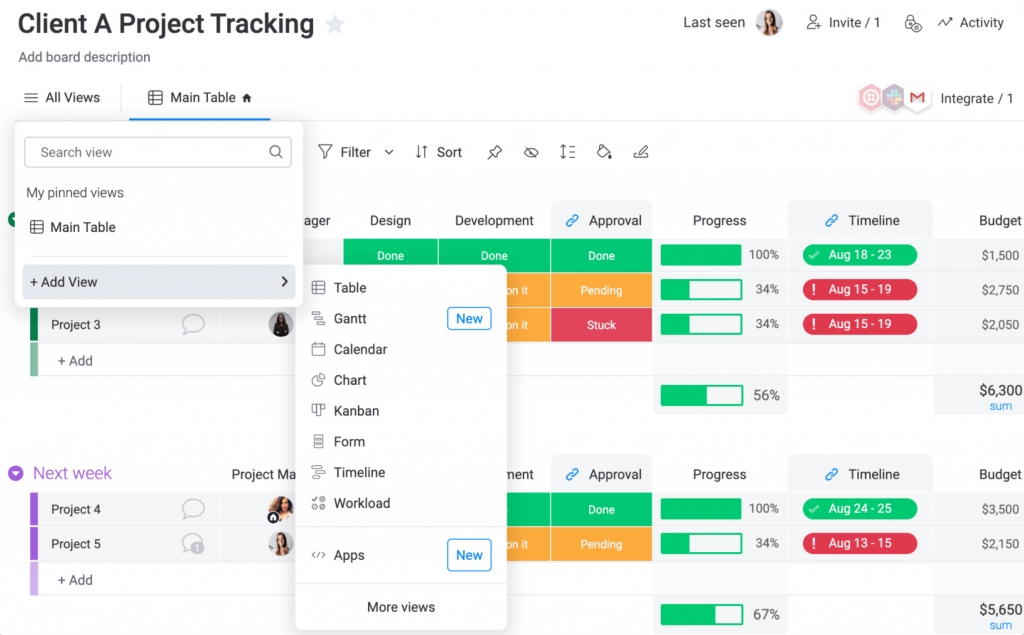
The trade-off is depth. Monday.com’s financial tracking and resource capacity planning are noticeably shallower than what a dedicated PPM platform offers, which becomes a real limitation once a portfolio grows past a handful of concurrent sites. It’s worth browsing a few Monday.com alternatives once you hit that ceiling.
Pros:
- Fast setup with an intuitive, visual board interface
- Strong automation builder for recurring approval or notification workflows
- Calendar, Gantt, and Kanban views cover multiple planning styles
- Wide integration library, including Outlook and Teams
Cons:
- Financial tracking and budgeting features are shallow for capital projects
- Pricing scales quickly with more seats and higher-tier plans
Pricing:
Starts at $12/seat/month, 3-seat minimum.
6. Asana – Best for Cross-Functional Coordination
Asana earns its spot here for teams that need clean task ownership and cross-functional coordination more than heavy scheduling. A friend who manages stakeholder communication for a community solar program uses it to keep marketing, legal, and field teams aligned on the same task list, since the interface is simple enough that non-project-management staff adopt it without much training.

It is worth knowing upfront that Asana was not built with construction or capital project budgeting in mind, so renewable teams tracking detailed cost baselines usually need a companion tool, which is why it is worth reviewing a few Asana alternatives built for that piece specifically.
Pros:
- Strong task dependency and ownership tracking
- Good reporting dashboards for cross-team status updates
- Free plan available for very small teams
- Wide range of integrations for cross-functional workflows
Cons:
- No dedicated budget or capital cost tracking
- Limited support for construction-specific scheduling logic
Pricing:
Free for up to 2 users. Starter plan starts at $10.99/user/month.
7. Smartsheet – Best for Spreadsheet-Native Teams
Smartsheet is the natural next step for renewable teams that live in Excel and are not ready to abandon the spreadsheet mental model entirely. It looks and feels like a spreadsheet but adds automated scheduling, dependencies, and real-time collaboration on top, which makes the transition easier for teams with less technical staff, like the finance-focused coordinators I have heard about on distributed renewable teams.
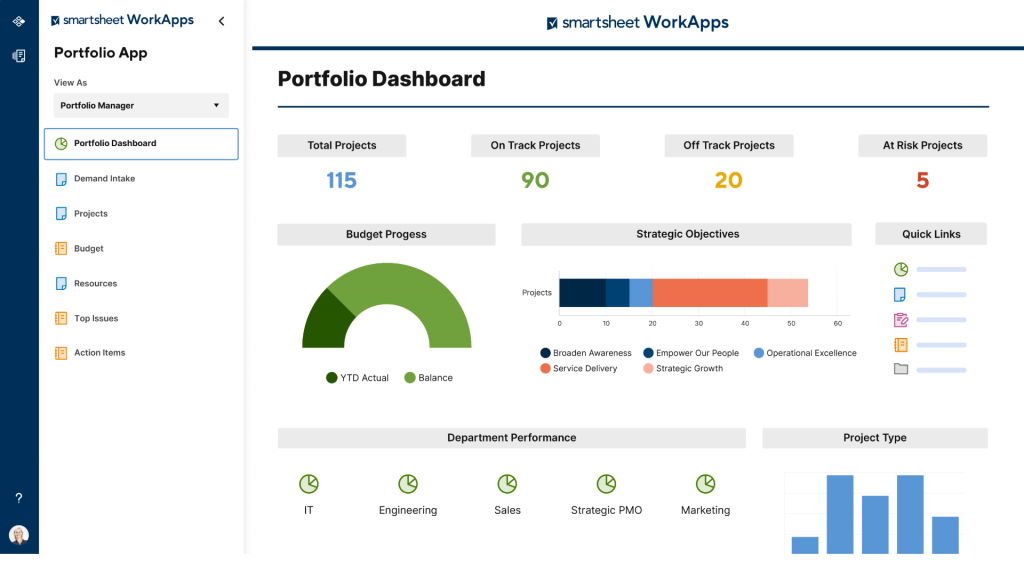
The trade-off is that Smartsheet’s project management depth, things like true resource capacity planning, is lighter than what a dedicated PPM platform offers, so it is worth comparing a few Smartsheet alternatives before committing a full renewable portfolio to it.
Pros:
- Automated reminders and dependency-based scheduling
- Strong visual tools, including Gantt charts and dashboards
- Real-time collaborative editing across the whole team
- Flexible enough for both simple task lists and complex project plans
Cons:
- Resource capacity planning is thinner than dedicated PPM tools
- Advanced automation and reporting sit behind higher-tier plans
Pricing:
Starts at $9/user/month.
8. Wrike – Best for Resource and Workload Management
Wrike’s workload view is its standout feature for renewable teams juggling the same engineers or specialists across multiple sites. It shows who is overallocated at a glance, which is exactly the kind of resource conflict that tends to surface too late on a spreadsheet. Custom request forms also help standardize how new project requests come in from different departments.
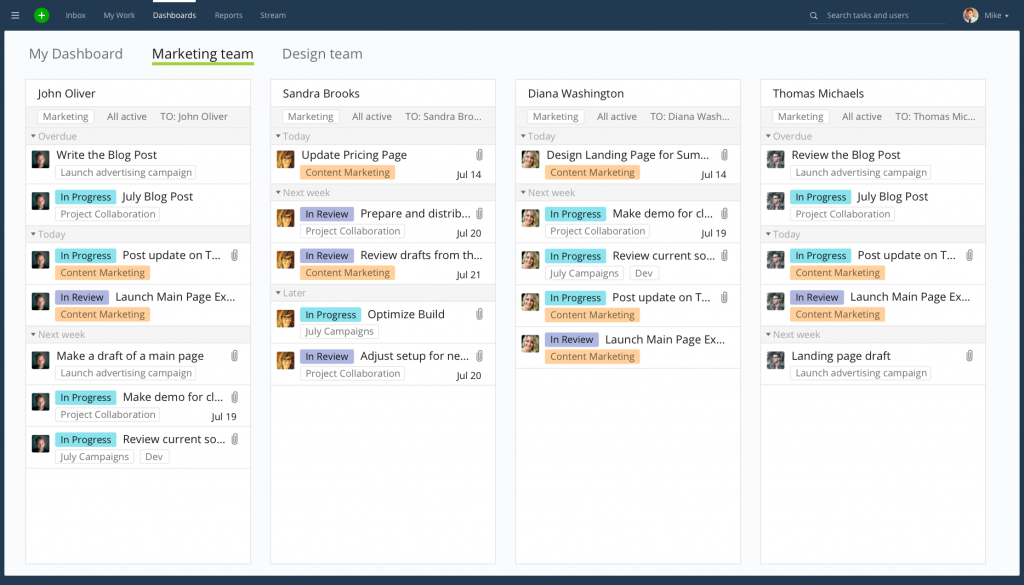
I have seen Wrike work well for mid-sized teams that have outgrown Asana or Trello but are not ready for a full enterprise PPM commitment yet, though a look at a few Wrike alternatives is worthwhile if the learning curve feels steep for your field team.
Pros:
- Workload view surfaces resource overallocation before it causes delays
- Custom request forms standardize incoming project requests
- Flexible enough to structure workflows around specific team needs
- Solid reporting and dashboard customization
Cons:
- Advanced financial tracking requires higher-tier plans
- Can feel feature-heavy for very small teams
Pricing:
Free plan available. Paid plans start around $10/user/month.
9. Basecamp – Best for Simple, Communication-First PM
Basecamp strips project management down to the essentials: to-do lists, message boards, schedules, and file storage, all wrapped in flat pricing that does not scale with headcount. For a small renewable developer running one or two projects with a lean, remote team, that simplicity is often exactly what is needed instead of a feature-heavy platform nobody has time to learn.
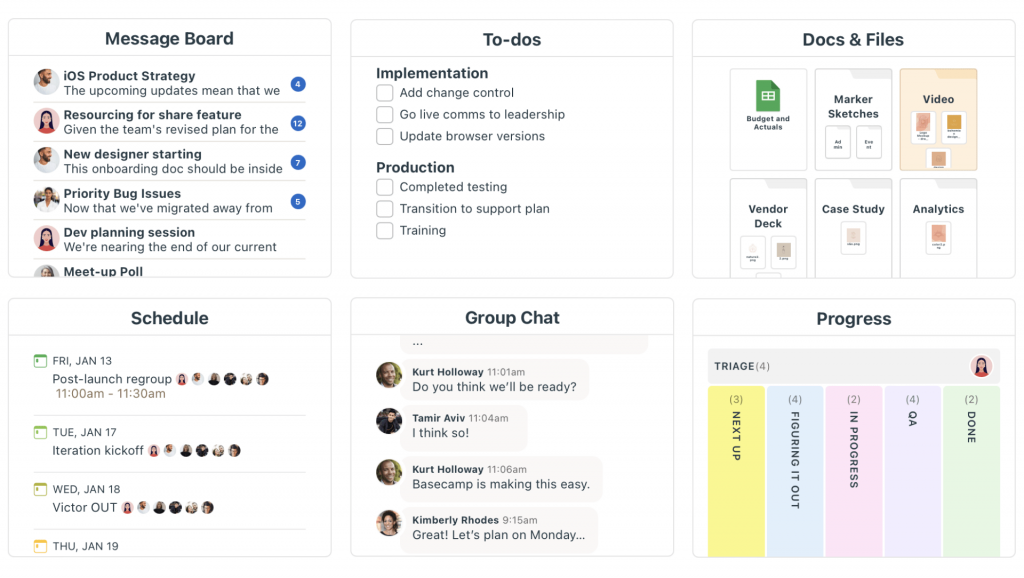
Where it falls short is depth. There is no real budget tracking, resource management, or dependency-based scheduling, so it works best as a coordination layer rather than a full project management system, and teams that outgrow it usually move to one of these Basecamp alternatives for anything beyond a small portfolio.
Pros:
- Flat pricing regardless of team size keeps costs predictable
- Simple, message-board style communication keeps remote teams aligned
- Centralized file and document storage
- Strong reputation for keeping small, distributed teams organized
Cons:
- Lacks Gantt charts or true dependency-based scheduling
- Not built for complex, multi-site portfolio management
Pricing:
Starts at $15/month flat, unlimited users.
10. Microsoft Project – Best for Detailed Gantt Scheduling
Microsoft Project remains the standard for teams that need deep, dependency-driven scheduling and are already inside the Microsoft ecosystem. Its Gantt chart engine handles complex, multi-phase construction schedules well, which matters for a utility-scale solar or wind build with dozens of interdependent tasks across procurement, permitting, and construction.
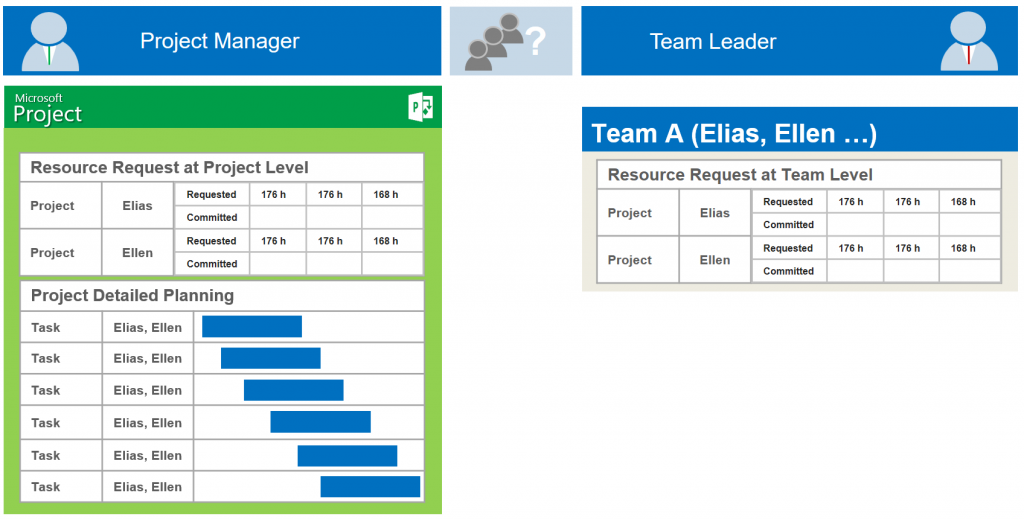
The limitation renewable teams run into is everything outside of scheduling. Portfolio-level financial tracking, resource capacity across dozens of concurrent projects, and executive-friendly reporting all need significant customization to work well, which sends a lot of teams looking at Microsoft Project alternatives instead.
Pros:
- Deep, dependency-driven Gantt chart scheduling
- Tight integration with the broader Microsoft 365 ecosystem
- Handles complex, multi-phase construction timelines well
- Familiar interface for teams already using Microsoft tools
Cons:
- Not built for portfolio-level financial tracking without customization
- Executive reporting requires significant manual setup
Pricing:
Starts at $10/user/month.
Evaluation Criteria
The evaluation of tools chosen for this article follows an unbiased, systematic approach that ensures a fair, insightful, and well-rounded review. This method employs six key factors:
- User Reviews / Ratings. Direct experiences from users, including ratings and feedback from reputable sites like G2 and Capterra, provide a ground-level perspective. This feedback is critical in understanding overall satisfaction and potential problems.
- Essential Features & Functionality. The value of a tool is ascertained by its core features and overall functionality. Through an in-depth exploration of scheduling, budgeting, and collaboration capabilities, the practical usefulness of each tool is carefully evaluated.
- Ease of Use. The user-friendliness of a tool is assessed, focusing on the design, interface, and navigation. This ensures a positive experience for field teams and project managers of all levels of expertise.
- Customer Support. The quality of customer support is examined, taking into account its efficiency and how well it supports users in different phases: setting up, addressing concerns, and resolving operational issues.
- Value for Money. Value for money is evaluated by comparing the quality, performance, and features against the price. The goal is to help you understand whether you would be getting your money’s worth for a renewable energy portfolio of your size.
- Personal Experience / Experts’ Opinions. This part of the evaluation draws on firsthand use of these tools alongside the opinions of project managers and industry experts working in solar, wind, and storage delivery.
My Top 3 Picks for Project Management Software for Renewable Energy
If you only read one section of this list, read this one. These are the three tools I would put in front of a renewable energy team first, based on team size, budget, and how much of the workflow needs to be purpose-built.
1. ProProfs Project
ProProfs Project is my first recommendation for any solar, wind, or storage team under about 20 people, mainly because of the flat-rate pricing and how fast a new project gets set up. I do not need to negotiate a per-seat contract every time the team grows, and the workflow management tools cover Gantt charts, time tracking, and invoicing well enough that a lean team does not need a second tool bolted on for billing.
2. Celoxis
Celoxis is my pick for teams managing a genuine portfolio, think a dozen or more active solar or wind sites with shared engineers and specialists moving between them. The resource capacity planning and continuous financial tracking are built for exactly that scale, and it is one of the stronger enterprise project management software options I have come across for capital-intensive delivery.
3. Sitetracker
Sitetracker rounds out my top three for developers who need permitting, interconnection, and asset-lifecycle tracking baked into the platform itself rather than configured after the fact. It asks more of your team upfront, particularly around Salesforce administration, but for a utility-scale project portfolio management software built specifically for infrastructure, it is hard to match.
Start Managing Smarter Projects
Renewable energy delivery has outgrown what a shared spreadsheet and a group chat can support, and the ten tools above cover the range from lean, flat-rate options to full enterprise portfolio platforms. If your team is running a handful of solar, wind, or storage projects and wants Gantt charts, time tracking, and invoicing without paying per seat, ProProfs Project is worth trying first, and its free plan makes it an easy addition to any shortlist of free project management software you are already comparing. If you are managing dozens of concurrent sites with heavy compliance requirements, Celoxis or Sitetracker will likely serve you better.
Whichever tool you land on, the goal is the same: one place where your team can see what is due, what is at risk, and who owns the next step, without reconstructing that picture from five different files before every update.
Frequently Asked Questions
What is project management software for renewable energy?
It is software that helps solar, wind, storage, and hydro teams plan schedules, track budgets, and coordinate vendors across one or more project sites. It can be a general PM tool configured for renewable workflows or a purpose-built platform with permitting and compliance modules.
How is renewable energy project management different from regular project management?
It shares the basics of scheduling and budgeting with any project, but adds technology-specific risk, interconnection and grid dependencies, and a regulatory landscape that varies by state, country, and utility territory.
What features should renewable energy PM software have?
Look for task and milestone tracking, Gantt or timeline scheduling, budget tracking, file sharing for permits and contracts, and reporting dashboards. Larger portfolios also benefit from resource capacity planning and compliance tracking.
Is ProProfs Project a good fit for solar or wind teams?
Yes, especially for small to mid-sized teams running a handful of concurrent projects. Its flat-rate pricing, Gantt charts, time tracking, and invoicing cover the core needs of a lean renewable energy team without a per-seat cost that scales against you.
How much does renewable energy project management software cost?
Pricing ranges from free plans for small teams to $10 to $12 per user per month for mid-market tools, up to custom enterprise pricing for purpose-built platforms like Sitetracker. Flat-rate tools like ProProfs Project charge one price regardless of team size.
Can small renewable energy developers use general PM tools instead of specialized software?
Yes. A developer running three to five concurrent projects with shared resources faces many of the same visibility problems as a large developer, just at a smaller scale, and a well-configured general PM tool is often enough until the portfolio grows significantly larger.
What is the best free project management software for renewable energy teams?
ProProfs Project offers a free plan for up to 3 users with Gantt charts and task tracking included. Jira and Asana also offer free tiers, though both need more setup to fit a construction-style renewable workflow.
How does project management software reduce cost overruns on energy projects?
It surfaces budget drift and resource conflicts in real time instead of at month-end close, which gives project managers weeks of extra warning to act on a risk before it becomes an expensive delay.
FREE. All Features. FOREVER!
Try our Forever FREE account with all premium features!