

Project management software for nonprofits is a tool that helps charitable organizations plan programs, assign tasks, track grant deadlines, and report progress to boards and funders, all from one shared workspace. It replaces scattered emails, sticky notes, and spreadsheets with a single visible system built for small, budget-conscious teams.
If you run programs, coordinate volunteers, or report to a board on a shoestring budget, you already know the problem. Your team is stretched across five things at once, half your volunteers are not comfortable with tech, and nobody has time to chase people for status updates.
I have spent a good chunk of my career testing project management tools for exactly this kind of team, and in this guide, I am sharing the 10 tools I would actually recommend to a nonprofit, based on hands-on use, pricing, and what real nonprofit teams have told me they need.
Why Do Nonprofits Need Project Management Software?
Nonprofits run on stretched staff, volunteer labor, and funding that depends on proving results. That combination creates problems that a shared spreadsheet or an email thread cannot solve on its own.
Here is the problem-to-solution breakdown I see most often:
- Problem: One person wears five hats and cannot spend a day each week chasing status updates. Solution: Automated reminders and live dashboards replace manual check-ins.
- Problem: Volunteers and board members are not tech-savvy and will not adopt a complex tool. Solution: Simple grid, list, Kanban, and calendar views that need no training.
- Problem: Grant reporting deadlines get missed because deliverables live in someone’s inbox. Solution: Tasks grouped by grant or funder, each with its own deadline and owner.
- Problem: Boards and funders want proof of progress, not a verbal update. Solution: Shareable dashboards and exportable reports that show real project status.
- Problem: Budgets cannot absorb a $20-plus per user enterprise tool. Solution: Free tiers and nonprofit discounts on tools built for lean teams.
A study by Bridgespan in 2025 shows that only 20 percent of funders currently provide grantees with money specifically for technology tools and resources, and of the technology budgets nonprofits do have, just 14 percent goes toward software, compared with 54 percent spent on hardware. That is exactly why an affordable, easy-to-adopt project tracker matters more for a nonprofit than it does for a well-funded corporate team.
Top 10 Project Management Software for Nonprofits
Here are the 10 tools I recommend most often when a nonprofit asks me what to use. I have used every tool on this list, either in my own work or in hands-on trials, and I have weighed each one against what actually matters for a small, budget-conscious team: cost, ease of use, and whether a volunteer could figure it out without a manual.
| Tool | Best For | Pricing | G2 Rating |
| ProProfs Project | Simplest Project Management Tool for SMBs With Client Invoicing, Time & Billing | Free plan available. Paid plan starts at $39.97. | 4.4/5 |
| Asana | Cross-team workflow automation | Free; paid plans start at $10.99/user/month | 4.4/5 |
| Trello | Visual Kanban boards for small teams | Free; paid plans start at $5/user/month | 4.4/5 |
| Monday.com | Customizable visual dashboards | Free (up to 2 seats); paid plans start at $9/seat/month | 4.7/5 |
| ClickUp | Feature-packed free plan | Free; paid plans start at $7/user/month | 4.7/5 |
| Wrike | Cross-departmental reporting | Free; paid plans start at $10/user/month | 4.2/5 |
| Smartsheet | Spreadsheet-style project tracking | Free trial only; paid plans start at $9/user/month | 4.4/5 |
| Basecamp | Flat-rate team communication | Free trial; paid plans start at $15/user/month | 4.1/5 |
| Hive | Flexible views with built-in proofing | Free; paid plans start at $4/user/month | 4.6/5 |
| Freedcamp | Free plan for very small nonprofits | Free; paid plans start at $1.49/user/month | 4.7/5 |
1. ProProfs Project – Simplest Project Management Tool for SMBs With Client Invoicing, Time & Billing
I use ProProfs Project to run my own project pipeline, and it is the first tool I point nonprofits toward when they tell me they do not have an IT department or a training budget. It keeps everything a small program team actually needs, task lists, Gantt charts, a calendar, and time tracking, without burying it under enterprise features nobody asked for.
What I like most is how little onboarding it takes. I can invite a new team member, and within a few minutes they are commenting on tasks, uploading files from Google Drive or Dropbox, and seeing exactly what is due this week. For a nonprofit juggling volunteers who are not tech-savvy, that low learning curve matters more than a longer feature list. Its AI project assistant also helps here, since it can set up a new program’s tasks and stages in seconds, so a volunteer coordinator does not have to build a project plan from a blank screen.
It also fits the reporting side of nonprofit work well. I generate quick status reports straight from the dashboard when I need to show a stakeholder where a project stands, instead of pulling data together manually the night before a meeting. Between the free plan for very small teams and the flat, predictable paid pricing, it is one of the few tools on this list that will not blow up your software budget as your programs grow.
Pros:
- Gantt charts, Kanban boards, calendar, and list views are all included at one price, with no feature paywall for basic views
- AI project assistant sets up tasks and stages for a new program in seconds, cutting down on manual planning
- Task comments and file sharing (Dropbox, Google Drive, Box) support collaboration without switching apps
- Built-in time tracking and invoicing help track volunteer hours or bill for grant-funded work
- Free plan supports up to 3 users, which suits very small nonprofit teams or a pilot rollout
Cons:
- Dark mode interface is not currently available
- No dedicated account manager on the free plan
Pricing:
Free plan available. Paid plans start at $39.97.
2. Asana – Best for Cross-Team Workflow Automation
Asana was the tool I reached for whenever a nonprofit client needed several departments, program, fundraising, and communications, working off the same project without stepping on each other’s tasks. The task and subtask structure made it easy to see exactly who owned what, even across a dozen active programs.

I found the automation rules genuinely useful once a workspace grew past a handful of volunteers. Instead of manually reassigning a task when a milestone closed, I set up a rule to do it automatically, which saved real staff time on repetitive admin work. The at-a-glance status tracking also meant board members did not need to email me for an update; they could just check the relevant project.
Where I ran into friction was cost as the team grew. Asana’s free plan is genuinely useful for up to two seats, but a nonprofit with 10 or more staff and volunteers will likely need the Starter plan, and the jump in price is noticeable for an organization watching every dollar.
Pros:
- Timeline and Gantt views make multi-program scheduling easy to visualize
- Workflow automation cuts down on manual task reassignment and status updates
- Custom fields and portfolios support tracking work by grant or funder
- Wide integration library, including Slack, Google Drive, and Microsoft Teams
Cons:
- Paid plans cost more per user than several other tools on this list
- Advanced reporting and goal tracking are locked behind the higher-priced Advanced tier
Pricing:
Free for up to 2 users; paid plans start at $10.99/user/month (billed annually).
If Asana’s pricing feels like a stretch once your team grows, it’s worth a look at our Asana alternatives roundup for lighter, cheaper options.
3. Trello – Best for Visual Kanban Boards for Small Teams
Trello was the easiest tool I have ever handed to a volunteer coordinator with zero project management background. The card-and-list format is close to how people already think about work, move it from “to do” to “doing” to “done,” so I rarely had to explain how the tool worked beyond a five-minute walkthrough.
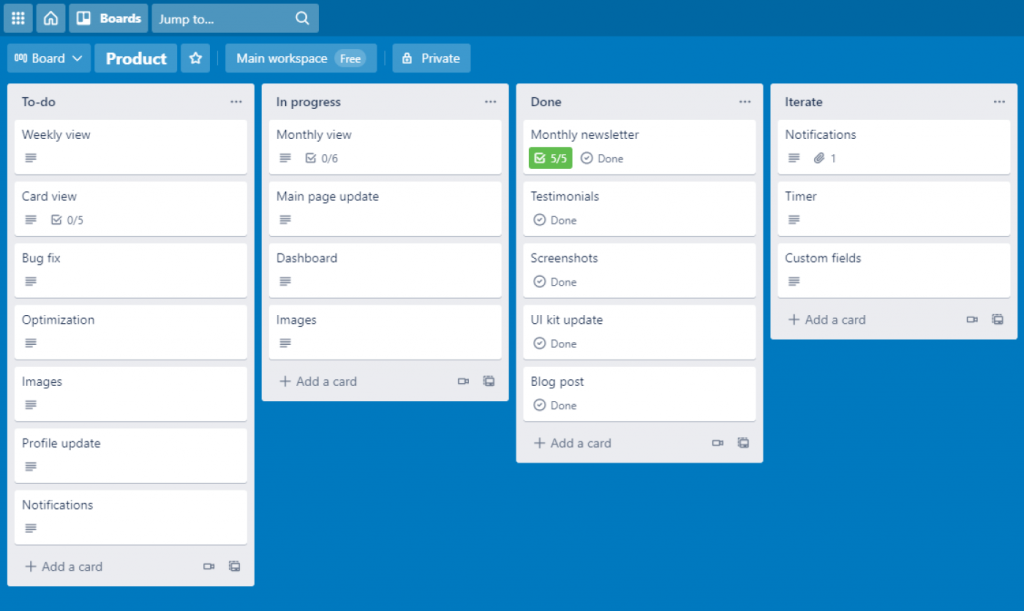
I appreciated that there is no cap on the number of people you can add for free, which matters when a nonprofit wants to loop in every volunteer without paying per seat. Creating cards by email was a small but genuinely handy feature for volunteers who preferred replying to a notification over logging into the app.
The tradeoff is depth. Once a program grew complex enough to need real reporting or resource views, Trello’s simplicity started working against me, and I had to bolt on Power-Ups to get functionality that other tools include out of the box.
Pros:
- Unlimited members even on the free plan, ideal for adding volunteers at no extra cost
- Kanban board format requires almost no training for new users
- Cards support checklists, labels, due dates, and file attachments
- Create or update cards by email, useful for less tech-comfortable volunteers
Cons:
- Free and Standard plans have no built-in reporting or data visualization
- Many advanced features live behind paid third-party Power-Ups, which add cost
Pricing:
Free for up to 10 users; paid plans start at $5/user/month (billed annually).
4. Monday.com – Best for Customizable Visual Dashboards
Monday.com stood out to me for how much a nonprofit can reshape the board layout without any technical help. I built columns for grant status, volunteer hours, and funder name on the same board, and the color-coded view made it easy for a board member to understand project health without any explanation.
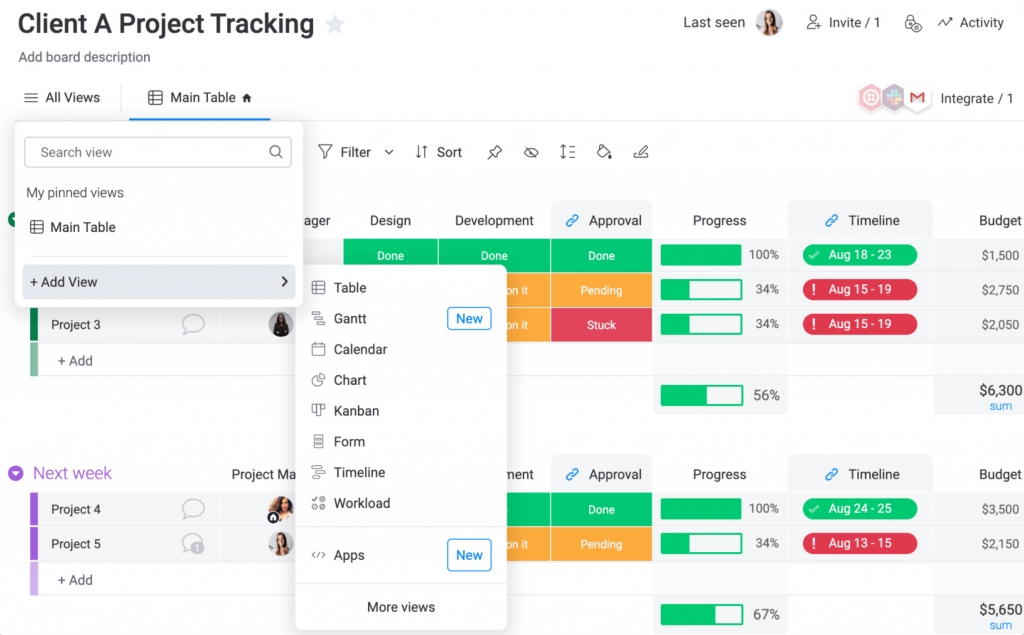
The automation and integration limits on the entry-level plans took some getting used to. On the cheapest paid tier, I could not connect Monday.com to Gmail or set up automated workflows, which meant I had to go a tier higher to get real value out of the automation nonprofits actually need for recurring reminders.
One quirk worth knowing before you buy: every paid plan requires a minimum of 3 seats, so even a two-person team pays for three. It is still one of the most visually intuitive tools I have tested, which is a big reason it consistently scores well with actual users.
Pros:
- Highly customizable boards and columns fit almost any nonprofit workflow
- Timeline, calendar, and Gantt views are included from the Standard tier up
- Guest access supports board members and funders without extra seat cost
- 200-plus templates speed up setup for common nonprofit workflows
Cons:
- Entry-level Basic plan has no automations or integrations
- 3-seat minimum on every paid plan raises the real starting cost for very small teams
Pricing:
Free for up to 2 seats; paid plans start at $9/seat/month (billed annually, 3-seat minimum).
5. ClickUp – Best for a Feature-Packed Free Plan
ClickUp gave me the most functionality for free of any tool on this list. Goals, checklists, custom statuses, and dashboards, features that are often gated behind a paid tier elsewhere, were all available on the free plan when I tested it for a small nonprofit workload.
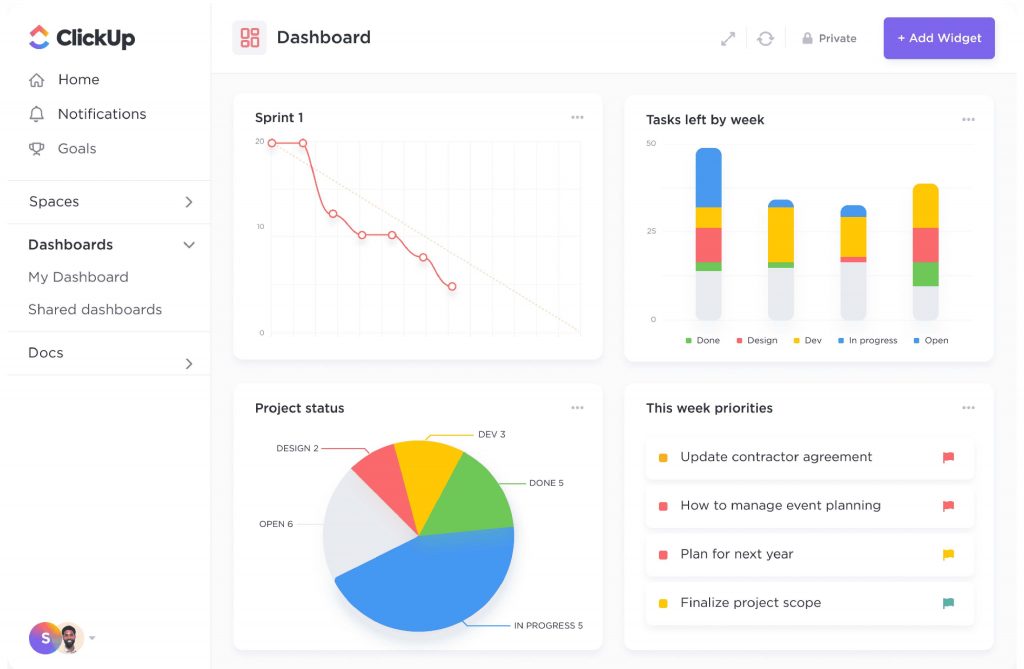
I also liked the multitask toolbar for making bulk changes across several tasks at once, which saved time when reassigning a batch of volunteer shifts after a schedule change. The tradeoff was complexity. ClickUp offers so many views and settings that a first-time user can feel lost before finding the handful of features they actually need.
For a nonprofit with a bit of internal tech comfort, or a volunteer who enjoys tinkering with software, this depth is a strength. For a board member who just wants to check a task list, it can be more tool than they need.
Pros:
- Free plan includes goals, dashboards, and custom statuses that many competitors charge for
- Multiple views, list, board, calendar, and Gantt, cover different working styles on one team
- Native time tracking supports logging volunteer hours or grant-funded work
- Large integration library covers most tools nonprofits already use
Cons:
- Interface has a steeper learning curve than simpler tools like Trello or Basecamp
- AI features are billed as a separate add-on, which adds unplanned cost
Pricing:
Free forever; paid plans start at $7/user/month (billed annually).
If the depth feels like more than your team needs, our list of ClickUp alternatives covers simpler options.
6. Wrike – Best for Cross-Departmental Reporting
Wrike was the tool I reached for when a nonprofit needed to report across several programs to one board or one major funder. The dashboard and reporting depth let me roll up status from multiple projects into a single view, which saved hours compared to compiling that data by hand.
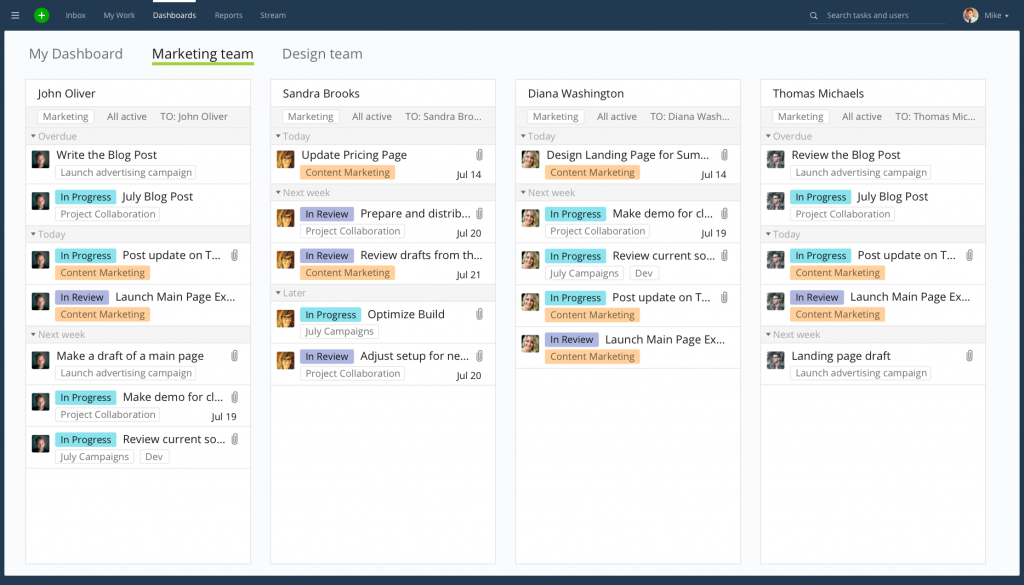
Setup took longer than most tools on this list. Wrike has a real learning curve, and I needed a few sessions before I felt confident building custom workflows and request forms. Once it was running, though, the Gantt chart dependencies and generative AI suggestions for subtasks were genuinely useful for planning more complex, multi-step programs.
If your nonprofit runs one or two straightforward programs, Wrike is likely more tool than you need. If you are coordinating multiple grants across departments, the reporting depth earns its higher price.
Pros:
- Free plan supports unlimited users, useful for adding volunteers at no cost
- Gantt charts with task dependencies support more complex, multi-step programs
- Request forms standardize how new project requests come in from staff or volunteers
- Custom dashboards roll up status across multiple programs into one view
Cons:
- Interface feels denser and less approachable for non-technical volunteers
- Paid plans cost more per user than budget-friendly options like Trello or Freedcamp
Pricing:
Free for unlimited users (limited features); paid plans start at $10/user/month (billed annually).
7. Smartsheet – Best for Spreadsheet-Style Project Tracking
Smartsheet felt instantly familiar the first time I opened it, because it is built around a grid that behaves a lot like Excel or Google Sheets. For a nonprofit with a finance-minded staff member who already lives in spreadsheets, that familiarity cut the onboarding time down significantly.
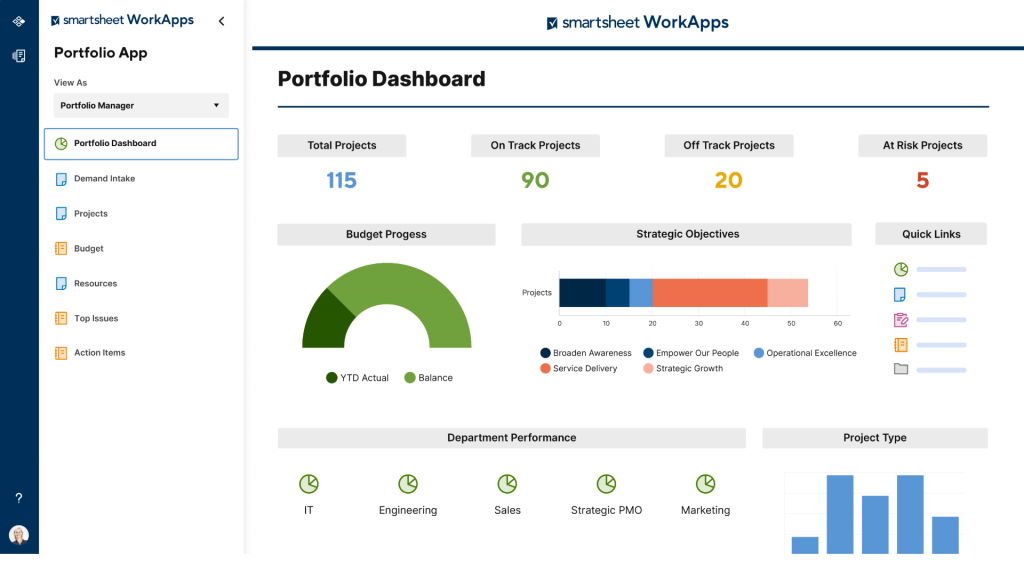
I used the critical path highlighting feature to catch scheduling risks early on a grant-funded program with a hard deadline, which is not something a basic Kanban tool offers. The automated workflows and real-time dashboards also made board and donor reporting easier, since I could share a live view instead of exporting a static file every time.
The one thing to plan for is that Smartsheet does not offer a permanent free plan, only a free trial, so budget for a paid seat from day one if you choose this tool.
Pros:
- Familiar spreadsheet-style grid shortens onboarding for finance-minded staff
- Critical path highlighting flags scheduling risk before a deadline slips
- Real-time dashboards support donor and board reporting without manual exports
- Automated workflows reduce repetitive administrative tasks
Cons:
- Advanced configurations can be difficult to set up without some technical comfort
- Built-in dashboard and reporting tools feel limited next to dedicated BI software
Pricing:
Free trial only; paid plans start at $9/user/month (billed annually).
8. Basecamp – Best for Flat-Rate Team Communication
Basecamp solved a very specific problem for me: keeping communication and task tracking in one place for a distributed team that otherwise lived across email, text, and three other apps. Message boards, to-do lists, and group chat sitting in one workspace meant nothing important got buried in somebody’s inbox.
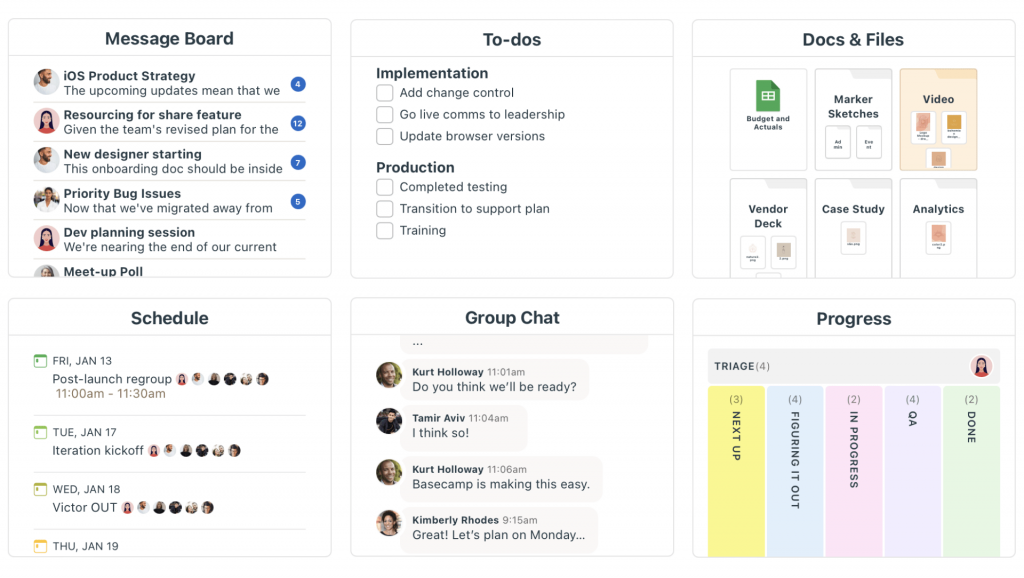
The flat-rate pricing was the real draw for budget-conscious teams. Instead of paying per user, I could add every volunteer and board member at no extra cost once on the Pro Unlimited plan, which made the math work out well for larger volunteer bases. Basecamp does offer a discount for verified nonprofits on this tier as well.
What I gave up for that simplicity was structure. There are no Gantt charts, no task dependencies, and no deep reporting, so Basecamp works best for straightforward coordination rather than complex, multi-milestone programs.
Pros:
- Flat-rate Pro Unlimited pricing adds unlimited users at no additional per-seat cost
- Message boards, to-dos, and file storage live in one simple, uncluttered workspace
- Automatic check-ins prompt team members for progress updates without a meeting
- Straightforward setup that most teams complete in under an hour
Cons:
- No Gantt charts, task dependencies, or advanced reporting tools
- Not built for tracking complex, multi-milestone grant deliverables
Pricing:
Free trial; paid plans start at $15/user/month, or $299/month for unlimited users.
9. Hive – Best for Flexible Views With Built-In Proofing
Hive is the tool I most associate with actual nonprofit case studies, since organizations like Camp Kesem and Fight Colorectal Cancer run fully remote teams on it. I found the flexible project views, Gantt, Kanban, and summary, useful for switching perspectives depending on whether I was planning a campaign or checking daily progress.
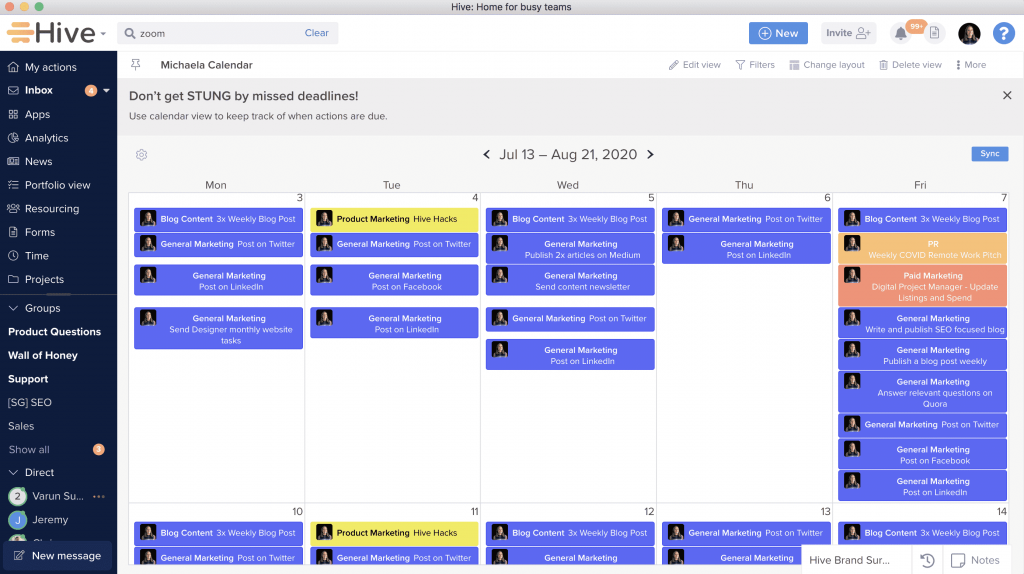
The built-in approvals and proofing tools stood out for nonprofit marketing work. When a fundraising flyer or social post needed sign-off from two people before it went out, I could route it through Hive instead of a messy email chain with attachments going back and forth.
Portfolio and dashboard views also gave leadership the macro-level visibility they wanted across multiple initiatives at once, without needing to ask each program lead for a status update individually.
Pros:
- Multiple project views (Gantt, Kanban, summary, calendar) suit different working styles
- Built-in approvals and proofing streamline sign-off on fundraising and marketing materials
- Portfolio and dashboard views give leadership visibility across several programs at once
- Resource planning helps balance staff capacity across grant-funded and general programs
Cons:
- Wide feature set can feel like a lot to explore for a first-time user
- Fewer templates available compared to more established competitors
Pricing:
Free for basic use; paid plans start at $4/user/month.
10. Freedcamp – Best for a Free Plan for Very Small Nonprofits
Freedcamp was the tool I recommended most often to nonprofits with fewer than 30 employees, because its nonprofit and student program grants free access to premium features that most tools charge for. Even the basic free plan lets me organize tasks by priority, set up recurring assignments, and build out a Gantt-style schedule.
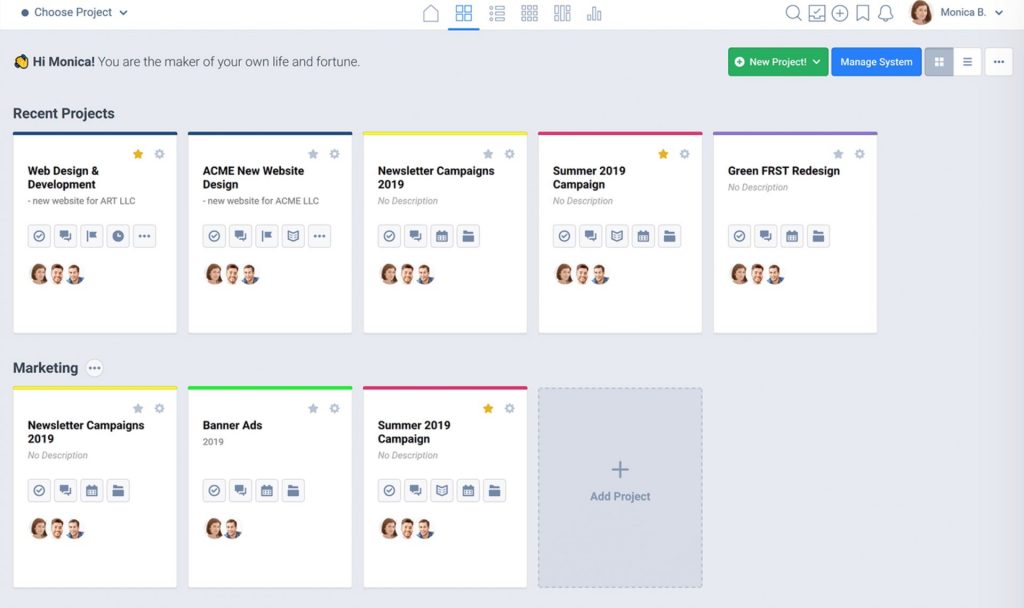
I liked that file sharing, discussion boards, and an in-app calendar were all included without hunting for a paid add-on. For a volunteer coordinator managing a handful of small campaigns, that was enough functionality without any real learning curve.
The interface is not as polished as some of the bigger names on this list, and larger, more complex programs may eventually outgrow it, but for a small nonprofit with a tight budget, it is hard to beat what Freedcamp includes for free.
Pros:
- Unlimited projects, tasks, and storage included even on the free plan
- Dedicated nonprofit program grants free premium access for orgs under 30 employees
- Discussion boards and comments keep task-level communication in one place
- Built-in calendar and Gantt-style scheduling need no separate tool
Cons:
- Free plan has a 10MB file size limit, which can be restrictive for larger documents
- Reporting and dashboard depth are limited compared to Smartsheet or Wrike
Pricing:
Free plan available; paid plans start at $1.49/user/month (billed annually).
Evaluation Criteria
I evaluated every tool on this list using the same six factors, so the comparisons above are consistent and not just a list of marketing claims.
- User Reviews and Ratings: I weighed G2 ratings and real user feedback for each tool, since a vendor’s own marketing page rarely tells you where a tool actually falls short.
- Essential Features and Functionality: I looked at whether each tool covers the core nonprofit needs, task tracking, grant or program grouping, volunteer collaboration, and reporting, not just a long feature list.
- Ease of Use: Since most nonprofits do not have an IT team, I paid close attention to how quickly a non-technical staff member or volunteer could get comfortable with each tool.
- Customer Support: I factored in how each vendor supports users during setup and when something goes wrong, since a small nonprofit team cannot afford to lose a day to a support ticket.
- Value for Money: I compared what each tool includes at its price point, since a nonprofit budget cannot absorb a tool that looks cheap and then charges extra for basic reporting or automation.
- Personal Experience and Industry Feedback: Beyond my own hands-on use, I pulled in what actual nonprofit teams and G2 reviewers said about day-to-day use, not just what a sales page promises.
My Top 3 Picks for the Best Project Management Software for Nonprofits
If you only read one section of this guide, read this one. Here are the three tools I would actually put in front of a nonprofit team today, based on budget, ease of use, and how quickly a volunteer could get up to speed.
1. ProProfs Project
This is my top recommendation for most nonprofits, and it is the tool I use myself day to day. It keeps project tracking simple enough for lean, non-technical nonprofit teams, without asking you to pay for features you will never touch. Between the free plan for very small teams and predictable flat pricing as you grow, it is the safest starting point for an organization that cannot afford a pricing surprise six months in.
2. Trello
For a nonprofit that mostly needs to coordinate volunteer tasks and campaigns without any real complexity, Trello’s card-based boards are about as close to zero learning curve as this category gets, and the unlimited free users make it easy to loop in every volunteer at no cost.
3. Freedcamp
If your organization has fewer than 30 employees and every dollar counts, Freedcamp’s dedicated nonprofit program is worth applying for. It unlocks premium scheduling and file-sharing features for free, which is hard to match anywhere else on this list.
What Should You Look for in Project Management Software for Nonprofits?
Here are the specific, standalone features worth checking for before you commit to a tool. For a longer breakdown of these and other must-haves, see our guide to must-have project management software features.
- Free Tier Or Verified Nonprofit Discount: Lowers the barrier for a small team to start without a budget approval process.
- Role-Based Permissions: Lets you give volunteers or board members limited, view-only access without a paid seat.
- Simple Views (Grid, List, Gantt Chart, Kanban, Calendar): Covers how most nonprofit staff already think about work, without a training session.
- Automated Reminders And Notifications: Replaces manual follow-up emails for approaching deadlines.
- Grant Or Funder Grouping: Lets you tag or filter deliverables by which grant or funder they belong to.
- File Attachments At The Task Level: Supports attaching sign-off documents, receipts, or compliance paperwork directly to the relevant task.
- Shareable Dashboards Or Reports: Gives boards and funders a self-serve view of progress instead of a status meeting.
- Basic Integrations (Email, Calendar, Cloud Storage): Connects to tools nonprofits already use, like Outlook, Gmail, or Google Drive.
If you are weighing this decision against tools outside the nonprofit space too, our broader guide on choosing project management software walks through the same process step by step.
Spend Less Time Chasing Updates and More Time on Your Mission
Picking the right tool from this list comes down to one thing: how much time it gives back to your team. The moment your staff and volunteers stop chasing each other over email for a status update, that time goes straight back into the programs, campaigns, and people your nonprofit actually exists to serve.
None of these tools will fix a messy process on their own, but the right one makes a good process easy to stick to. Start with your budget and your team’s comfort with tech, not the longest feature list, and you will end up with a tool people actually open every day instead of one that quietly gets abandoned after a month.
If you are still not sure where to start, a free plan is the lowest-risk way to test the waters with your actual programs before you commit to anything paid. ProProfs Project‘s free plan works well for this, since it lets a small team try out task tracking, Gantt charts, and reporting together before deciding if it is the right long-term fit.
Frequently Asked Questions
What Is the Best Project Management Software for Nonprofits?
ProProfs Project is our top pick for most nonprofits because it combines simple, non-technical setup with affordable, predictable pricing. Trello and Freedcamp are strong runners-up for very small, budget-first teams.
Is There Free Project Management Software for Nonprofits?
Yes. ProProfs Project, Trello, ClickUp, Wrike, Hive, and Freedcamp all offer a free plan, though most cap the number of users or active projects. Freedcamp also runs a dedicated nonprofit program with free premium access for organizations under 30 employees. See our full list of free project management software if budget is your main constraint.
What Should a Nonprofit Look for in Project Management Software?
Look for simple views, role-based permissions for volunteers and board members, automated reminders, and the ability to group tasks by grant or funder. Avoid tools built for enterprise IT teams unless you are managing many concurrent grant-funded programs.
Can Project Management Software Help With Grant Tracking?
Yes. Most tools on this list let you tag tasks by grant or funder, attach compliance documents at the task level, and set deadline reminders for reporting requirements, which reduces the risk of missing a funder deadline.
Do Project Management Tools Offer Nonprofit Discounts?
Some do. Freedcamp and Basecamp both offer dedicated nonprofit pricing programs, and several other vendors offer discounts through platforms like TechSoup. Always check directly with the vendor, since programs and eligibility change.
Is Project Management Software Hard for Volunteers to Learn?
It depends on the tool. Simple, visual tools like ProProfs Project, Trello, and Basecamp need very little training. Feature-heavy tools like Wrike, ClickUp, or Smartsheet offer more depth but take longer for a first-time user to feel comfortable.
What Is the Difference Between Project Management Software and a CRM?
Project management software tracks tasks, deadlines, and program progress. A CRM tracks donor and contact relationships, communication history, and giving records. Nonprofits often use both together rather than expecting one tool to do the job of the other.
How Much Does Project Management Software for Nonprofits Cost?
Pricing on this list ranges from $1.49/user/month to $15/user/month, with several tools offering a free plan for very small teams. Most nonprofit-friendly tools fall between $5 and $10 per user per month once you move past the free tier.
FREE. All Features. FOREVER!
Try our Forever FREE account with all premium features!