Project managers need an amazing channel to keep track of all the tasks and monitor the progress of every team. Now, imagine that you receive a report addressing the issues in your team related to productivity and meeting deadlines along with the solution to these problems!
The Kanban tool is exactly what you just imagined. An all-in-one solution for project managers to march towards the success of their projects and teams.
With sticky notes and whiteboards getting outdated, some of the best Kanban tools have taken over team planning and management for faster and efficient overall project completion.
However, you will probably find a ton of Kanban tools online out there, which makes it difficult for you to choose the best solution. We have taken care of it by scouring the web and narrowing the list down to 15 tools, from which you can decide the best Kanban app for your project.
But before we jump to the list, let us first understand what Kanban is and how it is beneficial for your company and team.
What is Kanban?
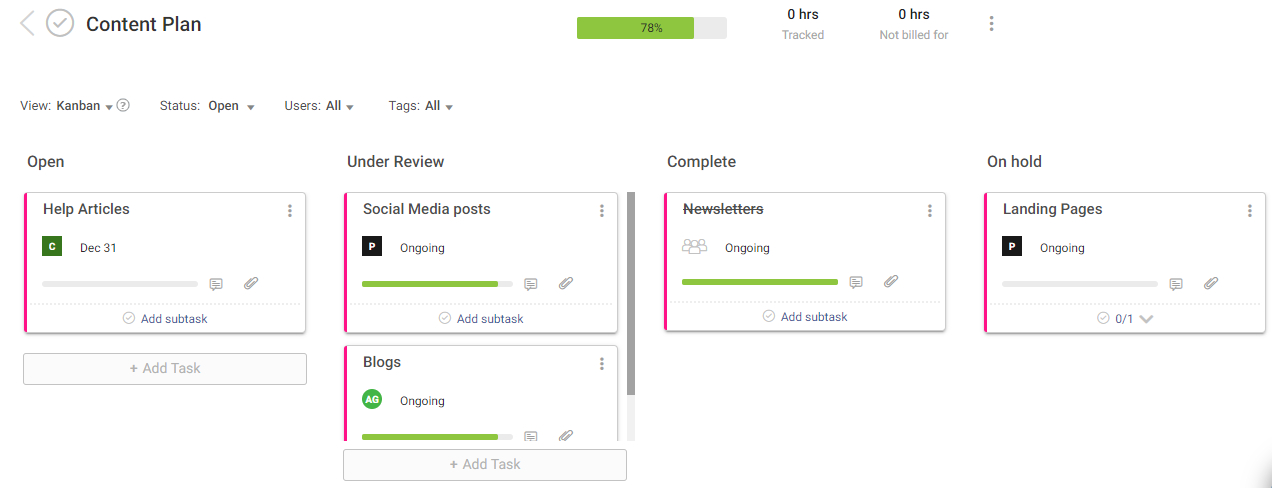
With sticky notes and whiteboards getting outdated, Kanban is something that allows you to easily manage your work, especially as it goes through a process. It visualizes both the process, your workflow, and actual work passing through the defined process. The ultimate goal of the Kanban process is to identify the bottlenecks in your project and fix them to save cost and time.
Fact Time: Often spelled as “Kamban,” the Japanese word Kanban translates to “Billboard,” which simply means ‘available capacity to work’. It is a concept related to Just-in-Time production (JIT), which tells you what to do, when to do, and how much to do.
The Kanban process was initially developed for Toyota automotive in Japan. It emerged with the physical cards moving down the Toyota production line. When the car moved during production, the corresponding card would move from one worker to another. This marked the beginning of each new task and helped managers to check productivity and optimize the process by re-assigning workers to meet the work requirements efficiently.
“The two pillars of the Toyota production system are just-in-time and automation with a human touch, or autonomation.” – David J. Anderson.
In a similar way, Kanban tools help the project managers and teams to fix bottlenecks by assigning high-priority tasks at the right time by utilizing the available resources. It is very helpful for team members as well to track tasks, and proceed towards project completion.
Core Kanban Method Practices
Many companies try Kanban board apps to see if there is an increase in productivity and quality, and a decrease in waste. For a successful implementation, there are six core Kanban method practices that need to be present.
1. Visualize the Workflow
To efficiently work with the Kanban process, you first need to visualize it. With an up-to-date Kanban board, you need to understand how to convert a request to a deliverable product. Then only will you be able to make the necessary changes in your workflow?
2. Limit Work in Progress
One of the most important functions of Kanban is to make sure that only a doable number of active tasks are in progress at a given time. Setting a limit on work-in-progress tasks ensures that all the team members work on finishing the current stage by quickly illuminating the problem areas and resolving them.
3. Manage Flow
When we say manage flow, it is not about managing the team members but about managing the tasks. The distribution and movement of work throughout the production process should be smooth and healthy. So, it is essential to monitor and track the performance metrics to find the average completion rate and then enhance your workflow.
4. Make Process Policies Explicit
Team managers can’t improve or manage something they don’t understand. That’s why it is important to first define the process clearly and should be shared with the team. Once everyone is familiar with the goals, they would be able to work and make decisions effectively.
5. Implement Feedback Loops
For teams looking to be more agile, a feedback loop is a crucial part in the longer run. This ensures that everyone related to the project is well aware and informed about what is going on in the team, and it enables knowledge sharing. Managers should conduct these feedback loops regularly to review the progress and tasks.
6. Improve Collaboratively
As soon as the teams are up and running on the Kanban tool, it is time to turn this into a collaboration tool for maximum throughput. Everyone should contribute to identifying various issues that need fixing and work together towards improvement.
Choose best kanban tools as part of the best agile project management tools landscape. Overview: Best Agile Project Management Tools.
Benefits of Using the Kanban System
Now that we know what Kanban is, let us check out how it benefits your company and projects. The benefits are different for project managers, team members, and the organization. Below are the top benefits of using the Kanban system.
1. Flexibility and Responsiveness
As the system is based on a just-in-time approach, this makes it flexible for Kanban to adapt to market changes. It is a responsive model in which extra work is added only after the currently assigned work is finished. So, project managers can deliver the products according to changing demands without disrupting the flow.
2. Visibility and Transparency
The visual representation of all the information is one of the most beneficial parts of Kanban. Goals, tasks, deadlines, progress, and risks, everything is in front of all the team members, which opens the door for seamless communication and collaboration to increase productivity.
3. Increased Output
Kanban limits the work in progress, which encourages the team as a whole to complete the work together. This avoids multitasking, leading to enhanced collaboration to get more work done faster. The output will increase, and team communication will be better.
4. Versatility
The tool is applicable universally and can be implemented in different teams in your company, from marketing to tech to HR and admin. The versatility makes it easier for team members to move across the functions in any project. For example, it gets simple to move a content marketing project from writing to design and graphics, or a website development project from construction to testing.
5. Constant Improvement and Delivery
Inputs from team members for improvements are necessary for maintaining quality, and this results in constant timely delivery. Kanban helps in increasing productivity and team focus, leading to improved deliverables. So, teams can find ways to improve their work and deliver beyond expectations.
Complement best kanban tools with best scrum tools for different needs. Recommendations: Best Scrum Tools.
Let’s now move on to the list of the top 15 Kanban software tools.
A Quick Look at Top Kanban Tools & Their Key Features
| Software | Key Features | Price | User Rating (G2) |
| ProProfs Project | Simplest Project Management Tool for SMBs With Client Invoicing, Time & Billing | Forever free for small teams. Paid plan starts at $39.97/month | 4.4/5 |
| Trello | Checklists with progress meter, real-time sync, tags/labels, data filtering, email notifications | Free: $0; Business: $12.50/user/month | 4.4/5 |
| ClickUp | Customizable statuses, real-time collaboration, filters/tags/grouping, built-in Docs | Free: $0; Unlimited: $5/user/month; Business: $12/user/month | 4.7/5 |
| Monday | Task/resource management, timesheet tracking, customizable boards, workflow automation, Gantt charts | Basic: $10/user/month; Standard: $12/user/month; Pro: $20/user/month | 4.7/5 |
| Hive | Time tracking, task/resource management, customizable dashboard, project scheduling, multiple views | Solo: $0; Teams: $16/user/month; Enterprise: On request | 4.6/5 |
| Hygger | Digital Kanban boards, time tracking, swimlanes/labels, real-time alerts | Free: $0; Standard: $9/user/month; Enterprise: $18/user/month | 4.6/5 |
| Bitrix24 | Project planning, time tracking, multi-board views, milestone/dependency management, social integrations | Free: $0; Start+: $24/month (2 users); up to Professional: $199/month (unlimited) | 4.1/5 |
| MeisterTask | Task management, time tracking, collaboration tools, automation checklists, reporting | Basic: $0; Pro: $4.19/user/month; Business: $10.39/user/month | 4.6/5 |
| Taskworld | Task/time tracking, milestone/dependency tracking, tags/labels, custom reminders | Professional: $13/user/month; Business: $30/user/month | 4.4/5 |
| Kanbanize | Task visualization, cross-functional workflows, card links for dependencies, integrations | Annual: $149/15 users/month | 4.5/5 |
| Productboard | Roadmap sync, dependency tracking, KPI monitoring, feature prioritization | Essentials: $25/user/month; Pro: $60/user/month; Scale: $120/user/month | 4.3/5 |
| Kanban One | Task/time tracking, collaboration tools, service classification, analytics | Free: $0; Pay As You Go: $2.50/user/month | 4.4/5 |
| Kanban Tool | Visual process management, real-time collaboration, Kanban analytics, cumulative flow diagram | Free: $0; Team: $5/user/month; Enterprise: $9/user/month | 4.3/5 |
| Drag | Gmail-native Kanban, card merging, reporting, dedicated support | Free: $0; Plus: $10/user/month; Pro: $15/user/month | 4.4/5 |
| Asana | Board views, priorities/deadlines, 100+ integrations, seamless collaboration | Basic: $0; Premium: $13.49/user/month; Business: $30.49/user/month | 4.4/5 |
| LeanKit | Parallel task/status views, Kanban templates, reporting/analytics, email notifications | Single Plan: $20/user/month | 4.2/5 |
| KanbanFlow | Customizable card boards, smart time tracking, recurring tasks, real-time collaboration | Free: $0; Premium: $5/user/month | 4.3/5 |
| Zoho Projects | Customizable dashboards, nested Kanban items, Zoho Analytics integration, Gantt charts | Free: $0; Premium: $5/user/month; Enterprise: $10/user/month | 4.3/5 |
| Jira | Workflow templates, real-time updates, customizable workflows, 3000+ app integrations | Free: $0; Standard: $7/user/month; Premium: $14/user/month | 4.3/5 |
| SwiftKanban | AI-powered similarity recommendations, backlog management, dependency tracking, Monte Carlo forecasting | Free plan available. Enterprise: $15/user/month | Not listed on G2 |
18 Best Kanban Tools List
1. ProProfs Project
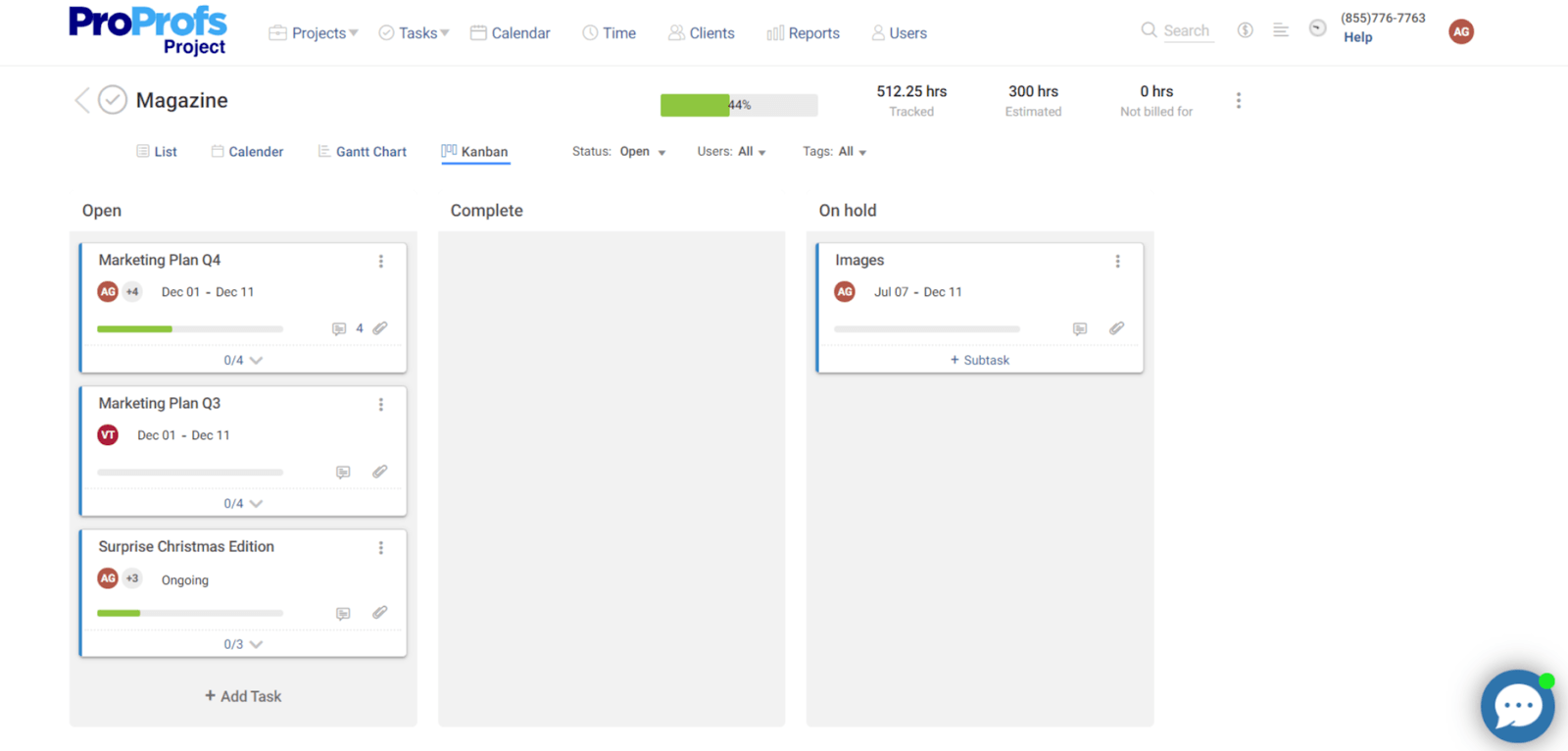
ProProfs Project is an easy-to-use online project management tool that helps project managers organize multiple projects on a single platform. The tool comes with the best Kanban board that gives a bird’s-eye view of all your project tasks. According to the unique workflow that managers follow, they can utilize multiple options based on different work environments.
The software aims to offer a delightful experience to users. From project planning to time tracking, prioritization of tasks to insightful reports and analytics, ProProfs Project is simply the perfect companion for all companies.
More recently, AI has become part of that experience too. Describe a project in plain language, and its AI Project Designer builds out the tasks, stages, and assignments for you automatically, saving the manual setup that eats into a project manager’s day. An AI assistant also stays active throughout the project, so you can ask direct questions like “which projects are overrunning” instead of digging through the Kanban board yourself.
Kanban Features
- Increased task visibility for better efficiency.
- Support for multiple teams and workflow methodologies.
- AI-powered project setup that builds your board structure from a simple description
- Responsive drag and drop features for ease of use.
- Sync across all users to keep everyone on the same page.
- Move and adjust the columns freely in the workflow.
- Data filtering via multiple overlays.
- Upload attachments of multiple extensions.
Pricing:
Starts at $39.97/month.
2. Trello
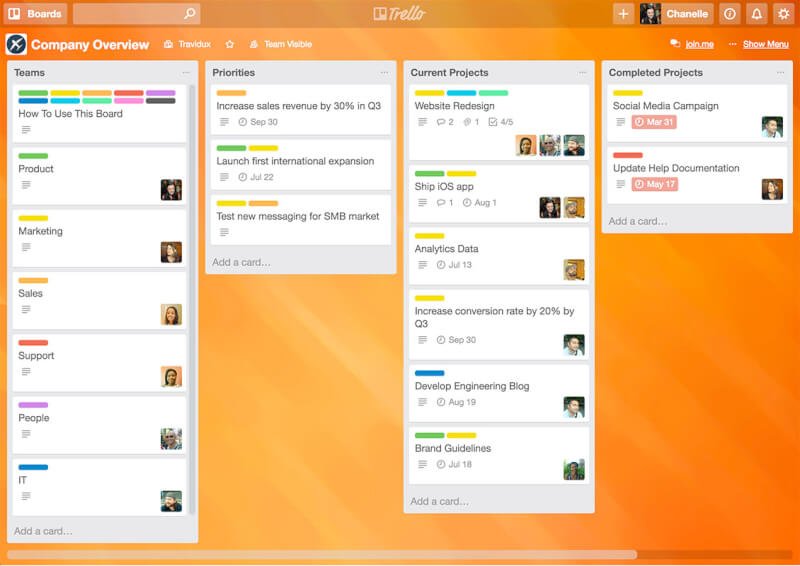
Trello is an amazing collaboration tool and is a popular pick for users looking to implement the Kanban process. With an easy to use interface, everything in Trello starts with Kanban cards and lists. The to-do list format simplifies the task management for project managers. As the changes made by the team members get updated in real time, it eases the communication between the team.
Kanban Features
- Create checklists with a progress meter.
- Real-time synchronization from all users.
- Email notifications.
- Seamless organization with the help of tags, labels, and categories.
- Reminders for deadlines.
- Data filtering for refined results/reports.
- Option to upload attachments.
Pricing:
- Free – $0/user
- Business – $5/user/month
- Enterprise – Starting from $17.50/user/month (more the users, less the price)
3. ClickUp
ClickUp is an all-encompassing project management platform with a particularly versatile Kanban process. Instead of forcing you to fit your work to a predetermined Kanban framework, ClickUp allows you to build a Kanban process that visualizes your work in a way that makes sense to your team and makes it easy for stakeholders at any level to access the information they need. By doing this, ClickUp helps you harness the full power of the Kanban process without sacrificing any of your team’s efficiency.
Kanban Features
- Customizable Statuses to fit your workflow
- Real-time collaboration
- Granular notification settings
- Filters, tags, and grouping to keep you organized
- Built-in Docs to keep track of processes and lessons learned
- Attachments and integrations for third-party resources
- Able to visualize work across multiple boards at once
Pricing
- Free Forever – $0
- Unlimited – $7/user/month
- Business – $12/user/month
- Business Plus – $19/user/month
- Enterprise – Available on request
4. Monday
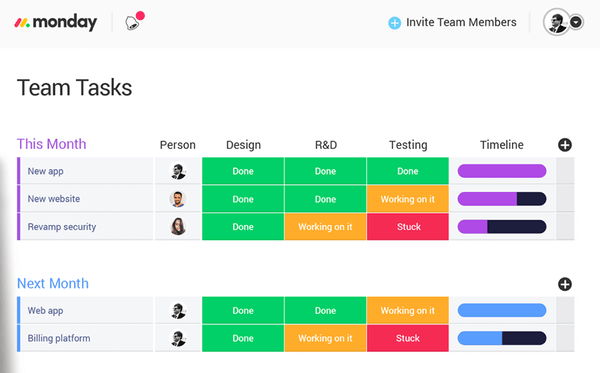
Monday is more than a typical project management software, which is popular for a simple interface that clarifies the sequence of work. A great project planning tool with Kanban boards, tracking options, workflow automation options, and collaboration options, it is a smart choice for teams looking to execute projects in a collaborative visual environment.
Kanban Features
- Easy task and resource management.
- Options to upload attachments, add comments, and mention teammates.
- Customizable task boards to adjust your methodology.
- Gantt charts are available.
- Timesheet tracking to assign the tasks and view progress.
- Workflow automation options to automate certain processes.
Pricing
- Basic – $27/month/3 seats
- Standard – $12/user/month
- Pro – $20/user/month
- Enterprise – Custom quotes on request.
5. Hive
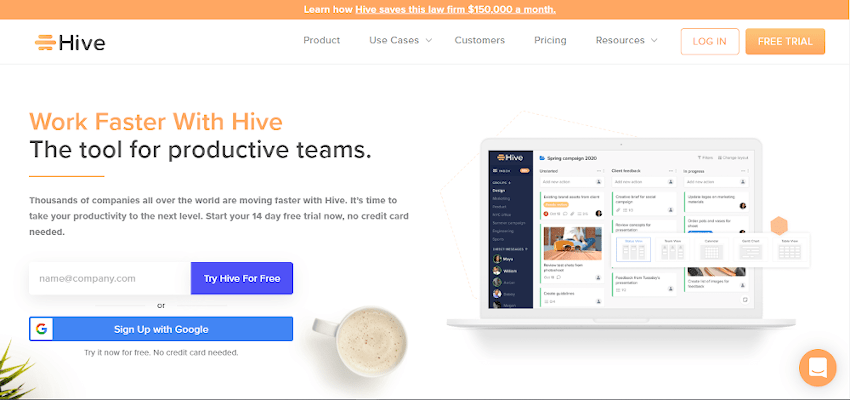
Hive is more than just your classic kanban tool — it’s the future of work productivity. Hive brings all of your workplace tools to one single dashboard, so you can manage projects, chat with coworkers, send emails, and even take meeting notes without ever leaving the window. Hive’s Kanban project boards are a great tool for agile teams, as they help visualize task progress and keep everyone informed in real-time. And if some people on your team prefer to view projects in a layout other than Kanban, Hive has 6 other flexible project views to let each person choose how they work best.
Kanban Features
- Task and resource management
- Real-time reporting on task progress
- Time tracking capabilities to assign estimates to individual tasks
- 1000+ third-party app integrations
- Drag and drop interface
- Note-taking tool to support sprint planning meetings
Pricing
- Free 2-week trial
- Pricing plans start at $5/user/month
- Additional app add ons starting at $3 per user
- Enterprise pricing plans are available by request
6. Hygger
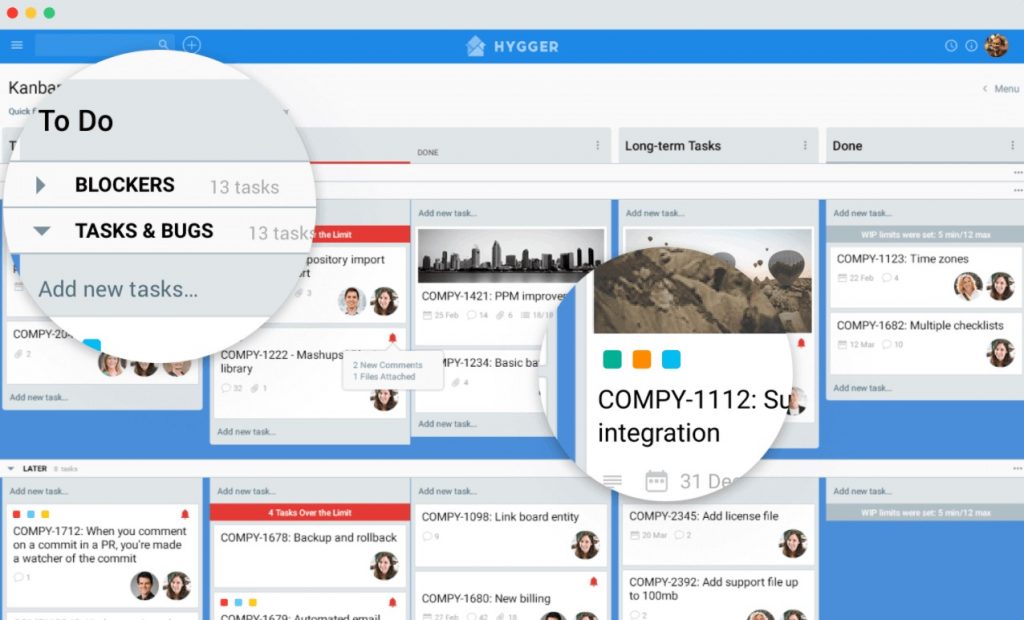
Hygger is a multifunctional project management tool that helps teams from various industries focus on what their customers need, prioritize what to build next, and develop it using convenient online Kanban boards. Hygger helps to build software using Kanban and Scrum, manage backlogs and prioritize ideas, features, and projects, create and share product roadmaps, and centralize all communication to improve cross-functional teams’ collaboration.
Kanban Features
- Friendly Kanban boards with WIP limits and Swimlanes.
- Managing numerous projects on the board and tracking everything in one place.
- Handy roadmaps for advanced planning and scheduling.
- Powerful prioritization matrices to prioritize backlogs.
- Convenient time tracking.
- Helpful templates of different features and tools.
Pricing:
- Free trial
- Standard – from $7 per user/monthly
- Enterprise – from $14 per user/monthly
7. Bitrix24
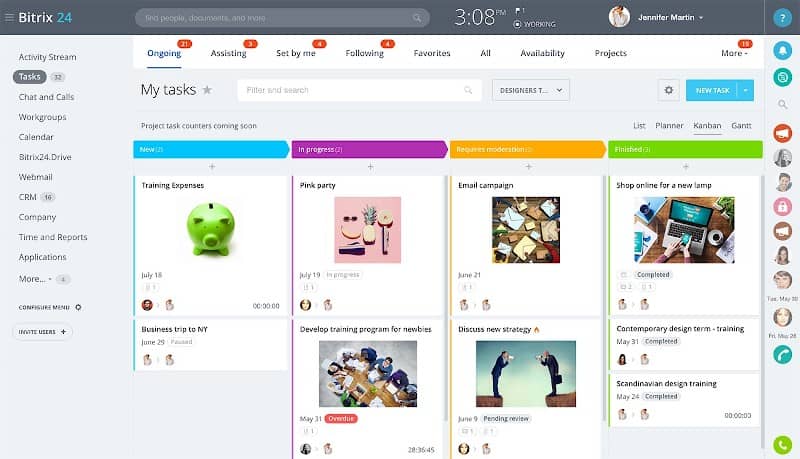
Bitrix24 is a project planning and management tool that is a combination of a CRM, conferencing tools, and task management. The interface offers a collaborative space for members to discuss tasks, share ideas, and view workflow for efficient project management. With virtual Kanban boards, Gantt charts, and a project calendar, users can customize the project workflow to visualize the progress.
Kanban Features
- Project planning and road-mapping.
- Time tracking and task management.
- Multi-board views for different project tasks.
- Milestone and dependency management.
- Document management and collaboration.
- Integration with social networks.
Pricing
- Free – $0
- Start+ – $49/month/5 users
- CRM+ – $69/month
- Project+ – $69/month
- Standard – $99/month
- Professional – $199/month
8. MeisterTask
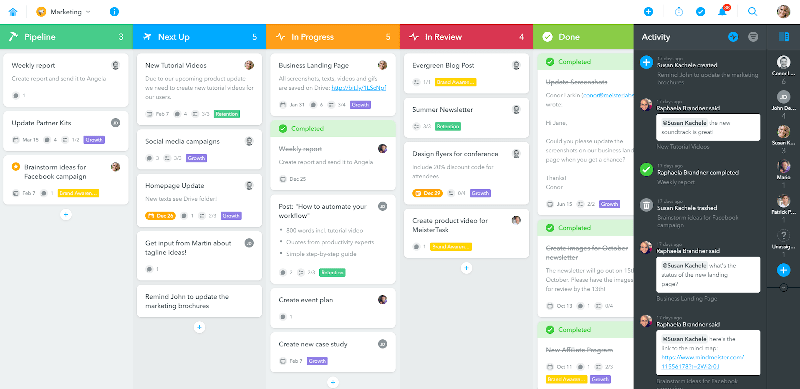
MeisterTask is an intuitive Kanban tool with a beautiful interface for the simple organization of tasks. Its Kanban board fits any workflow and can be customized as per the process and requirements. Teams can work together and easily communicate on a single platform. The best thing about MeisterTask is that while visualizing processes, it also automates them in different ways like creating recurring tasks, assigning tasks, notifying stakeholders, etc.
Kanban Features
- Task management and time tracking tool.
- Tools for efficient collaboration.
- Supports Scrum, which is useful for agile teams.
- Integrated with popular tools like GitHub, Slack, Harvest, etc.
- Add predefined checklists using automation.
- Insights based on various statistics and reports.
Pricing
- Basic – $0
- Pro – $4.19/user/month
- Business – $10.39/user/month
- Enterprise – Custom quotes on request.
9. Taskworld
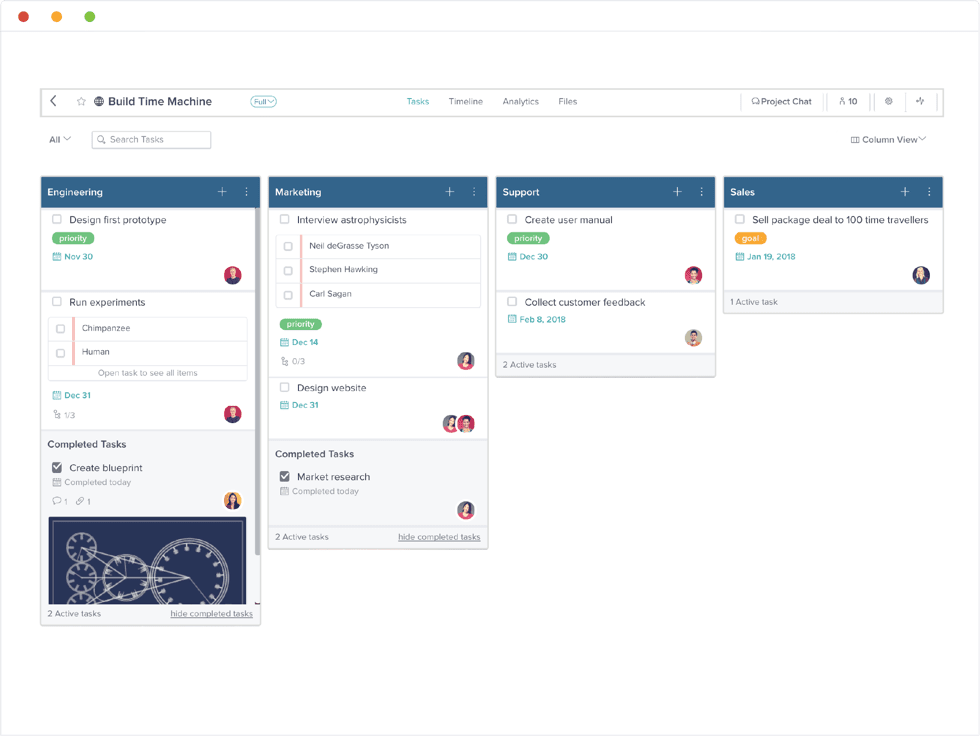
Taskworld is an efficient Kanban tool designed for real-world scenarios. A simple to manage Kanban board that converts your cards to a line of text, so that project managers and team members can visualize many tasks at once. Deadlines, time tracked, pending tasks, and other information that users add will be visible in the card’s checklist. However, there need to be some improvements in the iOS versions of this tool.
Kanban Features
- Track tasks, time, share ideas and measure performance.
- Supports Scrum for agile project management.
- Milestone and dependency tracking.
- Tags and labels to organize the boards.
- Customizable reminders and due dates.
- Drag and drop upload feature for attachments.
Pricing
- Professional – $13/user/month
- Business – $30/user/month
- Enterprise – Custom quotes on request.
10. Kanbanize
FREE. All Features. FOREVER!
Try our Forever FREE account with all premium features!