If you’re currently tracking your projects in a spreadsheet, or worse, in your head, you already need project management. You just haven’t named it yet.
So what is project management, exactly? It’s the system that turns scattered tasks, missed deadlines, and constant follow-ups into a structured, repeatable process, one where everyone knows what to do, who owns it, and when it’s due.
Most teams that struggle with these problems are not dealing with a people problem. They’re dealing with a process problem. And project management is what fixes it.
ProProfs Project is built for exactly this: teams who are done with spreadsheets and want a simple, visual way to manage their work from start to finish. But before we get to that, let’s break down how project management works and how to apply it in your organization.
Why Does Project Management Matter?
Here’s a number that should get your attention: according to a study by PMI in 2025, only 31% of projects succeed globally, delivered on time, on budget, and within scope.
That means nearly 7 out of 10 projects either fail outright or deliver less than promised.
The good news? A study by TeamStage in 2024 shows that implementing a formal project management process reduces project failure rates to 20% or below, a dramatic improvement over ad-hoc approaches.
Here’s what poor project management actually looks like in the real world:
- Work gets tracked in multiple spreadsheets that nobody keeps updated
- Team members don’t know what to prioritize because there’s no clear plan
- Deadlines slip because nobody has visibility into what’s blocking who
- The same work gets done twice because there’s no centralized communication
- Stakeholders ask for updates that take hours to compile manually
Sound familiar? That’s exactly what project management is designed to prevent.
What Problems Does Project Management Solve?
Before diving into frameworks and phases, it’s worth being direct about the specific problems project management addresses:
- No Visibility: You can’t tell what’s happening across projects at a glance
- Missed Deadlines: Work gets dropped because there’s no system tracking it
- Scope Creep: Projects grow beyond what was agreed without anyone catching it
- Resource Overload: People are either buried in work or underutilized, and nobody knows
- Communication Gaps: Teams operate in silos and stakeholders are always out of the loop
- Accountability Gaps: Tasks get assigned verbally and never tracked to completion
Each of these problems has a direct solution inside a well-run project management process, and the right software makes that process automatic.
What Are the Key Components of Project Management?
Project management isn’t just about making a to-do list. It’s a coordinated system with several distinct disciplines running simultaneously. Each component addresses a specific dimension of project risk — ignore one, and it will usually be the reason a project struggles.
1. Scope Management
Scope management means defining exactly what the project will and won’t include before a single task is assigned. It’s the foundation everything else is built on. Without a clear scope, teams end up doing work that wasn’t asked for, missing work that was, and constantly renegotiating expectations mid-project.
A well-documented scope also gives the project manager something concrete to point to when a stakeholder tries to add requirements three weeks into execution, commonly called scope creep.
2. Time Management
Project time management is the practice of planning schedules, setting milestones, and tracking deadlines so that work progresses at the right pace throughout the project lifecycle. It involves breaking the project into phases, estimating how long each task will take, identifying which tasks depend on others, and building a realistic timeline that accounts for risk and resource availability.
Poor time management is often invisible until it’s too late, tasks appear on track until a string of small delays compounds into a missed delivery date.
3. Cost Management
Cost management in project management covers estimating, allocating, and controlling project expenses so the work is completed within the approved budget. This includes tracking actuals against estimates in real time, flagging budget variances early, and making tradeoff decisions when costs start to climb.
Teams that skip formal cost management often discover they’ve overspent only at the point when it’s too late to course-correct.
4. Resource Management
Project resource management is about making sure the right people are assigned to the right tasks at the right time, and that nobody on the team is either overloaded or sitting idle. This includes capacity planning before a project starts, managing workload redistribution when priorities shift, and tracking utilization across multiple concurrent projects.
Resource constraints are one of the most common reasons projects miss deadlines, and the ones that don’t have a resource management process are usually the ones firefighting the most.
5. Risk Management
Every project carries uncertainty. Risk management is the discipline of identifying what could go wrong, assessing how likely and impactful those risks are, and building mitigation plans before problems materialize.
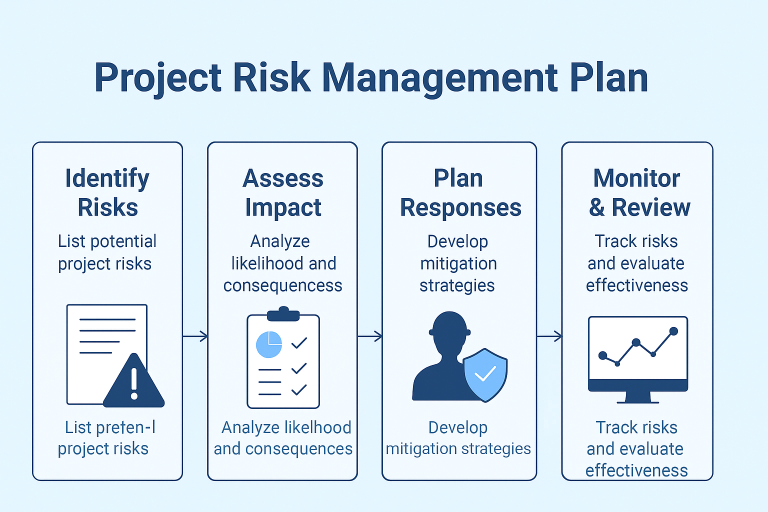
A risk management plan is not a document that gets written once and filed, it’s a living reference that should be reviewed at every major project milestone.
6. Communications Management
A project management communication plan decides who needs to know what, in what format, and how often. It covers internal team updates, client-facing status reports, escalation paths for blockers, and how decisions get documented and shared.
Poor communication is consistently cited as one of the top causes of project failure, not because teams don’t talk, but because they don’t have a defined structure for what gets shared with whom.
7. Quality Management
Project quality management ensures that the work being produced actually meets the standard agreed upon at the start of the project. This includes defining what “done” looks like for each deliverable, building review and approval steps into the workflow, and tracking defects or rework.
Quality management is easy to skip when teams are under pressure, but the cost of rework is almost always higher than the cost of building it right the first time.
8. Stakeholder Management
Stakeholder management means identifying everyone who has a stake in the project’s outcome — clients, leadership, end users, vendors, internal teams, and actively managing their expectations and involvement throughout the project.
Misaligned stakeholder expectations are a leading cause of projects that technically get delivered but are still considered failures.
What Are the 5 Phases of Project Management?
Every project, regardless of industry or size, moves through five phases. Understanding these phases helps you manage expectations, allocate resources at the right time, and close projects cleanly.
Phase 1: Initiation – What Are We Doing and Why?
The initiation phase is where the project is born. The project manager defines the project’s purpose, scope, and feasibility before any real work begins.
What happens here:
- Define project goals and objectives
- Identify key stakeholders
- Create a project charter (the official document authorizing the project)
- Conduct a feasibility check – is this project worth doing?
Example: A software company wants to build a new client portal. In the initiation phase, the project manager defines what the portal needs to do, who will use it, roughly how long it will take, and whether the team has the resources to build it.
Phase 2: Planning – How Will We Get There?
The planning phase is the most underrated phase in project management. Most project failures trace back to a planning phase that was rushed or skipped entirely.
What happens here:
- Break the project into tasks and subtasks
- Assign responsibilities to team members
- Estimate timelines and set milestones
- Build a budget
- Identify risks and draft contingency plans
Example: For the same client portal project, the planning phase produces a detailed project schedule, a breakdown of development sprints, a list of task dependencies, and a communication plan for weekly stakeholder updates.
Phase 3: Execution – Getting the Work Done
The execution phase is where your plan meets reality. The team is active, tasks are being completed, and the project manager’s job shifts to coordination and problem-solving.
What happens here:
- Assign and track tasks in real time
- Manage resources and resolve blockers
- Communicate with stakeholders
- Keep scope in check, push back on requests that weren’t part of the plan
Example: During the portal build, the project manager holds weekly standups, tracks progress in ProProfs Project, reassigns resources when a developer falls behind, and flags a scope change request from the client for a formal review.
Phase 4: Monitoring – Are We on Track?
Monitoring happens simultaneously with execution. It’s the ongoing process of checking whether the project is on track and making adjustments when it isn’t.
What happens here:
- Track progress against the original plan
- Monitor budget and resource usage
- Identify risks that are materializing
- Report status to stakeholders
A study by PMI in 2025 found that teams measuring progress across all three dimensions, success criteria, measurement system, and outcomes tracking, score a Net Project Success Score of +54, compared to +31 for teams that skip even one.
Phase 5: Closure – Wrapping Up Properly
The closure phase is where many teams cut corners, and pay for it later. A proper project closure documents what was delivered, captures lessons learned, and officially signs off the project with stakeholders.
What happens here:
- Confirm all deliverables are complete and accepted
- Conduct a post-project review (what went well, what didn’t)
- Document lessons learned for future projects
- Archive project files and close out contracts
Why it matters: Skipping closure means your team starts the next project without learning from the last one. Over time, this compounds into systemic problems.
What Are the Main Types of Project Management Methodologies?
Choosing the right project management methodology is one of the most important decisions you’ll make before starting a project. The method you choose shapes how work gets planned, how the team operates day to day, and how you handle change when things shift. Here’s a clear breakdown of the four most widely used approaches and when each one actually works.
1. Waterfall – Sequential and Structured
Waterfall is a linear methodology where each phase must be completed before the next begins. Think of it as a relay race, the baton passes from initiation to planning to execution to monitoring to closure, one stage at a time, with no going back.
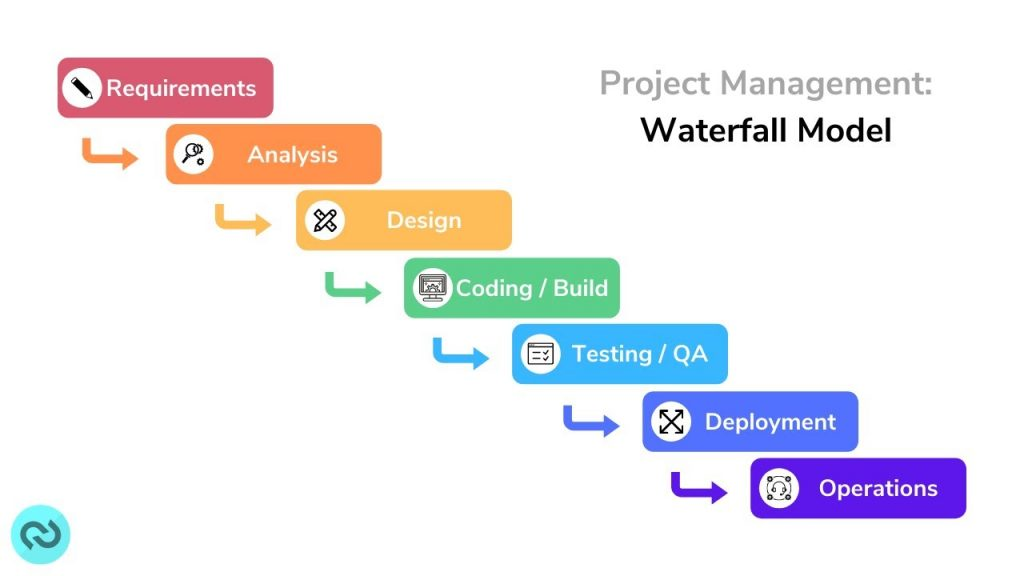
The strength of Waterfall is its predictability. Because requirements are locked in at the start, you can build a detailed timeline, set firm budgets, and give stakeholders a clear delivery date. The weakness is the same thing: if requirements change mid-project (and they often do), you’re in trouble. Waterfall has no built-in mechanism for iteration.
Best for: Projects with fixed scope and clear requirements that are unlikely to change, construction, manufacturing, compliance projects, and government contracts.
Not ideal for: Projects where customer feedback, market conditions, or evolving requirements need to shape the output mid-stream.
Real-world example: A construction company building a commercial office space uses Waterfall. The floor plan is finalized, permits are approved, and the build sequence, foundation, framing, electrical, interior, follows a strict order. Deviating from it mid-build is expensive and potentially illegal.
2. Agile – Flexible and Iterative
Agile project management breaks work into short cycles called sprints, typically one to four weeks long. At the end of each sprint, the team delivers a working increment, something usable, not just a status update, and then reviews feedback before planning the next sprint.
What makes Agile powerful is that it treats change as a feature, not a problem. Requirements can evolve between sprints. Priorities can shift. The team adapts continuously rather than locking everything down at the start and hoping nothing changes.
Best for: Software development, product development, marketing campaigns, and any project where requirements are likely to shift as the work progresses.
Not ideal for: Projects with fixed deliverables, fixed deadlines, or regulatory requirements that can’t be revisited once agreed upon.
Real-world example: A SaaS company building a new user dashboard uses Agile. Sprint one produces a basic version with core navigation. Sprint two adds filtering. Sprint three incorporates feedback from beta users. The product improves with each cycle rather than being delivered as a complete package at the end.
3. Lean – Reduce Waste, Deliver Value
Lean project management is built on a single governing principle: only do work that directly adds value to the end result. Anything else, waiting time, unnecessary approvals, rework caused by poor communication, over-engineering features nobody asked for is waste, and waste gets eliminated.
Lean originated on Toyota’s manufacturing floor in the 1950s and has since been applied to healthcare, software, construction, and professional services. The methodology uses frequent feedback loops and iterative improvement cycles to continuously refine processes as the project moves forward.
Best for: Startups operating on tight budgets, manufacturing environments focused on efficiency, healthcare workflows, and any team looking to cut operational costs without cutting quality.
Not ideal for: Highly creative projects where exploration and experimentation are part of the value.
Real-world example: A healthcare clinic uses Lean to redesign its patient intake process. The team maps every step from arrival to room assignment, identifies which steps add value (clinical assessment) and which don’t (duplicate paperwork), and eliminates or automates the waste. Patient wait times drop without adding staff.
4. Kanban – Visual Workflow Management
Kanban manages work through a visual board: columns representing the stages of work, cards representing individual tasks. As work progresses, cards move left to right across the board, giving the entire team a real-time view of what’s in progress, what’s waiting, and what’s done.
Unlike Waterfall or Agile, Kanban doesn’t use fixed project phases or time-boxed sprints. Work flows continuously, and the primary control mechanism is limiting how many tasks can be in progress at once (called WIP limits). This prevents the team from starting too many things simultaneously and finishing nothing.
Best for: Content creation, IT support and help desk teams, operations teams with ongoing recurring work, and any team managing a continuous stream of incoming requests.
Not ideal for: Projects with a defined end date and a structured sequence of phases.
Real-world example: A content team uses a Kanban board with four columns: Briefed, In Progress, In Review, and Published. Every article is a card. The editor sets a WIP limit of three articles in the “In Progress” column to prevent writers from starting new pieces before finishing current ones. Output becomes more consistent and predictable without any additional process overhead.
How Does Project Management Software Help?
Managing projects in spreadsheets creates exactly the visibility, accountability, and communication gaps described above. The right project management software brings everything into one place, tasks, timelines, team communication, progress tracking, and reporting, so you’re never hunting for status updates or compiling data from three different tools.
ProProfs Project is built for small and mid-size teams who want the structure of enterprise project management without the complexity of tools like Jira or Microsoft Project. Teams managing 5 to 50 people across multiple overlapping projects are exactly who it’s designed for.
Here’s what you get:
- Task And Subtask Management: Break any project into manageable pieces and assign ownership
- Gantt Charts And Timelines: See your entire project on one visual screen
- Real-Time Project Tracking: Always know what’s on track, what’s delayed, and what’s blocked
- Team Collaboration: Comment, tag teammates, and share files without leaving the tool
- Reports And Analytics: Generate status reports in seconds instead of hours
- Custom Notifications And Reminders: Stop chasing updates; let the system remind your team automatically
ProProfs Project offers a free plan, so your team can get started without a budget conversation.
What Are Common Project Management Challenges?
Even with a solid process in place, these six challenges show up repeatedly across teams of every size:
1. Scope Creep
The project grows beyond what was originally agreed, often one small request at a time. By the time anyone notices, the timeline and budget are blown. The fix: document the original scope clearly and require a formal change request for anything outside it.
2. Resource Constraints
Too much work, not enough people. A study by Visual Planning in 2024 found that 44% of project managers cite lack of resources as a top challenge.
The fix: use resource management tools to see team capacity before you commit to timelines.
3. Communication Breakdown
A study by PMI found that ineffective communication is the primary contributor to project failure one-third of the time, and puts $75 million of every $1 billion spent on projects at risk. The fix: establish a single source of truth, one tool where all project communication lives.
4. Time Management
Unexpected delays cascade when there’s no visibility into dependencies. One slipped task knocks five others off schedule. The fix: map task dependencies before execution so your team can see the ripple effects in advance.
5. Risk Management
Most teams identify risks in theory and then ignore them in practice. A study by PM Study Circle in 2025 found that projects without formal change management are 35% more likely to exceed costs or miss deadlines. The fix: build a risk log and review it at every status meeting.
6. Stakeholder Management
Different stakeholders have different expectations, and when those expectations conflict, projects stall. The fix: define stakeholder roles, communication frequency, and escalation paths during the planning phase, not after a conflict erupts.
How Do You Set Up a Project Management Process?
Here’s a practical step-by-step process to get structured project management running in your organization. The steps below use ProProfs Project as an example, since it’s designed specifically for teams that are just moving away from spreadsheet-based project tracking.
Step 1: Define Your Goals
What does success look like for this project? Be specific. “Launch the product by September 30 with zero critical bugs” is a goal. “Deliver the project on time” is not.
Before you open any tool, write down the outcomes you’re committing to, in plain language that every team member and stakeholder can understand. This becomes your north star when priorities compete later.
Step 2: Map Your Scope
Document what’s in scope and what’s explicitly out of scope before any work begins. List the deliverables, the people involved, the constraints (budget, timeline, resources), and the boundaries. Get stakeholder sign-off on this document.
A signed scope document is your first line of defense against scope creep, and it gives your project manager the authority to say no to requests that expand the work without expanding the timeline or budget.
Step 3: Build Your Project Plan
Break the project into phases, tasks, and subtasks. Assign an owner to each task, set a due date, and identify which tasks depend on others being completed first.
A Gantt chart is the simplest way to visualize this, it shows the full project on a single timeline, including overlaps and dependencies, so you can spot scheduling conflicts before execution begins.
Step 4: Create Your Project in ProProfs Project
This is where the plan moves from a document into a living workspace. In ProProfs Project, you can set up a new project in two ways:
The first is the manual route, go to the All Projects page, click Create a Project, and build out your task structure from scratch based on the plan you defined in Step 3.
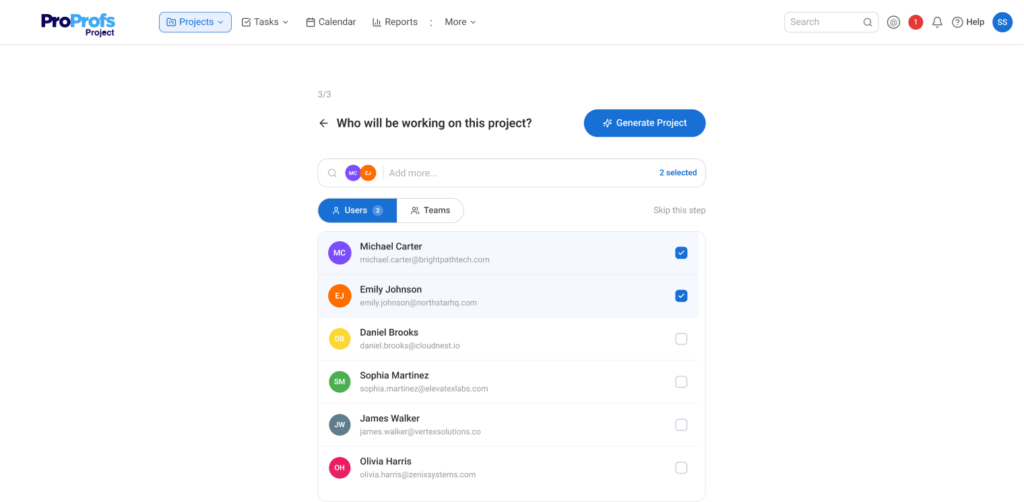
The second, faster option is to use Create Project With ProProfs AI. Click Create a Project in the top-right corner, then select Create Using ProProfs AI from the dropdown. Type a one-line description of your project (for example, “Product launch campaign with phases for design, content, and outreach”), and the AI project management feature generates a complete task and subtask structure for you in seconds.
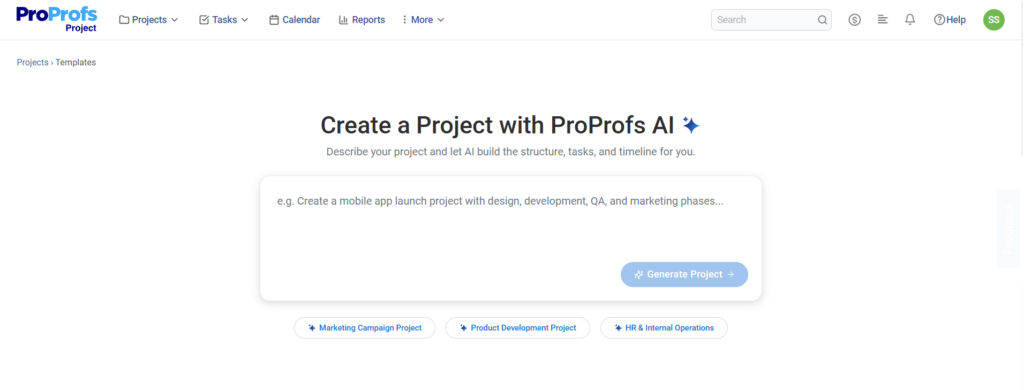
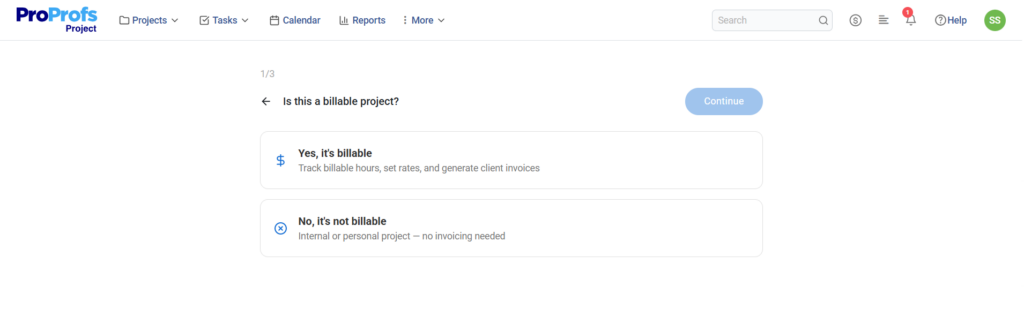
You then choose whether the project is billable, whether to track time, and which team members to assign, and the generated project lands directly on your dashboard, ready to customize.
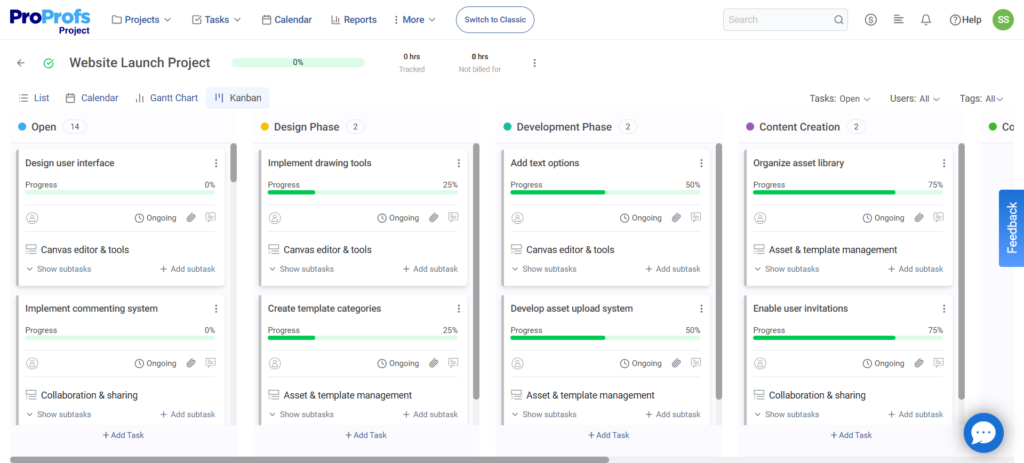
Once the project is live, you can view it in List, Gantt, Calendar, or Kanban view depending on how your team prefers to work.
Step 5: Configure Notifications and Time Tracking
Before execution begins, set up your automated notifications and reminders so the system does the follow-up work for you. In ProProfs Project, you can configure task deadline reminders, overdue alerts, and status update notifications so your team stays informed without requiring manual check-ins.
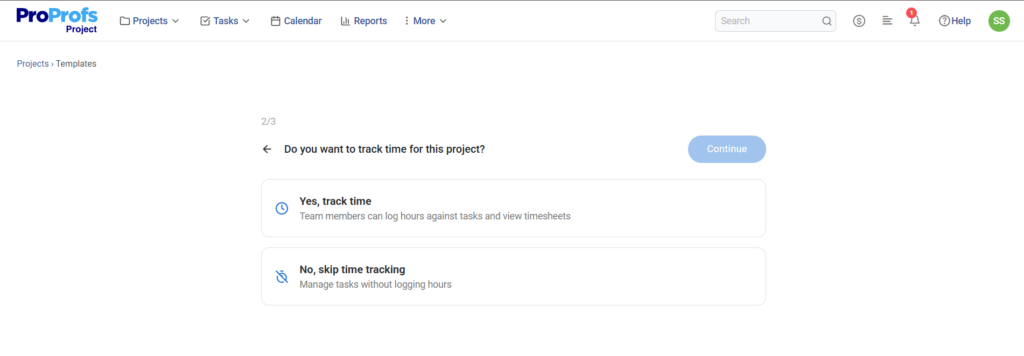
If your project is billable, also enable time tracking at the task level, this gives you accurate data for invoicing and helps you understand where hours are actually going versus where you planned them.
Step 6: Execute and Monitor Progress
Run the project. Assign tasks, move work through stages, and hold regular check-ins – weekly or biweekly depending on the project pace. Use ProProfs Project’s real-time tracking to monitor what’s on schedule, what’s delayed, and what’s blocked.
When something goes off track, it will adjust the timeline, reassign resources, or escalate the blocker. The goal isn’t a perfect plan; it’s a process that surfaces problems early enough to fix them.
Step 7: Close and Review
When the project wraps, don’t just move on. Confirm all deliverables are accepted, run a post-project review with the team, document what worked and what didn’t, and archive the project in ProProfs Project so the data is available for reference.
Teams that do this step consistently get measurably better at estimating and planning over time.
How Does Project Management Work Across Industries?
Project management isn’t just for construction or software. Here’s how different industries apply it day to day:
Marketing Teams: Plan campaigns from brief to publish, track creative reviews, manage agency deliverables, and report on campaign performance — all in one board. Read more: Marketing Project Management.
IT Teams: Track infrastructure upgrades, software rollouts, and compliance initiatives. Assign tasks to engineers and monitor SLA adherence without constant Slack check-ins. Read more: IT Project Management.
Real Estate and Property Management: Coordinate renovation projects, manage subcontractors, track milestone payments, and handle multiple properties simultaneously. Read more: Best Real Estate Project Management Software.
Construction: Manage multi-phase builds, track subcontractor schedules, monitor permit milestones, and keep budgets in check. Read more: Construction Project Management.
Small Businesses: Run operations, client projects, and internal initiatives without a dedicated PMO, using lightweight tools that don’t require a full-time administrator. Read more: Project Management for Small Business.
The common thread across all of these? Visibility, accountability, and a clear process – the three things every well-run project delivers.
Project Management vs. Task Management: What’s the Difference?
This is one of the most common points of confusion for teams just getting started.
| Task Management | Project Management | |
| Scope | Individual to-dos | End-to-end project lifecycle |
| Focus | Completing tasks | Delivering outcomes |
| Planning | Minimal | Detailed (phases, milestones, dependencies) |
| Team size | Individual or small team | Cross-functional teams |
| Tools | To-do lists, simple apps | Dedicated PM software with reporting |
| Best for | Daily personal workflow | Multi-person, multi-phase projects |
If you’re managing work that involves more than one person, has a defined start and end date, and produces a specific deliverable, that’s a project, not a task. It needs project management. For a deeper look at where these two disciplines diverge, see Task Management vs. Project Management vs. Process Management.
Bring Structure to Your Projects Starting Today
Project management isn’t a luxury reserved for large enterprises with dedicated PMOs. It’s a practical discipline that any team can adopt, and the sooner you do, the faster you’ll stop fighting fires and start delivering results.
The process is straightforward: define your scope, build your plan, execute with visibility, monitor progress, and close with intention.
The right tool makes all of this significantly easier. ProProfs Project gives your team everything it needs to move from spreadsheet chaos to structured, visible, accountable project management, without the learning curve of tools like Jira or the licensing costs of Microsoft Project.
Try ProProfs Project free and see how your team’s work transforms when everyone knows what to do, who owns it, and when it’s due.
Frequently Asked Questions
What are the 5 phases of project management?
The five phases are Initiation (defining the project), Planning (creating the roadmap), Execution (doing the work), Monitoring (tracking progress), and Closure (wrapping up and reviewing). Every project, regardless of industry, moves through these phases.
What is the most common cause of project failure?
According to PMI, unclear goals, poor stakeholder engagement, and weak communication are the top three causes. Projects without formal change management are 35% more likely to exceed costs or miss deadlines.
Do small teams need project management?
Yes, especially small teams. When there are fewer people, each person's work has a bigger impact on the whole project. A missed deadline by one person affects everyone. A structured process with clear ownership prevents these gaps.
What is the difference between Agile and Waterfall?
Waterfall is a linear, phase-by-phase approach best suited for projects with fixed requirements. Agile is iterative, working in short sprints with room for change. Most modern teams use a hybrid, Waterfall for planning and Agile for execution.
What is scope creep in project management?
Scope creep is when a project's requirements expand beyond what was originally agreed, often one small request at a time, without a formal change process. It's one of the leading causes of budget overruns and missed deadlines.
How do I choose the right project management methodology?
Ask two questions: (1) Are the project requirements likely to change?
If yes, lean toward Agile or Kanban. If no, Waterfall works well. (2) Is efficiency and waste reduction a priority? If yes, consider Lean. Most teams end up using a combination depending on the project.
What features should I look for in project management software?
Look for task and subtask management, visual timelines (Gantt charts), team collaboration tools, real-time progress tracking, reporting dashboards, and customizable notifications. ProProfs Project includes all of these in a clean, easy-to-use interface, with a free plan to get started.
FREE. All Features. FOREVER!
Try our Forever FREE account with all premium features!